
【Winform-自定义控件】DataGridView 单元格合并和二维表头
DataGridView单元格合并和二维表头应用:
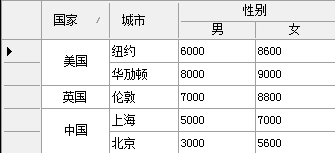
            //DataGridView绑定数据

            DataTable dt = new DataTable();

            dt.Columns.Add("");

            dt.Columns.Add("");

            dt.Columns.Add("");

            dt.Columns.Add("");

            dt.Rows.Add("中国", "上海", "", "");

            dt.Rows.Add("中国", "北京", "", "");

            dt.Rows.Add("美国", "纽约", "", "");

            dt.Rows.Add("美国", "华劢顿", "", "");

            dt.Rows.Add("英国", "伦敦", "", "");

            this.rowMergeView1.DataSource = dt;

            //列标题高度

            this.rowMergeView1.ColumnHeadersHeight = ;

            //设置不能调整列标题高度

            this.rowMergeView1.ColumnHeadersHeightSizeMode = DataGridViewColumnHeadersHeightSizeMode.DisableResizing;

            //合并的列(columnName)

            this.rowMergeView1.MergeColumnNames.Add("Column1");

            //合并的列标题,第3列起,共2列

            this.rowMergeView1.AddSpanHeader(, , "性别");
自定义控件全部代码: 空间上添加一个timer1,20毫秒
using System;
using System.Collections.Generic;
using System.ComponentModel;
using System.Data;
using System.Drawing;
using System.Drawing.Design;
using System.Text;
using System.Windows.Forms;
using System.Collections;
using System.Reflection;
using System.Runtime.InteropServices; /// <summary>
/// DataGridView行合并.请对属性MergeColumnNames 赋值既可
/// </summary>
public partial class RowMergeView : DataGridView
{
#region 构造函数
public RowMergeView()
{
InitializeComponent();
}
#endregion
#region 重写的事件
protected override void OnPaint(PaintEventArgs pe)
{
// TODO: 在此处添加自定义绘制代码 // 调用基类 OnPaint
base.OnPaint(pe);
}
protected override void OnCellPainting(DataGridViewCellPaintingEventArgs e)
{
try
{
if (e.RowIndex > - && e.ColumnIndex > -)
{
DrawCell(e);
}
else
{
//二维表头
if (e.RowIndex == -)
{
if (SpanRows.ContainsKey(e.ColumnIndex)) //被合并的列
{
//画边框
Graphics g = e.Graphics;
e.Paint(e.CellBounds, DataGridViewPaintParts.Background | DataGridViewPaintParts.Border); int left = e.CellBounds.Left, top = e.CellBounds.Top + ,
right = e.CellBounds.Right, bottom = e.CellBounds.Bottom; switch (SpanRows[e.ColumnIndex].Position)
{
case :
left += ;
break;
case :
break;
case :
right -= ;
break;
} //画上半部分底色
g.FillRectangle(new SolidBrush(this._mergecolumnheaderbackcolor), left, top,
right - left, (bottom - top) / ); //画中线
g.DrawLine(new Pen(this.GridColor), left, (top + bottom) / ,
right, (top + bottom) / ); //写小标题
StringFormat sf = new StringFormat();
sf.Alignment = StringAlignment.Center;
sf.LineAlignment = StringAlignment.Center; g.DrawString(e.Value + "", e.CellStyle.Font, Brushes.Black,
new Rectangle(left, (top + bottom) / , right - left, (bottom - top) / ), sf);
left = this.GetColumnDisplayRectangle(SpanRows[e.ColumnIndex].Left, true).Left - ; if (left < ) left = this.GetCellDisplayRectangle(-, -, true).Width;
right = this.GetColumnDisplayRectangle(SpanRows[e.ColumnIndex].Right, true).Right - ;
if (right < ) right = this.Width; g.DrawString(SpanRows[e.ColumnIndex].Text, e.CellStyle.Font, Brushes.Black,
new Rectangle(left, top, right - left, (bottom - top) / ), sf);
e.Handled = true;
}
}
}
base.OnCellPainting(e);
}
catch
{ }
}
protected override void OnCellClick(DataGridViewCellEventArgs e)
{
base.OnCellClick(e);
}
#endregion
#region 自定义方法
/// <summary>
/// 画单元格
/// </summary>
/// <param name="e"></param>
private void DrawCell(DataGridViewCellPaintingEventArgs e)
{
if (e.CellStyle.Alignment == DataGridViewContentAlignment.NotSet)
{
e.CellStyle.Alignment = DataGridViewContentAlignment.MiddleCenter;
}
Brush gridBrush = new SolidBrush(this.GridColor);
SolidBrush backBrush = new SolidBrush(e.CellStyle.BackColor);
SolidBrush fontBrush = new SolidBrush(e.CellStyle.ForeColor);
int cellwidth;
//上面相同的行数
int UpRows = ;
//下面相同的行数
int DownRows = ;
//总行数
int count = ;
if (this.MergeColumnNames.Contains(this.Columns[e.ColumnIndex].Name) && e.RowIndex != -)
{
cellwidth = e.CellBounds.Width;
Pen gridLinePen = new Pen(gridBrush);
string curValue = e.Value == null ? "" : e.Value.ToString().Trim();
string curSelected = this.CurrentRow.Cells[e.ColumnIndex].Value == null ? "" : this.CurrentRow.Cells[e.ColumnIndex].Value.ToString().Trim();
if (!string.IsNullOrEmpty(curValue))
{
#region 获取下面的行数
for (int i = e.RowIndex; i < this.Rows.Count; i++)
{
if (this.Rows[i].Cells[e.ColumnIndex].Value.ToString().Equals(curValue))
{
//this.Rows[i].Cells[e.ColumnIndex].Selected = this.Rows[e.RowIndex].Cells[e.ColumnIndex].Selected; DownRows++;
if (e.RowIndex != i)
{
cellwidth = cellwidth < this.Rows[i].Cells[e.ColumnIndex].Size.Width ? cellwidth : this.Rows[i].Cells[e.ColumnIndex].Size.Width;
}
}
else
{
break;
}
}
#endregion
#region 获取上面的行数
for (int i = e.RowIndex; i >= ; i--)
{
if (this.Rows[i].Cells[e.ColumnIndex].Value.ToString().Equals(curValue))
{
//this.Rows[i].Cells[e.ColumnIndex].Selected = this.Rows[e.RowIndex].Cells[e.ColumnIndex].Selected;
UpRows++;
if (e.RowIndex != i)
{
cellwidth = cellwidth < this.Rows[i].Cells[e.ColumnIndex].Size.Width ? cellwidth : this.Rows[i].Cells[e.ColumnIndex].Size.Width;
}
}
else
{
break;
}
}
#endregion
count = DownRows + UpRows - ;
if (count < )
{
return;
}
}
if (this.Rows[e.RowIndex].Selected)
{
backBrush.Color = e.CellStyle.SelectionBackColor;
fontBrush.Color = e.CellStyle.SelectionForeColor;
}
//以背景色填充
e.Graphics.FillRectangle(backBrush, e.CellBounds);
//画字符串
PaintingFont(e, cellwidth, UpRows, DownRows, count);
if (DownRows == )
{
e.Graphics.DrawLine(gridLinePen, e.CellBounds.Left, e.CellBounds.Bottom - , e.CellBounds.Right - , e.CellBounds.Bottom - );
count = ;
}
// 画右边线
e.Graphics.DrawLine(gridLinePen, e.CellBounds.Right - , e.CellBounds.Top, e.CellBounds.Right - , e.CellBounds.Bottom); e.Handled = true;
}
}
/// <summary>
/// 画字符串
/// </summary>
/// <param name="e"></param>
/// <param name="cellwidth"></param>
/// <param name="UpRows"></param>
/// <param name="DownRows"></param>
/// <param name="count"></param>
private void PaintingFont(System.Windows.Forms.DataGridViewCellPaintingEventArgs e, int cellwidth, int UpRows, int DownRows, int count)
{
SolidBrush fontBrush = new SolidBrush(e.CellStyle.ForeColor);
int fontheight = (int)e.Graphics.MeasureString(e.Value.ToString(), e.CellStyle.Font).Height;
int fontwidth = (int)e.Graphics.MeasureString(e.Value.ToString(), e.CellStyle.Font).Width;
int cellheight = e.CellBounds.Height; if (e.CellStyle.Alignment == DataGridViewContentAlignment.BottomCenter)
{
e.Graphics.DrawString((String)e.Value, e.CellStyle.Font, fontBrush, e.CellBounds.X + (cellwidth - fontwidth) / , e.CellBounds.Y + cellheight * DownRows - fontheight);
}
else if (e.CellStyle.Alignment == DataGridViewContentAlignment.BottomLeft)
{
e.Graphics.DrawString((String)e.Value, e.CellStyle.Font, fontBrush, e.CellBounds.X, e.CellBounds.Y + cellheight * DownRows - fontheight);
}
else if (e.CellStyle.Alignment == DataGridViewContentAlignment.BottomRight)
{
e.Graphics.DrawString((String)e.Value, e.CellStyle.Font, fontBrush, e.CellBounds.X + cellwidth - fontwidth, e.CellBounds.Y + cellheight * DownRows - fontheight);
}
else if (e.CellStyle.Alignment == DataGridViewContentAlignment.MiddleCenter)
{
e.Graphics.DrawString((String)e.Value, e.CellStyle.Font, fontBrush, e.CellBounds.X + (cellwidth - fontwidth) / , e.CellBounds.Y - cellheight * (UpRows - ) + (cellheight * count - fontheight) / );
}
else if (e.CellStyle.Alignment == DataGridViewContentAlignment.MiddleLeft)
{
e.Graphics.DrawString((String)e.Value, e.CellStyle.Font, fontBrush, e.CellBounds.X, e.CellBounds.Y - cellheight * (UpRows - ) + (cellheight * count - fontheight) / );
}
else if (e.CellStyle.Alignment == DataGridViewContentAlignment.MiddleRight)
{
e.Graphics.DrawString((String)e.Value, e.CellStyle.Font, fontBrush, e.CellBounds.X + cellwidth - fontwidth, e.CellBounds.Y - cellheight * (UpRows - ) + (cellheight * count - fontheight) / );
}
else if (e.CellStyle.Alignment == DataGridViewContentAlignment.TopCenter)
{
e.Graphics.DrawString((String)e.Value, e.CellStyle.Font, fontBrush, e.CellBounds.X + (cellwidth - fontwidth) / , e.CellBounds.Y - cellheight * (UpRows - ));
}
else if (e.CellStyle.Alignment == DataGridViewContentAlignment.TopLeft)
{
e.Graphics.DrawString((String)e.Value, e.CellStyle.Font, fontBrush, e.CellBounds.X, e.CellBounds.Y - cellheight * (UpRows - ));
}
else if (e.CellStyle.Alignment == DataGridViewContentAlignment.TopRight)
{
e.Graphics.DrawString((String)e.Value, e.CellStyle.Font, fontBrush, e.CellBounds.X + cellwidth - fontwidth, e.CellBounds.Y - cellheight * (UpRows - ));
}
else
{
e.Graphics.DrawString((String)e.Value, e.CellStyle.Font, fontBrush, e.CellBounds.X + (cellwidth - fontwidth) / , e.CellBounds.Y - cellheight * (UpRows - ) + (cellheight * count - fontheight) / );
}
}
#endregion
#region 属性
/// <summary>
/// 设置或获取合并列的集合
/// </summary>
[MergableProperty(false)]
[Editor("System.Windows.Forms.Design.ListControlStringCollectionEditor, System.Design, Version=2.0.0.0, Culture=neutral, PublicKeyToken=b03f5f7f11d50a3a", typeof(UITypeEditor))]
[DesignerSerializationVisibility(System.ComponentModel.DesignerSerializationVisibility.Visible)]
[Localizable(true)]
[Description("设置或获取合并列的集合"), Browsable(true), Category("单元格合并")]
public List<string> MergeColumnNames
{
get
{
return _mergecolumnname;
}
set
{
_mergecolumnname = value;
}
}
private List<string> _mergecolumnname = new List<string>();
#endregion
#region 二维表头
private struct SpanInfo //表头信息
{
public SpanInfo(string Text, int Position, int Left, int Right)
{
this.Text = Text;
this.Position = Position;
this.Left = Left;
this.Right = Right;
} public string Text; //列主标题
public int Position; //位置,1:左,2中,3右
public int Left; //对应左行
public int Right; //对应右行
}
private Dictionary<int, SpanInfo> SpanRows = new Dictionary<int, SpanInfo>();//需要2维表头的列
/// <summary>
/// 合并列
/// </summary>
/// <param name="ColIndex">列的索引</param>
/// <param name="ColCount">需要合并的列数</param>
/// <param name="Text">合并列后的文本</param>
public void AddSpanHeader(int ColIndex, int ColCount, string Text)
{
if (ColCount < )
{
throw new Exception("行宽应大于等于2,合并1列无意义。");
}
//将这些列加入列表
int Right = ColIndex + ColCount - ; //同一大标题下的最后一列的索引
SpanRows[ColIndex] = new SpanInfo(Text, , ColIndex, Right); //添加标题下的最左列
SpanRows[Right] = new SpanInfo(Text, , ColIndex, Right); //添加该标题下的最右列
for (int i = ColIndex + ; i < Right; i++) //中间的列
{
SpanRows[i] = new SpanInfo(Text, , ColIndex, Right);
}
}
/// <summary>
/// 清除合并的列
/// </summary>
public void ClearSpanInfo()
{
SpanRows.Clear();
//ReDrawHead();
}
private void DataGridViewEx_Scroll(object sender, ScrollEventArgs e)
{
if (e.ScrollOrientation == ScrollOrientation.HorizontalScroll)// && e.Type == ScrollEventType.EndScroll)
{
timer1.Enabled = false; timer1.Enabled = true;
}
}
//刷新显示表头
public void ReDrawHead()
{
foreach (int si in SpanRows.Keys)
{
this.Invalidate(this.GetCellDisplayRectangle(si, -, true));
}
}
private void timer1_Tick(object sender, EventArgs e)
{
timer1.Enabled = false;
ReDrawHead();
}
/// <summary>
/// 二维表头的背景颜色
/// </summary>
[Description("二维表头的背景颜色"), Browsable(true), Category("二维表头")]
public Color MergeColumnHeaderBackColor
{
get { return this._mergecolumnheaderbackcolor; }
set { this._mergecolumnheaderbackcolor = value; }
}
private Color _mergecolumnheaderbackcolor = System.Drawing.SystemColors.Control;
#endregion
}
【Winform-自定义控件】DataGridView 单元格合并和二维表头的更多相关文章
- 如何通过DataGridView 实现单元格合并和二维表头
先看下实现出来的效果(这里随便写了几组数据,用来测试) 先初始一个DataGridView 设置哪几列 DataGridView 里男女这两列的 AutoSizeMode 可以设置Fill. publ ...
- winform中dataGridView单元格根据值设置新值,彻底解决绑定后数据类型转换的困难
// winform中dataGridView单元格在数据绑定后,数据类型更改困难,只能迂回实现.有时候需要将数字变换为不同的文字描述,就会出现int32到string类型转换的异常,借助CellFo ...
- DataGridView单元格合并
本文章转载:http://www.cnblogs.com/xiaofengfeng/p/3382094.html 图: 代码就是如此简单 文件下载:DataGridView单元格合并源码 也可以参考: ...
- C#实例:datagridview单元格合并
这是替C#微信交流群群友做的一个小实例,目的就是在datagridview选择对应行以后,点击button后获取对应行的ip,并执行相应的操作,其实我觉得这样的话button没必要非放置到datagr ...
- winform的datagridview单元格输入限制和右键单击datagridview单元格焦点跟着改变
在datagridview的EditingControlShowing事件里面添加代码: if (this.dgv_pch.Columns[dgv_pch.CurrentCell.ColumnInde ...
- [WinForm]- 设置DataGridView单元格内根据不同值显示图片
首先设置要显示图片的列 DataGridViewImageColumn status = new DataGridViewImageColumn(); status.DisplayIndex = ; ...
- WinForm - 格式化DataGridView单元格数据
效果: 代码: /// <summary> /// 格式化数据 /// </summary> private void dataGridView1_CellFormatting ...
- Winform Datagridview 单元格html格式化支持富文本
Winform Datagridview 单元格html格式化支持富文本 示例: 源码:https://github.com/OceanAirdrop/DataGridViewHTMLCell 参考: ...
- WinForm笔记1:TextBox编辑时和DataGridView 单元格编辑时 的事件及其顺序
TextBox 编辑框 When you change the focus by using the mouse or by calling the Focus method, focus event ...
随机推荐
- Linux系列(6):入门之文件与目录管理
你知道常见的目录操作吗? 知道如何查询文件内容吗? 了解 umask 指令吗,知道如何查看和设置文件的默认权限吗? 知道文件的隐藏属性吗,了解如何设置(chattr指令)并查看(lsattr指令)吗? ...
- [C#.net]使用Thread.Sleep界面卡死的问题解决方法
很多初学者在写C#程序的时候,需要程序等待某个时间,但是又不想用比较繁琐的线程等操作,因此用Thread.Sleep()函数,但是这个函数在等待过程中会操作界面的卡死,那么,如何能保证既不卡死又能达到 ...
- webmagic学习之路-1:采集安居客列表页测试
---恢复内容开始--- package com.action; import java.util.ArrayList; import java.util.List; import java.util ...
- mysql双yes但是同步延时问题
今天发现在153服务器insert一条数据,然后查看从库154和162都没有这条数据,但是在154和162执行show slave status 显示的双yes 后来重启了153 154 162 ...
- 【Git的基本操作一】文件初始化及设置签名
1. 本地库初始化 命令: git init 效果:
- Dreamweaver CS6 破解安装
安装 双击Dreamweaver.dmg文件,然后Command+N,新建一个Finder,接着将Adobe Dreamweaver CS6拖到新建Finder的应用程序中. 在Finder中应用 ...
- linux安装RabbitMQ yum
一.RabbitMQ概念RabbitMQ是流行的开源消息队列系统,是AMQP(Advanced Message Queuing Protocol高级消息队列协议)的标准实现,用erlang语言开发 ...
- REST easy with kbmMW #1
kbmMW 5.0支持REST服务器的开发,并且非常简单,下面看看如何实作一个REST服务器. 首先我们制作一个服务器应用程序,增加一个简单的Form,并放置kbmMW组件. 在Delphi中单击Fi ...
- python中F/f表达式优于format()表达式
F/f表达式可以解析任意类型的数据 具体实现,看下面示例: 1.解析变量 1 a = 10 3 b = 20 5 res1 = F"a+b的值:{a+b}" 7 print(res ...
- 【2】Zookeeper安装
一.环境准备 Linux操作系统 Java运行环境(1.6或以上) 服务器列表: 配置主机名映射. vi /etc/hosts ##添加如下内容 168.5.7.75 server1 168.5.7. ...