
如何通过DataGridView 实现单元格合并和二维表头
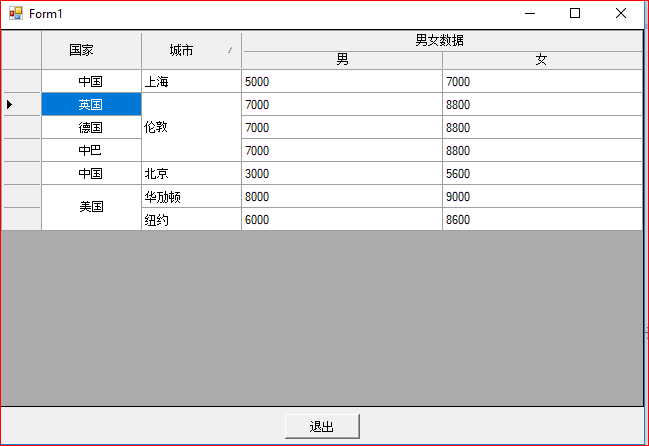
先看下实现出来的效果(这里随便写了几组数据,用来测试)
先初始一个DataGridView 设置哪几列
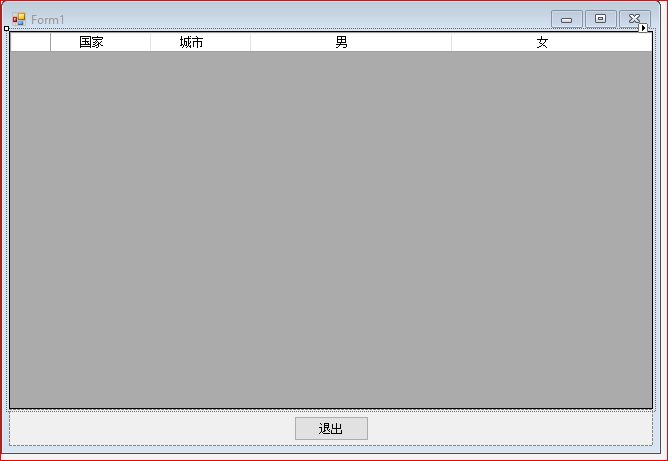
DataGridView 里男女这两列的 AutoSizeMode 可以设置Fill。
    public Form1()

        {

            InitializeComponent();

            this.CancelButton = this.button1;

            DataTable dt = new DataTable();

            dt.Columns.Add("1");

            dt.Columns.Add("2");

            dt.Columns.Add("3");

            dt.Columns.Add("4");

            dt.Rows.Add("中国", "上海", "5000", "7000");

            dt.Rows.Add("中国", "北京", "3000", "5600");

            dt.Rows.Add("美国", "纽约", "6000", "8600");

            this.rowMergeView1.DataSource = dt;

            this.rowMergeView1.ColumnHeadersHeight = 40;

            this.rowMergeView1.ColumnHeadersHeightSizeMode = DataGridViewColumnHeadersHeightSizeMode.DisableResizing;

            this.rowMergeView1.MergeColumnNames.Add("Column1");

            this.rowMergeView1.MergeColumnNames.Add("Column2");

            this.rowMergeView1.AddSpanHeader(2, 2, "男女数据");

        }
手动添加了一些数据填充到DataGridView里,创建一个新的类 RowMergeView 并且继承 DataGridView;通过这个类对DataGridView 进行重绘
using System;
using System.Collections.Generic;
using System.ComponentModel;
using System.Data;
using System.Drawing;
using System.Drawing.Design;
using System.Text;
using System.Windows.Forms;
using System.Collections;
using System.Reflection;
using System.Runtime.InteropServices; /// <summary>
/// DataGridView行合并.请对属性MergeColumnNames 赋值既可
/// </summary>
public partial class RowMergeView : DataGridView
{
#region 构造函数
public RowMergeView()
{
InitializeComponent();
}
#endregion
#region 重写的事件
protected override void OnPaint(PaintEventArgs pe)
{
// TODO: 在此处添加自定义绘制代码 // 调用基类 OnPaint
base.OnPaint(pe);
}
protected override void OnCellPainting(DataGridViewCellPaintingEventArgs e)
{
try
{
if (e.RowIndex > -1 && e.ColumnIndex > -1)
{
DrawCell(e);
}
else
{
//二维表头
if (e.RowIndex == -1)
{
if (SpanRows.ContainsKey(e.ColumnIndex)) //被合并的列
{
//画边框
Graphics g = e.Graphics;
e.Paint(e.CellBounds, DataGridViewPaintParts.Background | DataGridViewPaintParts.Border); int left = e.CellBounds.Left, top = e.CellBounds.Top + 2,
right = e.CellBounds.Right, bottom = e.CellBounds.Bottom; switch (SpanRows[e.ColumnIndex].Position)
{
case 1:
left += 2;
break;
case 2:
break;
case 3:
right -= 2;
break;
} //画上半部分底色
g.FillRectangle(new SolidBrush(this._mergecolumnheaderbackcolor), left, top,
right - left, (bottom - top) / 2); //画中线
g.DrawLine(new Pen(this.GridColor), left, (top + bottom) / 2,
right, (top + bottom) / 2); //写小标题
StringFormat sf = new StringFormat();
sf.Alignment = StringAlignment.Center;
sf.LineAlignment = StringAlignment.Center; g.DrawString(e.Value + "", e.CellStyle.Font, Brushes.Black,
new Rectangle(left, (top + bottom) / 2, right - left, (bottom - top) / 2), sf);
left = this.GetColumnDisplayRectangle(SpanRows[e.ColumnIndex].Left, true).Left - 2; if (left < 0) left = this.GetCellDisplayRectangle(-1, -1, true).Width;
right = this.GetColumnDisplayRectangle(SpanRows[e.ColumnIndex].Right, true).Right - 2;
if (right < 0) right = this.Width; g.DrawString(SpanRows[e.ColumnIndex].Text, e.CellStyle.Font, Brushes.Black,
new Rectangle(left, top, right - left, (bottom - top) / 2), sf);
e.Handled = true;
}
}
}
base.OnCellPainting(e);
}
catch
{ }
}
protected override void OnCellClick(DataGridViewCellEventArgs e)
{
base.OnCellClick(e);
}
#endregion
#region 自定义方法
/// <summary>
/// 画单元格
/// </summary>
/// <param name="e"></param>
private void DrawCell(DataGridViewCellPaintingEventArgs e)
{
if (e.CellStyle.Alignment == DataGridViewContentAlignment.NotSet)
{
e.CellStyle.Alignment = DataGridViewContentAlignment.MiddleCenter;
}
Brush gridBrush = new SolidBrush(this.GridColor);
SolidBrush backBrush = new SolidBrush(e.CellStyle.BackColor);
SolidBrush fontBrush = new SolidBrush(e.CellStyle.ForeColor);
int cellwidth;
//上面相同的行数
int UpRows = 0;
//下面相同的行数
int DownRows = 0;
//总行数
int count = 0;
if (this.MergeColumnNames.Contains(this.Columns[e.ColumnIndex].Name) && e.RowIndex != -1)
{
cellwidth = e.CellBounds.Width;
Pen gridLinePen = new Pen(gridBrush);
string curValue = e.Value == null ? "" : e.Value.ToString().Trim();
string curSelected = this.CurrentRow.Cells[e.ColumnIndex].Value == null ? "" : this.CurrentRow.Cells[e.ColumnIndex].Value.ToString().Trim();
if (!string.IsNullOrEmpty(curValue))
{
#region 获取下面的行数
for (int i = e.RowIndex; i < this.Rows.Count; i++)
{
if (this.Rows[i].Cells[e.ColumnIndex].Value.ToString().Equals(curValue))
{
//this.Rows[i].Cells[e.ColumnIndex].Selected = this.Rows[e.RowIndex].Cells[e.ColumnIndex].Selected; DownRows++;
if (e.RowIndex != i)
{
cellwidth = cellwidth < this.Rows[i].Cells[e.ColumnIndex].Size.Width ? cellwidth : this.Rows[i].Cells[e.ColumnIndex].Size.Width;
}
}
else
{
break;
}
}
#endregion
#region 获取上面的行数
for (int i = e.RowIndex; i >= 0; i--)
{
if (this.Rows[i].Cells[e.ColumnIndex].Value.ToString().Equals(curValue))
{
//this.Rows[i].Cells[e.ColumnIndex].Selected = this.Rows[e.RowIndex].Cells[e.ColumnIndex].Selected;
UpRows++;
if (e.RowIndex != i)
{
cellwidth = cellwidth < this.Rows[i].Cells[e.ColumnIndex].Size.Width ? cellwidth : this.Rows[i].Cells[e.ColumnIndex].Size.Width;
}
}
else
{
break;
}
}
#endregion
count = DownRows + UpRows - 1;
if (count < 2)
{
return;
}
}
if (this.Rows[e.RowIndex].Selected)
{
backBrush.Color = e.CellStyle.SelectionBackColor;
fontBrush.Color = e.CellStyle.SelectionForeColor;
}
//以背景色填充
e.Graphics.FillRectangle(backBrush, e.CellBounds);
//画字符串
PaintingFont(e, cellwidth, UpRows, DownRows, count);
if (DownRows == 1)
{
e.Graphics.DrawLine(gridLinePen, e.CellBounds.Left, e.CellBounds.Bottom - 1, e.CellBounds.Right - 1, e.CellBounds.Bottom - 1);
count = 0;
}
// 画右边线
e.Graphics.DrawLine(gridLinePen, e.CellBounds.Right - 1, e.CellBounds.Top, e.CellBounds.Right - 1, e.CellBounds.Bottom); e.Handled = true;
}
}
/// <summary>
/// 画字符串
/// </summary>
/// <param name="e"></param>
/// <param name="cellwidth"></param>
/// <param name="UpRows"></param>
/// <param name="DownRows"></param>
/// <param name="count"></param>
private void PaintingFont(System.Windows.Forms.DataGridViewCellPaintingEventArgs e, int cellwidth, int UpRows, int DownRows, int count)
{
SolidBrush fontBrush = new SolidBrush(e.CellStyle.ForeColor);
int fontheight = (int)e.Graphics.MeasureString(e.Value.ToString(), e.CellStyle.Font).Height;
int fontwidth = (int)e.Graphics.MeasureString(e.Value.ToString(), e.CellStyle.Font).Width;
int cellheight = e.CellBounds.Height; if (e.CellStyle.Alignment == DataGridViewContentAlignment.BottomCenter)
{
e.Graphics.DrawString((String)e.Value, e.CellStyle.Font, fontBrush, e.CellBounds.X + (cellwidth - fontwidth) / 2, e.CellBounds.Y + cellheight * DownRows - fontheight);
}
else if (e.CellStyle.Alignment == DataGridViewContentAlignment.BottomLeft)
{
e.Graphics.DrawString((String)e.Value, e.CellStyle.Font, fontBrush, e.CellBounds.X, e.CellBounds.Y + cellheight * DownRows - fontheight);
}
else if (e.CellStyle.Alignment == DataGridViewContentAlignment.BottomRight)
{
e.Graphics.DrawString((String)e.Value, e.CellStyle.Font, fontBrush, e.CellBounds.X + cellwidth - fontwidth, e.CellBounds.Y + cellheight * DownRows - fontheight);
}
else if (e.CellStyle.Alignment == DataGridViewContentAlignment.MiddleCenter)
{
e.Graphics.DrawString((String)e.Value, e.CellStyle.Font, fontBrush, e.CellBounds.X + (cellwidth - fontwidth) / 2, e.CellBounds.Y - cellheight * (UpRows - 1) + (cellheight * count - fontheight) / 2);
}
else if (e.CellStyle.Alignment == DataGridViewContentAlignment.MiddleLeft)
{
e.Graphics.DrawString((String)e.Value, e.CellStyle.Font, fontBrush, e.CellBounds.X, e.CellBounds.Y - cellheight * (UpRows - 1) + (cellheight * count - fontheight) / 2);
}
else if (e.CellStyle.Alignment == DataGridViewContentAlignment.MiddleRight)
{
e.Graphics.DrawString((String)e.Value, e.CellStyle.Font, fontBrush, e.CellBounds.X + cellwidth - fontwidth, e.CellBounds.Y - cellheight * (UpRows - 1) + (cellheight * count - fontheight) / 2);
}
else if (e.CellStyle.Alignment == DataGridViewContentAlignment.TopCenter)
{
e.Graphics.DrawString((String)e.Value, e.CellStyle.Font, fontBrush, e.CellBounds.X + (cellwidth - fontwidth) / 2, e.CellBounds.Y - cellheight * (UpRows - 1));
}
else if (e.CellStyle.Alignment == DataGridViewContentAlignment.TopLeft)
{
e.Graphics.DrawString((String)e.Value, e.CellStyle.Font, fontBrush, e.CellBounds.X, e.CellBounds.Y - cellheight * (UpRows - 1));
}
else if (e.CellStyle.Alignment == DataGridViewContentAlignment.TopRight)
{
e.Graphics.DrawString((String)e.Value, e.CellStyle.Font, fontBrush, e.CellBounds.X + cellwidth - fontwidth, e.CellBounds.Y - cellheight * (UpRows - 1));
}
else
{
e.Graphics.DrawString((String)e.Value, e.CellStyle.Font, fontBrush, e.CellBounds.X + (cellwidth - fontwidth) / 2, e.CellBounds.Y - cellheight * (UpRows - 1) + (cellheight * count - fontheight) / 2);
}
}
#endregion
#region 属性
/// <summary>
/// 设置或获取合并列的集合
/// </summary>
[MergableProperty(false)]
[Editor("System.Windows.Forms.Design.ListControlStringCollectionEditor, System.Design, Version=2.0.0.0, Culture=neutral, PublicKeyToken=b03f5f7f11d50a3a", typeof(UITypeEditor))]
[DesignerSerializationVisibility(System.ComponentModel.DesignerSerializationVisibility.Visible)]
[Localizable(true)]
[Description("设置或获取合并列的集合"), Browsable(true), Category("单元格合并")]
public List<string> MergeColumnNames
{
get
{
return _mergecolumnname;
}
set
{
_mergecolumnname = value;
}
}
private List<string> _mergecolumnname = new List<string>();
#endregion
#region 二维表头
private struct SpanInfo //表头信息
{
public SpanInfo(string Text, int Position, int Left, int Right)
{
this.Text = Text;
this.Position = Position;
this.Left = Left;
this.Right = Right;
} public string Text; //列主标题
public int Position; //位置,1:左,2中,3右
public int Left; //对应左行
public int Right; //对应右行
}
private Dictionary<int, SpanInfo> SpanRows = new Dictionary<int, SpanInfo>();//需要2维表头的列
/// <summary>
/// 合并列
/// </summary>
/// <param name="ColIndex">列的索引</param>
/// <param name="ColCount">需要合并的列数</param>
/// <param name="Text">合并列后的文本</param>
public void AddSpanHeader(int ColIndex, int ColCount, string Text)
{
if (ColCount < 2)
{
throw new Exception("行宽应大于等于2,合并1列无意义。");
}
//将这些列加入列表
int Right = ColIndex + ColCount - 1; //同一大标题下的最后一列的索引
SpanRows[ColIndex] = new SpanInfo(Text, 1, ColIndex, Right); //添加标题下的最左列
SpanRows[Right] = new SpanInfo(Text, 3, ColIndex, Right); //添加该标题下的最右列
for (int i = ColIndex + 1; i < Right; i++) //中间的列
{
SpanRows[i] = new SpanInfo(Text, 2, ColIndex, Right);
}
}
/// <summary>
/// 清除合并的列
/// </summary>
public void ClearSpanInfo()
{
SpanRows.Clear();
//ReDrawHead();
}
private void DataGridViewEx_Scroll(object sender, ScrollEventArgs e)
{
if (e.ScrollOrientation == ScrollOrientation.HorizontalScroll)// && e.Type == ScrollEventType.EndScroll)
{
timer1.Enabled = false; timer1.Enabled = true;
}
}
//刷新显示表头
public void ReDrawHead()
{
foreach (int si in SpanRows.Keys)
{
this.Invalidate(this.GetCellDisplayRectangle(si, -1, true));
}
}
private void timer1_Tick(object sender, EventArgs e)
{
timer1.Enabled = false;
ReDrawHead();
}
/// <summary>
/// 二维表头的背景颜色
/// </summary>
[Description("二维表头的背景颜色"), Browsable(true), Category("二维表头")]
public Color MergeColumnHeaderBackColor
{
get { return this._mergecolumnheaderbackcolor; }
set { this._mergecolumnheaderbackcolor = value; }
}
private Color _mergecolumnheaderbackcolor = System.Drawing.SystemColors.Control;
#endregion
}
然后在前台code里直接调用这个类里面的方法。
如何通过DataGridView 实现单元格合并和二维表头的更多相关文章
- 【Winform-自定义控件】DataGridView 单元格合并和二维表头
DataGridView单元格合并和二维表头应用: //DataGridView绑定数据 DataTable dt = new DataTable(); dt.Columns.Add("); ...
- DataGridView单元格合并
本文章转载:http://www.cnblogs.com/xiaofengfeng/p/3382094.html 图: 代码就是如此简单 文件下载:DataGridView单元格合并源码 也可以参考: ...
- ExtJS 4.2 Grid组件的单元格合并
ExtJS 4.2 Grid组件本身并没有提供单元格合并功能,需要自己实现这个功能. 目录 1. 原理 2. 多列合并 3. 代码与在线演示 1. 原理 1.1 HTML代码分析 首先创建一个Grid ...
- NPOI 教程 - 2.1单元格合并
来源:http://liyingchun343333.blog.163.com/blog/static/3579731620091018212990/ 合并单元格在制作表格时很有用,比如说表格的标题就 ...
- asp.net使用控件datagrid实现表头单元格合并
合并的要点: 1.datagid的单元格合并原理是table中tr,td的布局实现; 2.合并的时机实在其datagridcreate事件中实现; 3.认识一个对象TableCellCollectio ...
- devexpress实现单元格合并以及依据条件合并单元格
1.devexpress实现单元格合并非常的简单,只要设置属性[AllowCellMerge=True]就可以了,实现效果如下图: 2.但是在具体要求中并非需要所有的相同单元格都合并,可能需要其他的条 ...
- SNF快速开发平台MVC-表格单元格合并组件
1. 表格单元格合并组件 1.1. 效果展示 1.1.1. 页面展现表格合并单元格 图 4.1 1.1.2. 导出excel合并单元格 图 4.2 1.2. 调用说 ...
- 关于table动态添加数据 单元格合并 数组合并
var newArr = [ {"BranchID":1,"BranchName":"城二","BranchFullName&qu ...
- excel技巧--单元格合并与拆分
如果要将上图的地区列做成下图的合并单一列: 有如下做法: (以下图表格为例) 1.选择要排序的表格,点击“开始”-->排序和筛选-->自定义排序.在对话框选择“业务项目”进行排序: 2.选 ...
随机推荐
- asp.net core sdk & runtime 镜像[已更新至2.2.0]
在官方镜像的脚本上, 增加了System.Drawing相关的依赖库 以北京时间为默认的时间 2.2.0 Windows SDK地址: 官方: https://dotnetcli.blob.core. ...
- Windows核心编程:第8章 用户模式下的线程同步
Github https://github.com/gongluck/Windows-Core-Program.git //第8章 用户模式下的线程同步.cpp: 定义应用程序的入口点. // #in ...
- powerviot report cannot refresh data
配置完成powerviot后发现打开excel无法刷新数据源连接提示出错: 在security token service服务应用中新建application,如图创建,然后将excel里面的auth ...
- 背水一战 Windows 10 (50) - 控件(集合类): ItemsControl - 基础知识, 数据绑定, ItemsPresenter, GridViewItemPresenter, ListViewItemPresenter
[源码下载] 背水一战 Windows 10 (50) - 控件(集合类): ItemsControl - 基础知识, 数据绑定, ItemsPresenter, GridViewItemPresen ...
- PICE(1):Programming In Clustered Environment - 集群环境内编程模式
首先声明:标题上的所谓编程模式是我个人考虑在集群环境下跨节点(jvm)的流程控制编程模式,纯粹按实际需要构想,没什么理论支持.在5月份的深圳scala meetup上我分享了有关集群环境下的编程模式思 ...
- Android必学之AsyncTask
AsyncTask,即异步任务,是Android给我们提供的一个处理异步任务的类.通过此类,可以实现UI线程和后台线程进行通讯,后台线程执行异步任务,并把结果返回给UI线程. .为什么需要使用异步任务 ...
- Swift 里字符串(十一)OC 字符串和 Swift 字符串的转换
 to OC func _bridgeToObjectiveCImpl() -> AnyObject { if _guts.isSmall { return _guts.asSmall.wit ...
- Mac上搭建rtmp流媒体服务器(结合FFmpeg的使用)
1.确保安装homebrew ---安装则跳到第二步 ruby -e "$(curl -fsSL https://raw.githubusercontent.com/Homebrew/ins ...
- Unity 代码编译成dll 更新dll实现热更代码
Unity 代码编译成dll 更新dll实现热更代码 实现流程 代码编译成DLL DLL打包成AssetBundle 加载AssetBundle 加载代码程序集 获取指定类 使用反射赋值 C#代码编译 ...
- OS之内存管理 --- 虚拟内存管理(一)
虚拟内存的背景 在基本的内存管理策略中,所有的策略的相同点都是:每个进程在执行之前需要完全处于内存中.那有没有一种方法可以不需要将进程所有页面加载到内存中就可以开始运行进程呢?有没有可能在进程需要某些 ...