
osg Shader 着色器
#ifdef _WIN32

#include <Windows.h>

#endif // _WIN32

#include <osg/Group>

#include <osg/Camera>

#include <osgDB/ReadFile>

#include <osg/Node>

#include <osg/Geometry>

#include <osg/Image>

#include <osg/ShapeDrawable>

#include <osg/Texture2D>

#include <osg/MatrixTransform>

#include <osg/AnimationPath>

#include <osgViewer/Viewer>

#include <osgViewer/ViewerEventHandlers>

#include <osgGA/DriveManipulator>

#include <osgGA/GUIEventHandler>

#include <osgGA/GUIEventAdapter>

#include <osgGA/GUIActionAdapter>

#include <osgGA/AnimationPathManipulator>

#include <osgGA/KeySwitchMatrixManipulator>

#include <osgUtil/LineSegmentIntersector>

#include <iostream>

using namespace std;

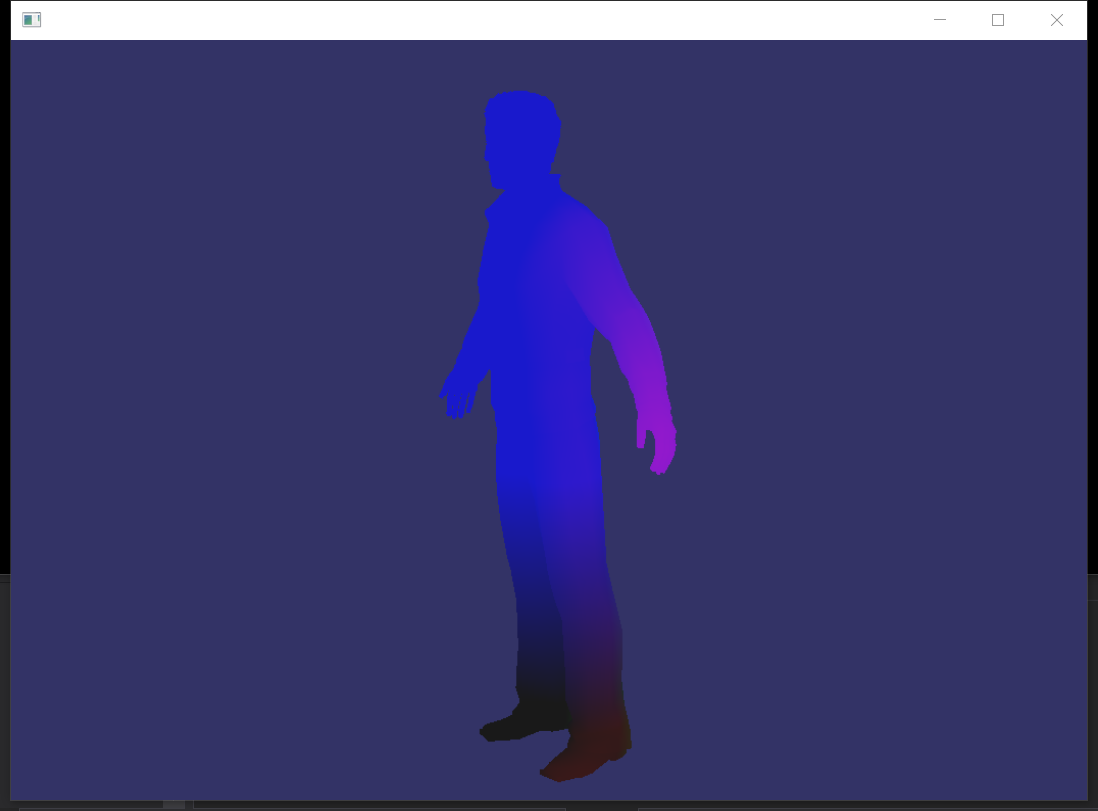
//顶点着色器

static const char* vertShader = {

    "varying vec4 color;\n"

    "void main(void)\n"

    "{\n"

        "color = gl_Vertex;\n"

        "gl_Position=gl_ModelViewProjectionMatrix*gl_Vertex;\n"

    "}\n"

};

//片元着色器

static const char* fragShader = {

    "varying vec4 color;\n"

    "void main(void)\n"

    "{\n"

    "    gl_FragColor = clamp(color,0.1,0.8);\n"

    "}\n"

};

int main()

{

    osg::ref_ptr<osgViewer::Viewer> viewer1 = new osgViewer::Viewer;

    osg::ref_ptr<osg::Group> group1 = new osg::Group;

    osg::ref_ptr<osg::Program> program1 = new osg::Program;

    //osg::ref_ptr<osg::Node> node1 = osgDB::readNodeFile("D:\\参考手册\\BIM\\osg\\四合院2019.osgb");

    osg::ref_ptr<osg::Node> node1 = osgDB::readNodeFile("D:\\参考手册\\BIM\\obj\\person1.obj");

    osg::ref_ptr<osg::StateSet> stateset1 = node1->getOrCreateStateSet();

    program1->addShader(new osg::Shader(osg::Shader::VERTEX, vertShader));

    program1->addShader(new osg::Shader(osg::Shader::FRAGMENT, fragShader));

    stateset1->setAttributeAndModes(program1, osg::StateAttribute::ON);

    group1->addChild(node1.get());

    viewer1->setSceneData(group1);

    viewer1->setUpViewInWindow(, , , , );

    return viewer1->run();

}

osg Shader 着色器的更多相关文章
- Unity3D学习笔记(三十四):Shader着色器(1)
一.GPU:图形处理器,Graphics Processing Unit 显卡的处理器就是图形处理器.与CPU类似. GPU和CPU的区别? 1.CPU主要是为了串行指令设计,GPU则是为了大规模 ...
- Unity Shader着色器优化
https://mp.weixin.qq.com/s?__biz=MzU5MjQ1NTEwOA==&mid=2247493518&idx=1&sn=c51b92e9300bcf ...
- [Unity] Shader(着色器)输入输出和语义
在Unity5.x后, 已经支持了基于物理的光照模型,也就是常说的次时代引擎所必须具备的功能. 如果在Properties使用2D,CG里要用sampler2D,代表使用的是2维纹理 如果在Prope ...
- [Unity] Shader(着色器)之纹理贴图
在Shader中,我们除了可以设定各种光线处理外,还可以增加纹理贴图. 使用 settexture 命令可以为着色器指定纹理. 示例代码: Shader "Sbin/ff2" { ...
- OpenGL之shader着色器的应用,三色渐变的三角形
学习自: https://learnopengl-cn.github.io/01%20Getting%20started/05%20Shaders/#_7 首先放一张效果图: 本次教程,将着色器单独定 ...
- Unity3D学习笔记(三十五):Shader着色器(2)- 顶点片元着色器
Alpha测试 AlphaTest Great:大于 AlphaTest Less:小于 AlphaTest Equal:等于 AlphaTest GEqual:大于等于 AlphaTest LEqu ...
- [Shader 着色器]冰霜效果的思考和实现
http://game.ceeger.com/forum/read.php?tid=23209&fid=2 由于最近要做一个冰系的角色,就想能不能做一些冰霜效果.那么就试试吧,先弄一张原图: ...
- [Unity] Shader(着色器)之固定管线
在Unity中,固定管线Shader的性能是最好的. 什么是固定管线呢? 固定渲染管线 —— 这是标准的几何&光照(T&L)管线,功能是固定的,它控制着世界.视.投影变换及固定光照控制 ...
- Unity3D学习笔记(三十六):Shader着色器(3)- 光照
光照模型:用数学的方法模拟现实世界中的光照效果. 场景中模型身上的光反射到相机中的光线: 1.漫反射:产生明暗效果 2.高光反射:产生镜面反射,物体中有最亮且比较耀眼的一部分 3.自发光: 4.环 ...
随机推荐
- JVM学习总结
JVM指令执行流程架构图:
- ubuntu18 搭建ftp服务器,以及文件目录权限问题
有时候呢我们有一台本地的台式机或者云服务器,我们想要搭个ftp服务器好让我们在内网/外网中方便的传输.保存文件,这样别的任何电脑啊,设备啊,只要访问这个ftp的地址,就可以进行文件传输啦!由于我现在台 ...
- P1363 幻象迷宫[搜索]
题目描述 (喵星人LHX和WD同心协力击退了汪星人的入侵,不幸的是,汪星人撤退之前给它们制造了一片幻象迷宫.) WD:呜呜,肿么办啊-- LHX:momo...我们一定能走出去的! WD:嗯,+U+U ...
- 数据库中聚合索引(MySQL和SQL Server区别)
一.聚集索引和非聚集索引 聚集索引:类似字典的拼音目录.表中的数据按照聚集索引的规则来存储的.就像新华字典.整本字典是按照A-Z的顺序来排列.这也是一个表只能有一个聚集索引的原因.因为这个特点,具体索 ...
- LoadRunner在Controller场景中配置获取Windows Resources
一.首先需要在被监控Windows服务器端(只支持Windows)进行如下设置: 启动服务: Remote Procedure Call (RPC) RemoteRegistry 操作方法: 按Win ...
- Git报错:Permission denied (publickey)
Git在克隆的时候报错.Permission denied (publickey). 报错 Permission denied (publickey) 具体如下: 原因:没有将自己的电脑的SSH ke ...
- vue2 路由,运动
- LightOJ - 1214-Large Division(数学,同余)
链接: https://vjudge.net/problem/LightOJ-1214 题意: Given two integers, a and b, you should check whethe ...
- Soda Theme sublime 自定义编辑器主题
1.Soda ThemeSublime Text 3中较为常用的一款自定义编辑器主题,用过的人都说好.Soda Theme包含代码着色.标签.图标,拥有light和dark两种颜色主题便于用户在不同时 ...
- Oracle 通过sqlnet.ora文件控制对Oracle数据库的访问
一.通过sqlnet.ora文件控制对Oracle数据库的访问 出于数据安全考虑,对Oracle数据库的IP做一些限制,只有固定的IP才能访问.修改$JAVA_HOME/NETWORK/ADMIN/s ...