
Flutter easyrefresh示例 上拉加载+下拉刷新
官方示例,简单改了下,实现功能为主。
代码如下:
import 'dart:async';

import 'package:flutter/material.dart';

import 'package:flutter_easyrefresh/easy_refresh.dart';

class BasicPage extends StatefulWidget {

  @override

  _BasicPageState createState() => _BasicPageState();

}

class _BasicPageState extends State<BasicPage> {

  List<String> addStr = ["", "", "", "", "", "", "", "", "", ""];

  List<String> str = ["", "", "", "", "", "", "", "", "", ""];

  GlobalKey<EasyRefreshState> _easyRefreshKey = GlobalKey<EasyRefreshState>();

  @override

  Widget build(BuildContext context) {

    return Scaffold(

      appBar: AppBar(

        title: Text("EasyRefresh"),

      ),

      body: Center(

          child: new EasyRefresh(

            key: _easyRefreshKey,

            child: new ListView.builder(

              //ListView的Item

                itemCount: str.length,

                itemBuilder: (BuildContext context, int index) {

                  return new Container(

                      height: 70.0,

                      child: Card(

                        child: new Center(

                          child: new Text(

                            str[index],

                            style: new TextStyle(fontSize: 18.0),

                          ),

                        ),

                      ));

                }),

            onRefresh: () async {

              await new Future.delayed(const Duration(seconds: ), () {

                setState(() {

                  str.clear();

                  str.addAll(addStr);

                });

              });

            },

            loadMore: () async {

              await new Future.delayed(const Duration(seconds: ), () {

                if (str.length < ) {

                  setState(() {

                    str.addAll(addStr);

                  });

                }

              });

            },

          )),

    );

  }

}
特殊效果+底部按钮,代码如下:
import 'dart:async';

import 'package:flutter/material.dart';

import 'package:flutter_easyrefresh/easy_refresh.dart';

import 'package:flutter_easyrefresh/bezier_circle_header.dart';//如果要使用炫酷的样式需要引入,不同的样式引入不同的文件,详见官方api

import 'package:flutter_easyrefresh/bezier_bounce_footer.dart';//如果要使用炫酷的样式需要引入,不同的样式引入不同的文件,详见官方api

class BasicPage extends StatefulWidget {

  @override

  _BasicPageState createState() => _BasicPageState();

}

class _BasicPageState extends State<BasicPage> {

  List<String> addStr = ["", "", "", "", "", "", "", "", "", ""];

  List<String> str = ["", "", "", "", "", "", "", "", "", ""];

  GlobalKey<EasyRefreshState> _easyRefreshKey = new GlobalKey<EasyRefreshState>();

  GlobalKey<RefreshHeaderState> _headerKey = new GlobalKey<RefreshHeaderState>();

  GlobalKey<RefreshFooterState> _footerKey = new GlobalKey<RefreshFooterState>();

  @override

  Widget build(BuildContext context) {

    return Scaffold(

      appBar: AppBar(

        title: Text("EasyRefresh"),

      ),

      body: Center(

          child: new EasyRefresh(

            key: _easyRefreshKey,

            refreshHeader: BezierCircleHeader(

              key: _headerKey,

              color: Theme.of(context).scaffoldBackgroundColor,

            ),

            refreshFooter: BezierBounceFooter(

              key: _footerKey,

              color: Theme.of(context).scaffoldBackgroundColor,

            ),

            child: new ListView.builder(

              //ListView的Item

                itemCount: str.length,

                itemBuilder: (BuildContext context, int index) {

                  return new Container(

                      height: 70.0,

                      child: Card(

                        child: new Center(

                          child: new Text(

                            str[index],

                            style: new TextStyle(fontSize: 18.0),

                          ),

                        ),

                      ));

                }),

            onRefresh: () async {

              await new Future.delayed(const Duration(seconds: ), () {

                setState(() {

                  str.clear();

                  str.addAll(addStr);

                });

              });

            },

            loadMore: () async {

              await new Future.delayed(const Duration(seconds: ), () {

                if (str.length < ) {

                  setState(() {

                    str.addAll(addStr);

                  });

                }

              });

            },

          )),

      persistentFooterButtons: <Widget>[

        FlatButton(

            onPressed: () {

              _easyRefreshKey.currentState.callRefresh();

            },

            child: Text("refresh", style: TextStyle(color: Colors.black))),

        FlatButton(

            onPressed: () {

              _easyRefreshKey.currentState.callLoadMore();

            },

            child: Text("loadMore", style: TextStyle(color: Colors.black)))

      ],

    );

  }

}
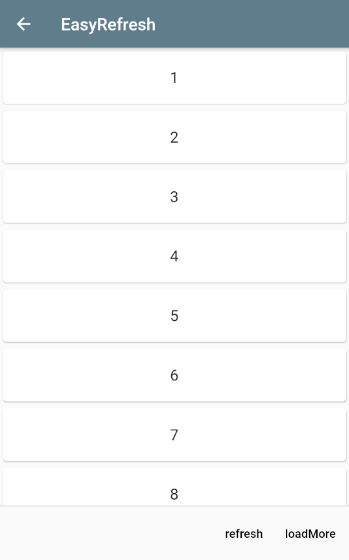
效果图:
Flutter easyrefresh示例 上拉加载+下拉刷新的更多相关文章
- Vue mint ui用在消息页面上拉加载下拉刷新loadmore 标记
之前总结过一个页面存在多个下拉加载的处理方式,今天再来说一下在消息页面的上拉加载和下拉刷新,基本上每个app都会有消息页面,会遇到这个需求 需求:每次加载十条数据,上拉加载下拉刷新,并且没有点击查看过 ...
- 上拉加载下拉刷新控件WaterRefreshLoadMoreView
上拉加载下拉刷新控件WaterRefreshLoadMoreView 效果: 源码: // // SRSlimeView // @author SR // Modified by JunHan on ...
- RecyclerView 上拉加载下拉刷新
RecyclerView 上拉加载下拉刷新 <android.support.v4.widget.SwipeRefreshLayout android:id="@+id/teach_s ...
- APICloud上啦加载下拉刷新模块
apicloud有自带的上啦加载下拉刷新,当让也可以用第三方或者在模块库里面找一个使用 一.下拉刷新,一下代码写在 apiready = function (){} 里面 apiready = fun ...
- 微信小程序上拉加载下拉刷新
微信小程序实现上拉加载下拉刷新 使用小程序默认提供方法. (1). 在xxx.json 中开启下拉刷新,需要设置backgroundColor,或者是backgroundTextStyle ,因为加载 ...
- mui scroll和上拉加载/下拉刷新
mui中 scroll和上拉加载/下拉刷新同时存在会出现两个滚动条 把/* */ /* //mui页面鼠标拖动代码: mui('.mui-scroll-wrapper').scroll({ dec ...
- Flutter上拉加载下拉刷新---flutter_easyrefresh
前言 Flutter默认不支持上拉加载,下拉刷新也仅仅支持Material的一种样式.Android开发使用过SmartRefreshLayout的小伙伴都知道这是一个强大的刷新UI库,集成了很多出色 ...
- 微信小程序 - 上拉加载下拉刷新
点击下载示例:小程序 - 上拉刷新下拉加载
- flutter 下拉加载+下拉加载
功能: 1.下拉加载 2.上拉加载 3.显示加载图标 4.更新列表数据,隐藏加载图标 flutter库: flutter_spinkit: ^3.1.0 加载图标 其他:加载列表需要列表,基于上一节的 ...
- SwipeRefreshLayout实现上拉加载下拉刷新
package com.example.swiperefreshlayoutdemo; import java.util.ArrayList;import java.util.HashMap; imp ...
随机推荐
- SIGAI机器学习第十五集 支持向量机2
讲授线性分类器,分类间隔,线性可分的支持向量机原问题与对偶问题,线性不可分的支持向量机原问题与对偶问题,核映射与核函数,多分类问题,libsvm的使用,实际应用 大纲: SVM求解面临的问题 SMO算 ...
- php面向对象之静态方法使用
什么是静态方法? 不是所有的变量和方法都要通过创建对象来调用.可以通过给变量和方法加上static关键字来直接调用.无锡大理石测量平台 调用静态成员的语法格式为: 关键字::静态成员 关键字可以是: ...
- [转]C++ 类中的static成员的初始化和特点
在C++的类中有些成员变量初始化和一般数据类型的成员变量有所不同.以下测试编译环境为: ➜ g++ -v Using built-in specs. COLLECT_GCC=g++ Target: x ...
- 【原创】go语言学习(十八)反射详解
目录 变量介绍 反射介绍 结构体反射 反射总结以及应用场景 变量介绍 1.变量的内在机制 A. 类型信息,这部分是元信息,是预先定义好的B. 值类型,这部分是程序运行过程中,动态改变的 var arr ...
- Pycharm使用常见问题
Pycharm下载 下载链接:https://www.jetbrains.com/pycharm/download/ 分为专业版和社区版,社区版也能满足学习需求 Pycharm专业版激活 使用前请将& ...
- Concurrent初探 --- Atomic 无锁
一.CAS算法 Compare And Swap,CAS算法的过程是这样:它包含3个参数CAS(V,E,N).V表示要更新的变量,E表示预期值,N表示新值.仅当V值等于E值时,才会将V的值设为N,如果 ...
- 在使用avalon框架的时候,用ms-duplex双工绑定,在template上是有数据渲染的,但是js里面却是undefined
controller绑定是用于圈定某个VM的作用域范围,因为有的页面,你用的对象一致,而这两个作用域里面有相同的数据,那么很有可能是另一个作用域里面的东西影响了这个作用域,所以在指定作用域的给不同的命 ...
- selenium反爬机制
使用selenium模拟浏览器进行数据抓取无疑是当下最通用的数据采集方案,它通吃各种数据加载方式,能够绕过客户JS加密,绕过爬虫检测,绕过签名机制.它的应用,使得许多网站的反采集策略形同虚设.由于se ...
- bad object refs/remotes/origin/HEAD
How to handle git gc fatal: bad object refs/remotes/origin/HEAD error: failed to run repack I random ...
- 分享CSS3里box-shadow属性的使用方法,包括内阴影box-shadow:inset
一.box-shadow语法 box-shadow: none | inset(可选值,不设置,为外投影,设置,为内投影) x-offset(阴影水平偏移量,正方向为right) y-offset(阴 ...