
WPF——Application
Application类处于WPF应用程序的最顶端,main函数就在这个类中。
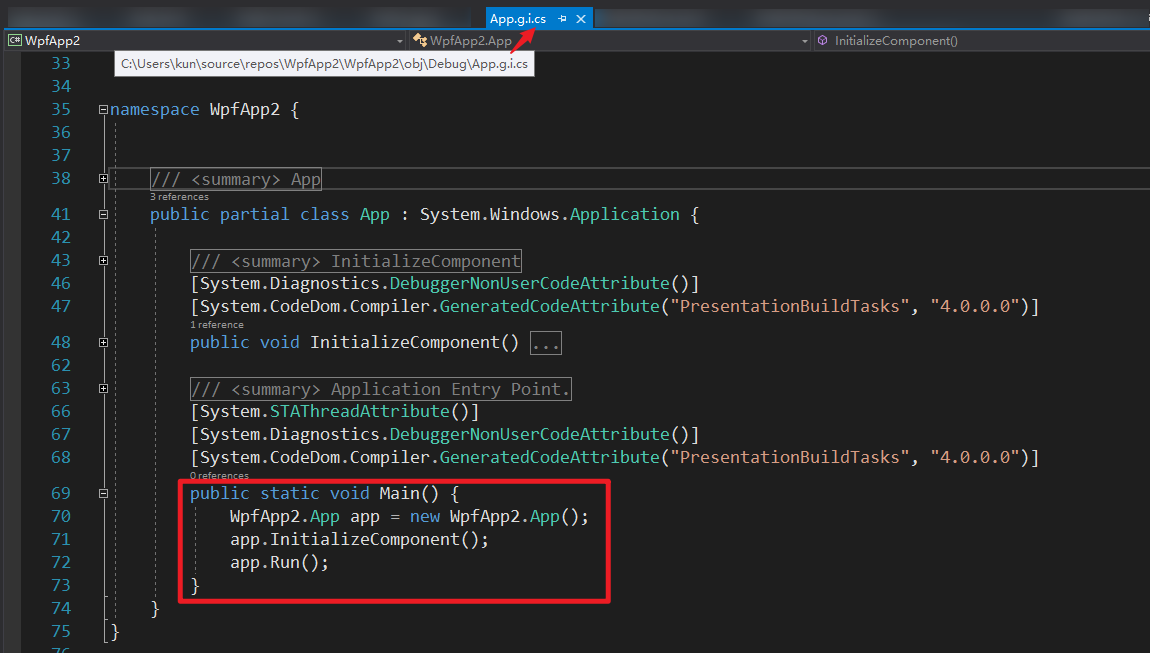
Application类的作用:
截图连接 https://docs.microsoft.com/zh-cn/dotnet/api/system.windows.application?view=netframework-4.8
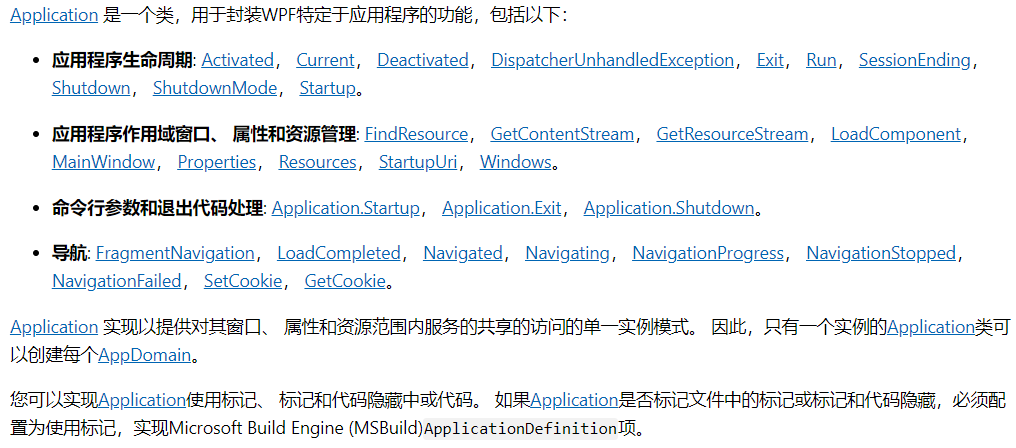
https://docs.microsoft.com/zh-cn/dotnet/framework/wpf/app-development/application-management-overview
#region Assembly PresentationFramework, Version=4.0.0.0, Culture=neutral, PublicKeyToken=31bf3856ad364e35

// C:\Program Files (x86)\Reference Assemblies\Microsoft\Framework\.NETFramework\v4.5\PresentationFramework.dll

#endregion

using System.Collections;

using System.Reflection;

using System.Security;

using System.Windows.Markup;

using System.Windows.Navigation;

using System.Windows.Resources;

using System.Windows.Threading;

namespace System.Windows

{

    public class Application : DispatcherObject, IHaveResources, IQueryAmbient

    {

        [SecurityCritical]

        public Application();

        public static Assembly ResourceAssembly { get; set; }

        public static Application Current { get; }

        public WindowCollection Windows { get; }

        public Window MainWindow { get; set; }

        public ShutdownMode ShutdownMode { get; set; }

        [Ambient]

        public ResourceDictionary Resources { get; set; }

        public Uri StartupUri { get; set; }

        public IDictionary Properties { get; }

        public event StartupEventHandler Startup;

        public event ExitEventHandler Exit;

        public event EventHandler Deactivated;

        public event SessionEndingCancelEventHandler SessionEnding;

        public event DispatcherUnhandledExceptionEventHandler DispatcherUnhandledException;

        public event NavigatingCancelEventHandler Navigating;

        public event NavigatedEventHandler Navigated;

        public event NavigationProgressEventHandler NavigationProgress;

        public event NavigationFailedEventHandler NavigationFailed;

        public event LoadCompletedEventHandler LoadCompleted;

        public event EventHandler Activated;

        public event NavigationStoppedEventHandler NavigationStopped;

        public event FragmentNavigationEventHandler FragmentNavigation;

        [SecurityCritical]

        public static StreamResourceInfo GetContentStream(Uri uriContent);

        public static string GetCookie(Uri uri);

        [SecurityCritical]

        public static StreamResourceInfo GetRemoteStream(Uri uriRemote);

        [SecurityCritical]

        public static StreamResourceInfo GetResourceStream(Uri uriResource);

        public static object LoadComponent(Uri resourceLocator);

        [SecurityCritical]

        public static void LoadComponent(object component, Uri resourceLocator);

        public static void SetCookie(Uri uri, string value);

        public object FindResource(object resourceKey);

        [SecurityCritical]

        public int Run(Window window);

        public int Run();

        public void Shutdown();

        [SecurityCritical]

        public void Shutdown(int exitCode);

        public object TryFindResource(object resourceKey);

        protected virtual void OnActivated(EventArgs e);

        protected virtual void OnDeactivated(EventArgs e);

        protected virtual void OnExit(ExitEventArgs e);

        protected virtual void OnFragmentNavigation(FragmentNavigationEventArgs e);

        protected virtual void OnLoadCompleted(NavigationEventArgs e);

        protected virtual void OnNavigated(NavigationEventArgs e);

        protected virtual void OnNavigating(NavigatingCancelEventArgs e);

        protected virtual void OnNavigationFailed(NavigationFailedEventArgs e);

        protected virtual void OnNavigationProgress(NavigationProgressEventArgs e);

        protected virtual void OnNavigationStopped(NavigationEventArgs e);

        protected virtual void OnSessionEnding(SessionEndingCancelEventArgs e);

        protected virtual void OnStartup(StartupEventArgs e);

    }

}
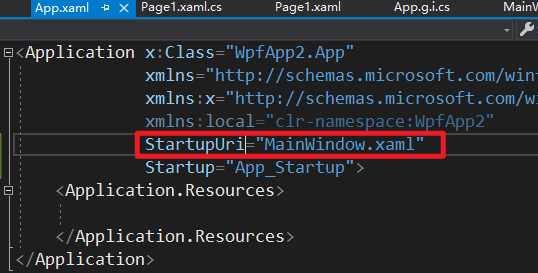
在xml文件中指定启动的Page或者Windows就可启动窗体。
WPF——Application的更多相关文章
- Handling events in an MVVM WPF application
Posted: June 30, 2013 | Filed under: MVVM, WPF, XAML |1 Comment In a WPF application that uses the ...
- 【转】How to view word document in WPF application
How to view word document in WPF application (CSVSTOViewWordInWPF) Introduction The Sample demonstra ...
- Merging a WPF application into a single EXE(WPF应用程序合并成单个Exe文件)
I always dislike handing off little applications to people. Not because I can’t, but because of the ...
- C# WPF Application 下的文件操作
好气哦,电脑好烂,每天花大把的时间在等电脑反应上. 没有钱买新电脑,连组台式机的钱都没有.好气哦. 啊啊啊啊文件操作是什么鬼???C++下我都懵了,C#下好多东西要学!!!我不会!我不会!我不会!!! ...
- 每天翻译一点点: WPF Application Framework (WAF)
ps:http://waf.codeplex.com/wikipage?title=Model-View-ViewModel%20Pattern&referringTitle=Document ...
- WPF Application 类介绍以及怎样修改启动方式
因为想要修改wpf的启动方式,所以研究了下Application类,现把一些有用的属性与大家分享下: 属性: Current 获取当前 AppDomain的 Appl ...
- WPF Application
Application类作为启动的入口,在VS中,通常自动代码为我们继承了Application类,这样做的有点,我还没有理解到,但是我们先学到这个知识点. 为了能够更好的控制整个启动过程,包括得到A ...
- vs 编译错误 The name 'InitializeComponent' does not exist in the current context in WPF application
1:文件命名空间的问题 xaml文件和model.cs文件的命名空间 2:csproj 那么它究竟是给谁用的呢?那是给开发工具用的,例如我们在熟悉不过的Visual Studio,以及大家可以没有接触 ...
- WPF Application 执行顺序
public static void Main() { ApplicationClass.App app = new ApplicationClass.App();app.InitializeComp ...
随机推荐
- QTableWidget界面有数据之后鼠标点击无响应界面无响应
1.问题:QTableWidget上出现数据之后,界面无响应,鼠标点击没有响应,但是还是可以正常接收数据,连关闭按钮都无法关闭,必须通过杀死进程来关闭程序.有的电脑是无响应,有的电脑又可以. 2.分析 ...
- 解决:安装jenkins时web界面出现jenkins实例似乎已离线问题
https://blog.51cto.com/8593714/2318144?tdsourcetag=s_pctim_aiomsg Windows下环境也可以解决:
- react-hook设定定时器的方法
const useInterval = (callback, delay) => { const savedCallback = useRef(); // 保存新回调 useEffect(() ...
- qt5之网络通信
QT5 TCP网络通讯 服务器与客户端建立连接listen() - connectToHost(); 触发newPendingConnect信号 实时数据通讯write(); read(); 触发 ...
- SpringCloud(五)之Spring Cloud 中 Feign结合Hystrix断路器开发实战
1.先讲hystrx(断路器) 在springcloub 中的使用 1.1 加入依赖 注意:网上新旧版本问题,所以要以官网为主,不然部分注解会丢失最新版本 2.0 <dependency> ...
- leetcode25 K 个一组翻转链表
这道题关于链表的操作,中间指针操作略复杂. /** * Definition for singly-linked list. * struct ListNode { * int val; * List ...
- GIT管理以及运行规范
继前天看分享的前后端分离后,又重新研究了GIT分支与各个环境的应用. 从开始使用git就一直有在网上查各种资料,查他的运行规范.但不知道是自己理解不够还是怎么的,一直用得不是很好. 根据自己的摸索,整 ...
- 框架-Eureka:百科
ylbtech-框架-Eureka:百科 1.返回顶部 1. Eureka是Netflix开发的服务发现框架,本身是一个基于REST的服务,主要用于定位运行在AWS域中的中间层服务,以达到负载均衡和中 ...
- 什么是APJ与使用Spring Data JPA 基于Hibernate
目录结构 首先在Maven项目中添加依赖包 <!-- https://mvnrepository.com/artifact/org.springframework.data/ spring-da ...
- Linux命令集锦:ssh命令
保持连接配置服务端SSH总是被强行中断,导致效率低下,可以在服务端配置,让 server 每隔30秒向 client 发送一个 keep-alive 包来保持连接: vim /etc/ssh/sshd ...