
vscode使用npm安装依赖报错
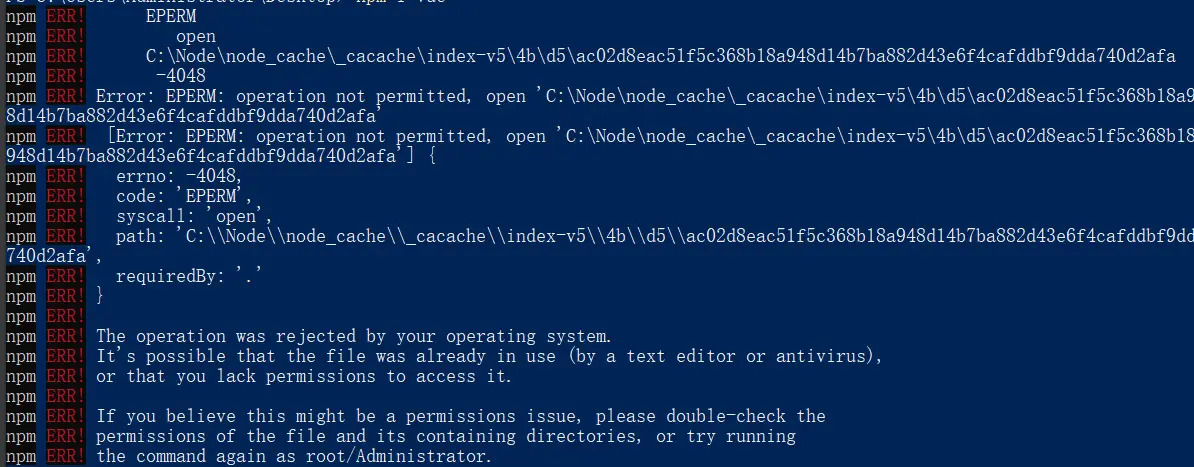
1.报错信息
npm ERR! code EPERM
npm ERR! syscall open
npm ERR! path C:\Node\node_cache_cacache\index-v5\4b\d5\ac02d8eac51f5c368b18a948d14b7ba882d43e6f4cafddbf9dda740d2afa
npm ERR! errno -4048
npm ERR! Error: EPERM: operation not permitted, open 'C:\Node\node_cache_cacache\index-v5\4b\d5\ac02d8eac51f5c368b18a948d14b7ba882d43e6f4cafddbf9dda740d2afa'
npm ERR! [Error: EPERM: operation not permitted, open 'C:\Node\node_cache_cacache\index-v5\4b\d5\ac02d8eac51f5c368b18a948d14b7ba882d43e6f4cafddbf9dda740d2afa'] {
npm ERR! errno: -4048,
npm ERR! code: 'EPERM',
npm ERR! syscall: 'open',
npm ERR! path: 'C:\Node\node_cache\_cacache\index-v5\4b\d5\ac02d8eac51f5c368b18a948d14b7ba882d43e6f4cafddbf9dda740d2afa',
npm ERR! requiredBy: '.'
npm ERR! }
npm ERR!
npm ERR! The operation was rejected by your operating system.
npm ERR! It's possible that the file was already in use (by a text editor or antivirus),
npm ERR! or that you lack permissions to access it.
npm ERR!
npm ERR! If you believe this might be a permissions issue, please double-check the
npm ERR! permissions of the file and its containing directories, or try running
2.原因
操作权限不足,此处截图在终端打开,与vscode打开相同,终端采用管理员权限打开,一样可以正常安装
3.解决
使用管理员身份打开vscode
vscode使用npm安装依赖报错的更多相关文章
- yum 安装 依赖报错
今天使用yum安装的时候 报错: Error: Multilib version problems found. This often means that the root cause 应该是yum ...
- npm install 安装依赖报错
npm ERR! Unexpected end of JSON input while parsing near '...2.4.8","karma":"~0. ...
- mac系统 下 npm 安装 bower报错
在mac终端运行 sudo npm install -g bower (安装之前你要确定你已经成功安装了node 和 git) 然后会报错 like this: npm ERR! Darwin 15. ...
- python MySQL安装依赖报错的坑
0X01 问题 MySQL-python是python调用MySQL的常用库 通常安装时会遇到某些坑. EnvironmentError: mysql_config not found yum -y ...
- npm安装依赖报 npm ERR! code Z_BUF_ERROR npm ERR! errno -5 npm ERR! zlib: unexpected end of file 这个错误解决方案
今天碰到了一个比较奇怪的问题,下载依赖有问题报错 npm ERR! code Z_BUF_ERROR npm ERR! errno -5 npm ERR! zlib: unexpected end o ...
- react项目运行安装依赖报错:Error: pngquant failed to build, make sure that libpng-dev is installed
安装报错之后.但是安装libpng-dev.发现找不到.通过多方查找.准备重新安装pngquant.命令如下: npm install --save-dev pngquant安装成功并运行成功
- npm安装hexo报错
报错提示 npm WARN saveError ENOENT: no such file or directory, open '/home/linux1/package.json' npm noti ...
- 处理npm安装模块报错01
报错:Error: EACCES: permission denied, mkdir '/usr/local/lib/node_modules/nodemon_tmp' 解决:sudo cnpm in ...
- vscode安装依赖报错 TypeError: zipfile.readEntry is not a function
错误原因是npm的版本太高,需要把5.x的版本换回4.x的 npm install npm@4 -g 或者 cnpm install npm@4 -g 详见:https://github.com/Mi ...
- npm安装cnpm报错
1.持久使用 npm config set registry https://registry.npm.taobao.org // 配置后可通过下面方式来验证是否成功npm config get re ...
随机推荐
- Spring事务(六)-只读事务
@Transactional(readOnly=true)就可以把事务方法设置成只读事务.设置了只读事务,事务从开始到结束,将看不见其他事务所提交的数据.这在某种程度上解决了事务并发的问题.一个方法内 ...
- Elasticsearch 如何保证写入过程中不丢失数据的
丢失数据的本质 在本文开始前,首先明白一个点,平时我们说的组件数据不丢失究竟是在指什么,如果你往ES写入数据,ES返回给你写入错误,这个不算数据丢失.如果你往ES写入数据,ES返回给你成功,但是后续因 ...
- git svn 提交代码日志填写规范 BUG NEW DEL CHG TRP gitz 日志z
git svn 提交代码日志填写规范 BUG NEW DEL CHG TRP gitz 日志z
- Swing 使用 beautyeye_lnf.jar 美化
Springboot整合Swing制作简单GUI客户端项目记录 https://blog.csdn.net/Youdmeng/article/details/106549991
- 快速搭建Web安全测试环境
快速搭建Web安全测试环境 1.虚拟机安装 2.网站搭建 一.虚拟机安装 下载VMware虚拟机,Windows 虚拟机 | Workstation Pro | VMware | CN 安装VMwar ...
- C++ 派生类对象的构造与析构过程
C++ 派生类对象的构造与析构过程 因为基类的成员变量和派生类的成员变量在内存中的连续的(下面程序会验证这一点),如下图所示: 所以构造派生类对象的时候,构造成员变量的过程就像入栈一样: 那么很自然, ...
- shell求水仙花数
水仙花数(100-999).水仙花数是指一个 3 位数,它的每个位上的数字的 3次幂之和等于它本身 c++代码 int i=100; while(i<=999){ int sum=0; int ...
- 学会Promise,看这里!!!
前言 众所周知,在JavaScript的世界中,代码都是单线程执行的.由于这个原因,JavaScript中的耗时操作,如网络操作.浏览器事件等,都需要异步执行.这也导致在JavaScript中异步操作 ...
- 快速上手系列:CSS
一 选择符 1 通配:*{} 所有元素 类:p{} 如 p 标签等相应元素 ID:#id{} 使用相应 id 属性的元素样式 类:.类名{} 使用相应 class 属性的元素样式 包含:div p{} ...
- base64格式上传图片后台写入
前台 var reader = new FileReader(); reader.readAsDataURL(file); reader.onload = function(e){//回调 } 后台 ...