
Spring Cloud Bus:消息总线
Spring Cloud Bus:消息总线
- SpringCloud学习教程
- SpringCloud
Spring Cloud Bus 使用轻量级的消息代理来连接微服务架构中的各个服务,可以将其用于广播状态更改(例如配置中心配置更改)或其他管理指令,本文将对其用法进行详细介绍。
#Spring Cloud Bus 简介
我们通常会使用消息代理来构建一个主题,然后把微服务架构中的所有服务都连接到这个主题上去,当我们向该主题发送消息时,所有订阅该主题的服务都会收到消息并进行消费。使用 Spring Cloud Bus 可以方便地构建起这套机制,所以 Spring Cloud Bus 又被称为消息总线。Spring Cloud Bus 配合 Spring Cloud Config 使用可以实现配置的动态刷新。目前 Spring Cloud Bus 支持两种消息代理:RabbitMQ 和 Kafka,下面以 RabbitMQ 为例来演示下使用Spring Cloud Bus 动态刷新配置的功能。
#RabbitMQ的安装

- 安装RabbitMQ,下载地址:https://dl.bintray.com/rabbitmq/all/rabbitmq-server/3.7.14/rabbitmq-server-3.7.14.exeopen in new window

- 安装完成后,进入RabbitMQ安装目录下的sbin目录:

- 在地址栏输入cmd并回车启动命令行,然后输入以下命令启动管理功能:
rabbitmq-plugins enable rabbitmq_management
1

- 访问地址查看是否安装成功:http://localhost:15672/open in new window

- 输入账号密码并登录:guest guest
#动态刷新配置
使用 Spring Cloud Bus 动态刷新配置需要配合 Spring Cloud Config 一起使用,我们使用上一节open in new window中的config-server、config-client模块来演示下该功能。
#给config-server添加消息总线支持
- 在pom.xml中添加相关依赖:
<dependency>

    <groupId>org.springframework.cloud</groupId>

    <artifactId>spring-cloud-starter-bus-amqp</artifactId>

</dependency>

<dependency>

    <groupId>org.springframework.boot</groupId>

    <artifactId>spring-boot-starter-actuator</artifactId>

</dependency>
- 添加配置文件application-amqp.yml,主要是添加了RabbitMQ的配置及暴露了刷新配置的Actuator端点;
server:

  port: 8904

spring:

  application:

    name: config-server

  cloud:

    config:

      server:

        git:

          uri: https://gitee.com/macrozheng/springcloud-config.git

          username: macro

          password: 123456

          clone-on-start: true # 开启启动时直接从git获取配置

  rabbitmq: #rabbitmq相关配置

    host: localhost

    port: 5672

    username: guest

    password: guest

eureka:

  client:

    service-url:

      defaultZone: http://localhost:8001/eureka/

management:

  endpoints: #暴露bus刷新配置的端点

    web:

      exposure:

        include: 'bus-refresh'
#给config-client添加消息总线支持
- 在pom.xml中添加相关依赖:
<dependency>

    <groupId>org.springframework.cloud</groupId>

    <artifactId>spring-cloud-starter-bus-amqp</artifactId>

</dependency>
- 添加配置文件bootstrap-amqp1.yml及bootstrap-amqp2.yml用于启动两个不同的config-client,两个配置文件只有端口号不同;
server:

  port: 9004

spring:

  application:

    name: config-client

  cloud:

    config:

      profile: dev #启用环境名称

      label: dev #分支名称

      name: config #配置文件名称

      discovery:

        enabled: true

        service-id: config-server

  rabbitmq: #rabbitmq相关配置

    host: localhost

    port: 5672

    username: guest

    password: guest

eureka:

  client:

    service-url:

      defaultZone: http://localhost:8001/eureka/

management:

  endpoints:

    web:

      exposure:

        include: 'refresh'
#动态刷新配置演示
- 我们先启动相关服务,启动eureka-server,以application-amqp.yml为配置启动config-server,以bootstrap-amqp1.yml为配置启动config-client,以bootstrap-amqp2.yml为配置再启动一个config-client,启动后注册中心显示如下:

- 启动所有服务后,我们登录RabbitMQ的控制台可以发现Spring Cloud Bus 创建了一个叫springCloudBus的交换机及三个以 springCloudBus.anonymous开头的队列:


- 我们先修改Git仓库中dev分支下的config-dev.yml配置文件:
# 修改前信息

config:

  info: "config info for dev(dev)"

# 修改后信息

config:

  info: "update config info for dev(dev)"
- 调用注册中心的接口刷新所有配置:http://localhost:8904/actuator/bus-refreshopen in new window

- 刷新后再分别调用http://localhost:9004/configInfoopen in new window 和 http://localhost:9005/configInfoopen in new window 获取配置信息,发现都已经刷新了;
update config info for dev(dev)
1
- 如果只需要刷新指定实例的配置可以使用以下格式进行刷新:http://localhost:8904/actuator/bus-refresh/{destination} ,我们这里以刷新运行在9004端口上的config-client为例http://localhost:8904/actuator/bus-refresh/config-client:9004open in new window。
#配合WebHooks使用
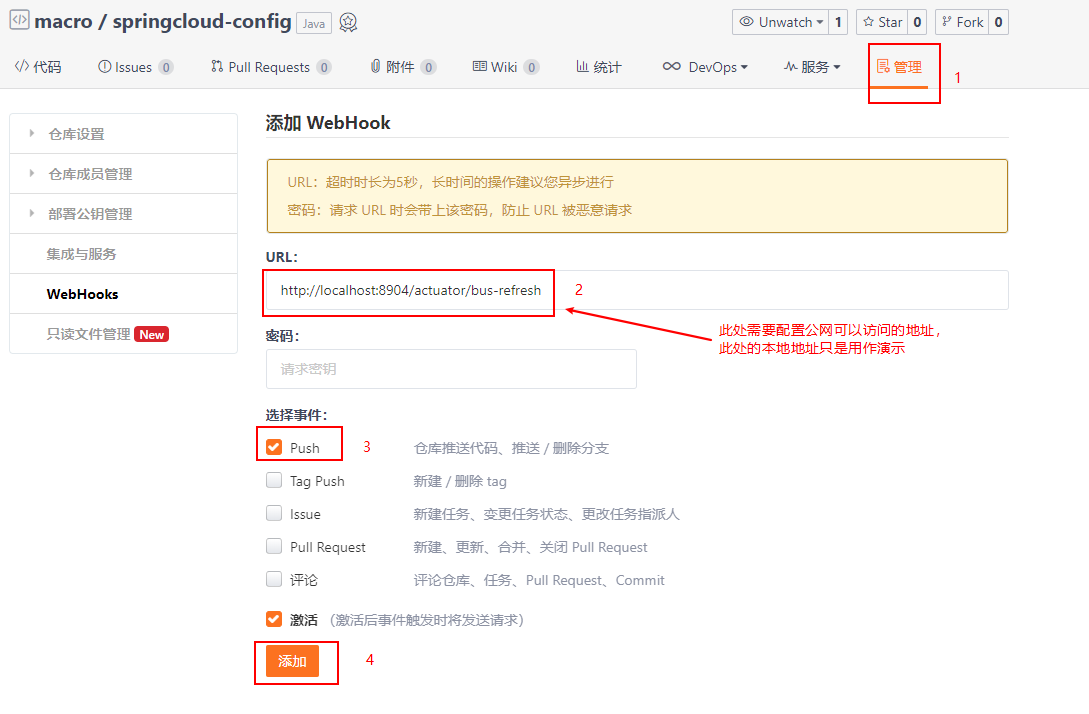
WebHooks相当于是一个钩子函数,我们可以配置当向Git仓库push代码时触发这个钩子函数,这里以Gitee为例来介绍下其使用方式,这里当我们向配置仓库push代码时就会自动刷新服务配置了。
#使用到的模块
springcloud-learning

├── eureka-server -- eureka注册中心

├── config-server -- 配置中心服务

└── config-client -- 获取配置的客户端服务
Spring Cloud Bus:消息总线的更多相关文章
- 跟我学SpringCloud | 第八篇:Spring Cloud Bus 消息总线
SpringCloud系列教程 | 第八篇:Spring Cloud Bus 消息总线 Springboot: 2.1.6.RELEASE SpringCloud: Greenwich.SR1 如无特 ...
- Spring Cloud(十一)高可用的分布式配置中心 Spring Cloud Bus 消息总线集成(RabbitMQ)
详见:https://www.w3cschool.cn/spring_cloud/spring_cloud-jl8a2ixp.html 上一篇文章,留了一个悬念,Config Client 实现配置的 ...
- spring cloud bus 消息总线 动态刷新配置文件 【actuator 与 RabbitMQ配合完成】
1.前言 单机刷新配置文件,使用actuator就足够了 ,但是 分布式微服务 不可能是单机 ,将会有很多很多的工程 ,无法手动一个一个的发送刷新请求, 因此引入了消息中间件 ,常用的 消息中间件 是 ...
- Spring Cloud Bus 消息总线 RabbitMQ
Spring Cloud Bus将分布式系统中各节点通过轻量级消息代理连接起来. 从而实现例如广播状态改变(例如配置改变)或其他的管理指令. 目前唯一的实现是使用AMQP代理作为传输对象. Sprin ...
- 干货|Spring Cloud Bus 消息总线介绍
继上一篇 干货|Spring Cloud Stream 体系及原理介绍 之后,本期我们来了解下 Spring Cloud 体系中的另外一个组件 Spring Cloud Bus (建议先熟悉 Spri ...
- Spring Cloud 2-Bus 消息总线(九)
Spring Cloud Bus 1.服务端配置 pom.xml application.yml 2.客户端配置 pom.xml application.yml Controller.java 3 ...
- Spring Cloud Stream消息总线
Springcloud 里面对于MQ的整合一个是前一篇的消息总线一个是本文介绍的消息驱动 大体要学习这么几个知识点: 课题:SpringCloud消息驱动Stream1.什么是SpringCloud消 ...
- SpringCloud学习之Bus消息总线实现配置自动刷新(九)
前面两篇文章我们聊了Spring Cloud Config配置中心,当我们在更新github上面的配置以后,如果想要获取到最新的配置,需要手动刷新或者利用webhook的机制每次提交代码发送请求来刷新 ...
- 第七篇: 消息总线(Spring Cloud Bus)
Spring Cloud Bus 将分布式的节点用轻量的消息代理连接起来.它可以用于广播配置文件的更改或者服务之间的通讯,也可以用于监控.本文要讲述的是用Spring Cloud Bus实现通知微服务 ...
- 第九章 消息总线: Spring Cloud Bus
在微服务架构的系统中, 我们通常会使用轻量级的消息代理来构建一个共用的消息主题让系统中所有微服务实例都连接上来, 由于该主题中产生的消息会被所有实例监听和消费, 所以我们称它为消息总线. 在总线上的各 ...
随机推荐
- Java 多线程------多线程的创建(2),方式一:继承于Thread类
1 package com.bytezero.threadexer; 2 3 /** 4 * 创建两个分线程,其中一个线程遍历100以内的偶数,另一个线程遍历100以内的奇数 5 * 6 * 7 * ...
- if (ctx.ifTo(ctx.property, next)) return
if (ctx.ifTo(ctx.property, next)) return if (ctx.ifGoto(ctx.property, 'functionName')) return 试试 a & ...
- git 提交本地仓库 提交错误撤销命令
git reset --hard HEAD~1
- 关于debian11无法安装星火商店的解决方法
#!/bin/bash if [ "$(id -u)" != "0" ] then echo "请确保你使用root权限启动此脚本" exi ...
- Android Studio自带模拟器无法访问网络问题解决
测试APP的时候,发现Android Studio自带的模拟器访问不了百度等网站,之前一直用的好好的,觉得可能是版本的问题,也有可能是公司网络的问题(因为在家里的电脑的Android Studio的模 ...
- linux下find命令根据系统时间查找文件用法
find 命令有几个用于根据您系统的时间戳搜索文件的选项.这些时间戳包括 mtime 文件内容上次修改时间 atime 文件被读取或访问的时间 ctime 文件状态变化时间 mtime 和 atime ...
- python读取文本多行合并一行
# 需要合并的行数 col = 4 # 创建新文件 nf = open("*.txt", "w+") # 读取初始文件 with open("*.tx ...
- 毕设系列之JrtpLib H264(裸视频数据) 实时视频传输(发送与接受)
PS:要转载请注明出处,本人版权所有. PS: 这个只是基于<我自己>的理解, 如果和你的原则及想法相冲突,请谅解,勿喷. 前置说明 本文作为本人csdn blog的主站的备份.(Bl ...
- 不要升级!不要升级!MacOS 14.4 引发Java 应用崩溃
如果最近您收到了MacOS 14.4的升级提醒,那么建议你暂时先不要升级! 在x上,Java开发领域的一些大v们,也发现了这个问题,并提醒大家不要升级. 根据Java官方发布的文章了解到,该问题主要是 ...
- SqlSugar的几种连接方式
1.最简单的使用 public class DatabaseService { private static readonly Lazy<SqlSugarClient> _db = new ...