
第七篇: 消息总线(Spring Cloud Bus)
Spring Cloud Bus 将分布式的节点用轻量的消息代理连接起来。它可以用于广播配置文件的更改或者服务之间的通讯,也可以用于监控。本文要讲述的是用Spring Cloud Bus实现通知微服务架构的配置文件的更改。
一、准备工作
本文还是基于上一篇文章来实现。按照官方文档,我们只需要在配置文件中配置 spring-cloud-starter-bus-amqp ;这就是说我们需要装rabbitMq,点击rabbitmq下载,点击erlang下载。上两个下载都是百度网盘的链接,也可以https://download.csdn.net/download/snowwolf9999/10551353帮我加点CSDN分,嘿嘿。
具体安装erlang环境,参考https://www.cnblogs.com/PPBoy/p/9335943.html。
二、改造eureka-config-client工程。
在pom文件加上起步依赖spring-cloud-starter-bus-amqp和spring-boot-starter-actuator。
        <dependency>

            <groupId>org.springframework.cloud</groupId>

            <artifactId>spring-cloud-starter-bus-amqp</artifactId>

        </dependency>

        <dependency>

            <groupId>org.springframework.boot</groupId>

            <artifactId>spring-boot-starter-actuator</artifactId>

        </dependency>
完整的配置文件如下:
<project xmlns="http://maven.apache.org/POM/4.0.0" xmlns:xsi="http://www.w3.org/2001/XMLSchema-instance" xsi:schemaLocation="http://maven.apache.org/POM/4.0.0 http://maven.apache.org/xsd/maven-4.0.0.xsd">

  <modelVersion>4.0.0</modelVersion>

  <groupId>com.sun</groupId>

  <artifactId>eureka-config-client</artifactId>

  <version>0.0.1-SNAPSHOT</version>

    <packaging>jar</packaging>

    <name>config-client</name>

    <description>Demo project for Spring Boot</description>

    <parent>

        <groupId>com.sun</groupId>

        <artifactId>springcloud-parent</artifactId>

        <version>0.0.1-SNAPSHOT</version>

    </parent>

    <dependencies>

        <dependency>

            <groupId>org.springframework.boot</groupId>

            <artifactId>spring-boot-starter-web</artifactId>

        </dependency>

        <dependency>

            <groupId>org.springframework.cloud</groupId>

            <artifactId>spring-cloud-starter-config</artifactId>

        </dependency>

        <dependency>

            <groupId>org.springframework.cloud</groupId>

            <artifactId>spring-cloud-starter-netflix-eureka-client</artifactId>

        </dependency>

        <dependency>

            <groupId>org.springframework.cloud</groupId>

            <artifactId>spring-cloud-starter-bus-amqp</artifactId>

        </dependency>

        <dependency>

            <groupId>org.springframework.boot</groupId>

            <artifactId>spring-boot-starter-actuator</artifactId>

        </dependency>

    </dependencies>

</project>
在配置文件application.yml中加上RabbitMq的配置,包括RabbitMq的地址、端口,用户名、密码。并需要加上spring.cloud.bus的三个配置,具体如下:
spring:

  application:

    name: config-client

  cloud:

    config:

      label: master

      profile: dev

      #uri: http://localhost:8888/

      bus:

        enabled: true

        trace:

          enabled:true

    discovery:

      enabled: true

      serviceId: config-server

  rabbitmq:

    host: localhost

    port: 5672

    username: guest

    password: guest

eureka:

  client:

    serviceUrl:

      defaultZone: http://localhost:8888/eureka/

server:

  port: 8881

management:

  endpoints:

    web:

      exposure:

        include: bus-refresh
ConfigClientApplication启动类代码如下:
package com.sun;

import org.springframework.beans.factory.annotation.Value;

import org.springframework.boot.SpringApplication;

import org.springframework.boot.autoconfigure.SpringBootApplication;

import org.springframework.cloud.context.config.annotation.RefreshScope;

import org.springframework.cloud.netflix.eureka.EnableEurekaClient;

import org.springframework.web.bind.annotation.RequestMapping;

import org.springframework.web.bind.annotation.RestController;

@SpringBootApplication

@RestController

@EnableEurekaClient

@RefreshScope //添加注释

public class ConfigClientApplication {

    public static void main(String[] args) {

        SpringApplication.run(ConfigClientApplication.class, args);

    }

    @Value("${foo}")

    String foo;

    @RequestMapping(value = "/hi")

    public String hi(){

        return foo;

    }

}
这时我们去代码仓库将foo的值改为“foo version 4”,即改变配置文件foo的值。如果是传统的做法,需要重启服务,才能达到配置文件的更新。此时,我们只需要发送post请求:http://localhost:8881/actuator/bus-refresh,你会发现config-client会重新读取配置文件:
c.c.c.ConfigServicePropertySourceLocator : Fetching config from server at : http://localhost:8888
tip:这里发送post请求可以用postman:

写地址发送就可以了,这时我们再访问http://localhost:8881/hi 或者http://localhost:8882/hi 浏览器显示:
foo version 4
另外,/actuator/bus-refresh接口可以指定服务,即使用”destination”参数,比如 “/actuator/bus-refresh?destination=customers:**” 即刷新服务名为customers的所有服务。
三、分析
此时的架构图:
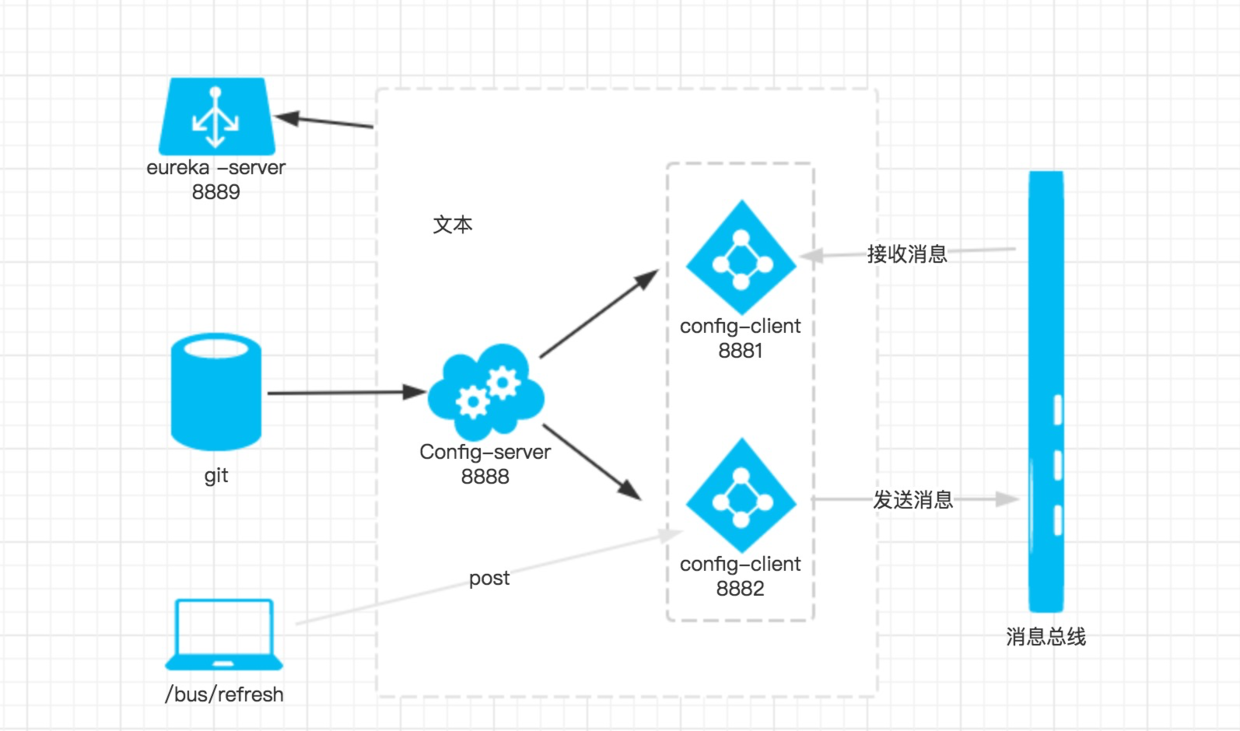
当git文件更改的时候,通过pc端用post 向端口为8881的config-client发送请求/bus/refresh/;此时8881端口会发送一个消息,由消息总线向其他服务传递,从而使整个微服务集群都达到更新配置文件。
当然,向端口8882的服务发送也可以。
最后说一下http://localhost:8881/actuator/bus-refresh不能成功刷新,基本上有2种可能:
1、查看rabbitmq是否安装完毕,是否运行。查看rabbitmq状态,参考:https://blog.csdn.net/lglgsy456/article/details/79045850
2、必须是post请求。可以由postman模拟发送。
本文绝大部分参考博客:https://blog.csdn.net/forezp/article/details/81041062 再次对博主表示感谢。
第七篇: 消息总线(Spring Cloud Bus)的更多相关文章
- 【SpringCloud 】第八篇: 消息总线(Spring Cloud Bus)
前言: 必需学会SpringBoot基础知识 简介: spring cloud 为开发人员提供了快速构建分布式系统的一些工具,包括配置管理.服务发现.断路器.路由.微代理.事件总线.全局锁.决策竞选. ...
- 原 史上最简单的SpringCloud教程 | 第八篇: 消息总线(Spring Cloud Bus)(Finchley版本)
转载请标明出处: 原文首发于:https://www.fangzhipeng.com/springcloud/2018/08/30/sc-f8-bus/ 本文出自方志朋的博客 转载请标明出处: Spr ...
- 史上最简单的SpringCloud教程 | 第八篇: 消息总线(Spring Cloud Bus)
转载请标明出处: 原文首发于:https://www.fangzhipeng.com/springcloud/2017/07/12/sc08-bus/ 本文出自方志朋的博客 最新Finchley版本请 ...
- SpringCloud教程 | 第八篇: 消息总线(Spring Cloud Bus)
一.安装rabbitmq 二.pom父文件 <?xml version="1.0" encoding="UTF-8"?> <project x ...
- 一起来学Spring Cloud | 第八章:消息总线(Spring Cloud Bus)
上一章节,我们讲解了分布式配置中心spring cloud config,我们把配置项存放在git或者本地,当我们修改配置时,需要重新启动服务才能生效.但是在生产上,一个服务部署了多台机器,重新启动比 ...
- 通过消息总线Spring Cloud Bus实现配置文件刷新(使用Kafka或RocketMQ)
如果需要客户端获取到最新的配置信息需要执行refresh,我们可以利用webhook的机制每次提交代码发送请求来刷新客户端,当客户端越来越多的时候,需要每个客户端都执行一遍,这种方案就不太适合了.使用 ...
- SpringCloud学习(八)消息总线(Spring Cloud Bus)(Finchley版本)
Spring Cloud Bus 将分布式的节点用轻量的消息代理连接起来.它可以用于广播配置文件的更改或者服务之间的通讯,也可以用于监控.本文要讲述的是用Spring Cloud Bus实现通知微服务 ...
- springCloud学习-消息总线(Spring Cloud Bus)
1.简介 Spring Cloud Bus 将分布式的节点用轻量的消息代理连接起来.它可以用于广播配置文件的更改或者服务之间的通讯,也可以用于监控.本文要讲述的是用Spring Cloud Bus实现 ...
- SpringCloud 教程 (一) 消息总线(Spring Cloud Bus)
Spring Cloud Bus 将分布式的节点用轻量的消息代理连接起来.它可以用于广播配置文件的更改或者服务之间的通讯,也可以用于监控.本文要讲述的是用Spring Cloud Bus实现通知微服务 ...
随机推荐
- tomcat简单使用
下载解压tomcat[root@localhost]# tar zxf apache-tomcat-8.5.4.tar.gz -C /usr/local/tomcat yum自带JDK,注意区别JRE ...
- zookeeper测试代码
package com.sjt.test; import java.util.List; import java.util.concurrent.CountDownLatch; import org. ...
- HTTP协议之url详解
HTTP使用统一资源标识符(Uniform Resource Identifiers, URI)来传输数据和建立连接.URL是一种特殊类型的URI,包含了用于查找某个资源的足够的信息 URL,全称是U ...
- 七、PyQT5控件——QSlider,QSpinBox
一.Qslider QSlider是一个滑动条,可以设置成水平或垂直放置.最常用的方法允许用户在某一范围内互动该滑块,并将滑块的位置转换成一个整数值(int类型),这种方式可以在某一个范围内平顺的变动 ...
- CentOS下安装Git
在终端输入命令:yum install git,此时会进行提示安装,输入y, 在这种安装方式下,速度很快(windows系统下下载客户端速度超慢),当出现安装完毕时,就可以了. 安装完毕后输入git ...
- lombok学习
lombok的官方地址:https://projectlombok.org/ lombok的Github地址:https://github.com/rzwitserloot/lombok lombok ...
- PIO学习
边沿捕获 PIO可以对输入进行边沿捕获,它可以捕获上升沿.下降沿和双沿,当检测到边沿时PIO会把它存在edgecapture 寄存器之内: 打开Synchronously capture 时,会生成一 ...
- Notes : <Hands-on ML with Sklearn & TF> Chapter 5
.caret, .dropup > .btn > .caret { border-top-color: #000 !important; } .label { border: 1px so ...
- 20个Linux防火墙应用技巧
转载 1.显示防火墙的状态 以root权限运行下面的命令: # iptables -L -n -v 参数说明: -L:列出规则. -v:显示详细信息.此选项会显示接口名称.规则选项和TOS掩码,以及封 ...
- 汇总java生态圈常用技术框架、开源中间件,系统架构及经典案例等
转自:http://www.51testing.com/html/83/n-3718883.html 有人认为编程是一门技术活,要有一定的天赋,非天资聪慧者不能及也.非也,这是近几年,对于技术这碗饭有 ...