
fence的使用
一、创建一个集群及pcs安装

1、真机切换root用户下
2、打开PC管理器视图

1、安装pcs,关掉防火墙,重启pcs和下次开机自动启动pcs
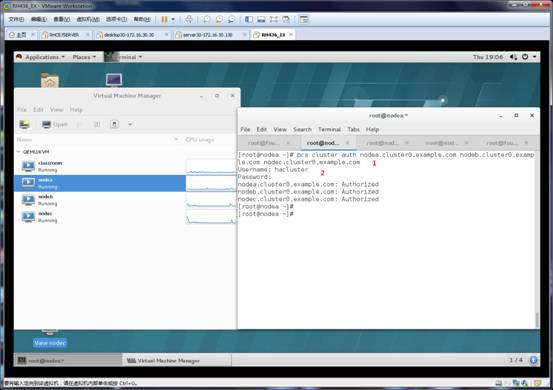
1、创建一个集群,用户:hacluster;密码:redhat
2、输出创建的用户和密码
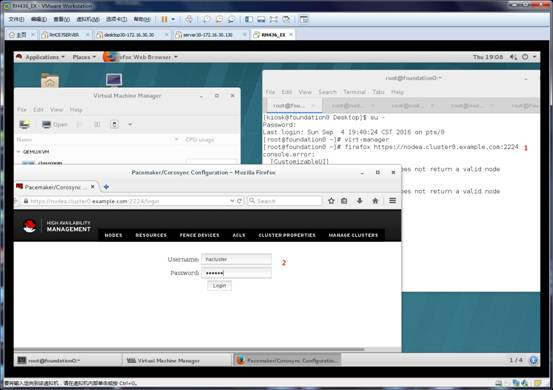
1、firefox远程打开nodea节点的火狐浏览器
2、输出登陆的帐号和密码
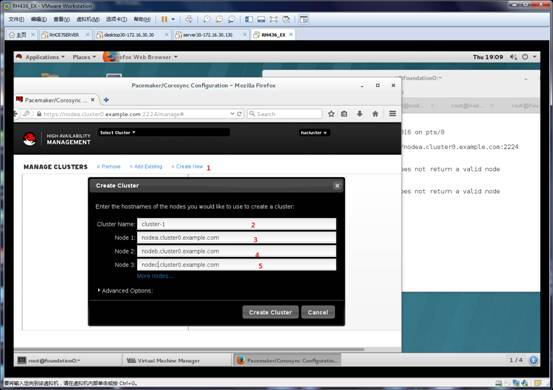
1、在集群内创建一个用户
2、用户名为cluster-1
3-5、为三个节点的host名
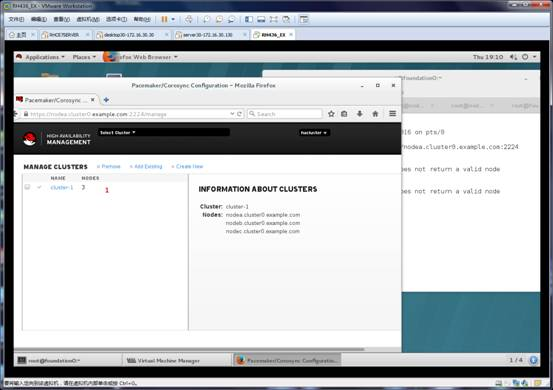
1、创建后用户的信息

1、设置
2、将Stonith Enabled 去勾

1、资源
2、添加
3、选择ip浮动
4、资源ID为vip
5、ID的IP为172.25.0.111
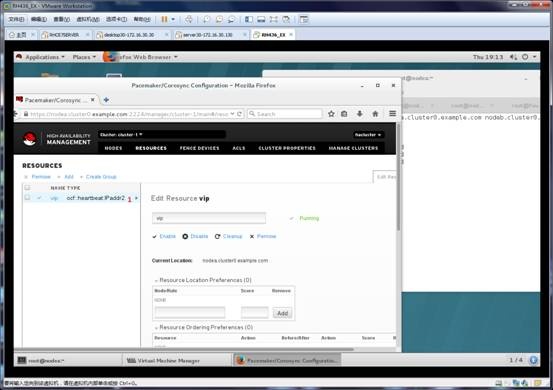
1、创建资源vip的信息
二、fence的使用

1、在/etc/创建一个cluster文件夹
2、进入/etc/cluster下
3、安装fence_virt*包
4-6、三个节点(nodea、nodeb、nodec)同1、2、3做同样的命令

1、将一个空设备内写入一个fence_xvm.key放在/etc/cluster/下
2、修改fence文件的内容

1、将接口改成br0(interface[virb0]:br0)

1、确定选择

1、重启fence_virtd,下次开机自动启动fence_virtd
2、查看/etc/cluster/下的文件
3、将fence_xvm.key拷贝到nodea:/etc/cluster/
4、将fence_xvm.key拷贝到nodeb:/etc/cluster/
5、将fence_xvm.key拷贝到nodec:/etc/cluster/

1、打开fence视图
2、添加
3、选择fence_xvm.key
4、fence名:fence-1
5、添加三个节点(nodea,nodeb,nodec)
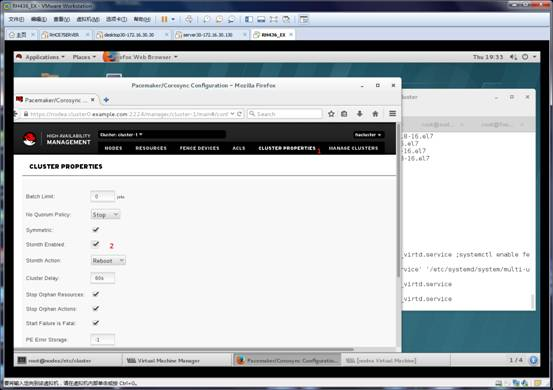
1-2、设置,将 Stonith Enabled 勾选 ,并将真机、nodea、nodeb、nodec的fence_virtd服务重启

1、查看所有资源信息
2、资源vip的信息
3、fence fence-1的信息

1、在其他节点上可以命令任何一个节点重启(nodebc指令nodea重启)

1、在其他节点上可以命令任何一个节点重启(nodebc指令nodeb重启)
fence的使用的更多相关文章
- [LeetCode] Paint Fence 粉刷篱笆
There is a fence with n posts, each post can be painted with one of the k colors. You have to paint ...
- poj 3253 Fence Repair
Fence Repair Time Limit: 2000MS Memory Limit: 65536K Total Submissions: 42979 Accepted: 13999 De ...
- CF 484E - Sign on Fence
E. Sign on Fence time limit per test 4 seconds memory limit per test 256 megabytes input standard in ...
- poj3253 Fence Repair
http://poj.org/problem?id=3253 Farmer John wants to repair a small length of the fence around the pa ...
- CF448C Painting Fence (分治递归)
Codeforces Round #256 (Div. 2) C C. Painting Fence time limit per test 1 second memory limit per tes ...
- Codeforces Round #276 (Div. 1) E. Sign on Fence 二分+主席树
E. Sign on Fence Bizon the Champion has recently finished painting his wood fence. The fence consi ...
- ACM Color the fence
Color the fence 时间限制:1000 ms | 内存限制:65535 KB 难度:2 描述 Tom has fallen in love with Mary. Now Tom w ...
- codeforces 349B Color the Fence 贪心,思维
1.codeforces 349B Color the Fence 2.链接:http://codeforces.com/problemset/problem/349/B 3.总结: 刷栅栏.1 ...
- [LintCode] Paint Fence 粉刷篱笆
There is a fence with n posts, each post can be painted with one of the k colors.You have to paint a ...
- LeetCode Paint Fence
原题链接在这里:https://leetcode.com/problems/paint-fence/ 题目: There is a fence with n posts, each post can ...
随机推荐
- Solution -「HDU 3507」Print Article
Description Link. 给出 \(N\) 个单词,每个单词有个非负权值 \(C_{i}\),现要将它们分成连续的若干段,每段的代价为此段单词的权值和,还要加一个常数 \(M\),即 \(( ...
- iptables和firewalld
iptables简介 iptables不是一个单一的软件工具,而是一套c/s样式的软件组,它是由工作在用户空间的iptables和工作在内核空间的vetilter模块组成,一般统称为Iptables. ...
- 记录 Ucharts 的使用
1.开启 2d 渲染 线上运行开启 canvas2d 可以解决图表显示问题 <qiun-data-charts canvas2d .../> canvasId 可以不传,官方内置生成随机字 ...
- CefSharp自定义滚动条样式
在WinForm/WPF中使用CefSharp混合开发时,通常需要自定义滚动条样式,以保证应用的整体风格统一.本文将给出一个简单的示例介绍如何自定义CefSharp中滚动条的样式. 基本思路 在前端开 ...
- mysql5.5自定义函数-计算并赋值
mysql自定义函数的写法 特别注意,将全部的定义现在最前面,然后再写其他语句,因为之前将定义变量和赋值混着写,死活报错.最后一个前同事高手"邢哥"解决. DELIMITER $$ ...
- 生成CSR和自签名证书
CSR,全称Certificate Signing Request(证书签发请求),是一种包含了公钥和与主题(通常是实体的信息,如个人或组织)相关的其他信息的数据结构.CSR通常用于向证书颁发机构(C ...
- 【Qt6】列表模型——几个便捷的列表类型
前面一些文章,老周简单介绍了在Qt 中使用列表模型的方法.很明显,使用 Item Model 在许多时候还是挺麻烦的--要先建模型,再放数据,最后才构建视图.为了简化这些骚操作,Qt 提供了几个便捷类 ...
- python环境配置常用命令
#安装前请更新 sudo apt-get update python -m pip install --upgrade pip #升级PIP版本 sudo apt-get install python ...
- Filter入门实例
一.介绍 Filter:Filter是Servlet的"加强版",它主要用于对用户请求进行预处理,也可对HttpServletResponse进行后处理,是个典型的"处理 ...
- Centos7.5镜像获取
Centos.7.5镜像可从以下地址获取 镜像源地址:https://mirrors.tuna.tsinghua.edu.cn/ 1.下拉找到cc目录下的centos-vault 2.点击进入下一级目 ...