
【Android】构建Android12项目报错
报错信息:
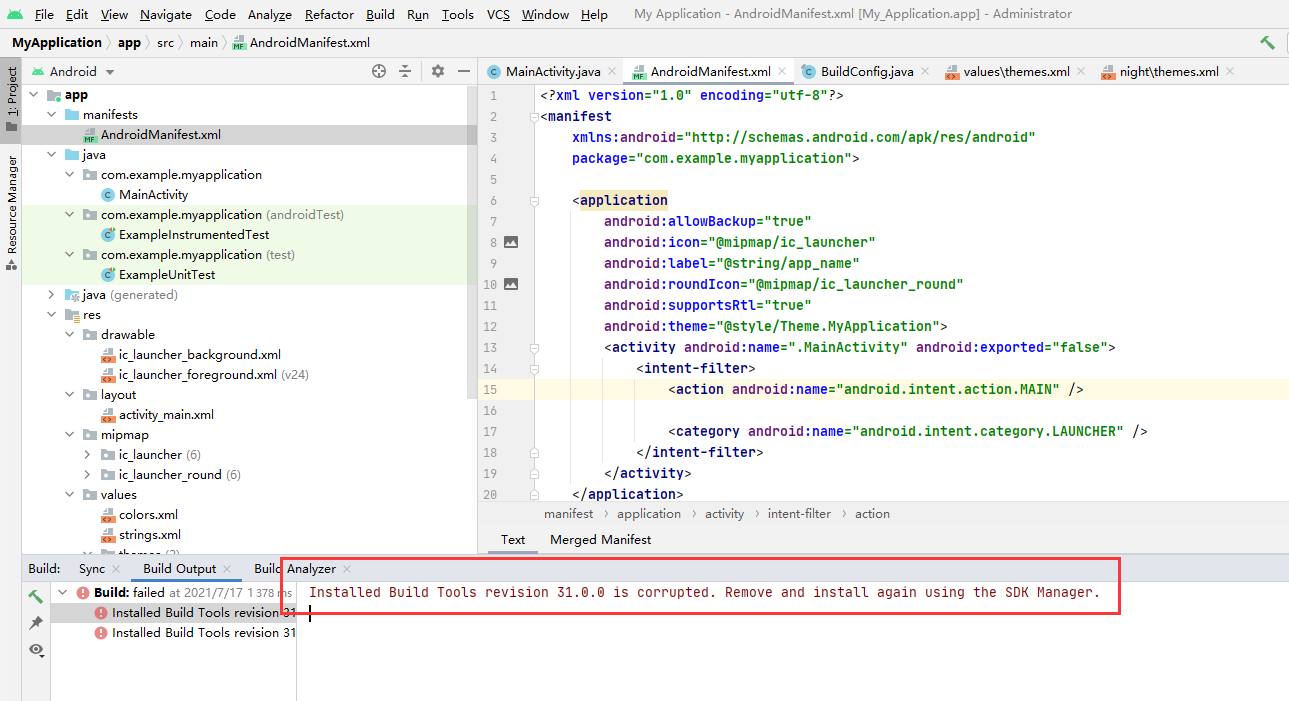
Installed Build Tools revision 31.0.0 is corrupted. Remove and install again using the SDK Manager.
意思是构建工具31版本已中断,使用SDK管理器移除并且重新安装
解决方案:
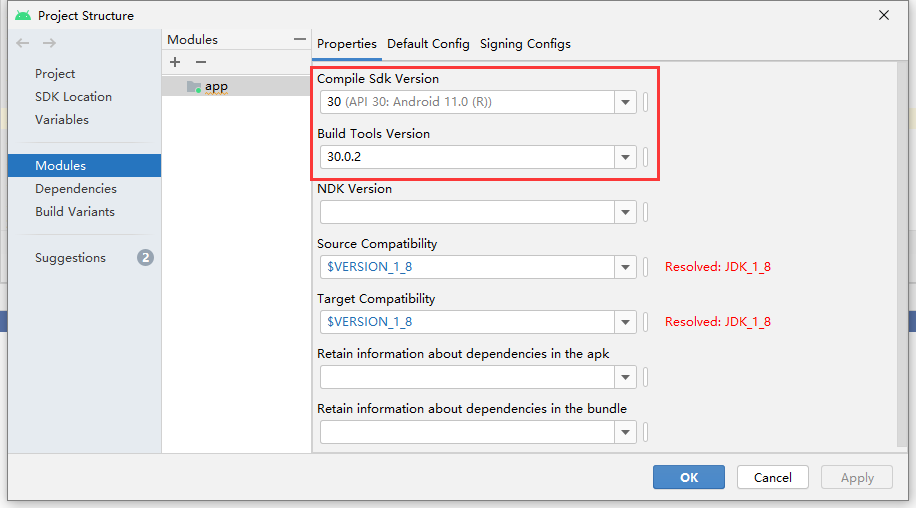
在【Project Structure】选项中,【Module】
在这里回退30版本稳定的,小版本也要更改:
如果没有,要先去下载这个版本的SDK
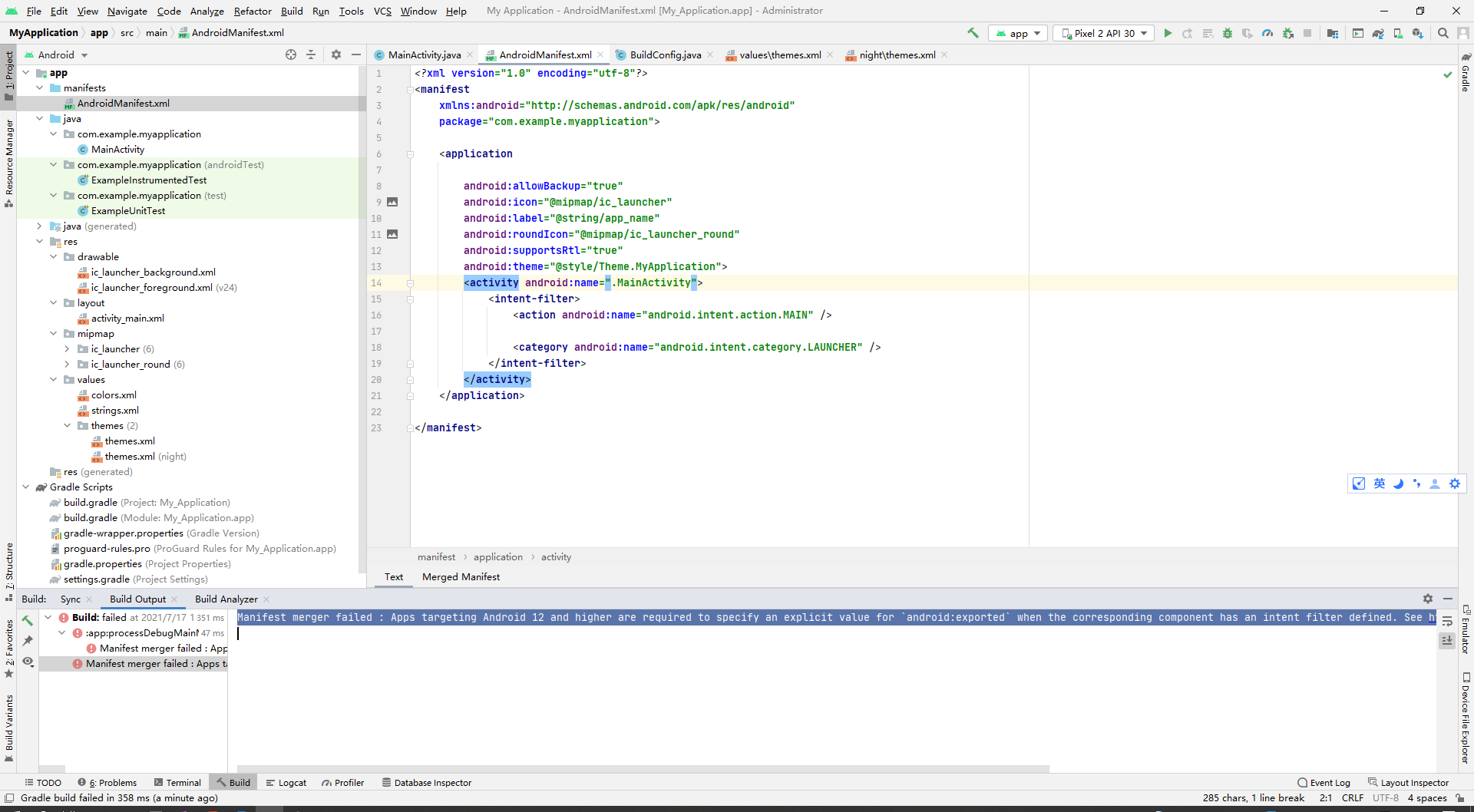
报错信息:
Manifest merger failed :
Apps targeting Android 12 and higher are required to specify an explicit value for `android:exported`
when the corresponding component has an intent filter defined.

See https://developer.android.com/guide/topics/manifest/activity-element#exported for details.
解决参考地址:
https://blog.csdn.net/lyabc123456/article/details/117232115
就是在那个标签上面需要设置这个约束属性:
<service android:name="com.example.app.backgroundService"

         android:exported="false">

    <intent-filter>

        <action android:name="com.example.app.START_BACKGROUND" />

    </intent-filter>

</service>
原生构建的项目【清单文件】是没有这个的:
<?xml version="1.0" encoding="utf-8"?>

<manifest

    xmlns:android="http://schemas.android.com/apk/res/android"

    package="com.example.myapplication">

    <application

        android:allowBackup="true"

        android:icon="@mipmap/ic_launcher"

        android:label="@string/app_name"

        android:roundIcon="@mipmap/ic_launcher_round"

        android:supportsRtl="true"

        android:theme="@style/Theme.MyApplication">

        <activity android:name=".MainActivity">

            <intent-filter>

                <action android:name="android.intent.action.MAIN" />

                <category android:name="android.intent.category.LAUNCHER" />

            </intent-filter>

        </activity>

    </application>

</manifest>
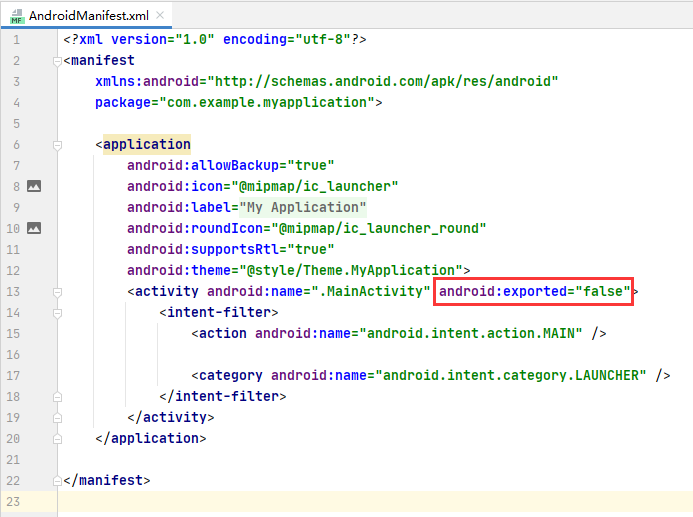
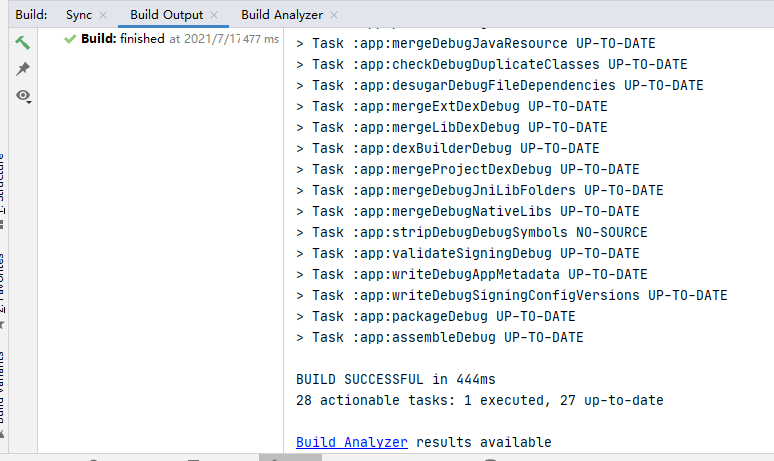
现在加上去之后立刻构建正常。。。
【Android】构建Android12项目报错的更多相关文章
- 利用Eclipse中的Maven构建Web项目报错(一)
利用Eclipse中的Maven构建Web项目 1.在进行上述操作时,pom.xml一直报错 <project xmlns="http://maven.apache.org/POM/4 ...
- 【Android】 导入项目报错的解决方案
1.打项目的properties -->android 为其指一个运版本, 2.修改default properties 文件 ,改相应版本等级 3.选中项目,单击右键,选中properties ...
- IDEA_构建Maven项目报错(1)
构建报错: [ERROR] Plugin org.apache.maven.plugins:maven-archetype-plugin:RELEASE or one of its dependenc ...
- 利用Eclipse中的Maven构建Web项目报错(二)
利用Eclipse中的Maven构建Web项目 1.错误描述 [INFO] Scanning for projects... [INFO] [INFO] Using the builder org.a ...
- Android Studio运行项目报错:Error:null value in entry: annotationProcessorOutputFolder=null的解决方案
一般是在Android studio异常退出(比如强制关机)后,重新打开后运行项目出现该问题. 解决方案 删除项目根目录的.gradle文件夹,然后Clean Project —— Rebulid ...
- MyEclipse构建maven项目报错
直接上图: 这里有三种方案: 1.检查jdk版本:最好换成1.8版本 项目右键-->build path-->configure build Path; 1.2 点击 libraries ...
- 【Android Studio】之构建项目报错
问题1: 报错: Could not download fastutil.jar (it.unimi.dsi:fastutil:7.2.0): No cached version available ...
- 安卓开发第一记 android stdio 安装后 新建测试项目报错
Failed to resolve:com.android.support:appcompat-v7:报错处理 你在使用android studio时是否也出现过上图的报错,你还在为它的出现烦恼? ...
- Android无法删除项目+导入项目报错
Android无法删除项目+导入项目报错 Android无法删除项目:关闭eclipse或关闭电脑,然后重启,继续删除就可以了 导入项目报错:右键–>配置–>中就可以看到了,更改一下就可以 ...
- [原]Jenkins(八)---jenkins构建项目报错时发送错误报告邮件
/** * lihaibo * 文章内容都是根据自己工作情况实践得出. * 版权声明:本博客欢迎转发,但请保留原作者信息! http://www.cnblogs.com/horizonli/p/533 ...
随机推荐
- 数据结构之栈(Java,C语言的实现)以及相关习题巩固
目录 栈 概念以及代码实现 例题 232. 用栈实现队列 1614. 括号的最大嵌套深度 234. 回文链表 1614. 括号的最大嵌套深度 LCR 123. 图书整理 I 206. 反转链表 402 ...
- JavaSE 数据类型以及基本转化与包装
目录 数据类型. 1.基本类型(八个) 数值型 整型类型 byte型:1字节 8bit位 第一位是符号位 null short型:2字节 int 型:4字节 long型:8字节 浮点类型 float ...
- 【Java】JVM字节码分析
一.功能 1.工作原理 2.解释和运行 jvm本质上是运行在计算机上的程序,负责运行java字节码文件 对字节码文件中的指令,实时的解释成机器码,供计算机执行 3.内存管理 自动为对象.方法等分配内存 ...
- 面向对象编程 es5和es6的构造函数
/* 面向对象编程 本质 创建一个对象 可以用 属性属性值的 方式 存储 数据参数 ...
- 鼠标悬浮显示鼠标停留数据的内容 elementui + vue
先看效果图 直接上代码 <el-tabs v-model="activeName" @tab-click="handleClick"> <el ...
- 开机启动VM WARE 某台虚拟机
新建一个批处理,内容如下: set vm_root=C:\Program Files (x86)\VMware\VMware Workstation "%vm_root%\vmrun.exe ...
- Prometheus + Grafana (2) mysql、redis、Docker容器、服务端点以及预警
接着上一节 <Prometheus + Grafana (1) 监控 >,我们继续探讨 Prometheus + Grafana 的复杂应用 实现目标 这节我们的目标是搭建一个多维度监控微 ...
- leetcode_2-两数相加_javascript
题目 2.两数相加 给出两个 非空 的链表用来表示两个非负的整数.其中,它们各自的位数是按照 逆序 的方式存储的,并且它们的每个节点只能存储 一位 数字. 如果,我们将这两个数相加起来,则会返回一个新 ...
- 58同城的登录(RSA算法)
Tips:当你看到这个提示的时候,说明当前的文章是由原emlog博客系统搬迁至此的,文章发布时间已过于久远,编排和内容不一定完整,还请谅解` 58同城的登录(RSA算法) 日期:2016-11-23 ...
- spring使用RedisCacheManager管理key的一些问题
spring可以很好地管理各种内存的快速缓存. 这些常见的内存缓存库实现方式有redis,Ehcache. 本文阐述的是redis,毕竟这个东西相当容易使用. spring通过 org.springf ...