
006. Gitlab组件介绍
Gitlab组件
[root@master tools]# gitlab-ctl status    #检查服务状态

run: gitaly: (pid 26704) 2201s; run: log: (pid 25672) 2576s

run: gitlab-monitor: (pid 26715) 2201s; run: log: (pid 25775) 2569s #

run: gitlab-workhorse: (pid 26724) 2201s; run: log: (pid 25571) 2595s #轻量级的反向代理服务器

run: logrotate: (pid 26733) 2200s; run: log: (pid 25608) 2582s  #用于处理日志.

run: nginx: (pid 26740) 2200s; run: log: (pid 25590) 2588s   #作为静态web资源服务器的

run: node-exporter: (pid 26746) 2199s; run: log: (pid 25719) 2575s

run: postgres-exporter: (pid 26752) 2199s; run: log: (pid 25829) 2561s

run: postgresql: (pid 26761) 2198s; run: log: (pid 25350) 2639s

run: prometheus: (pid 26804) 2198s; run: log: (pid 25810) 2562s

run: redis: (pid 26813) 2198s; run: log: (pid 25278) 2645s

run: redis-exporter: (pid 26817) 2197s; run: log: (pid 25789) 2568s

run: sidekiq: (pid 26831) 2195s; run: log: (pid 25553) 2601s

run: unicorn: (pid 26855) 2194s; run: log: (pid 25515) 2603s
Gitlab工作流程

gitlab基础命令
gitlab-ctl tail       #查看gitlab日志.

gitlab-ctl reconfigure    #重新配置gitlab

gitlab-ctl restart        #重启所有gitlab服务,gitlab-ctl restart [服务名]  重启指定服务.

gitlab-ctl stop         #停止所有gitlab服务,gitlab-ctl 停止 [服务名]  停止指定服务.

gitlab-ctl status       #查看所有服务状态, gitlab-ctl status [服务名] 查看指定服务状态
Gitlab日志
gitlab默认日志路径:  /var/log/gitlab

[root@master gitlab]# ll /var/log/gitlab/

total 0

drwx------ 2 git               root        95 Dec 17 18:21 gitaly

drwx------ 2 git               root        95 Dec 17 18:18 gitlab-monitor

drwx------ 2 git               root       188 Dec 16 01:57 gitlab-rails

drwx------ 2 git               root        30 Dec 16 01:57 gitlab-shell

drwx------ 2 git               root        95 Dec 17 18:28 gitlab-workhorse

drwx------ 2 root              root        95 Dec 17 18:21 logrotate

drwxr-x--- 2 root              gitlab-www 131 Dec 16 01:58 nginx

drwx------ 2 gitlab-prometheus root        95 Dec 17 18:21 node-exporter

drwx------ 2 gitlab-psql       root        95 Dec 17 18:21 postgres-exporter

drwx------ 2 gitlab-psql       root        95 Dec 17 18:21 postgresql

drwx------ 2 gitlab-prometheus root        95 Dec 17 18:20 prometheus

drwxr-xr-x 2 root              root        28 Dec 16 01:56 reconfigure

drwx------ 2 gitlab-redis      root        95 Dec 17 18:18 redis

drwx------ 2 gitlab-redis      root        95 Dec 17 18:21 redis-exporter

drwx------ 2 git               root        95 Dec 17 18:19 sidekiq

drwx------ 2 git               root       147 Dec 17 18:22 unicorn

#综合日志查看:

gitlab-ctl  tail

gitlab-ctl tail nginx    #只查看nginx日志.
Gitlab目录
#gitlab库的默认存储目录:

/var/opt/gitlab/git-data/repositories/

#gitlab默认日志路径:  /var/log/gitlab/

#该目录存储了gitlab组件产生的日志

[root@master gitlab]# ll /var/log/gitlab/

total 0

drwx------ 2 git               root        95 Dec 17 18:21 gitaly

drwx------ 2 git               root        95 Dec 17 18:18 gitlab-monitor

drwx------ 2 git               root       188 Dec 16 01:57 gitlab-rails

drwx------ 2 git               root        30 Dec 16 01:57 gitlab-shell

drwx------ 2 git               root        95 Dec 17 18:28 gitlab-workhorse

drwx------ 2 root              root        95 Dec 17 18:21 logrotate

drwxr-x--- 2 root              gitlab-www 131 Dec 16 01:58 nginx

drwx------ 2 gitlab-prometheus root        95 Dec 17 18:21 node-exporter

drwx------ 2 gitlab-psql       root        95 Dec 17 18:21 postgres-exporter

drwx------ 2 gitlab-psql       root        95 Dec 17 18:21 postgresql

drwx------ 2 gitlab-prometheus root        95 Dec 17 18:20 prometheus

drwxr-xr-x 2 root              root        28 Dec 16 01:56 reconfigure

drwx------ 2 gitlab-redis      root        95 Dec 17 18:18 redis

drwx------ 2 gitlab-redis      root        95 Dec 17 18:21 redis-exporter

drwx------ 2 git               root        95 Dec 17 18:19 sidekiq

drwx------ 2 git               root       147 Dec 17 18:22 unicorn

#应用代码和响应依赖程序目录:

[root@master gitlab]# ll /opt/gitlab/

total 1624

drwxr-xr-x  2 root root     108 Dec 16 01:45 bin

-rw-r--r--  1 root root  157364 Nov 24  2017 dependency_licenses.json

drwxr-xr-x 18 root root     218 Dec 16 01:57 embedded

drwxr-xr-x  6 root root     166 Dec 16 01:58 etc

drwxr-xr-x  2 root root     243 Dec 16 01:58 init

-rw-r--r--  1 root root 1460869 Nov 24  2017 LICENSE

drwxr-xr-x  2 root root    4096 Dec 16 01:45 LICENSES

drwxr-xr-x  2 root root     243 Dec 16 01:58 service

drwxr-xr-x 15 root root     243 Dec 16 01:58 sv

drwxr-xr-x  3 root root      21 Dec 16 01:57 var

-rw-r--r--  1 root root   19881 Nov 24  2017 version-manifest.json

-rw-r--r--  1 root root    8696 Nov 24  2017 version-manifest.txt

#gitlab配置文件目录:

[root@master gitlab]# ll  /etc/gitlab/

total 84

-rw------- 1 root root 72677 Dec 16 01:55 gitlab.rb

-rw------- 1 root root  9663 Dec 16 01:57 gitlab-secrets.json

drwxr-xr-x 2 root root     6 Dec 16 01:57 trusted-certs

#备份文件生成的目录:

/var/opt/gitlab/backups/

#gitlab数据目录:

[root@master gitlab]# ll /var/opt/gitlab/

total 8

drwx------ 2 git               root         6 Dec 16 01:57 backups

-rw------- 1 root              root        38 Dec 16 01:58 bootstrapped

drwx------ 2 git               root        46 Dec 16 02:04 gitaly

drwx------ 3 git               root        26 Dec 16 01:57 git-data

drwxr-xr-x 3 git               root        20 Dec 16 01:57 gitlab-ci

drwxr-xr-x 2 git               root        32 Dec 16 01:58 gitlab-monitor

drwxr-xr-x 9 git               root       160 Dec 16 01:57 gitlab-rails

drwx------ 2 git               root        24 Dec 16 01:57 gitlab-shell

drwxr-x--- 2 git               gitlab-www  54 Dec 16 02:04 gitlab-workhorse

drwx------ 3 root              root        71 Dec 16 08:44 logrotate

drwxr-x--- 9 root              gitlab-www 163 Dec 16 02:04 nginx

drwxr-xr-x 3 root              root        32 Dec 16 01:58 node-exporter

drwx------ 2 gitlab-psql       root        26 Dec 16 01:58 postgres-exporter

drwxr-xr-x 3 gitlab-psql       root        81 Dec 16 02:04 postgresql

drwxr-x--- 3 gitlab-prometheus root        40 Dec 16 01:58 prometheus

drwxr-x--- 2 gitlab-redis      git         60 Dec 17 18:43 redis

-rw-r--r-- 1 root              root        40 Dec 16 01:57 trusted-certs-directory-hash

#gitlab仓库数据目录:

ll /var/opt/gitlab/git-data/repositories/
关闭私有仓库注册
企业中,一般都是来人后创建gitlab账户进行分配,而不需要用户主动注册,所以注册功能需要关闭.
现有的私有仓库有注册功能:

关闭注册功能:
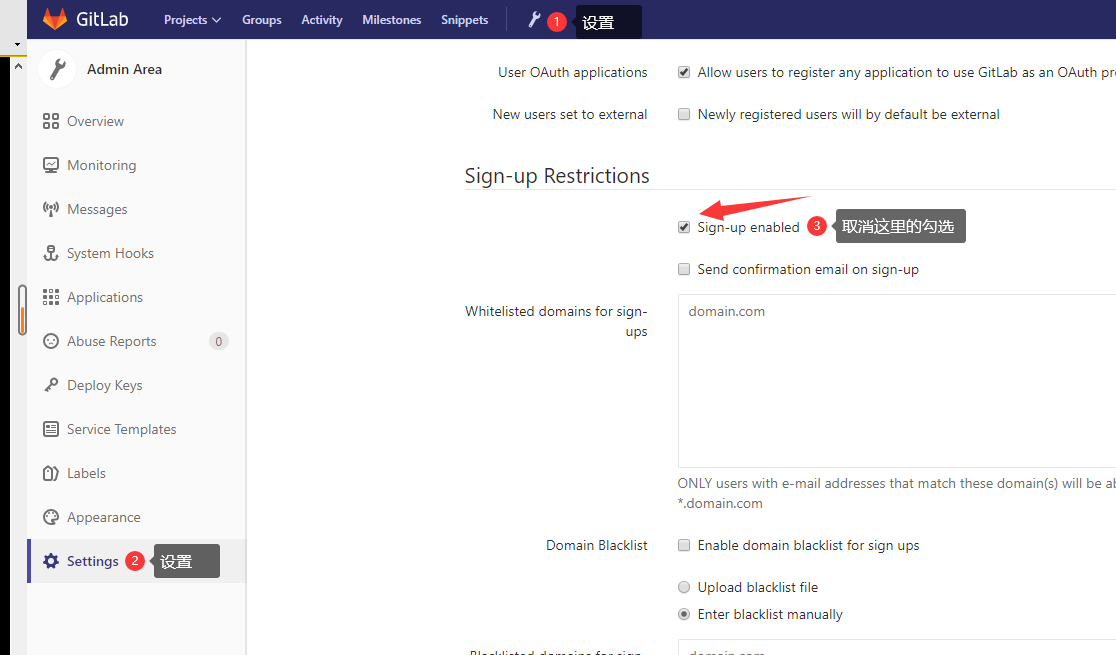
设置好了,下拉到底下 save

检查效果:

此时登录页面只有Sign in 没有 Sign up按钮了
gitlab自定义标题
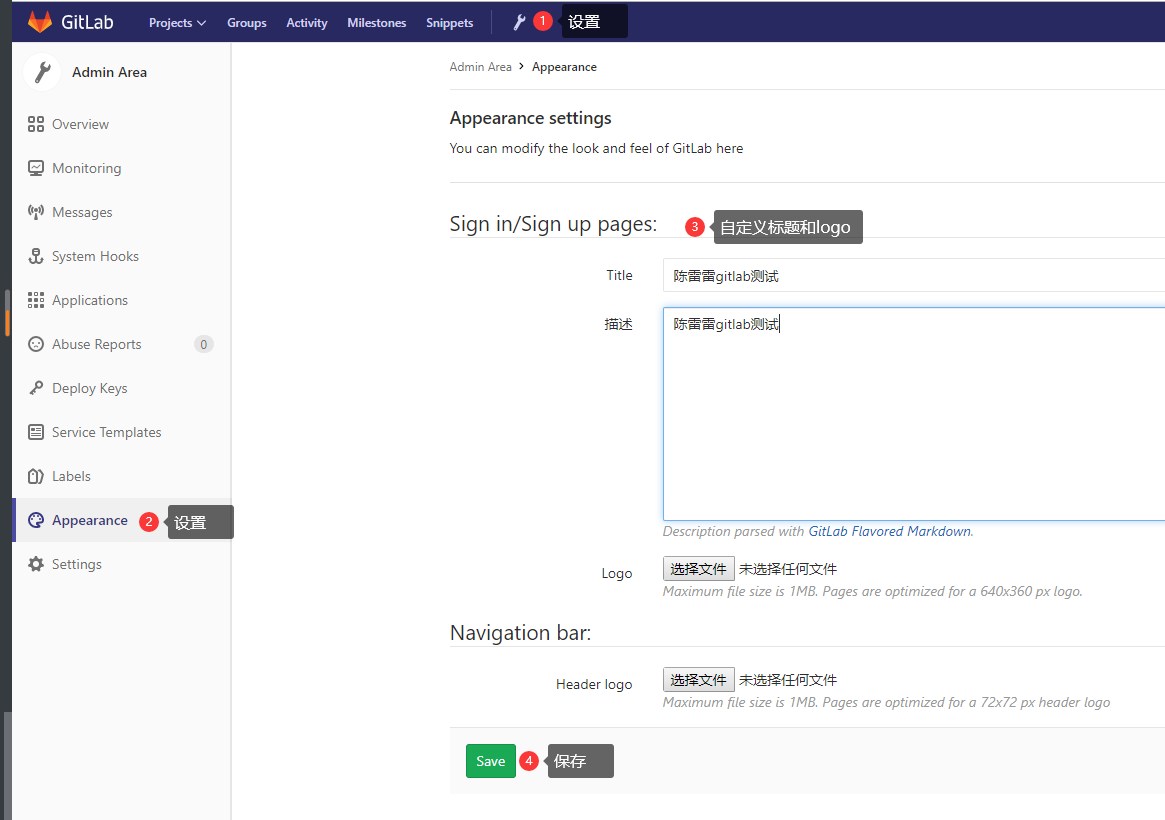
配置效果:
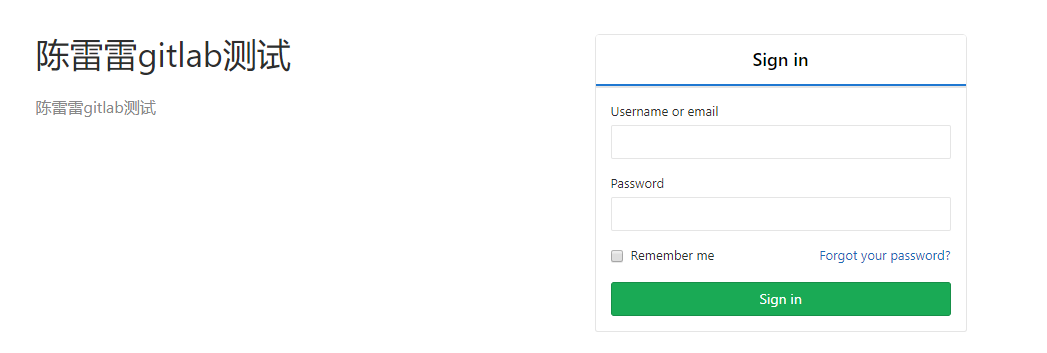
除此之外还可以设置logo,这里就不设置了..浪费青春!
http://IP/admin/appearance
006. Gitlab组件介绍的更多相关文章
- 开源免费且稳定实用的.NET PDF打印组件itextSharp(.NET组件介绍之八)
在这个.NET组件的介绍系列中,受到了很多园友的支持,一些园友(如:数据之巅. [秦时明月]等等这些大神 )也给我提出了对应的建议,我正在努力去改正,有不足之处还望大家多多包涵.在传播一些简单的知识的 ...
- 免费开源的.NET多类型文件解压缩组件SharpZipLib(.NET组件介绍之七)
前面介绍了六种.NET组件,其中有一种组件是写文件的压缩和解压,现在介绍另一种文件的解压缩组件SharpZipLib.在这个组件介绍系列中,只为简单的介绍组件的背景和简单的应用,读者在阅读时可以结合官 ...
- 免费高效实用的.NET操作Excel组件NPOI(.NET组件介绍之六)
很多的软件项目几乎都包含着对文档的操作,前面已经介绍过两款操作文档的组件,现在介绍一款文档操作的组件NPOI. NPOI可以生成没有安装在您的服务器上的Microsoft Office套件的Excel ...
- 免费开源的DotNet任务调度组件Quartz.NET(.NET组件介绍之五)
很多的软件项目中都会使用到定时任务.定时轮询数据库同步,定时邮件通知等功能..NET Framework具有“内置”定时器功能,通过System.Timers.Timer类.在使用Timer类需要面对 ...
- 免费开源的DotNet二维码操作组件ThoughtWorks.QRCode(.NET组件介绍之四)
在生活中有一种东西几乎已经快要成为我们的另一个电子”身份证“,那就是二维码.无论是在软件开发的过程中,还是在普通用户的日常中,几乎都离不开二维码.二维码 (dimensional barcode) , ...
- 最好的.NET开源免费ZIP库DotNetZip(.NET组件介绍之三)
在项目开发中,除了对数据的展示更多的就是对文件的相关操作,例如文件的创建和删除,以及文件的压缩和解压.文件压缩的好处有很多,主要就是在文件传输的方面,文件压缩的好处就不需要赘述,因为无论是开发者,还是 ...
- 高效而稳定的企业级.NET Office 组件Spire(.NET组件介绍之二)
在项目开发中,尤其是企业的业务系统中,对文档的操作是非常多的,有时几乎给人一种错觉的是”这个系统似乎就是专门操作文档的“.毕竟现在的很多办公中大都是在PC端操作文档等软件,在这些庞大而繁重的业务中,单 ...
- 一款开源免费的.NET文档操作组件DocX(.NET组件介绍之一)
在目前的软件项目中,都会较多的使用到对文档的操作,用于记录和统计相关业务信息.由于系统自身提供了对文档的相关操作,所以在一定程度上极大的简化了软件使用者的工作量. 在.NET项目中如果用户提出了相关文 ...
- [.NET] 开头不讲"Hello Word",读尽诗书也枉然 : Word 操作组件介绍 - Spire.Doc
开头不讲"Hello Word",读尽诗书也枉然 : Word 操作组件介绍 - Spire.Doc [博主]反骨仔 [原文地址]http://www.cnblogs.com/li ...
- .NET平台开源项目速览(6)FluentValidation验证组件介绍与入门(一)
在文章:这些.NET开源项目你知道吗?让.NET开源来得更加猛烈些吧!(第二辑)中,给大家初步介绍了一下FluentValidation验证组件.那里只是概述了一下,并没有对其使用和强大功能做深入研究 ...
随机推荐
- Causal Inference理论学习篇-Tree Based-Causal Tree
Tree-Based Algorithms Tree-based这类方法,和之前meta-learning 类的方法最明显的区别是: 这类方法把causal effect 的计算显示的加入了到了树模型 ...
- Taurus.MVC 性能压力测试(ap 压测 和 linux 下wrk 压测):.NET 版本
前言: 上次发布了:Taurus.MVC 性能压力测试(ap 压测 和 linux 下wrk 压测):.NET Core 版本 今天计划准备压测一下 .NET 版本,来测试并记录一下 Taurus.M ...
- pypinyin 获取拼音,作为智能设备的唤醒比对结果
from pypinyin import lazy_pinyin,TONE,TONE2,TONE3,NORMAL a = "小七同学" b = "小琦同学" c ...
- kubernetes集群最新版安装
原文地址:https://haiyux.cc/2022/09/21/k8s-install/ 虚拟机准备 我这里准备了三台虚拟机,分别部署一个master和两个node,操作系统位ubuntu 20. ...
- Oracle常用的创建表语句
Oracle常用的创建表语句 Oracle常用的创建表语句 指定字段的创建 --指定字段的创建 create table table_name( test_1(字段名1) varchar2(50),( ...
- 体验下,大厂在使用功能的API网关!
作者:小傅哥 博客:https://bugstack.cn 沉淀.分享.成长,让自己和他人都能有所收获! 大家好,我是技术UP主小傅哥. 还是在22年的时候,小傅哥做了一套基于 Netty 协议转换和 ...
- 力扣608(MySQL)-树节点(中等)
题目: 给定一个表 tree,id 是树节点的编号, p_id 是它父节点的 id . 树中每个节点属于以下三种类型之一: 叶子:如果这个节点没有任何孩子节点.根:如果这个节点是整棵树的根,即没有父节 ...
- 力扣586(MySQL)-订单最多的客户(简单)
题目: 编写一个SQL查询,为下了 最多订单 的客户查找 customer_number . 测试用例生成后, 恰好有一个客户 比任何其他客户下了更多的订单. 查询结果格式如下所示. 进阶: 如果有多 ...
- 阿里云峰会 | 阿里云CDN六大边缘安全能力,全力助推政企数字化转型
6月9日,2020年阿里云线上峰会召开.阿里云智能总裁张建锋认为,数字化已经成为中国经济的主要驱动力,疫情让政府.企业都认识到数字化的迫切性.在峰会上,阿里云CDN正式对外发布基于CDN构建的六大边缘 ...
- EMR StarRocks 极速数据湖分析原理解析
简介:数据湖概念日益火热,本文由阿里云开源大数据 OLAP 团队和 StarRocks 数据湖分析团队共同为大家介绍" StarRocks 极速数据湖分析 "背后的原理. [首月9 ...