
【Azure 应用服务】更便捷的方式抓取Azure App Service for Windows的网络包
问题描述
在之前的一篇博文中,介绍了在App Service中抓取网络日志:
- 抓取Windows的网络包:【应用服务 App Service】App Service中抓取网络日志
- 抓取Linux的网络包:【Azure 应用服务】App Service For Linux 如何在 Web 应用实例上住抓取网络日志
现在,随着App Service的更新,Linnx也可以直接登录到SSH而不在需要复杂的配置操作。同时Windows环境中,也不在需要在本地安装 armclient.exe工具,而是直接通过 App Service的门户完成抓取,下载操作。
操作步骤
第一步: 进入App Service的Overview页面,点击“Diagnose and solve problems”, 然后再选择“ Diagnostic Tools” 方块
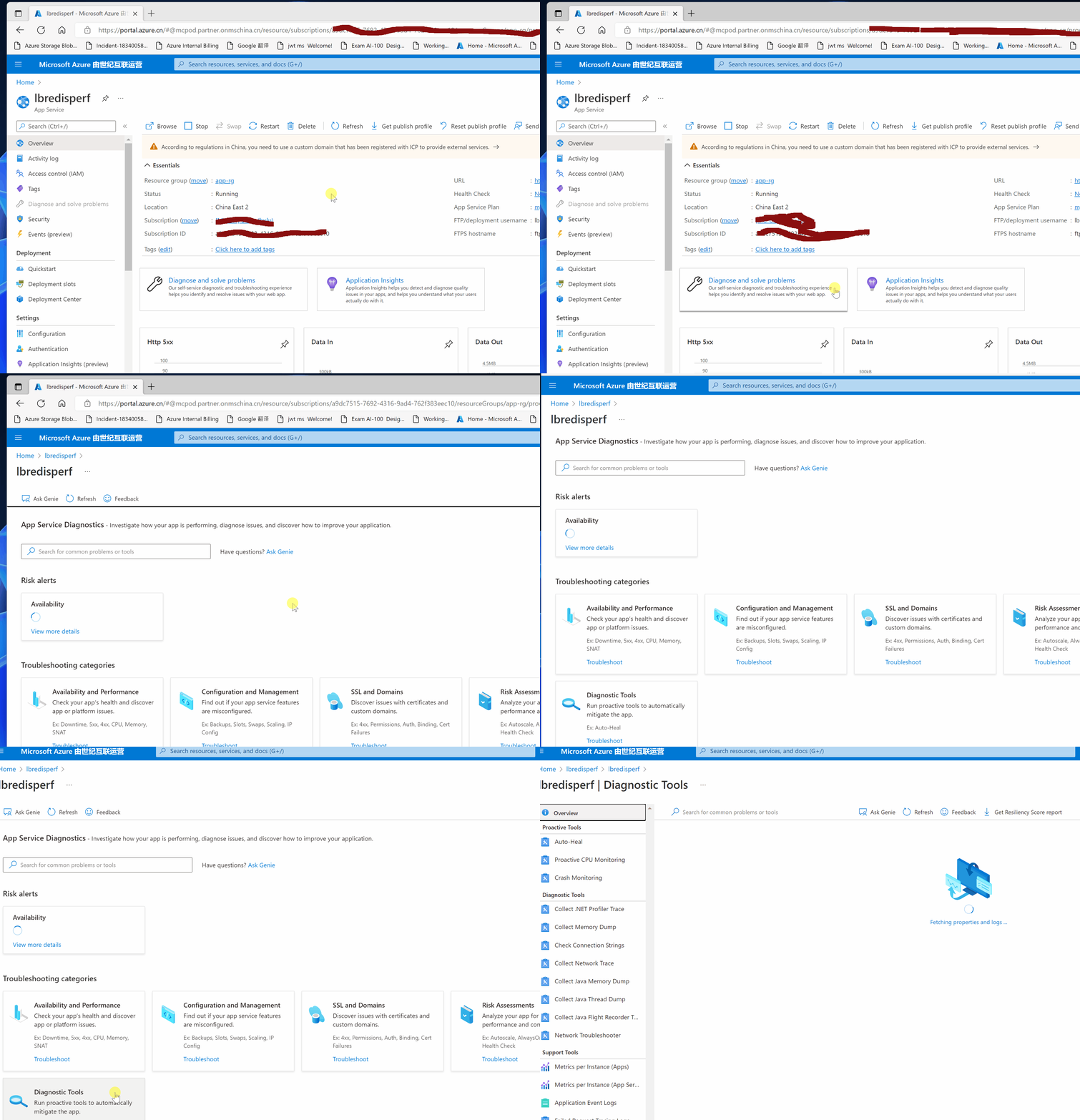
(注意: Diagnostic Tools路径变动,查看下图中的步骤)

第二步:选择 Collect Network Trace , 并设定抓取日志的时间长度, 60秒 ~ 15分钟的值供选择。页面中也对抓取网络日志的情况进行了说明:
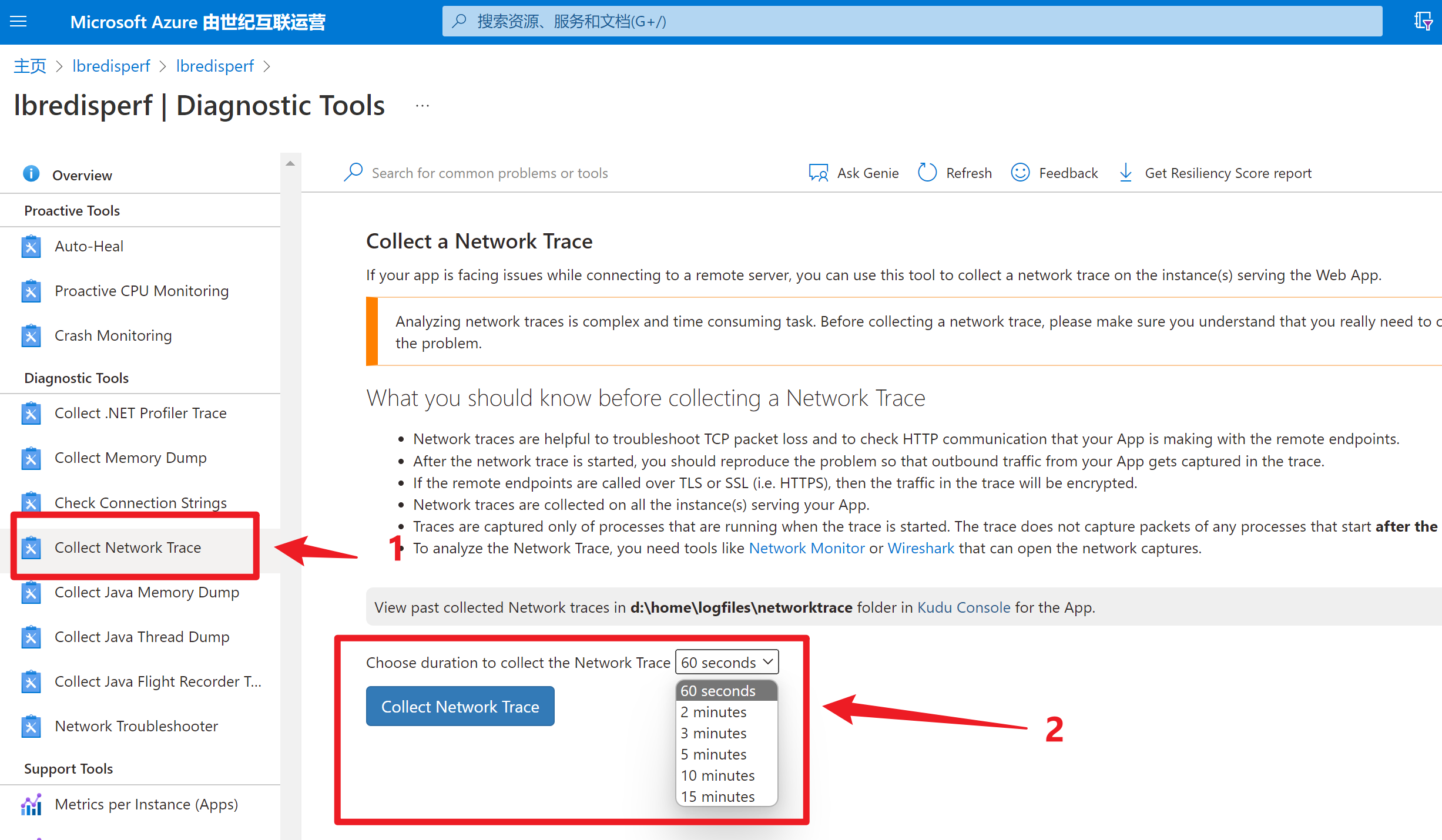
Collect a Network Trace
If your app is facing issues while connecting to a remote server, you can use this tool to collect a network trace on the instance(s) serving the Web App.
Analyzing network traces is complex and time consuming task. Before collecting a network trace, please make sure you understand that you really need to collect a network trace to troubleshoot the problem.
What you should know before collecting a Network Trace
- 网络日志帮助定位TCP丢包,检查App Service与其他服务之间的HTTP通信情况(Network traces are helpful to troubleshoot TCP packet loss and to check HTTP communication that your App is making with the remote endpoints.)
- 在开始抓取网络日志后,要在App Service上重新我们需要抓包解决的问题(After the network trace is started, you should reproduce the problem so that outbound traffic from your App gets captured in the trace.)
- 如果适用HTTPS,那么数据将被加密(If the remote endpoints are called over TLS or SSL (i.e. HTTPS), then the traffic in the trace will be encrypted.)
- 将会收集应用所在的全部实例上的网络包(Network traces are collected on all the instance(s) serving your App.)
- 抓取网络日志只包含当前正在运行进程。当抓取网络包开始后,新的进程的网络包将不被抓取(Traces are captured only of processes that are running when the trace is started. The trace does not capture packets of any processes that start after the capture is started.)
- 可以适用Network Monitor和Wireshark工具对网络包进行分析(To analyze the Network Trace, you need tools like Network Monitoror Wireshark that can open the network captures.)
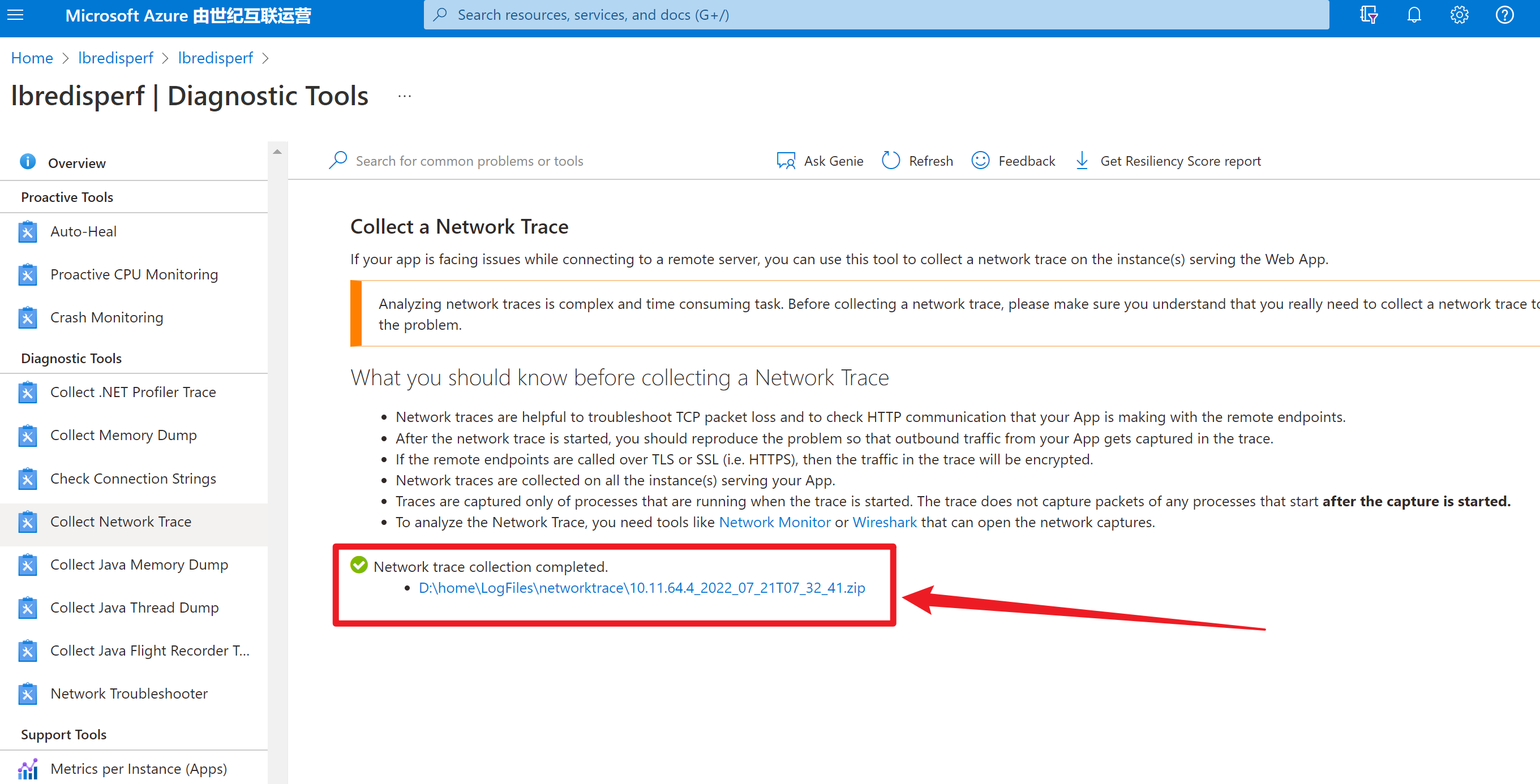
第三步:等待抓取时间完成,页面会直接显示网络包的下载地址。点击即可。
PS:此处不需要在登录到Kudu站点中,到 c:\home\logfiles\networktrace 目录中进行下载,但是如果要查看历史的网络抓包文件,还是需要到Kudu站点中下载。
注意:当前App Service For Linux环境,还是不支持以上方式抓包。 需要SSH,然后执行以下命令:
tcpdump -i any host <your app service inbound ip address> and tcp port 443 -n -v -s 0 -w /tmp/appnetworktrace.pcap
[END]
【Azure 应用服务】更便捷的方式抓取Azure App Service for Windows的网络包的更多相关文章
- 【Azure 应用服务】Python flask 应用部署在Aure App Service 遇见的 3 个问题
在App Service(Windows)中部署Flask应用时的注意事项: ● 添加Python扩展插件,Python 3.6.4 x64: ●● 配置 FastCGI 处理程序,添加Web.con ...
- 【Azure 应用服务】Python flask 应用部署在Aure App Service中作为一个子项目时,解决遇见的404 Not Found问题
问题描述 在成功的部署Python flask应用到App Service (Windows)后,如果需要把当前项目(如:hiflask)作为一个子项目(子站点),把web.config文件从wwwr ...
- 【转载】ASP.NET以Post方式抓取远程网页内容类似爬虫功能
使用HttpWebRequest等Http相关类,可以在应用程序中或者网站中模拟浏览器发送Post请求,在请求带入相应的Post参数值,而后请求回远程网页信息.实现这一功能也很简单,主要是依靠Http ...
- Fiddler高级用法-抓取手机app数据包
在上一篇中介绍了Fiddler的基本使用方法.通过上一篇的操作我们可以直接抓取浏览器的数据包.但在APP测试中,我们需要抓取手机APP上的数据包,应该怎么操作呢? Andriod配置方法 1)确保手机 ...
- 通过天天模拟器加burpsuite抓取手机app流量
通过天天模拟器,代理抓取安卓app数据包.也可以抓取https. 1.下载天天模拟器,官方下载即可,下载安装. 2.启动天天模拟器,设置代理,点击上方wlan设置图标,打开wlan设置,如下: 3.鼠 ...
- 使用Fiddler抓取手机APP数据包--360WIFI
使用Fiddler抓取手机APP流量--360WIFI 操作步骤:1.打开Fiddler,Tools-Fiddler Options-Connections,勾选Allow remote comput ...
- jmeter旅程第一站:Jmeter抓包浏览器或者抓取手机app的包
学习jmeter?从实际出发,我也是一个初学者,会优先考虑先用来做一些简单的抓包.接口测试,在实践的过程中学习jmeter用途.那么接下来,这篇文章我会以jmeter抓包开启我的jmeter旅程. 这 ...
- 【Azure 应用服务】Azure Mobile App (NodeJS) 的服务端部署在App Service for Windows中出现404 Not Found -- The resource you are looking for has been removed, had its name changed, or is temporarily unavailable.
问题描述 使用NodeJS的后端应用,开发一个Mobile App的服务端,手机端通过REST API来访问获取后端数据.在本地编译好后,通过npm start启动项目,访问效果如下: 但是,当把项目 ...
- 【Azure 应用服务】在 App Service for Windows 中自定义 PHP 版本的方法
问题描述 在App Service for Windows的环境中,当前只提供了PHP 7.4 版本的选择情况下,如何实现自定义PHP Runtime的版本呢? 如 PHP Version 8.1.9 ...
- 实例:使用puppeteer headless方式抓取JS网页
puppeteer google chrome团队出品的puppeteer 是依赖nodejs和chromium的自动化测试库,它的最大优点就是可以处理网页中的动态内容,如JavaScript,能够更 ...
随机推荐
- Istio安装和部署
Istio的版本对k8s的版本是有要求的,不兼容的版本会引发一些隐蔽的错误,安装前先参考下图 版本 目前支持 发行日期 停止维护 支持的 Kubernetes 版本 未测试,可能支持的 Kuberne ...
- Gorm 数据库表迁移与表模型定义
目录 一.Docker快速创建MySQL实例 1.1 创建 1.3 创建数据库 二.AutoMigrate介绍与使用 2.1 AutoMigrate介绍 2.2 AutoMigrate 基本使用 三. ...
- 基于OpenIM 实现聊天机器人功能
### 简要描述 使用 OpenIM 中的 Webhook 机制实现聊天机器人功能.发送文本消息或图片消息给聊天机器人后,机器人会返回相同的消息.开发者可以替换此逻辑,在LangChain框架上调用L ...
- 【SpringBoot】当AOP引发的异常与@RestControllerAdvice擦肩而过:异常处理的盲点揭秘
各位上午/下午/晚上好呀! 今天在写bug的时候发现一个这样的问题: AOP抛出的异常竟然没有被@RestControllerAdvice注解修饰的异常统一处理类处理. 有一个需求,对某些加了自定义注 ...
- 【8】同步vscode配置和插件【导入导出】、再也不用担心换电脑重新安装插件了
相关文章: [1]VScode中文界面方法-------超简单教程 [2]VScode搭建python和tensorflow环境 [3]VSCode 主题设置推荐,自定义配色方案,修改注释高亮颜色 [ ...
- C++ Boost 函数与回调应用
#include <iostream> #include <string> #include <boost\bind.hpp> using namespace st ...
- Bootstrap Table 动态修改行的颜色
Bootstrap Table 官网地址 https://bootstrap-table.com/百度搜了大量资料 还是找不 动态改变行的颜色,一般搜索到的都是 初始化的时候 使用 rowStyle ...
- 设计模式-2 简单工厂模式Factory Method
设计模式-2 简单工厂模式 1 意图: 定义一个用户创建对象的接口,让子类决定实例化那个类.Factory Method使一个类的实例化延迟到其子类 使用场景:将一个类的实例化延迟到其子类结构: 优缺 ...
- 【双指针】双指针算法详解两道经典OJ【力扣27,力扣26,力扣38】超详细算法教程
[双指针]双指针算法详解两道经典OJ[力扣27,力扣26,力扣38]超详细算法教程 今天又又到了我们刷力扣题的时间啦! 今天博主给大家带来的三道题是: 27. 移除元素 26. 删除有序数组中的重复项 ...
- CF911G Mass Change Queries 题解
题目链接:CF 或者 洛谷 前置知识点:平衡树合并: CF文章 与维基百科 看上去这题有很多人用线段树分裂与合并去做,其实这种需要分裂和合并的,我们用文艺平衡树去维护区间信息是最容易写的. 考虑本题的 ...