
【Azure 应用服务】Python flask 应用部署在Aure App Service中作为一个子项目时,解决遇见的404 Not Found问题
问题描述
在成功的部署Python flask应用到App Service (Windows)后,如果需要把当前项目(如:hiflask)作为一个子项目(子站点),把web.config文件从wwwroot中移动到项目文件夹中。访问时,确遇见了404 Not Found的错误。
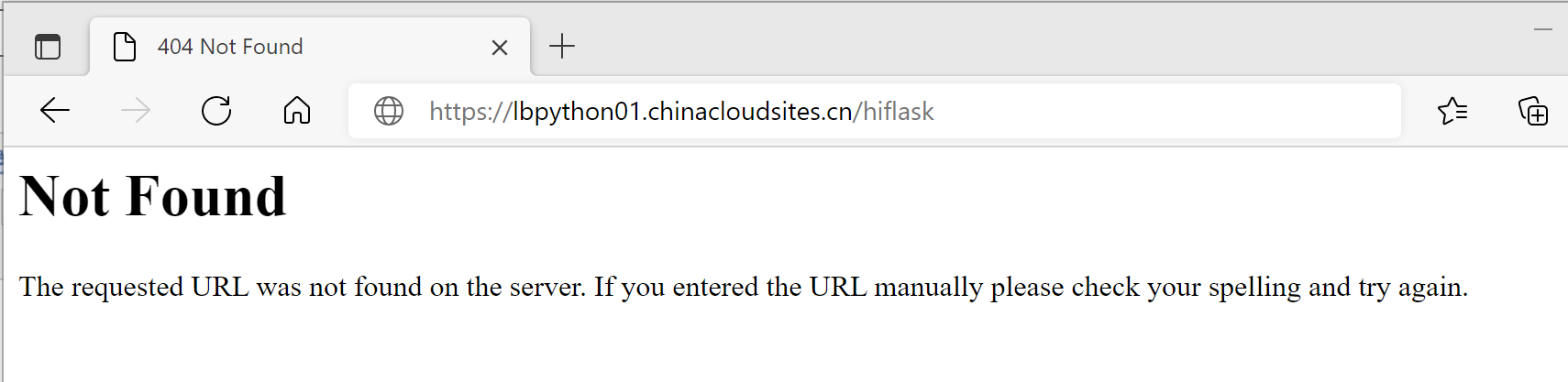
查看flask项目的启动日志,可以看见项目启动已经成功。但是为什么请求一直都是404的问题呢?
2021-09-10 05:29:58.224796: wfastcgi.py will restart when files in D:\home\site\wwwroot\hiflask\ are changed: .*((\.py)|(\.config))$

2021-09-10 05:29:58.240445: wfastcgi.py 3.0.0 initialized
问题解决
在搜索 flask return 404问题后,发现是因为 URL前缀(prefixed )的问题。因为当前的flask应用访问路径不再是根目录(/),而是(/hiflask)。 所以需要 flask项目中使用 中间件 来处理 url前缀的问题。
原文内容为:https://stackoverflow.com/questions/18967441/add-a-prefix-to-all-flask-routes/36033627#36033627
ll you have to do is to write a middleware to make the following changes:
- modify
PATH_INFOto handle the prefixed url.- modify
SCRIPT_NAMEto generate the prefixed url.Like this:
class PrefixMiddleware(object):

    def __init__(self, app, prefix=''):

        self.app = app

        self.prefix = prefix

    def __call__(self, environ, start_response):

        if environ['PATH_INFO'].startswith(self.prefix):

            environ['PATH_INFO'] = environ['PATH_INFO'][len(self.prefix):]

            environ['SCRIPT_NAME'] = self.prefix

            return self.app(environ, start_response)

        else:

            start_response('404', [('Content-Type', 'text/plain')])

            return ["This url does not belong to the app.".encode()]
Wrap your app with the middleware, like this:
from flask import Flask, url_for

app = Flask(__name__)

app.debug = True

app.wsgi_app = PrefixMiddleware(app.wsgi_app, prefix='/foo')

@app.route('/bar')

def bar():

    return "The URL for this page is {}".format(url_for('bar'))

if __name__ == '__main__':

    app.run('0.0.0.0', 9010)
Visit
http://localhost:9010/foo/bar,You will get the right result:
The URL for this page is /foo/bar
而在App Service中的解决方式就是添加了 PrefixMiddleware,并指定prefix为 /hiflask 。 附上完成的hiflask/app.py 代码和web.config内容。
hiflask/app.py
from flask import Flask

from datetime import datetime

from flask import render_template

import re

class PrefixMiddleware(object):

    def __init__(self, app, prefix=''):

        self.app = app

        self.prefix = prefix

    def __call__(self, environ, start_response):

        if environ['PATH_INFO'].startswith(self.prefix):

            environ['PATH_INFO'] = environ['PATH_INFO'][len(self.prefix):]

            environ['SCRIPT_NAME'] = self.prefix

            return self.app(environ, start_response)

        else:

            start_response('404', [('Content-Type', 'text/plain')])

            return ["This url does not belong to the app.".encode()]

#if __name__ =="__name__"

app = Flask(__name__)

app.debug = True

app.wsgi_app = PrefixMiddleware(app.wsgi_app, prefix='/hiflask')

# @app.route("/")

# def home():

#     return "Hello, Flask!"

print("flask applicaiton started and running..." +datetime.now().strftime("%m/%d/%Y, %H:%M:%S"))

# Replace the existing home function with the one below

@app.route("/")

def home():

    return render_template("home.html")

# New functions

@app.route("/about/")

def about():

    return render_template("about.html")

@app.route("/contact/")

def contact():

    return render_template("contact.html")

@app.route("/hello/")

@app.route("/hello/<name>")

def hello_there(name = None):

    return render_template(

        "hello_there.html",

        name=name,

        date=datetime.now()

    )

@app.route("/api/data")

def get_data():

    return app.send_static_file("data.json")

if __name__ == '__main__':

    app.run(debug=True)
hiflask/web.config
<?xml version="1.0" encoding="utf-8"?>

<configuration>

  <appSettings>

    <add key="WSGI_HANDLER" value="app.app"/>

    <add key="PYTHONPATH" value="D:\home\site\wwwroot\hiflask"/>

    <add key="WSGI_LOG" value="D:\home\site\wwwroot\hiflask\hiflasklogs.log"/>

  </appSettings>

  <system.webServer>

    <handlers>

    <add name="PythonHandler" path="*" verb="*" modules="FastCgiModule" scriptProcessor="D:\home\python364x64\python.exe|D:\home\python364x64\wfastcgi.py" resourceType="Unspecified" requireAccess="Script"/>

    </handlers>

  </system.webServer>

</configuration>
最终效果(作为子项目部署完成成功,所以一个app service就可以部署多个站点)
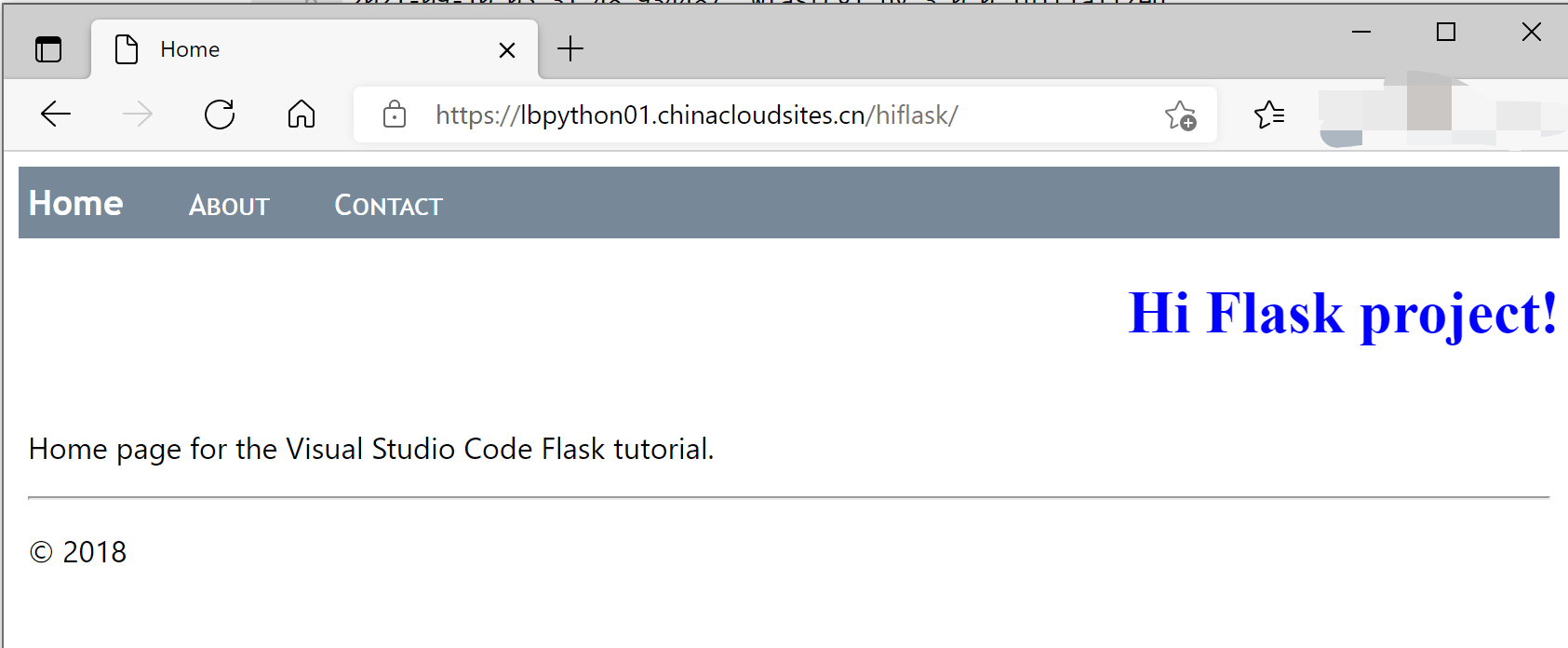
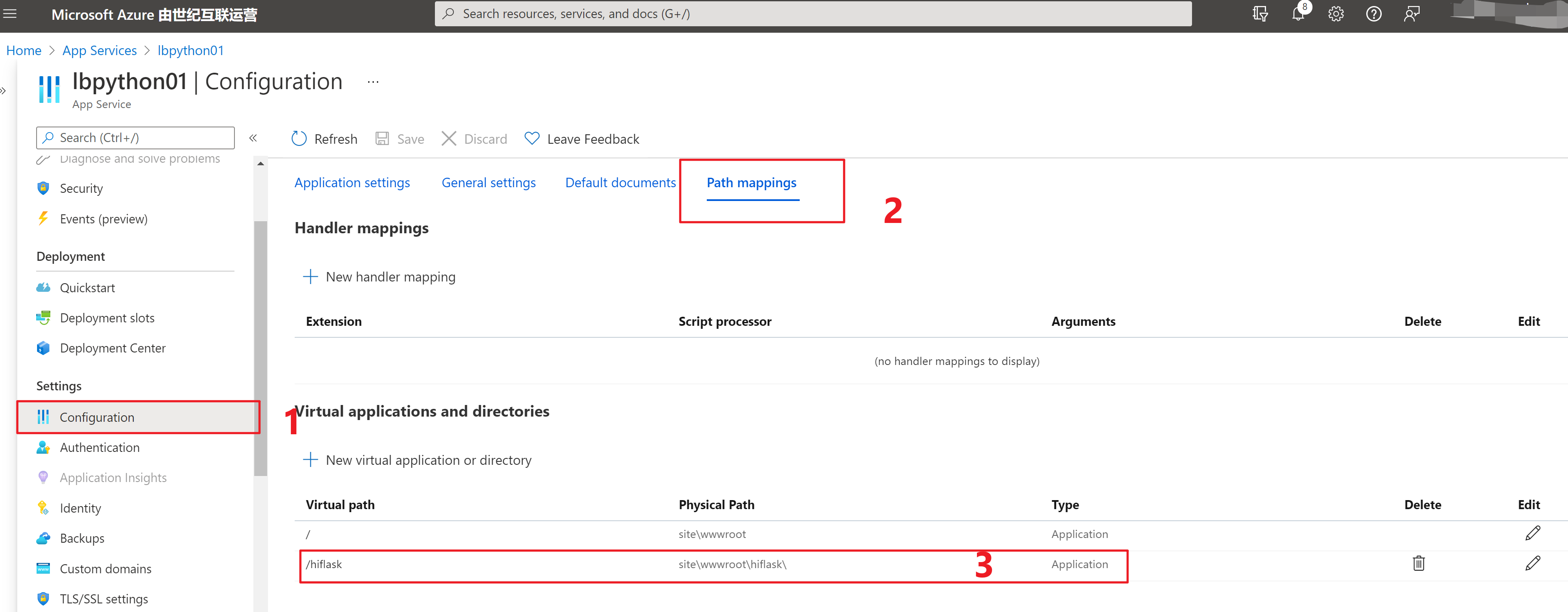
提醒一点:App Service中如果要部署多站点,需要在Configration 中配置 Virtual Applications。
参考资料:
https://stackoverflow.com/questions/18967441/add-a-prefix-to-all-flask-routes/36033627#36033627
https://www.cnblogs.com/lulight/p/15220297.html
https://www.cnblogs.com/lulight/p/15227028.html
【Azure 应用服务】Python flask 应用部署在Aure App Service中作为一个子项目时,解决遇见的404 Not Found问题的更多相关文章
- 【Azure 应用服务】Python flask 应用部署在Aure App Service 遇见的 3 个问题
在App Service(Windows)中部署Flask应用时的注意事项: ● 添加Python扩展插件,Python 3.6.4 x64: ●● 配置 FastCGI 处理程序,添加Web.con ...
- 【Azure 应用服务】App Service中运行Python 编写的 Jobs,怎么来安装Python包 (pymssql)呢?
问题描述 在App Service中运行Python编写的定时任务,需要使用pymssql连接到数据库,但是发现使用 python.exe -m pip install --upgrade -r re ...
- 【应用服务 App Service】Azure App Service 中如何安装mcrypt - PHP
问题描述 Azure App Service (应用服务)如何安装PHP的扩展 mcrypt(mcrypt 是php里面重要的加密支持扩展库) 准备条件 创建App Service, Runtime ...
- 【应用服务 App Service】当遇见某些域名在Azure App Service中无法解析的错误,可以通过设置指定DNS解析服务器来解决
问题情形 当访问部署在Azure App Service中的应用返回 "The remote name could not be resolved: ''xxxxxx.com'" ...
- 【应用服务 App Service】在Azure App Service中使用WebSocket - PHP的问题 - 如何使用和调用
问题描述 在Azure App Service中,有对.Net,Java的WebSocket支持的示例代码,但是没有成功的PHP代码. 以下的步骤则是如何基于Azure App Service实现PH ...
- 如何将Azure DevOps中的代码发布到Azure App Service中
标题:如何将Azure DevOps中的代码发布到Azure App Service中 作者:Lamond Lu 背景 最近做了几个项目一直在用Azure DevOps和Azure App Servi ...
- 【应用服务 App Service】App Service中抓取网络日志
问题描述 众所周知,Azure App Service是一种PaaS服务,也就是说,IaaS层面的所有内容都由平台维护,所以使用App Service的我们根本无法触碰到远行程序的虚拟机(VM), 所 ...
- 【Azure 应用程序见解】 Application Insights 对App Service的支持问题
问题描述 Web App 发布后, Application Insights 收集不到数据了 问题分析 在应用服务(App Service)中收集应用的监控数据(如Request,Exception, ...
- Azure应用服务+Github实现持续部署
上次我们介绍了如何使用Azure应用服务(不用虚机不用Docker使用Azure应用服务部署ASP.NET Core程序).我们通过Visual studio新建一个项目后手动编译发布代码.然后通过F ...
随机推荐
- 基于arduino UNO R3+ESP8266控制LED灯的开关(无USB转TTL工具实现)
最近由于项目要求,需要开发物联网云平台,而本人对硬件和通信技术一窍不通,故而选择arduino这一简单单片机来实现学习掌握基础的硬件和通信技术. 下面就是本人通过查阅大佬资料做的一个整合版本的通过手机 ...
- SQL Server 行转列 列转行操作
1.多行转成一行(并以','分开) 表数据如下图: 查询结果如下图: SQL查询脚本: SELECT addPer, house_code = (STUFF((SELECT ',' + house_c ...
- 解决:无法从 Windows 应用商店下载。请检查网络连接
今天在安装wsl的时候,装了几次一直中断,一直提示正在从Windows 应用商店下载,网络无法连接... 每次都是加载到2%就断了.网上搜了一圈,找到以下2种解决办法: 修改DNS把DNS修改为微软的 ...
- 可怕!字节跳动大牛爆出的“Android进阶指南”,强到无法形容,GitHub已标星“8.5k”!
前言 从去年8月份开始,我开始重新找工作,在这期间刷了不少面试题和大牛博客,无意中薅到一份字节跳动大牛整理的一份"Android进阶指南",包含Android面试常见问题.主流技术 ...
- Kotlin高阶函数实战
前言 1. 高阶函数有多重要? 高阶函数,在 Kotlin 里有着举足轻重的地位.它是 Kotlin 函数式编程的基石,它是各种框架的关键元素,比如:协程,Jetpack Compose,Gradle ...
- [TensorFlow2.0]-张量与常用函数
本人人工智能初学者,现在在学习TensorFlow2.0,对一些学习内容做一下笔记.笔记中,有些内容理解可能较为肤浅.有偏差等,各位在阅读时如有发现问题,请评论或者邮箱(右侧边栏有邮箱地址)提醒. 若 ...
- javaScript学习DOM模型
DOM 全称是 Document Object Model 文档对象模型大白话,就是把文档中的标签,属性,文本,转换成为对象来管理 ...
- VRRP协议原理与配置
一.VRRP协议概述 1.1.VRRP协议基本概念 局域网中的用户终端通常采用配置一个默认网关的形式访问外部网络,如果此时默认网关设备发生故障,将中断所有用户终端的网络访问,这很可能会给用户带来不可预 ...
- NOIP 模拟 7 回家
题解 题目 第一眼,板子题,不就是一个缩点吗?后来一想不对,哪有这么傻的出题人呢,出个这水题. 一想,不对,不仅要求割点,还要判断这个割点是否在搜索树 \(n\) 的祖先上.想到这后,我哈哈大笑,还想 ...
- 题解 P3941 入阵曲
题解 观察数据范围,可以 \(\mathcal O(n^2m^2)\) 暴力计算,而加上特殊性质,则可以骗到 \(75pts\) 正解: 我们发现,在一维情况下,\(\mod k\) 相同的前缀和相减 ...