
Room组件的用法
一.Android官方ORM数据库Room
Android采用Sqlite作为数据库存储。但由于Sqlite代码写起来繁琐且容易出错,因此Google推出了Room,其实Room就是在Sqlite上面再封装了一层。下面是Room的架构图:
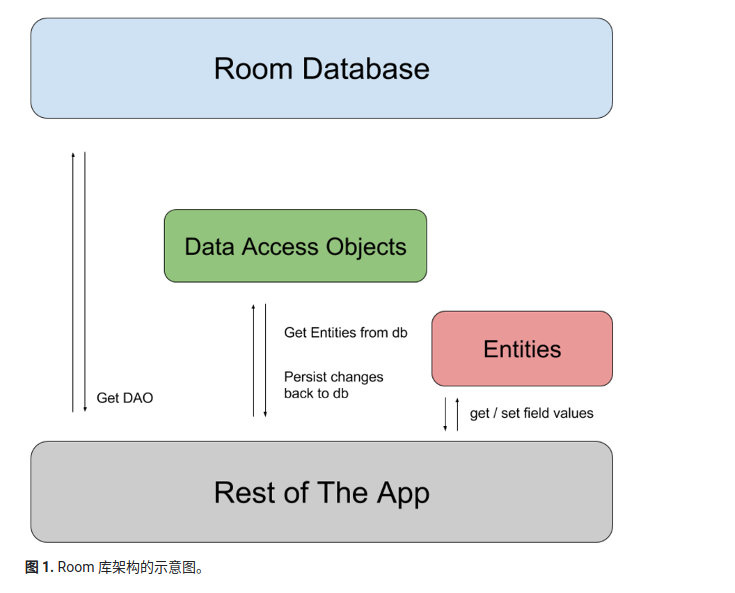
要想更好地理解上面的图,我们先要理解几个概念:Entity和Dao
Entity:实体,一个entity就对应于数据库中的一张表。Entity类是Sqlite中的表对java类的映射,例如有一个学生表,有id,name,age三个字段;那么对应的就有一个学生类,有id,name,age三个成员变量和学生表中的字段进行一一对应。
Dao:即Data Access Object,数据访问对象,就是字面意思,可以通过他来访问数据库中的数据。
那么所谓的ORM(Object Relational Mapping),对象关系映射,就很好理解了。就是建立一个从数据库表到java类的映射,表中的字段对应类中的成员变量,表中的记录对应该类的一个实例。
二.Room数据库的基本使用方法
1.在使用Room数据库前,先要在app/build.gradle文件中导入以下的依赖:
  implementation 'androidx.room:room-runtime:2.5.2'
  annotationProcessor 'androidx.room:room-compiler:2.5.2'
 2.创建一个关于学生的Entity,即创建一张学生表:
@Entity
public class Student {
    @PrimaryKey
    private Integer id;
    @ColumnInfo(name="name",typeAffinity = ColumnInfo.TEXT)
    private String name;
    @ColumnInfo(name="age",typeAffinity = ColumnInfo.INTEGER)
    private Integer age;

    public Integer getId() {
        return id;
    }

    public void setId(Integer id) {
        this.id = id;
    }

    public String getName() {
        return name;
    }

    public void setName(String name) {
        this.name = name;
    }

    public Integer getAge() {
        return age;
    }

    public void setAge(Integer age) {
        this.age = age;
    }

    public Student(Integer id, String name, Integer age) {
        this.id = id;
        this.name = name;
        this.age = age;
    }

    @Override
    public String toString() {
        return "Student{" +
                "id=" + id +
                ", name='" + name + '\'' +
                ", age=" + age +
                '}';
    }
}
@Entity注解用于将Student类和Room数据库中的数据表对应起来;@PrimaryKey注解即主键约束;@ColumnInfo注解可以设置该成员变量对应的表中字段的名称以及类型
需要注意的一点是get方法不可省略
3.针对上面的学生类Entity,我们需要定义一个Dao接口文件,以便对数据库进行访问,在接口的上方加上@Dao注解即可
@Dao

public interface StudentDao {

    @Insert

    void insertStudent(Student student);

    @Delete

    void deleteStudent(Student student);

    @Update

    void updataStudent(Student student);

    @Query("select * from Student")

    LiveData<List<Student>> getAllStudents();

    @Query("select * from student where id=:id")

    Student selectStudentById(Integer id);

}
4.定义好Entity和Dao后,接下来就是创建数据库了,代码如下:
@Database(entities = {Student.class},version = 1)

public abstract class MyDatabase extends RoomDatabase {

    private static final String DATABASE_NAME="my_db";

    private static MyDatabase myDatabase;

    public static synchronized MyDatabase getInstance(Context context){

        if(myDatabase==null){

            myDatabase= Room.databaseBuilder(context,MyDatabase.class,DATABASE_NAME).build();

        }

        return myDatabase;

    }

    @Override

    public void clearAllTables() {

    }

    @NonNull

    @Override

    protected InvalidationTracker createInvalidationTracker() {

        return null;

    }

    @NonNull

    @Override

    protected SupportSQLiteOpenHelper createOpenHelper(@NonNull DatabaseConfiguration databaseConfiguration) {

        return null;

    }

    public abstract StudentDao studentDao();

}
@Database注解用于告诉系统这是Room数据库对象,entities属性用于指定该数据库有哪些表,version用于指定数据库的版本号
数据库类需要继承RoomDatabase类,并结合单例模式完成创建。
到这里,数据库和表就创建完成了,接下来就看看如何对数据库进行增删改查了。
5.结合ViewModel和LiveData,对数据库进行增删改查,并且数据库表的记录发生变化时,页面可以及时收到通知,并更新页面。
LiveData通常和ViewModel一起使用,ViewModel用于存储页面的数据,因此我们可以把数据库的实例化放到ViewModel中,但数据库的实例化需要用到Context对象,因此我们不宜直接用ViewModel,而应该用其子类AndroidViewModel。
public class StudentViewModel extends AndroidViewModel {

    private MyDatabase myDatabase;

    private LiveData<List<Student>> liveDataStudents;

    public StudentViewModel(@NonNull Application application) {

        super(application);

        myDatabase=MyDatabase.getInstance(application);

        liveDataStudents=myDatabase.studentDao().getAllStudents();

    }

    public LiveData<List<Student>> getLiveDataStudents(){

        return liveDataStudents;

    }

    public void insertStudent(Student student){

        myDatabase.studentDao().insertStudent(student);

    }

    public void deleteStudent(Student student){

        myDatabase.studentDao().deleteStudent(student);

    }

    public void updateStudent(Student student){

        myDatabase.studentDao().updataStudent(student);

    }

    public Student selectStudentById(Integer id){

        return myDatabase.studentDao().selectStudentById(id);

    }

}
6.在Activity中实例化StudentViewModel,并进行增删改查操作,并监听LiveData的变化。
public class MainActivity extends AppCompatActivity implements View.OnClickListener {

    private Button btn_insert,btn_delete,btn_update,btn_select;

    private TextView tv_display;

    private StudentViewModel studentViewModel;

    private ExecutorService executor = Executors.newSingleThreadExecutor();

    private Student student;

    @SuppressLint("MissingInflatedId")

    @Override

    protected void onCreate(Bundle savedInstanceState) {

        super.onCreate(savedInstanceState);

        setContentView(R.layout.activity_main);

        tv_display=findViewById(R.id.tv_display);

        btn_delete=findViewById(R.id.btn_delete);

        btn_insert=findViewById(R.id.btn_insert);

        btn_update=findViewById(R.id.btn_update);

        btn_select=findViewById(R.id.btn_select);

        btn_select.setOnClickListener(this);

        btn_insert.setOnClickListener(this);

        btn_delete.setOnClickListener(this);

        btn_update.setOnClickListener(this);

        studentViewModel=new ViewModelProvider(this,new MyViewModelFactory(getApplication())).get(StudentViewModel.class);

        studentViewModel.getLiveDataStudents().observe(this, new Observer<List<Student>>() {

            @Override

            public void onChanged(List<Student> students) {

                tv_display.setText(students+"");

            }

        });

    }

    @Override

    public void onClick(View view) {

        switch(view.getId()){

            case R.id.btn_delete:

                executor.execute(new Runnable() {

                    @Override

                    public void run() {

                        studentViewModel.deleteStudent(new Student(1,"jack",20));

                    }

                });

                break;

            case R.id.btn_update:

                executor.execute(new Runnable() {

                    @Override

                    public void run() {

                        studentViewModel.updateStudent(new Student(1,"zhangsan",32));

                    }

                });

                break;

            case R.id.btn_insert:

                executor.execute(new Runnable() {

                    @Override

                    public void run() {

                        studentViewModel.insertStudent(new Student(1,"lisi",22));

                    }

                });

                break;

            case R.id.btn_select:

                executor.execute(new Runnable() {

                    @Override

                    public void run() {

                        student = studentViewModel.selectStudentById(1);

                        Log.i("test",student.toString());

                    }

                });

                break;

        }

    }

}
public class MyViewModelFactory implements ViewModelProvider.Factory {

    private Application application;

    public MyViewModelFactory(Application application){

        this.application=application;

    }

    @NonNull

    @Override

    public <T extends ViewModel> T create(@NonNull Class<T> modelClass) {

        return (T)new StudentViewModel(application);

    }

}
运行应用程序,对数据库进行增删改操作时,onChanged方法就会回调,然后在这个方法中对页面进行更新即可。
Room组件的用法的更多相关文章
- Vue组件基础用法
前面的话 组件(Component)是Vue.js最强大的功能之一.组件可以扩展HTML元素,封装可重用的代码.根据项目需求,抽象出一些组件,每个组件里包含了展现.功能和样式.每个页面,根据自己所需, ...
- layui(七)——rate组件常见用法总结
layui中提供了rate组件,用法很简单,直接上代码. <div id="test1"></div> <script> layui.use(' ...
- vue高级进阶( 三 ) 组件高级用法及最佳实践
vue高级进阶( 三 ) 组件高级用法及最佳实践 世界上有太多孤独的人害怕先踏出第一步. ---绿皮书 书接上回,上篇介绍了vue组件通信比较有代表性的几种方法,本篇主要讲述一下组件的高级用法和最 ...
- layui(三)——laypage组件常见用法总结
laypage 的使用非常简单,指向一个用于存放分页的容器,通过服务端得到一些初始值,即可完成分页渲染.核心方法: laypage.render(options) 来设置基础参数. 一.laypag ...
- [UE4]虚幻4 spline组件、spline mesh组件的用法
最近公司项目需要,把这两个东东好好看了下.不得不说,这两个组件还是非常方便的,但是相关的介绍.教程却非常的少.它们概念模糊,用法奇特,我就总结下吧. 首先,先要明白spline component.s ...
- 中间件:ElasticSearch组件RestHighLevelClient用法详解
本文源码:GitHub·点这里 || GitEE·点这里 一.基础API简介 1.RestHighLevelClient RestHighLevelClient的API作为ElasticSearch备 ...
- 开源.NET FTP组件edtFTPnet 用法
edtFTPnet官方网站:http://www.enterprisedt.com/products/edtftpnet/ 目前最新版本为2.2.3,下载后在bin目录中找到edtFTPnet.dll ...
- SSIS: Lookup组件高级用法,生成推断成员(inferred member)
将数据导入事实表如果无法匹配维度表的记录一般有两种处理方式. 一是将不匹配记录输出到一个表中待后续处理,然后重新导入.二是先生成维度Key,后续再完善维度key,本文指导各位使用第二种方式. 背景 比 ...
- django框架中的form组件的用法
form组件的使用 先导入: from django.forms import Form from django.forms import fields from django.forms impor ...
- vue组件详解(五)——组件高级用法
一.递归组件 组件在它的模板内可以递归地调用自己, 只要给组件设置name 的选项就可以了. 示例如下: <div id="app19"> <my-compone ...
随机推荐
- 2022-12-27:etcd是无界面的,不好看,joinsunsoft/etcdv3-browser是etcd的web可视化工具之一。请问在k3s中部署,yaml如何写?
2022-12-27:etcd是无界面的,不好看,joinsunsoft/etcdv3-browser是etcd的web可视化工具之一.请问在k3s中部署,yaml如何写? 答案2022-12-27: ...
- 2022-03-16:给你一个整数 n ,表示有 n 个专家从 0 到 n - 1 编号。 另外给一个下标从 0 开始的二维整数数组 meetings , 其中 meetings[i] = [xi,
2022-03-16:给你一个整数 n ,表示有 n 个专家从 0 到 n - 1 编号. 另外给一个下标从 0 开始的二维整数数组 meetings , 其中 meetings[i] = [xi, ...
- 在 Transformers 中使用对比搜索生成可媲美人类水平的文本 🤗
1. 引言 自然语言生成 (即文本生成) 是自然语言处理 (NLP) 的核心任务之一.本文将介绍神经网络文本生成领域当前最先进的解码方法 对比搜索 (Contrastive Search).提出该方法 ...
- AcWing901. 滑雪(python)
题目详情 知识点 记忆化DP 思路 自己的思路(仅参考):一开始想的是找最大值,然后从最大值开始向下滑,但是我们是要求最长路径,不一定是从最高的点滑下去的,也不一定是滑到最低点,而且会存在最大值不止一 ...
- 数据科学工具 Jupyter Notebook 教程(二)
Jupyter Notebook 是一个把代码.图像.注释.公式和作图集于一处,实现可读性分析的交互式笔记本工具.借助所谓的内核(Kernel)的概念,Jupyter Notebook 可以同时支持包 ...
- wireshark基本使用
Wireshark 是一种开源.跨平台的网络数据包分析工具,能够嗅探和调查实时流量并检查数据包捕获 (PCAP).它通常 被用作最好的数据包分析工具之一. 数据包过滤操作 ip过滤器 IP 过滤器帮助 ...
- Python异步编程之web框架 异步vs同步 数据库IO任务压测对比
测试基本信息 主题:比较异步框架和同步框架在数据库IO操作的性能差异 python版本:python 3.8 数据库:mysql 8.0.27 (docker部署) 压测工具:locust web框架 ...
- 【VS Code 与 Qt6】运用事件过滤器批量操作子级组件
如果某个派生自 QObject 的类重写 eventFilter 方法,那它就成了事件过滤器(Event Filter).该方法的声明如下: virtual bool eventFilter(QObj ...
- 20200411 联想Yoga 2 13升级大SSD
20200411:下文的操作实际发生在2018年11月,当时完成了就写好了这篇文章,却忘了放上来,最近家里一个电脑的硬盘坏了,来翻箱底才找到,现在发上来. 原配置:Lonevo Yoga2 13,唯一 ...
- 5 大数据实战-hive实战分析
1 内部表 Show databses; Use hive_data; 1.1 创建内部表 CREATE TABLE SOGOUQ2(DT STRING,WEBSESSION STRING,WORD ...