
Vue组件基础用法
前面的话
组件(Component)是Vue.js最强大的功能之一。组件可以扩展HTML元素,封装可重用的代码。根据项目需求,抽象出一些组件,每个组件里包含了展现、功能和样式。每个页面,根据自己所需,使用不同的组件来拼接页面。这种开发模式使前端页面易于扩展,且灵活性高,而且组件之间也实现了解耦。本文将详细介绍Vue组件基础用法

概述
在 Vue 里,一个组件本质上是一个拥有预定义选项的一个 Vue 实例
组件是一个自定义元素或称为一个模块,包括所需的模板、逻辑和样式。在HTML模板中,组件以一个自定义标签的形式存在,起到占位符的功能。通过Vue.js的声明式渲染后,占位符将会被替换为实际的内容
下面是一个最简单的模块示例
<div id="app">

    <xiaohuochai></xiaohuochai>

</div>

注册组件
组件注册包括全局注册和局部注册两种
【全局注册】
要注册一个全局组件,可以使用 Vue.component(tagName, options)
Vue.component('my-component', {

  // 选项

})
组件在注册之后,便可以在父实例的模块中以自定义元素 <my-component></my-component> 的形式使用
[注意]要确保在初始化根实例之前注册了组件
<div id="example">

  <my-component></my-component>

</div>
<script>

// 注册

Vue.component('my-component', {

  template: '<div>A custom component!</div>'

})

// 创建根实例

new Vue({

  el: '#example'

})

</script>

【局部注册】
通过使用组件实例选项components注册,可以使组件仅在另一个实例/组件的作用域中可用
<div id="example">

  <my-component></my-component>

</div>
<script>

// 注册

var Child = {

  template: '<div>A custom component!</div>'

};

// 创建根实例

new Vue({

  el: '#example',

    components: {

    // <my-component> 将只在父模板可用

    'my-component': Child

  }

})

</script>
组件树
使用组件实例选项components注册,可以实现组件树的效果
<div id="example">

  <my-component></my-component>

</div>
<script>

// 注册

var headerTitle = {

    template: '<p>我是标题</p>',

};

var headerContent = {

    template: '<p>我是内容</p>',

};

var header = {

  template: `

      <div class="hd">

            <header-content></header-content>

            <header-title></header-title>

      </div>

  `,

    components: {

    'header-content': headerContent,

    'header-title': headerTitle

  }

};

// 创建实例

new Vue({

  el: '#example',

    components: {

    'my-component': header

  }

})

</script>

对于大型应用来说,有必要将整个应用程序划分为组件,以使开发可管理。一般地组件应用模板如下所示
<div id="app">

  <app-nav></app-nav>

  <app-view>

    <app-sidebar></app-sidebar>

    <app-content></app-content>

  </app-view>

</div>
【v-once】
尽管在 Vue 中渲染 HTML 很快,不过当组件中包含大量静态内容时,可以考虑使用 v-once 将渲染结果缓存起来
Vue.component('my-component', {

  template: '<div v-once>hello world!...</div>'

})
模板分离
在组件注册中,使用template选项中拼接HTML元素比较麻烦,这也导致了HTML和JS的高耦合性。庆幸的是,Vue.js提供了两种方式将定义在JS中的HTML模板分离出来
【script】
在script标签里使用 text/x-template 类型,并且指定一个 id
<script type="text/x-template" id="hello-world-template">

  <p>Hello hello hello</p>

</script>
Vue.component('hello-world', {

  template: '#hello-world-template'

})
上面的代码等价于
Vue.component('hello-world', {

  template: '<p>Hello hello hello</p>'

})
下面是一个简单示例
<div id="example">

  <my-component></my-component>

</div>
<script type="text/x-template" id="hello-world-template">

  <div>hello world!</div>

</script>
<script>

Vue.component('my-component', {

  template: '#hello-world-template'

})

new Vue({

  el: '#example'

})

</script>

【template】
如果使用<template>标签,则不需要指定type属性
<div id="example">

  <my-component></my-component>

</div>
<template id="hello-world-template">

  <div>hello world!</div>

</template>
<script>

// 注册

Vue.component('my-component', {

  template: '#hello-world-template'

})

// 创建根实例

new Vue({

  el: '#example'

})

</script>

命名约定
对于组件的命名,W3C规范是字母小写且包含一个中划线(-),虽然Vue没有强制要求,但最好遵循规范
<!-- 在HTML模版中始终使用 kebab-case -->

<kebab-cased-component></kebab-cased-component>

<camel-cased-component></camel-cased-component>

<pascal-cased-component></pascal-cased-component>
当注册组件时,使用中划线、小驼峰、大驼峰这三种任意一种都可以
// 在组件定义中

components: {

  // 使用 中划线 形式注册

  'kebab-cased-component': { /* ... */ },

  // 使用 小驼峰 形式注册

  'camelCasedComponent': { /* ... */ },

  // 使用 大驼峰 形式注册

  'PascalCasedComponent': { /* ... */ }

}
嵌套限制
并不是所有的元素都可以嵌套模板,因为要受到HTML元素嵌套规则的限制,尤其像<ul>,<ol>,<table>,<select> 限制了能被它包裹的元素,而一些像 <option> 这样的元素只能出现在某些其它元素内部
[注意]关于HTML标签的详细嵌套规则移步至此
在自定义组件中使用这些受限制的元素时会导致一些问题,例如
<table id="example">

  <my-row>...</my-row>

</table>
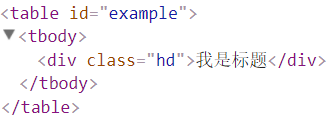
自定义组件 <my-row> 被认为是无效的内容,因此在渲染的时候会导致错误
<script>

// 注册

var header = {

  template: '<div class="hd">我是标题</div>'

};

// 创建实例

new Vue({

  el: '#example',

    components: {

    'my-row': header

  }

})

</script>

【is属性】
变通的方案是使用特殊的 is 属性
<table id="example">

  <tr is="my-row"></tr>

</table>
<script>

// 注册

var header = {

  template: '<div class="hd">我是标题</div>'

};

// 创建实例

new Vue({

  el: '#example',

    components: {

    'my-row': header

  }

})

</script>
根元素
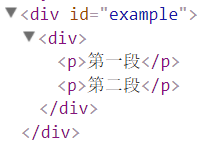
Vue强制要求每一个Vue实例(组件本质上就是一个Vue实例)需要有一个根元素
如下所示,则会报错
<div id="example">

  <my-component></my-component>

</div>
<script>

// 注册

Vue.component('my-component', {

  template: `

    <p>第一段</p>

    <p>第二段</p>

  `,

})

// 创建根实例

new Vue({

  el: '#example'

})

</script>

需要改写成如下所示
<script>

// 注册

Vue.component('my-component', {

  template: `

    <div>

      <p>第一段</p>

      <p>第二段</p>

    </div>

  `,

})

// 创建根实例

new Vue({

  el: '#example'

})

</script>
data数据
一般地,我们在Vue实例对象或Vue组件对象中,我们通过data来传递数据
<div id="example">

  <my-component></my-component>

  <my-component></my-component>

  <my-component></my-component>

</div>
<script>

// 注册

Vue.component('my-component', {

  template: '<div>{{message}}</div>',

  data:{

      message: 'hello'

  }

})

// 创建根实例

new Vue({

  el: '#example'

})

</script>
运行上面的代码,会使Vue停止执行,并在控制台发出错误提示,告诉你在组件中 data 必须是一个函数

可以用如下方式来绕开Vue的错误提示
<script>

// 注册

var data = {counter: 0}

Vue.component('my-component', {

  template: '<button v-on:click="counter += 1">{{ counter }}</button>',

  data:function(){

      return data;

  }

})

// 创建根实例

new Vue({

  el: '#example'

})

</script>
由于这三个组件共享了同一个 data,因此增加一个 counter 会影响所有组件
当一个组件被定义, data 需要声明为返回一个初始数据对象的函数,因为组件可能被用来创建多个实例。如果 data 仍然是一个纯粹的对象,则所有的实例将共享引用同一个数据对象。通过提供 data 函数,每次创建一个新实例后,能够调用 data 函数,从而返回初始数据的一个全新副本数据对象
因此,可以通过为每个组件返回全新的 data 对象来解决这个问题:
<script>

// 注册

Vue.component('my-component', {

  template: '<button v-on:click="counter += 1">{{ counter }}</button>',

  data:function(){

      return {counter: 0};

  }

})

// 创建根实例

new Vue({

  el: '#example'

})

</script>
现在每个 counter 都有它自己内部的状态了
原生事件
有时候,可能想在某个组件的根元素上监听一个原生事件。直接使用v-bind指令是不生效的
<div id="example">

  <my-component @click="doTheThing"></my-component>

  <p>{{message}}</p>

</div>
<script>

Vue.component('my-component', {

  template: '<button>按钮</button>',

})

new Vue({

  el: '#example',

  data:{

    message:0

  },

  methods:{

    doTheThing(){

      this.message++;

    }

  }

})

</script>
可以使用 .native 修饰 v-on指令即可
<div id="example">

  <my-component @click.native="doTheThing"></my-component>

  <p>{{message}}</p>

</div>
<script>

Vue.component('my-component', {

  template: '<button>按钮</button>',

})

new Vue({

  el: '#example',

  data:{

    message:0

  },

  methods:{

    doTheThing(){

      this.message++;

    }

  }

})

</script>
Vue组件基础用法的更多相关文章
- Vue组件基础
<!DOCTYPE html><html> <head> <meta charset="utf-8"> ...
- vue组件基础之父子传值
可以看出数据从后端获取过来,最外层的父组件接收数据,子组件不能直接获取,必须由父组件传递,此时使用props,并且父组件的值更新后,子组件的值也会随之更新,但是反过来通过修改子组件props来影响父组 ...
- Vue 组件基础完整示例
<!DOCTYPE html> <html lang="en"> <head> <meta charset="UTF-8&quo ...
- Vue.js 学习笔记之四:Vue 组件基础
到目前为止,这个系列的笔记所展示的都是一些极为简单的单页面 Web 应用程序,并且页面上通常只有几个简单的交互元素.但在实际生产环境中,Web 应用程序的用户界面往往是由多个复杂的页面共同组成的.这时 ...
- vue组件基础之创建与使用
一.创建组件 <script src="vue.js"></script> <!--引入vue.js文件--> <div id=" ...
- Vue组件基础知识总结
组件系统是Vue.js其中一个重要的概念,它提供了一种抽象,让我们可以使用独立可复用的小组件来构建大型应用,任意类型的应用界面都可以抽象为一个组件树. 那么什么是组件呢?组件可以扩展HTML元素,封装 ...
- vue 组件高级用法实例详解
一.递归组件 组件在它的模板内可以递归地调用自己, 只要给组件设置name 的选项就可以了. 示例如下: <div id="app19"> <my-compone ...
- Vue 组件基础完整示例2
简介此页面可以直接复制运行,包含以下应用: Vue slot插槽使用Vue v-model使用Vue props使用父子组件数据传递element-ui使用HTML方式注册子组件,可以将子组件数据写在 ...
- vue—组件基础了解
什么是组件? 组件是vue中的一个可复用实例,所以new Vue()是vue中最大的那个组件,根组件,有名字,使用的时候以单标签或双标签使用 vm = newVue() 是最大的组件,具有很多实用性的 ...
随机推荐
- 网页中区分IE各版本
CSS Hack 直接在CSS文件中写CSS Hack是非常直观的区分方法.区分不同IE版本的hack代码为 #content{ background:red; /* 所有浏览器 */ backgro ...
- 关于MATLAB处理大数据坐标文件2017526
运行六个特征,提高了3分,也就是说以前做的特征已经用完了,穷途末路,依靠以前的特征已经很难取得进步了,提出以下建议 1.测试集曾经运行错误的数据尽早画出图形,并尽可能发现问题并提出特征 2.运行其他程 ...
- 设置Ubuntu下adb 及 fastboot权限
以普通用户登录linux,然后运行adb devices会提示权限不够: List of devices attached ???????????? no permissions 这是因为 ...
- mac+phpstorm增加xdebug调试
一.版本信息 mac 10.10.5 phpstorm 10.0.3 xdebug 版本需要与phpstorm匹配,匹配地址 点我匹配 点我查看所有版本 提示:不确定xdebug版本的,把php ...
- [leetcode-532-K-diff Pairs in an Array]
Given an array of integers and an integer k, you need to find the number of unique k-diff pairs in t ...
- EXT 基础环境搭建
EXT 基础环境搭建使用 Sencha CMD 下载地址 https://www.sencha.com/products/extjs/cmd-download/ Sencha CMD 常用命令 API ...
- usaco training 4.2.2 The Perfect Stall 最佳牛栏 题解
The Perfect Stall题解 Hal Burch Farmer John completed his new barn just last week, complete with all t ...
- HTML5头部标签中<meta>常用信息
整理一些平时常用的,方便查阅 <!-- 字体编码 --> <meta charset="utf-8" /> <!-- 关键字 --> <m ...
- java的字符串操作和for循环的使用
/* "12 0 99 -7 30 4 100 13" 要求对字符串中的数值进行排序.生成一个数值从小到大新字符串. "-7 0 4 12 13 30 99 100&qu ...
- cocos 射线检测 3D物体 (Sprite3D点击)
看了很多朋友问怎么用一个3D物体做一个按钮,而且网上好像还真比较难找到答案, 今天翻了一下cocos源码发现Ray 已经封装了intersects函数,那么剩下的工作其实很简单了, 从屏幕的一个poi ...