问题导读
1.VXLAN 模式下,网络的架构跟 GRE 模式类似,他们的不同点在什么地方?
2.网络节点的作用是什么?
3.tap-xxx、qr-xxx是指什么?

接上篇:深入理解 Neutron -- OpenStack 网络实现(2):VLAN 模式
VXLAN 模式下,网络的架构跟 GRE 模式类似,所不同的是,不同节点之间通过 VXLAN 隧道互通,即虚拟化层是采用的 VXLAN 协议。
基本结构如下图所示。
<ignore_js_op>

其中,节点网络配置如下所示,注意数据网络接口需要 IP 地址,因为是隧道协议需要底下的三层转发支持。
控制节点
- eth0: 9.186.100.77/24 作为管理网络(同时也是公共网络)。
- eth1: 10.0.100.77/24 作为数据网络接口。
计算节点
- eth0: 9.186.100.88/24 作为管理网络(同时也是公共网络)。
- eth1: 10.0.100.88/24 作为数据网络接口。
计算节点
计算节点上运行着虚拟机。如果不启用 DVR 特性,则所有的网络相关的服务,都在网络节点上进行。即计算节点上的网络只需要实现二层转发即可。
br-int
集成网桥 br-int 规则比较简单,作为一个正常的二层交换机使用。无论下面虚拟化层是哪种技术实现,集成网桥是看不到的,只知道根据 vlan 和 mac 进行转发。
所连接接口除了从安全网桥过来的 qvo-xxx(每个虚拟机会有一个),就是一个往外的 patch-tun 接口,连接到 br-tun 网桥。
其中,qvo-xxx 接口上会为每个网络分配一个内部 vlan 号,比如这里是同一个网络启动了两台虚机,所以 tag 都为 1。
[Bash shell] 纯文本查看 复制代码
08 |
Interface "qvoc4493802-43" |
12 |
options: {peer=patch-int} |
15 |
Interface "qvof47c62b0-db" |
转发规则表 0 中是对所有包进行 NORMAL,表 23 中是所有包直接丢弃(是否后面将安全组规则在这里实现?)。
[Bash shell] 纯文本查看 复制代码
01 |
$ sudo ovs-ofctl dump-flows br-int |
02 |
NXST_FLOW reply (xid=0x4): |
03 |
cookie=0x0, duration=52889.682s, table=0, n_packets=161, n_bytes=39290, idle_age=13, priority=1 actions=NORMAL |
04 |
cookie=0x0, duration=52889.451s, table=23, n_packets=0, n_bytes=0, idle_age=52889, priority=0 actions=drop |
br-tun
br-tun 作为虚拟化层网桥,规则就要复杂一些。 要将内部过来的网包进行合理甄别,内部带着正确 vlan tag 过来的,从正确的 tunnel 扔出去;外面带着正确 tunnel 号过来的,要改到对应的内部 vlan tag 扔到里面。
[Bash shell] 纯文本查看 复制代码
04 |
Interface "vxlan-0a00644d" |
06 |
options: {df_default="true", in_key=flow, local_ip="10.0.100.88", out_key=flow, remote_ip="10.0.100.77"} |
10 |
options: {peer=patch-tun} |
其中,端口 br-tun 是内部端口,vxlan-0a00644d 这样的端口是向其它节点发包时候的 VXLAN 隧道端点,patch-int 端口通过一条管道连接到 br-int 上的 patch-tun 端口。
正常情况下,虚拟机的流量经过 br-int 转发,经过 patch-tun 端口,抵达 patch-int 端口,从而到达 br-tun 网桥,该网桥根据自身规则将合适的网包经过 VXLAN 隧道送出去。
[Bash shell] 纯文本查看 复制代码
01 |
$ sudo ovs-ofctl dump-flows br-tun |
02 |
NXST_FLOW reply (xid=0x4): |
03 |
cookie=0x0, duration=329.194s, table=0, n_packets=31, n_bytes=2906, idle_age=29, priority=1,in_port=1 actions=resubmit(,2) |
04 |
cookie=0x0, duration=325.847s, table=0, n_packets=14, n_bytes=1591, idle_age=33, priority=1,in_port=2 actions=resubmit(,4) |
05 |
cookie=0x0, duration=328.954s, table=0, n_packets=6, n_bytes=480, idle_age=321, priority=0 actions=drop |
06 |
cookie=0x0, duration=328.712s, table=2, n_packets=9, n_bytes=694, idle_age=33, priority=0,dl_dst=00:00:00:00:00:00/01:00:00:00:00:00 actions=resubmit(,20) |
07 |
cookie=0x0, duration=328.465s, table=2, n_packets=22, n_bytes=2212, idle_age=29, priority=0,dl_dst=01:00:00:00:00:00/01:00:00:00:00:00 actions=resubmit(,22) |
08 |
cookie=0x0, duration=328.223s, table=3, n_packets=0, n_bytes=0, idle_age=328, priority=0 actions=drop |
09 |
cookie=0x0, duration=50.703s, table=4, n_packets=12, n_bytes=1451, idle_age=33, priority=1,tun_id=0x3e9 actions=mod_vlan_vid:1,resubmit(,10) |
10 |
cookie=0x0, duration=327.979s, table=4, n_packets=2, n_bytes=140, idle_age=94, priority=0 actions=drop |
11 |
cookie=0x0, duration=327.742s, table=10, n_packets=12, n_bytes=1451, idle_age=33, priority=1 actions=learn(table=20,hard_timeout=300,priority=1,NXM_OF_VLAN_TCI[0..11],NXM_OF_ETH_DST[]=NXM_OF_ETH_SRC[],load:0->NXM_OF_VLAN_TCI[],load:NXM_NX_TUN_ID[]->NXM_NX_TUN_ID[],output:NXM_OF_IN_PORT[]),output:1 |
12 |
cookie=0x0, duration=38.551s, table=20, n_packets=9, n_bytes=694, hard_timeout=300, idle_age=33, hard_age=33, priority=1,vlan_tci=0x0001/0x0fff,dl_dst=fa:16:3e:83:95:fa actions=load:0->NXM_OF_VLAN_TCI[],load:0x3e9->NXM_NX_TUN_ID[],output:2 |
13 |
cookie=0x0, duration=327.504s, table=20, n_packets=0, n_bytes=0, idle_age=327, priority=0 actions=resubmit(,22) |
14 |
cookie=0x0, duration=50.94s, table=22, n_packets=11, n_bytes=1334, idle_age=29, dl_vlan=1 actions=strip_vlan,set_tunnel:0x3e9,output:2 |
15 |
cookie=0x0, duration=327.261s, table=22, n_packets=10, n_bytes=808, idle_age=51, priority=0 actions=drop |
这些规则组成如下图所示的转发逻辑。
<ignore_js_op>
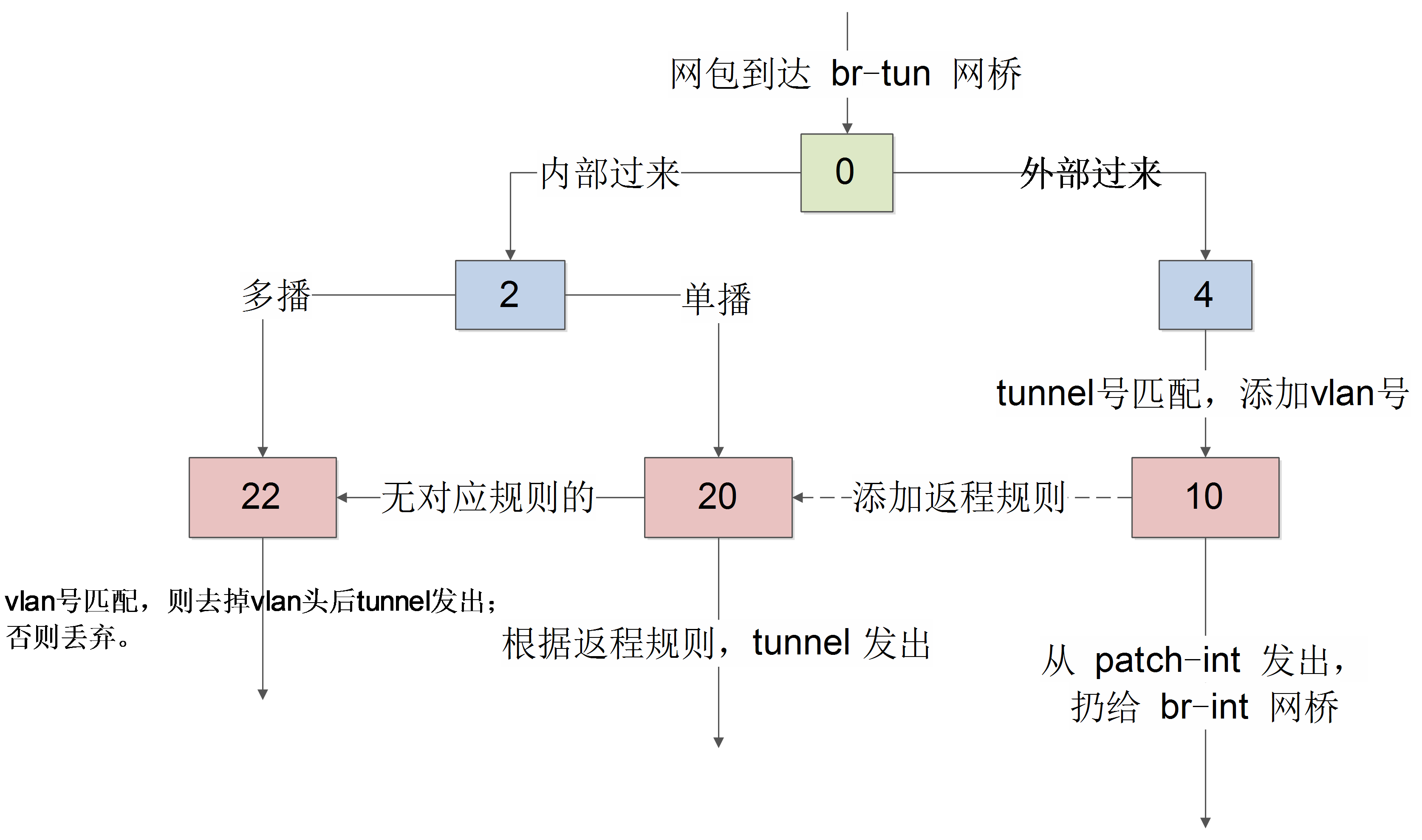
表 0
先看 table0 中的规则
[Bash shell] 纯文本查看 复制代码
01 |
cookie=0x0, duration=329.194s, table=0, n_packets=31, n_bytes=2906, idle_age=29, priority=1,in_port=1 actions=resubmit(,2) |
02 |
cookie=0x0, duration=325.847s, table=0, n_packets=14, n_bytes=1591, idle_age=33, priority=1,in_port=2 actions=resubmit(,4) |
03 |
cookie=0x0, duration=328.954s, table=0, n_packets=6, n_bytes=480, idle_age=321, priority=0 actions=drop |
从 1 端口(patch-int)进来的网包,扔给表 2 处理,从 2 端口(vxlan-0a00644d)进来的网包,扔给表 4 处理。即一个处理来自内部 vm 的,一个处理来自外面的 vxlan 隧道的。
表 2
对于内部包,表 2 中规则为
[Bash shell] 纯文本查看 复制代码
01 |
cookie=0x0, duration=53316.397s, table=2, n_packets=0, n_bytes=0, idle_age=53316, priority=0,dl_dst=00:00:00:00:00:00/01:00:00:00:00:00 actions=resubmit(,20) |
02 |
cookie=0x0, duration=53316.162s, table=2, n_packets=161, n_bytes=39562, idle_age=422, priority=0,dl_dst=01:00:00:00:00:00/01:00:00:00:00:00 actions=resubmit(,22) |
即里面过来的单播包,扔给表 20 处理;多播和广播包,扔给表 22 处理。
表 3
丢弃所有包。
[Bash shell] 纯文本查看 复制代码
01 |
cookie=0x0, duration=328.223s, table=3, n_packets=0, n_bytes=0, idle_age=328, priority=0 actions=drop |
表 4
对于外部来的数据,表 4 中规则为
[Bash shell] 纯文本查看 复制代码
01 |
cookie=0x0, duration=50.703s, table=4, n_packets=12, n_bytes=1451, idle_age=33, priority=1,tun_id=0x3e9 actions=mod_vlan_vid:1,resubmit(,10) |
02 |
cookie=0x0, duration=327.979s, table=4, n_packets=2, n_bytes=140, idle_age=94, priority=0 actions=drop |
匹配给定的 tunnel 号,添加对应的 vlan 号,扔给表 10 去学习一下后扔到 br-int 网桥。
表 10
[Bash shell] 纯文本查看 复制代码
01 |
cookie=0x0, duration=327.742s, table=10, n_packets=12, n_bytes=1451, idle_age=33, priority=1 actions=learn(table=20,hard_timeout=300,priority=1,NXM_OF_VLAN_TCI[0..11],NXM_OF_ETH_DST[]=NXM_OF_ETH_SRC[],load:0->NXM_OF_VLAN_TCI[],load:NXM_NX_TUN_ID[]->NXM_NX_TUN_ID[],output:NXM_OF_IN_PORT[]),output:1 |
主要作用是学习外部(从 tunnel)进来的包,往表 20 中添加对返程包的正常转发规则,并且从 patch-int 扔给 br-int。
使用了 openvswitch 的 learn 动作。该动作能根据处理的流来动态修改其它表中的规则。
具体来看 learn 规则。
- table=20 说明是修改表 20 中的规则,后面是添加的规则内容;
- NXM_OF_VLAN_TCI[0..11],匹配跟当前流同样的 VLAN 头,其中 NXM 是 Nicira Extensible Match 的缩写;
- NXM_OF_ETH_DST[]=NXM_OF_ETH_SRC[],包的目的 mac 跟当前流的源 mac 匹配;
- load:0->NXM_OF_VLAN_TCI[],将 vlan 号改为 0;
- load:NXM_NX_TUN_ID[]->NXM_NX_TUN_ID[],将 tunnel 号修改为当前的 tunnel 号;
- output:NXM_OF_IN_PORT[],从当前入口发出。
表 20
[Bash shell] 纯文本查看 复制代码
01 |
cookie=0x0, duration=38.551s, table=20, n_packets=9, n_bytes=694, hard_timeout=300, idle_age=33, hard_age=33, priority=1,vlan_tci=0x0001/0x0fff,dl_dst=fa:16:3e:83:95:fa actions=load:0->NXM_OF_VLAN_TCI[],load:0x3e9->NXM_NX_TUN_ID[],output:2 |
02 |
cookie=0x0, duration=327.504s, table=20, n_packets=0, n_bytes=0, idle_age=327, priority=0 actions=resubmit(,22) |
其中,第一条规则就是表 10 学习来的结果。对于 vlan 号为 1,目标 mac 是 fa:16:3e:83:95:fa(之前,我们从虚拟机内 ping 10.0.0.1,这个 mac 作为源 mac 从 tunnel 来过)的网包,去掉 vlan 号,添加当时的 vxlan 号,并从 tunnel 发出。
对于没学习到规则的网包,则扔给表 22 处理。
表 22
[Bash shell] 纯文本查看 复制代码
01 |
cookie=0x0, duration=50.94s, table=22, n_packets=11, n_bytes=1334, idle_age=29, dl_vlan=1 actions=strip_vlan,set_tunnel:0x3e9,output:2 |
02 |
cookie=0x0, duration=327.261s, table=22, n_packets=10, n_bytes=808, idle_age=51, priority=0 actions=drop |
表 22 检查如果 vlan 号正确,则去掉 vlan 头后从 tunnel 扔出去。
网络节点
网络节点担负着进行网络服务的任务,包括DHCP、路由和高级网络服务等。一般包括三个网桥:br-tun、br-int 和 br-ex。
[Bash shell] 纯文本查看 复制代码
02 |
49761e8e-031f-4a60-b838-28bb82aac7b7 |
10 |
Interface "qr-694450d6-f6" |
14 |
Interface "tap13685e28-b0" |
19 |
options: {peer=patch-int} |
25 |
Interface "qg-e76de35e-90" |
33 |
Interface "vxlan-0a006458" |
35 |
options: {df_default="true", in_key=flow, local_ip="10.0.100.77", out_key=flow, remote_ip="10.0.100.88"} |
39 |
options: {peer=patch-tun} |
br-tun
跟计算节点类似,br-tun 作为虚拟化层网桥。 要将内部过来的网包进行合理甄别,内部带着正确 vlan tag 过来的,从正确的 tunnel 扔出去;外面带着正确 tunnel 号过来的,要改到对应的内部 vlan tag 扔到里面。
包括两个接口,跟其它接点形成 tunnel 的 vxlan-xxx 端口,以及跟 br-int 互连的 patch-int 端口。
[Bash shell] 纯文本查看 复制代码
07 |
Interface "vxlan-0a006458" |
09 |
options: {df_default="true", in_key=flow, local_ip="10.0.100.77", out_key=flow, remote_ip="10.0.100.88"} |
13 |
options: {peer=patch-tun} |
其中,端口 br-tun 是内部端口,vxlan-0a00644d 这样的端口是向其它节点发包时候的 VXLAN 隧道端点,patch-int 端口通过一条管道连接到 br-int 上的 patch-tun 端口。
查看 br-tun 上的转发规则。
[Bash shell] 纯文本查看 复制代码
01 |
$ sudo ovs-ofctl dump-flows br-tun |
02 |
NXST_FLOW reply (xid=0x4): |
03 |
cookie=0x0, duration=422.153s, table=0, n_packets=1073, n_bytes=107845, idle_age=96, priority=1,in_port=1 actions=resubmit(,2) |
04 |
cookie=0x0, duration=185.009s, table=0, n_packets=1076, n_bytes=102922, idle_age=96, priority=1,in_port=2 actions=resubmit(,4) |
05 |
cookie=0x0, duration=421.853s, table=0, n_packets=6, n_bytes=480, idle_age=62414, priority=0 actions=drop |
06 |
cookie=0x0, duration=421.552s, table=2, n_packets=1047, n_bytes=105725, idle_age=96, priority=0,dl_dst=00:00:00:00:00:00/01:00:00:00:00:00 actions=resubmit(,20) |
07 |
cookie=0x0, duration=421.252s, table=2, n_packets=26, n_bytes=2120, idle_age=61953, priority=0,dl_dst=01:00:00:00:00:00/01:00:00:00:00:00 actions=resubmit(,22) |
08 |
cookie=0x0, duration=420.939s, table=3, n_packets=0, n_bytes=0, idle_age=62420, priority=0 actions=drop |
09 |
cookie=0x0, duration=394.249s, table=4, n_packets=1076, n_bytes=102922, idle_age=96, priority=1,tun_id=0x3e9 actions=mod_vlan_vid:1,resubmit(,10) |
10 |
cookie=0x0, duration=420.628s, table=4, n_packets=0, n_bytes=0, idle_age=62420, priority=0 actions=drop |
11 |
cookie=0x0, duration=420.304s, table=10, n_packets=1076, n_bytes=102922, idle_age=96, priority=1 actions=learn(table=20,hard_timeout=300,priority=1,NXM_OF_VLAN_TCI[0..11],NXM_OF_ETH_DST[]=NXM_OF_ETH_SRC[],load:0->NXM_OF_VLAN_TCI[],load:NXM_NX_TUN_ID[]->NXM_NX_TUN_ID[],output:NXM_OF_IN_PORT[]),output:1 |
12 |
cookie=0x0, duration=1314.149s, table=20, n_packets=1006, n_bytes=101338, hard_timeout=300, idle_age=96, hard_age=95, priority=1,vlan_tci=0x0001/0x0fff,dl_dst=fa:16:3e:52:7a:f2 actions=load:0->NXM_OF_VLAN_TCI[],load:0x3e9->NXM_NX_TUN_ID[],output:2 |
13 |
cookie=0x0, duration=419.977s, table=20, n_packets=0, n_bytes=0, idle_age=62419, priority=0 actions=resubmit(,22) |
14 |
cookie=0x0, duration=184.683s, table=22, n_packets=3, n_bytes=230, idle_age=61953, dl_vlan=1 actions=strip_vlan,set_tunnel:0x3e9,output:2 |
15 |
cookie=0x0, duration=419.668s, table=22, n_packets=23, n_bytes=1890, idle_age=61961, priority=0 actions=drop |
这些规则跟计算节点上的 br-tun 网桥规则类似,组成如下图所示的转发逻辑。
<ignore_js_op>
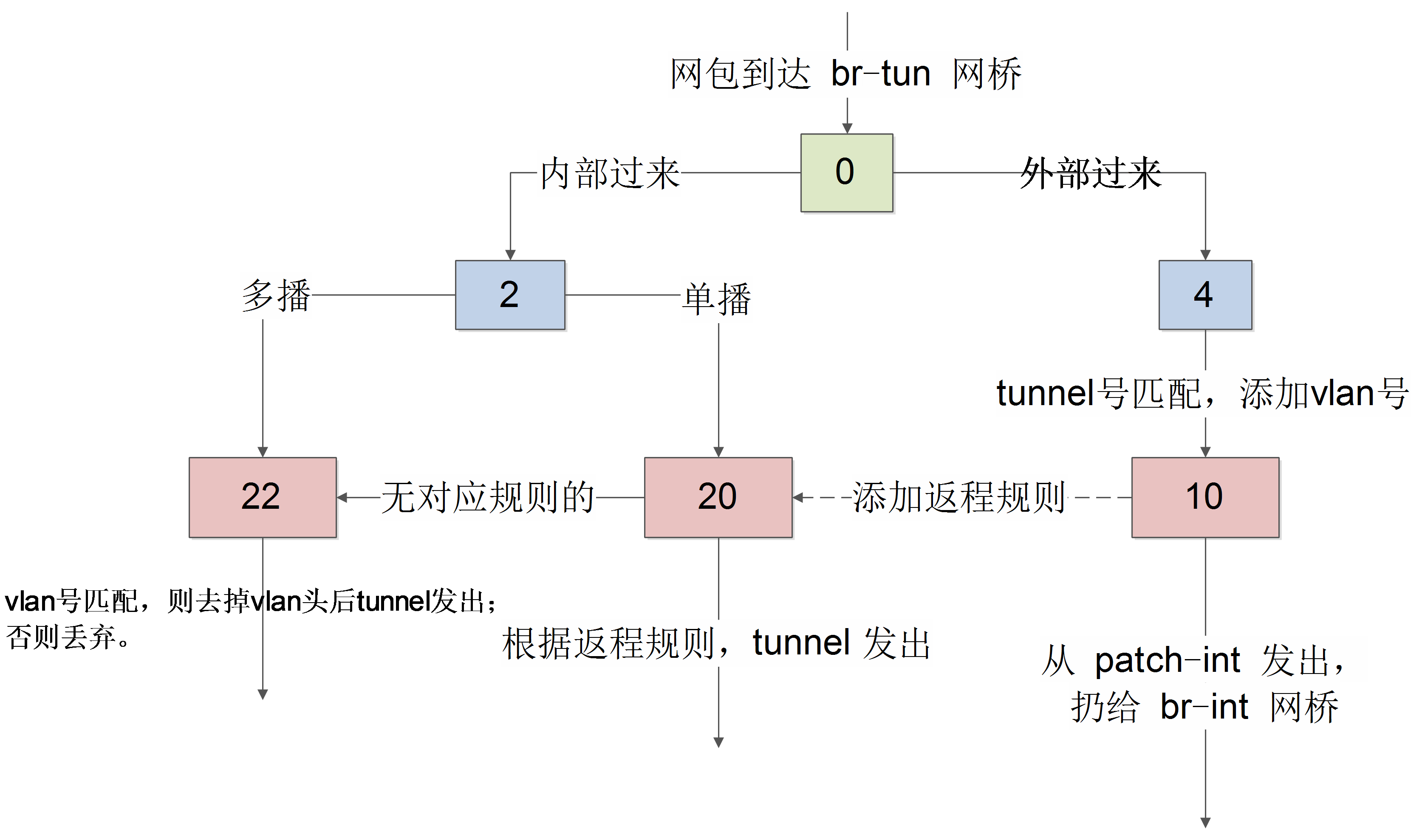
表 0
先看 table0 中的规则
[Bash shell] 纯文本查看 复制代码
01 |
cookie=0x0, duration=422.153s, table=0, n_packets=1073, n_bytes=107845, idle_age=96, priority=1,in_port=1 actions=resubmit(,2) |
02 |
cookie=0x0, duration=185.009s, table=0, n_packets=1076, n_bytes=102922, idle_age=96, priority=1,in_port=2 actions=resubmit(,4) |
03 |
cookie=0x0, duration=421.853s, table=0, n_packets=6, n_bytes=480, idle_age=62414, priority=0 actions=drop |
从 1 端口(patch-int)进来的网包,扔给表 2 处理,从 2 端口(vxlan-0a00644d)进来的网包,扔给表 4 处理。即一个处理来自内部 br-int 的(这上面挂载着所有的网络服务,包括路由、DHCP 等),一个处理来自外面的 VXLAN 隧道的。
表 2
对于内部包,表 2 中规则为
[Bash shell] 纯文本查看 复制代码
01 |
cookie=0x0, duration=421.552s, table=2, n_packets=1047, n_bytes=105725, idle_age=96, priority=0,dl_dst=00:00:00:00:00:00/01:00:00:00:00:00 actions=resubmit(,20) |
02 |
cookie=0x0, duration=421.252s, table=2, n_packets=26, n_bytes=2120, idle_age=61953, priority=0,dl_dst=01:00:00:00:00:00/01:00:00:00:00:00 actions=resubmit(,22) |
即里面过来的单播包,扔给表 20 处理;多播和广播包,扔给表 22 处理。
表 3
丢弃所有包。
[Bash shell] 纯文本查看 复制代码
01 |
cookie=0x0, duration=420.939s, table=3, n_packets=0, n_bytes=0, idle_age=62420, priority=0 actions=drop |
表 4
对于外部来的数据,表 4 中规则为
[Bash shell] 纯文本查看 复制代码
01 |
cookie=0x0, duration=394.249s, table=4, n_packets=1076, n_bytes=102922, idle_age=96, priority=1,tun_id=0x3e9 actions=mod_vlan_vid:1,resubmit(,10) |
02 |
cookie=0x0, duration=420.628s, table=4, n_packets=0, n_bytes=0, idle_age=62420, priority=0 actions=drop |
匹配给定的 tunnel 号,添加对应的 vlan 号,扔给表 10 去学习一下后扔到 br-int 网桥。
表 10
[Bash shell] 纯文本查看 复制代码
01 |
cookie=0x0, duration=420.304s, table=10, n_packets=1076, n_bytes=102922, idle_age=96, priority=1 actions=learn(table=20,hard_timeout=300,priority=1,NXM_OF_VLAN_TCI[0..11],NXM_OF_ETH_DST[]=NXM_OF_ETH_SRC[],load:0->NXM_OF_VLAN_TCI[],load:NXM_NX_TUN_ID[]->NXM_NX_TUN_ID[],output:NXM_OF_IN_PORT[]),output:1 |
主要作用是学习外部(从 tunnel)进来的包,往表 20 中添加对返程包的正常转发规则,并且从 patch-int 扔给 br-int。
使用了 openvswitch 的 learn 动作。该动作能根据处理的流来动态修改其它表中的规则。
具体来看 learn 规则。
- table=20 说明是修改表 20 中的规则,后面是添加的规则内容;
- NXM_OF_VLAN_TCI[0..11],匹配跟当前流同样的 VLAN 头,其中 NXM 是 Nicira Extensible Match 的缩写;
- NXM_OF_ETH_DST[]=NXM_OF_ETH_SRC[],包的目的 mac 跟当前流的源 mac 匹配;
- load:0->NXM_OF_VLAN_TCI[],将 vlan 号改为 0;
- load:NXM_NX_TUN_ID[]->NXM_NX_TUN_ID[],将 tunnel 号修改为当前的 tunnel 号;
- output:NXM_OF_IN_PORT[],从当前入口发出。
表 20
[Bash shell] 纯文本查看 复制代码
01 |
cookie=0x0, duration=1314.149s, table=20, n_packets=1006, n_bytes=101338, hard_timeout=300, idle_age=96, hard_age=95, priority=1,vlan_tci=0x0001/0x0fff,dl_dst=fa:16:3e:52:7a:f2 actions=load:0->NXM_OF_VLAN_TCI[],load:0x3e9->NXM_NX_TUN_ID[],output:2 |
02 |
cookie=0x0, duration=419.977s, table=20, n_packets=0, n_bytes=0, idle_age=62419, priority=0 actions=resubmit(,22) |
其中,第一条规则就是表 10 学习来的结果。对于 vlan 号为 1,目标 mac 是 fa:16:3e:83:95:fa(之前,我们从虚拟机内 ping 10.0.0.1,这个 mac 作为源 mac 从 tunnel 来过)的网包,去掉 vlan 号,添加当时的 vxlan 号,并从 tunnel 发出。
对于没学习到规则的网包,则扔给表 22 处理。
表 22
[Bash shell] 纯文本查看 复制代码
01 |
cookie=0x0, duration=184.683s, table=22, n_packets=3, n_bytes=230, idle_age=61953, dl_vlan=1 actions=strip_vlan,set_tunnel:0x3e9,output:2 |
02 |
cookie=0x0, duration=419.668s, table=22, n_packets=23, n_bytes=1890, idle_age=61961, priority=0 actions=drop |
表 22 检查如果 vlan 号正确,则去掉 vlan 头后从 tunnel 扔出去。
br-int
集成网桥 br-int 规则比较简单,作为一个正常的二层交换机使用。无论下面虚拟化层是哪种技术实现,集成网桥是看不到的,只知道根据 vlan 和 mac 进行转发。
所连接接口包括:
- tap-xxx,连接到网络 DHCP 服务的命名空间;
- qr-xxx,连接到路由服务的命名空间;
- 往外的 patch-tun 接口,连接到 br-tun 网桥。
其中网络服务接口上会绑定内部 vlan 号,每个号对应一个网络。
[Bash shell] 纯文本查看 复制代码
08 |
Interface "qr-694450d6-f6" |
12 |
Interface "tap13685e28-b0" |
17 |
options: {peer=patch-int} |
转发规则表 0 中是对所有包进行 NORMAL,表 23 中是所有包直接丢弃(是否后面将安全组规则在这里实现?)。
[Bash shell] 纯文本查看 复制代码
01 |
$ sudo ovs-ofctl dump-flows br-int |
02 |
NXST_FLOW reply (xid=0x4): |
03 |
cookie=0x0, duration=52889.682s, table=0, n_packets=161, n_bytes=39290, idle_age=13, priority=1 actions=NORMAL |
04 |
cookie=0x0, duration=52889.451s, table=23, n_packets=0, n_bytes=0, idle_age=52889, priority=0 actions=drop |
br-ex
核心接口有两个。
一个是挂载的物理接口上,如 eth0,网包将从这个接口发送到外部网络上。
另外一个是 qg-xxx 这样的接口,是连接到 router 服务的网络名字空间中,里面绑定一个路由器的外部 IP,作为 nAT 时候的地址,另外,网络中的 floating IP 也放在这个网络名字空间中。
[Bash shell] 纯文本查看 复制代码
08 |
Interface "qg-e76de35e-90" |
网桥的规则也很简单,作为一个正常的二层转发设备即可。
[Bash shell] 纯文本查看 复制代码
01 |
$ sudo ovs-ofctl dump-flows br-ex |
02 |
NXST_FLOW reply (xid=0x4): |
03 |
cookie=0x0, duration=75072.257s, table=0, n_packets=352212, n_bytes=85641148, idle_age=0, hard_age=65534, priority=0 actions=NORMAL
|
原文 http://www.aboutyun.com/thread-13027-1-1.html
- 深入理解 Neutron -- OpenStack 网络实现(4):网络名字空间
问题导读1.如何查看网络名字空间?2.网络名字空间开头的名字有什么规律?3.dhcp服务是如何实现的?4.router的实现是通过iptables进行的是否正确?5.SNAT和DNAT规则有什么作用? ...
- 深入理解 Neutron -- OpenStack 网络实现(2):VLAN 模式
问题导读 1.br-int.br-ethx的作用是什么?2.安全组策略是如何实现的?3.VLAN 模式与GRE模式有哪些不同点?流量上有哪些不同?4.L3 agent实现了什么功能? 接上篇深入理解 ...
- 深入理解 Neutron -- OpenStack 网络实现(1):GRE 模式
问题导读1.什么是VETH.qvb.qvo?2.qbr的存在的作用是什么?3.router服务的作用是什么? 如果不具有Linux网络基础,比如防火墙如何过滤ip.端口或则对openstack ovs ...
- 理解 neutron(15):Neutron Linux Bridge + VLAN/VXLAN 虚拟网络
学习 Neutron 系列文章: (1)Neutron 所实现的虚拟化网络 (2)Neutron OpenvSwitch + VLAN 虚拟网络 (3)Neutron OpenvSwitch + GR ...
- openstack 网络架构 nova-network + neutron
openstack网络架构(nova-network/neutron) openstack网络体系中,网络技术没有创新,但用到的技术点很庞杂,包含bridge.vlan.gre.vxlan.ovs.o ...
- 高可用OpenStack(Queen版)集群-7.Neutron控制/网络节点集群
参考文档: Install-guide:https://docs.openstack.org/install-guide/ OpenStack High Availability Guide:http ...
- openstack网络架构(nova-network/neutron)
openstack网络体系中,网络技术没有创新,但用到的技术点非常庞杂,包括bridge.vlan.gre.vxlan.ovs.openflow.sdn.iptables等,当然这里不会做具体技术介绍 ...
- 云计算管理平台之OpenStack网络服务neutron
一.简介 neutron的主要作用是在openstack中为启动虚拟机实例提供网络服务,对于neutron来讲,它可以提供两种类型的网络:第一种是provider network,这种网络就是我们常说 ...
- 一文理解OpenStack网络
摘要:如果你能理解OpenStack的网络,那么对于其他云平台的网络,应该也可以通过分析后理解掌握了. 本文分享自华为云社区<<跟唐老师学习云网络> - OpenStack网络实现& ...
随机推荐
- Android开发之获取相册照片和获取拍照照片二
转至 http://blog.csdn.net/beyond0525/article/details/8940840 上一篇文章中讲解了照相机获取照片的时候遇到了可能取得的uri为null的状态,并给 ...
- CorelDRAW X7绘制可爱的卡通动漫多啦A梦
今天小编为大家分享CorelDRAW X7绘制可爱的卡通动漫多啦A梦方法,教程绘制出来的哆啦A梦非常可爱,适合新手来学习,推荐过来,来看看吧! 1.新建文件 新建A4大小横向画布,双击“矩形工具”绘制 ...
- C# byte[]保存成文件
string path = Server.MapPath(@"\a.pdf"); FileStream fs = new FileStream(path, FileMode.Cre ...
- 几个免费IP地址查询API接口
转:http://blog.csdn.net/ishxiao/article/details/52670242 -------------------------------------------- ...
- 浏览器兼容css
原文:https://www.cnblogs.com/shizk/p/8459362.html 1.为什么会出现浏览器兼容问题? 由于各大主流浏览器由不同的厂家开发,所用的核心架构和代码也很难重和,这 ...
- 一则Gedit死机引起的错误之解决
一次,虚拟机中CentOS不明原因死机了,终端打开不能操作,SecureCRT和从SecureCRT中运行的托关于本机Windows下的Xming下的gedit也死掉了,无奈只能强制关机.重新启动后其 ...
- Lua之转义字符
print("\a"); --bell 硬件滴一声 print("a"); print("\b"); --back space ...
- windows 下为Python安装redis
最近在看<redis实战>,里面的redis示例都是Python写的,先将环境整好 启动redis redis-server.exe redis.conf 安装了python2.7 安装 ...
- linux中高亮显示文本的工具 -- bat
bat 的项目地址 https://github.com/sharkdp/bat bat 是用rust 开发的, 在centos中安装bat需要rust的环境, 我们可以通过安装rust的包管理工具c ...
- 使用a标签制作tooltips
摘要: 前面已经分享了三种方法制作tooltips,今天再来分享一个借助a标签来实现tooltips的方法. 效果如下:
