| 问题导读
1.br-int、br-ethx的作用是什么?
2.安全组策略是如何实现的?
3.VLAN 模式与GRE模式有哪些不同点?流量上有哪些不同?
4.L3 agent实现了什么功能?

接上篇深入理解 Neutron -- OpenStack 网络实现(1)
Vlan模式下的系统架构跟GRE模式下类似,如下图所示。
需要注意的是,在vlan模式下,vlan tag的转换需要在br-int和br-ethx两个网桥上进行相互配合。即br-int负责从int-br-ethX过来的包(带外部vlan)转换为内部vlan,而br-ethx负责从phy-br-ethx过来的包(带内部vlan)转化为外部的vlan。
(个人对vlan tag的理解,应该是对vlan的一个人为标记,起到识别的作用)
<ignore_js_op> 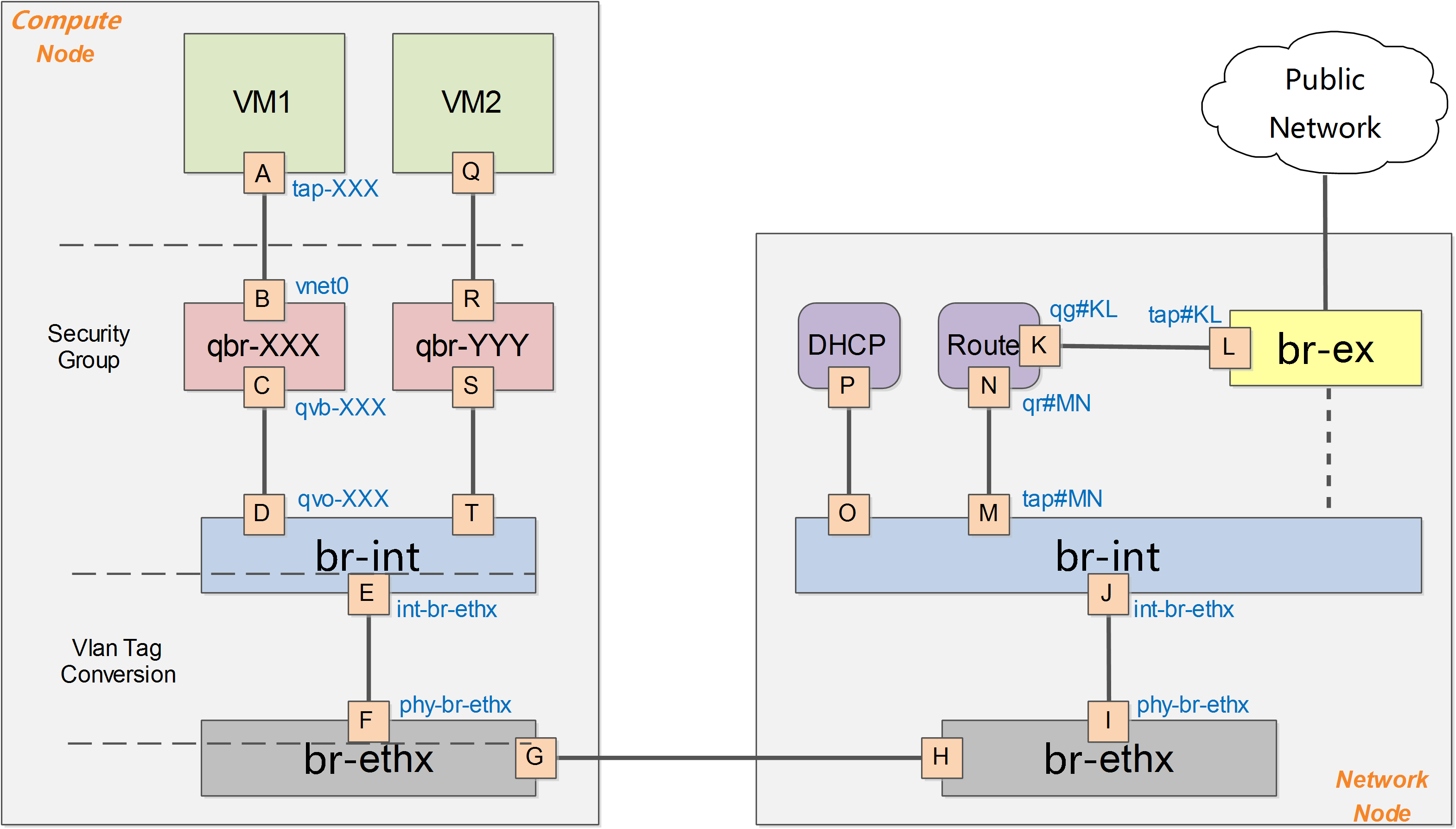 下面进行一些细节的补充讨论,以Vlan作为物理网络隔离的实现。假如要实现同一个租户下两个子网,如下图所示:
<ignore_js_op> 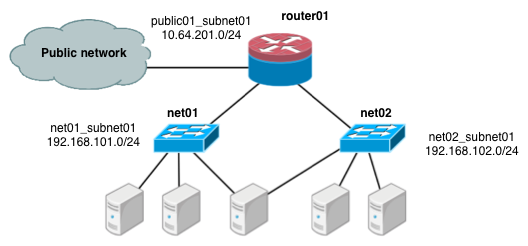 计算节点
<ignore_js_op>  查看网桥信息,主要包括两个网桥:br-int和br-eth1:
[Bash shell] 纯文本查看 复制代码
01 |
[root@Compute ~]# ovs-vsctl show |
02 |
f758a8b8-2fd0-4a47-ab2d-c49d48304f82 |
05 |
Interface "phy-br-eth1" |
25 |
Interface "int-br-eth1" |
类似GRE模式下,br-int负责租户隔离,br-eth1负责跟计算节点外的网络通信。 在Vlan模式下,租户的流量隔离是通过vlan来进行的,因此此时包括两种vlan,虚拟机在Compute Node内流量带有的local vlan和在Compute Node之外物理网络上隔离不同租户的vlan。
br-int和br-eth1分别对从端口int-br-eth1和phy-br-eth1上到达的网包进行vlan tag的处理。此处有两个网,分别带有两个vlan tag(内部tag1对应外部tag101,内部tag2对应外部tag102)。 其中,安全组策略仍然在qbr相关的iptables上实现。
br-int
与GRE模式不同的是,br-int完成从br-eth1上过来流量(从口int-br-eth1到达)的vlan tag转换,可能的规则为
[Bash shell] 纯文本查看 复制代码
01 |
#ovs-ofctl dump-flows br-int |
02 |
cookie=0x0, duration=100.795s, table=0, n_packets=6, n_bytes=468, idle_age=90, priority=2,in_port=3 actions=drop |
03 |
cookie=0x0, duration=97.069s, table=0, n_packets=22, n_bytes=6622, idle_age=31, priority=3,in_port=3,dl_vlan=101 actions=mod_vlan_vid:1,NORMAL |
04 |
cookie=0x0, duration=95.781s, table=0, n_packets=8, n_bytes=1165, idle_age=11, priority=3,in_port=3,dl_vlan=102 actions=mod_vlan_vid:2,NORMAL |
05 |
cookie=0x0, duration=103.626s, table=0, n_packets=47, n_bytes=13400, idle_age=11, priority=1 actions=NORMAL |
br-eth1
br-eth1上负责从br-int上过来的流量(从口phy-br-eth1到达),实现local vlan到外部vlan的转换。
[Bash shell] 纯文本查看 复制代码
01 |
#ovs-ofctl dump-flows br-eth0 |
02 |
NXST_FLOW reply (xid=0x4): |
03 |
cookie=0x0, duration=73.461s, table=0, n_packets=51, n_bytes=32403, idle_age=2, hard_age=65534, priority=4,in_port=4,dl_vlan=1 actions=mod_vlan_vid:101,NORMAL |
04 |
cookie=0x0, duration=83.461s, table=0, n_packets=51, n_bytes=32403, idle_age=2, hard_age=65534, priority=4,in_port=4,dl_vlan=2 actions=mod_vlan_vid:102,NORMAL |
05 |
cookie=0x0, duration=651.538s, table=0, n_packets=72, n_bytes=3908, idle_age=2574, hard_age=65534, priority=2,in_port=4 actions=drop |
06 |
cookie=0x0, duration=654.002s, table=0, n_packets=31733, n_bytes=6505880, idle_age=2, hard_age=65534, priority=1 actions=NORMAL |
网络节点
<ignore_js_op> 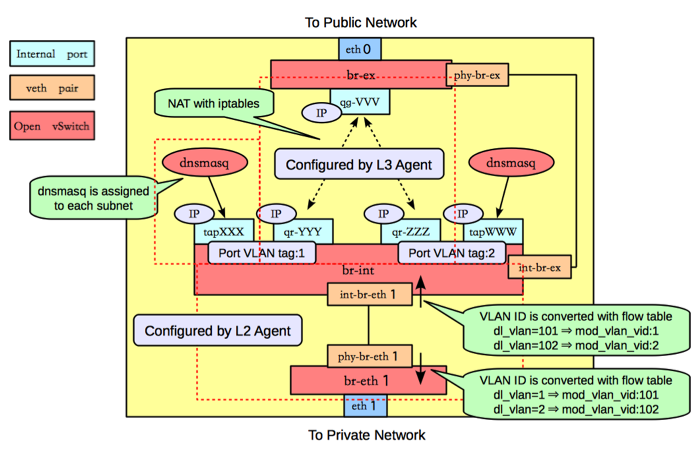 类似GRE模式下,br-eth1收到到达的网包,int-br-eth1和phy-br-eth1上分别进行vlan转换,保证到达br-int上的网包都是带有内部vlan tag,到达br-eth1上的都是带有外部vlan tag。br-ex则完成到OpenStack以外网络的连接。 查看网桥信息,包括三个网桥,br-eth1、br-int和br-ex。
[Bash shell] 纯文本查看 复制代码
02 |
3bd78da8-d3b5-4112-a766-79506a7e2801 |
17 |
Interface "int-br-eth0" |
36 |
Interface "phy-br-eth1" |
br-eth1
br-eth1主要负责把物理网络上外部vlan转化为local vlan。
[Bash shell] 纯文本查看 复制代码
01 |
#ovs-ofctl dump-flows br-eth1 |
02 |
NXST_FLOW reply (xid=0x4): |
03 |
cookie=0x0, duration=144.33s, table=0, n_packets=13, n_bytes=28404, idle_age=24, hard_age=65534, priority=4,in_port=5,dl_vlan=101 actions=mod_vlan_vid:1,NORMAL |
04 |
cookie=0x0, duration=144.33s, table=0, n_packets=13, n_bytes=28404, idle_age=24, hard_age=65534, priority=4,in_port=5,dl_vlan=102 actions=mod_vlan_vid:2,NORMAL |
05 |
cookie=0x0, duration=608.373s, table=0, n_packets=23, n_bytes=1706, idle_age=65534, hard_age=65534, priority=2,in_port=5 actions=drop |
06 |
cookie=0x0, duration=675.373s, table=0, n_packets=58, n_bytes=10625, idle_age=24, hard_age=65534, priority=1 actions=NORMAL |
br-int
br-int上挂载了大量的agent来提供各种网络服务,另外负责对发往br-eth1的流量,实现local vlan转化为外部vlan。
[Bash shell] 纯文本查看 复制代码
01 |
#ovs-ofctl dump-flows br-int |
02 |
NXST_FLOW reply (xid=0x4): |
03 |
cookie=0x0, duration=147294.121s, table=0, n_packets=224, n_bytes=33961, idle_age=13, hard_age=65534, priority=3,in_port=4,dl_vlan=1 actions=mod_vlan_vid:101,NORMAL |
04 |
cookie=0x0, duration=603538.84s, table=0, n_packets=19, n_bytes=2234, idle_age=18963, hard_age=65534, priority=2,in_port=4 actions=drop |
05 |
cookie=0x0, duration=603547.134s, table=0, n_packets=31901, n_bytes=6419756, idle_age=13, hard_age=65534, priority=1 actions=NORMAL |
dnsmasq负责提供DHCP服务,绑定到某个特定的名字空间上,每个需要DHCP服务的租户网络有自己专属隔离的DHCP服务(图中的tapXXX和tapWWW上各自监听了一个dnsmasq)。
路由是L3 agent来实现,每个子网在br-int上有一个端口(qr-YYY和qr-ZZZ,已配置IP,分别是各自内部子网的网关),L3 agent绑定到上面。要访问外部的公共网络,需要通过L3 agent发出,而不是经过int-br-ex到phy-br-ex(实际上并没有网包从这个veth pair传输)。如果要使用外部可见的floating IP,L3 agent仍然需要通过iptables来进行NAT。
每个L3 agent或dnsmasq都在各自独立的名字空间中,如下图所示,其中同一租户的两个子网都使用了同一个路由器。
<ignore_js_op> 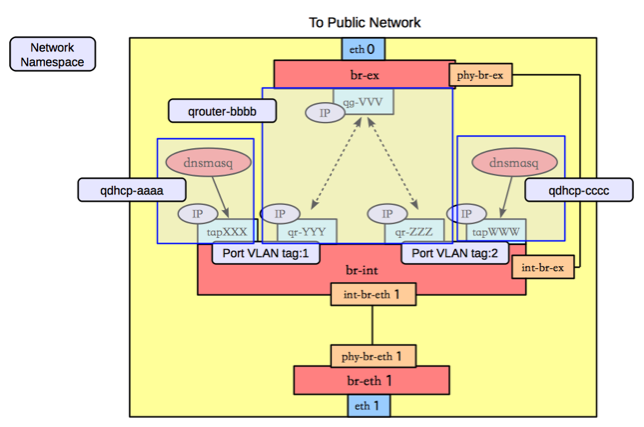 对于子网使用不同路由器的情况,多个路由器会在自己独立的名字空间中。例如要实现两个租户的两个子网的情况,如下图所示。
<ignore_js_op> 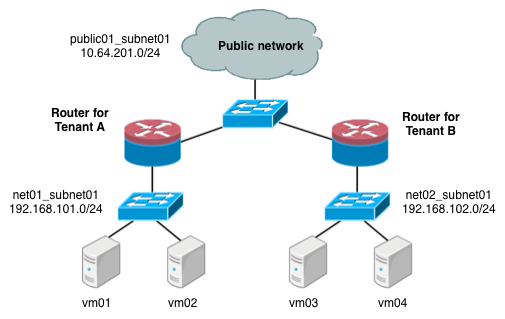 这种情况下,网络节点上的名字空间如下图所示。
<ignore_js_op> 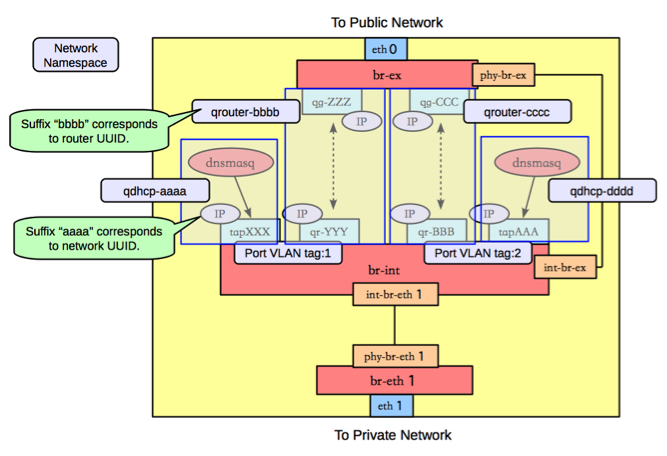 br-ex
br-ex要做的事情很简单,只需要正常转发即可。
[Bash shell] 纯文本查看 复制代码
01 |
#ovs-ofctl dump-flows br-ex |
02 |
NXST_FLOW reply (xid=0x4): |
03 |
cookie=0x0, duration=6770.969s, table=0, n_packets=5411, n_bytes=306944, idle_age=0, hard_age=65534, priority=0 actions=NORMAL |
|
