
The superclass "javax.servlet.http.HttpServlet" was not found on the Java Build Path 解决方法
项目忽然出现 The superclass "javax.servlet.http.HttpServlet" was not found on the Java Build Path 解决方法
0.环境:
新装win8.1系统,Tomcat配置无误。
1.错误:
项目中某一.jps页面忽然出现错误,鼠标点上去为:The superclass "javax.servlet.http.HttpServlet" was not found on the Java Build Path.
忽视错误,在Eclipse下启动tomcat的时候,报错为:Eclipse下启动tomcat报错:The archive: D:/Program Files/apache-tomcat-7.0.52/bin/bootstrap.jar which is referenced by the classpath, does not exist.
2.查找原因:
原本我的Tomcat路径为:D:\Program Files\apache-tomcat-7.0.52\,后来由于重装系统,改为:D:\ProgramFiles\apache-tomcat-7.0.52\,在报错中可以发现是缺少servlet-api.jar,也即tomcat路径问题。
3.尝试解决:
①.
1.右键点击项目->build path->configure build path->add library->server runtime->apache tomcat
无果,无法添加。
②.
1.打开Eclipse中tomcat配置,就是双击server选项卡中的tomcat,然后选择openlaunch configuration,如下图所示: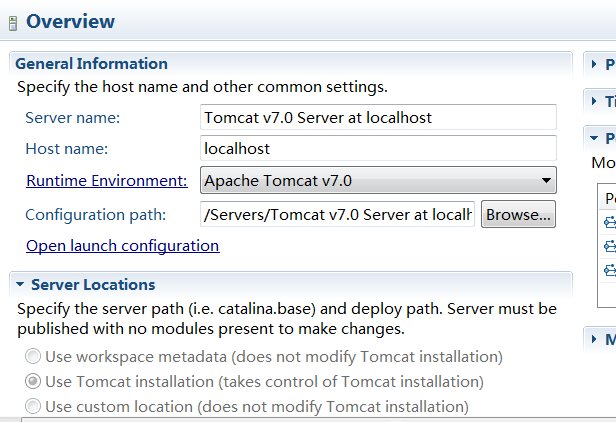
2.打开以后会出现如下界面:

3.如上图所示,将错误路径删除,并保证正确配置tomcat-juli.jar和bootstrap.jar这两个jar包的路径。
无果,修改后仍启动不了Tomcat。
③.
1.在server选项卡中删除所有server,新建tomcat。
无果,无法新建。
④.
1.退出 eclipse
2.到[工程目录下]/.metadata/.plugins/org.eclipse.core.runtime
3.把org.eclipse.wst.server.core.prefs和 org.eclipse.jst.server.tomcat.core.prefs这两个文件去掉
4.重启eclipse
无果,没找到org.eclipse.wst.server.core.prefs和 org.eclipse.jst.server.tomcat.core.prefs这两个文件。
⑤.
1.在Eclipse中,Window-->preference --> servers --> runtime --> environments --> 全部删除
2.Add-->Browse-->选择本地tomcat文件夹所在位置-->确定 --> finish-->OK
成功!
4.结论:
实际上是preference中路径错误的问题,直接删除掉server再重建的方法不行。
以后在移动相关资源或者依赖资源的时候会对原有的依赖它的项目产生影响。尽量将自己的IDE和相关的环境固定,少做更改,减少那些隐藏的错误出现的几率。
5.后续疑问:(未解)
重装系统后Tomcat、Eclipse都是重新解压配置的,为何Eclipse会记住重装系统前的路径?
The superclass "javax.servlet.http.HttpServlet" was not found on the Java Build Path 解决方法的更多相关文章
- 项目忽然出现 The superclass "javax.servlet.http.HttpServlet" was not found on the Java Build Path 解决方法
0.环境: 新装win8.1系统,Tomcat配置无误. 1.错误: 项目中某一.jps页面忽然出现错误,鼠标点上去为:The superclass "javax.servlet.http. ...
- 项目出现 The superclass "javax.servlet.http.HttpServlet" was not found on the Java Build Path 解决方法
1. The superclass "javax.servlet.http.HttpServlet" was not found on the Java Build Path ①项 ...
- java eclipse maven The superclass "javax.servlet.http.HttpServlet" was not found on the Java Build Path 解决方法
在eclipse 中使用maven 创建java web项目,启动服务器遇到提示:The superclass "javax.servlet.http.HttpServlet" w ...
- The superclass "javax.servlet.http.HttpServlet" was not found on the Java Build Path 解决办法
♦ 未在 Java构建路径中 找到父类 "javax.servlet.http.HttpServlet" ♦ 解决办法: 项目右击 → Build Path → 右侧 Add L ...
- 新建jsp文件,The superclass "javax.servlet.http.HttpServlet" was not found on the Java Build Path错误解决方法
新建一个jsp文件后,有一个错误,The superclass "javax.servlet.http.HttpServlet" was not found on the Java ...
- HttpServletRequest cannot be resolved to a type The superclass "javax.servlet.http.HttpServlet" was not found on the Java Build Path
HttpServletRequest cannot be resolved to a type The superclass "javax.servlet.http.HttpServlet& ...
- jsp页面提示“Multiple annotations found at this line: - The superclass "javax.servlet.http.HttpServlet" was not found on the Java Build Path”解决方案
Multiple annotations found at this line: - The superclass "javax.servlet.http.HttpServlet" ...
- The superclass "javax.servlet.http.HttpServlet" was not found on the Java Build Path解决方案
0.环境: win7系统,Tomcat9配置无误. 1.错误: 项目中某一.jps页面忽然出现错误,鼠标点上去为:The superclass "javax.servlet.http.Htt ...
- The superclass "javax.servlet.http.HttpServlet" was not found on the Java Build Path。问题
JSP页面顶端出现“红色”的报错信息:The superclass "javax.servlet.http.HttpServlet" was not found on the Ja ...
随机推荐
- 代码实现SQL SERVER TCP/IP协议配置
代码实现SQL SERVER TCP/IP协议配置 SET NOCOUNT ON ) ,) ,) SET @Root = 'HKEY_LOCAL_MACHINE' SET @Path = 'Softw ...
- PHP Warning: preg_match(): JIT compilation failed: no more memory in
PHP7.3出现如下错误:PHP Warning: preg_match(): JIT compilation failed: no more memory in ... 解决方案: 修改 /usr/ ...
- How to enable TLS 1.2 on Windows Server 2008 R2
Problem How to enable TLS 1.2 on Windows Server 2008 R2? Resolution QuoVadis recommends enabling and ...
- ssh 远程执行命令
SSH 是 Linux 下进行远程连接的基本工具,但是如果仅仅用它来登录那可是太浪费啦!SSH 命令可是完成远程操作的神器啊,借助它我们可以把很多的远程操作自动化掉!下面就对 SSH 的远程操作功能进 ...
- LeetCode--687. 最长同值路径
题目描述:给定一个二叉树,找到最长的路径,这个路径中的每个节点具有相同值.这条路径可以经过也可以不经过根节点.注意:两个节点之间的路径长度由它们之间的边数表示. 示例1:输入: 5 / \ 4 5 / ...
- Map<String, String>循环遍历的方法
Map<String, String>循环遍历的方法 Map<String, String>循环遍历的方法 Map<String, String>循环遍历的方法 下 ...
- testNG入门详解
TestNG 的注释: @DataProvider @ExpectedExceptions @Factory @Test @Parameters <suite name="Parame ...
- (转)使用XCode6打开项目以后再用XCode5出现的问题fatal error: malformed or corrupted AST file: 'Unable to load module
使用不同版本的XCode出现的问题: fatal error: malformed or corrupted AST file: 'Unable to load module "/Users ...
- js 数组循环和迭代
(之前一直没怎么注意数组循环,今天做一道题时,用到forEach循环发现它并没有按照我想象的样子执行,总结一下数组循环) 一.第一种方法就是for()循环 for( var index = 0; ...
- recv函数返回值说明
recv函数 int recv( SOCKET s, char FAR *buf, int len, int flags); 不论是客户还是服务器应用程序都用recv函数从TCP连接的另一端接收数据. ...