
项目出现 The superclass "javax.servlet.http.HttpServlet" was not found on the Java Build Path 解决方法
1. The superclass "javax.servlet.http.HttpServlet" was not found on the Java Build Path
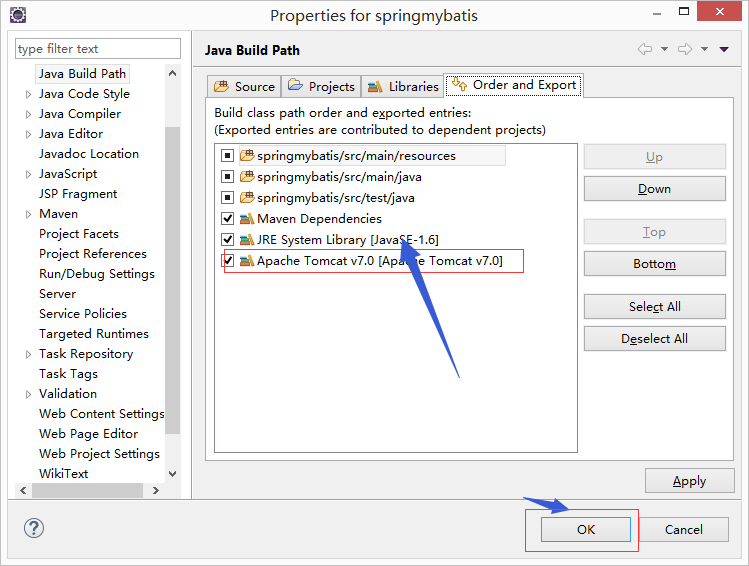
①项目右击-->build path -->添加libraries-->server runtime-->ok
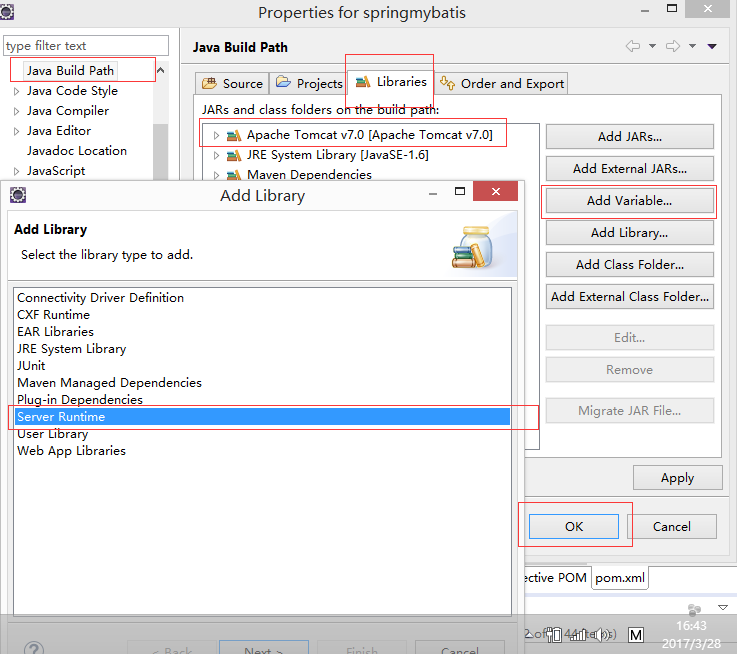
②下图
2. JDBC连接Oracle:ORA-28009:connection as SYS should be as SYSDBA OR SYSOPER
解决方案:用户名设置为user = "sys as sysdba",其他不变
3. 表和视图不存在!
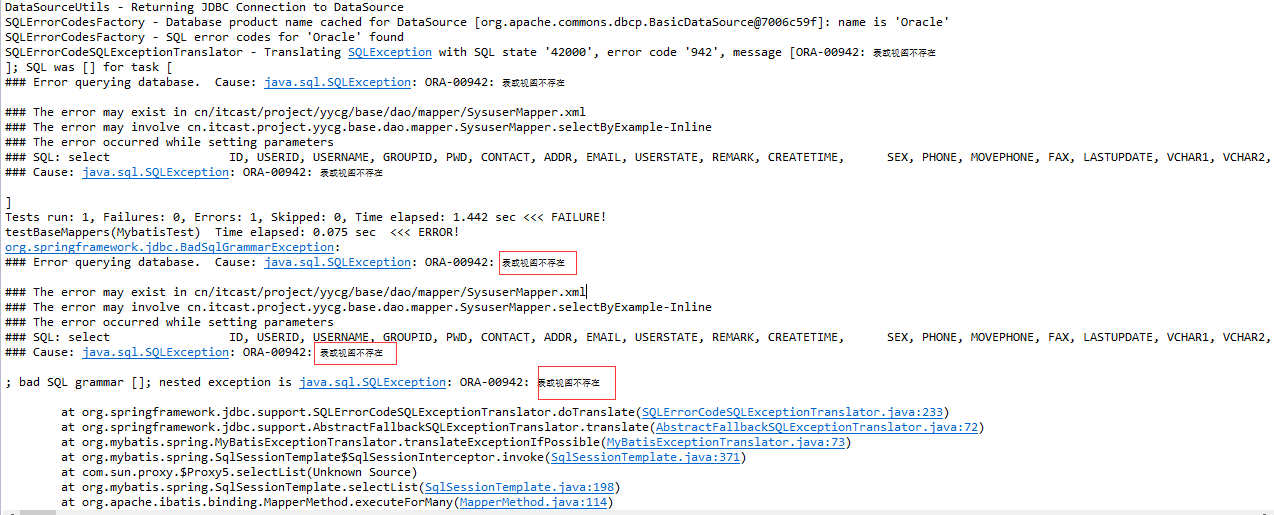
我的原因是:就比如sys用户,如果是不时用sysdba的身份登陆,就会出现这种情况,如果使用dba的身份登陆就对了
4. Failed to execute goal org.codehaus.cargo:cargo-maven2-plugin:1.2.3:run (cargo-run) on project yycg: Execution cargo-run of goal org.codehaus.cargo:cargo-maven2-plugin:1.2.3:run failed: [e:/apache-tomcat-7.0.52] is not a directory. It must point to the container home directory. -> [Help 1]
如图:

关键位置:run failed: [e:/apache-tomcat-7.0.52] is not a directory,
解决方案:tomcat配置错误,在pom.xml中修改插件配置中tomcat的路径
5. Could not write file: D:\JAVA_TOOLS\work-space\mars\sysconfig\.classpath.
build path时,出现,jre system library (unbound)
解决方案:修改 D:\JAVA_TOOLS\work-space\mars\sysconfig\.classpath. 这个文件,改为不隐藏,
6.Exception in thread “main" java.lang.UnsupportedClassVersionError(Unsupported major. minor version 52.0(xxx))
这个错两种情况①:jdk版本太低 ②位数不对,32,64位,我出现这个错的原因是位数不对,我的是64位 改为32位就对了
7.java.sql.SQLException: [Microsoft][SQLServer 2000 Driver for JDBC]Error establishing socket.
1433端口没有打开
8.java.sql.SQLException: [Microsoft][SQLServer 2000 Driver for JDBC][SQLServer]传入的表格格式数据流(TDS)远程过程调用(RPC)协议流不正确。参数 1 (""): 数据类型 0x38 未知。
驱动版本不对
9.No suitable driver found for jdbc:microsoft:sqlserver://localhost:1433;DatabaseName=db_JXC;SelectMethod=Cursor
这里将jdbc:microsoft:sqlserver://localhost:1433;DatabaseName=db_JXC;SelectMethod=Cursor 改为jdbc:sqlserver://localhost:1433;DatabaseName=db_JXC;SelectMethod=Cursor
也就是 将“microsoft” 去掉
项目出现 The superclass "javax.servlet.http.HttpServlet" was not found on the Java Build Path 解决方法的更多相关文章
- The superclass "javax.servlet.http.HttpServlet" was not found on the Java Build Path 解决方法
项目忽然出现 The superclass "javax.servlet.http.HttpServlet" was not found on the Java Build Pat ...
- 项目忽然出现 The superclass "javax.servlet.http.HttpServlet" was not found on the Java Build Path 解决方法
0.环境: 新装win8.1系统,Tomcat配置无误. 1.错误: 项目中某一.jps页面忽然出现错误,鼠标点上去为:The superclass "javax.servlet.http. ...
- java eclipse maven The superclass "javax.servlet.http.HttpServlet" was not found on the Java Build Path 解决方法
在eclipse 中使用maven 创建java web项目,启动服务器遇到提示:The superclass "javax.servlet.http.HttpServlet" w ...
- maven新建web项目提示The superclass "javax.servlet.http.HttpServlet" was not found on the Java Build Path
maven新建web项目提示The superclass "javax.servlet.http.HttpServlet" was not found on the Java Bu ...
- The superclass "javax.servlet.http.HttpServlet" was not found on the Java Build Path 解决办法
♦ 未在 Java构建路径中 找到父类 "javax.servlet.http.HttpServlet" ♦ 解决办法: 项目右击 → Build Path → 右侧 Add L ...
- 新建jsp文件,The superclass "javax.servlet.http.HttpServlet" was not found on the Java Build Path错误解决方法
新建一个jsp文件后,有一个错误,The superclass "javax.servlet.http.HttpServlet" was not found on the Java ...
- HttpServletRequest cannot be resolved to a type The superclass "javax.servlet.http.HttpServlet" was not found on the Java Build Path
HttpServletRequest cannot be resolved to a type The superclass "javax.servlet.http.HttpServlet& ...
- jsp页面提示“Multiple annotations found at this line: - The superclass "javax.servlet.http.HttpServlet" was not found on the Java Build Path”解决方案
Multiple annotations found at this line: - The superclass "javax.servlet.http.HttpServlet" ...
- Eclipse导入JavaWeb项目报错:The superclass "javax.servlet.http.HttpServlet" was not found on the Java Build Path
JavaWeb项目中写的JSP页面需要Web容器解析处理成HTML才能展示到前端浏览器,解析JSP需要Web容器.JSP页面顶端出现“红色”的报错信息:The superclass "jav ...
随机推荐
- matlab handle plot
https://cn.mathworks.com/help/matlab/ref/plotyy.html
- 12.double的int方
给定一个double类型的浮点数base和int类型的整数exponent.求base的exponent次方. 不要用Math.pow(double,double)哟.效率极其低下,比连成慢好多: 题 ...
- mxnet自定义dataloader加载自己的数据
实际上关于pytorch加载自己的数据之前有写过一篇博客,但是最近接触了mxnet,发现关于这方面的教程很少 如果要加载自己定义的数据的话,看mxnet关于mnist基本上能够推测12 看pytorc ...
- doc转html
Doc2Html li标签没闭合 在线Word转HTML style样式
- python 中os的常用方法
1.更改当前的路径 import os os.chdir( "D:/java") 注意python中表示文件路径,文件夹之间用/或者\\不能使用\
- python三大框架之一flask应用
创建一个python项目 第一步:打开pytharm 第二步:创建pure python 类型的项目 第三步:创建项目完成之后选择之前创建的py3_flack 作为虚拟环境 第四步:路径可以通过在制定 ...
- Stm32L0串口中断接收使用
最新在做LoRa的项目,使用的是STM32L072和SX1276,需要做一个串口透传模块,刚开始做demo的时候不考虑功耗,所以串口发送和接收直接使用下列函数执行: HAL_UART_Transmit ...
- 【mybatis源码学习】mybtias知识点
Mybatis技术内幕系列博客,从原理和源码角度,介绍了其内部实现细节,无论是写的好与不好,我确实是用心写了,由于并不是介绍如何使用Mybatis的文章,所以,一些参数使用细节略掉了,我们的目标是介绍 ...
- day05 Spring中自定义注解的用处-之获取自定义的Servie
PS: 在RPC远程调用中,想要获取自定义的service的方法,就得自定义标签遍历拿到方法 PS:在spring中,两个最核心的 概念是aop和ioc,aop其实就是动态代理. ioc 就是解决对象 ...
- MySQL Transaction--TPS计算规则
TPS计算规则 在MYSQL 中,TPS(Transaction Per Second)的计算方法为 (com_commit+com_rollback)/time,但com_commit和com_ro ...