
Install Hyper-V on Windows 10
Enable Hyper-V to create virtual machines on Windows 10.
Hyper-V can be enabled in many ways including using the Windows 10 control panel, PowerShell (my favorite) or using the Deployment Imaging Servicing and Management tool (DISM). This documents walks through each option.
Note: Hyper-V is built into Windows as an optional feature -- there is no Hyper-V download or installable component.
Check Requirements
- Windows 10 Enterprise, Professional, or Education
- 64-bit Processor with Second Level Address Translation (SLAT).
- CPU support for VM Monitor Mode Extension (VT-c on Intel CPU's).
- Minimum of 4 GB memory.
The Hyper-V role cannot be installed on Windows 10 Home.
Upgrade from Windows 10 Home edition to Windows 10 Professional by opening up Settings > Update and Security > Activation.
For more information and troubleshooting, see Windows 10 Hyper-V System Requirements.
Install Hyper-V
Hyper-V is built into Windows as an optional feature -- there is no Hyper-V download or installable component. There are several ways to enable the built-in Hyper-V role.
Enable Hyper-V using PowerShell
- Open a PowerShell console as Administrator.
- Run the following command:
PowerShellCopy
Enable-WindowsOptionalFeature -Online -FeatureName:Microsoft-Hyper-V -All
If the command couldn't be found, make sure you're running PowerShell as Administrator.
When the installation has completed you need to reboot the computer.
Enable Hyper-V with CMD and DISM
The Deployment Image Servicing and Management tool (DISM) helps configure Windows and Windows images. Among its many applications, DISM can enable Windows features while the operating system is running.
To enable the Hyper-V role using DISM:
- Open up a PowerShell or CMD session as Administrator.
- Type the following command:
PowerShellCopy
DISM /Online /Enable-Feature /All /FeatureName:Microsoft-Hyper-V


For more information about DISM, see the DISM Technical Reference.
Manually enable the Hyper-V role
- Right click on the Windows button and select 'Programs and Features'.
- Select Turn Windows Features on or off.
- Select Hyper-V and click OK.


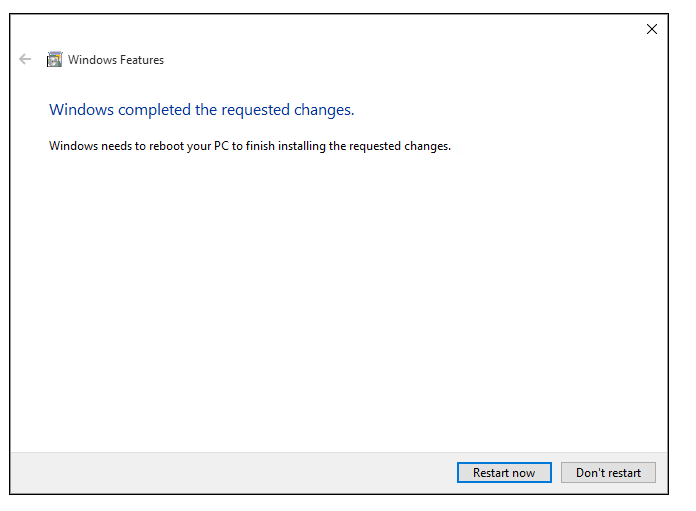
When the installation has completed you are prompted to restart your computer.




From: https://docs.microsoft.com/en-us/virtualization/hyper-v-on-windows/quick-start/enable-hyper-v
Install Hyper-V on Windows 10的更多相关文章
- 如何在 Windows 10 上安装 WSL 2
翻译自 Joey Sneddon 2020年10月30日的文章<How to Install WSL 2 on Windows 10> [1] 如果您想在最新的 Windows 版本中尝试 ...
- 在Windows 10 系统上启用Hyper V遇到的错误:0x800f0831
Hyper-V是微软的一款虚拟化技术,是微软第一个采用类似Vmware和Citrix开源Xen一样的基于hypervisor的技术. 在Windows 10的powershell命令里,输入如下的命令 ...
- windows server 2008 r2 企业版 hyper v做虚拟化的相关问题处理
windows server 2008 r2 企业版 hyper v做虚拟化的相关问题处理 今天在dell r710 上用windows server 2008 r2企业版hyper v 做虚拟化,添 ...
- Install and run DB Query Analyzer 6.04 on Microsoft Windows 10
Install and run DB Query Analyzer 6.04 on Microsoft Windows 10 DB Query Analyzer is presented ...
- A Newbie’s Install of Keras & Tensorflow on Windows 10 with R
This weekend, I decided it was time: I was going to update my Python environment and get Keras and T ...
- windows 10安装和配置caffe教程 | Install and Configure Caffe on windows 10
本文首发于个人博客https://kezunlin.me/post/1739694c/,欢迎阅读! Install and Configure Caffe on windows 10 Part 1: ...
- windows rails new demo时候出错Make sure that `gem install mysql2 -v '0.3.15'` succeeds before bundling.
rails new demo --database=mysql最后报错Gem files will remain installed in D:/BillFiles/rails_dev/Ruby193 ...
- Windows 10 新特性 -- Bing Maps 3D地图开发入门(一)
本文主要内容是讲述如何创建基于 Windows Universal App 的Windows 10 3D地图应用,涉及的Windows 10新特性包括 Bing Maps 控件.Compiled da ...
- 2016最新 wamp2.5+windows 10安装CoedSgniffer代码格式检查:
14:59 2016/1/112016最新 wamp2.5+windows 10安装CoedSgniffer代码格式检查:注意问题:1.手动安装2.5.0和pear安装方式都成功但是执行时无任何反映, ...
随机推荐
- HDU 4511 小明系列故事——女友的考验 (AC自动机+DP)
小明系列故事——女友的考验 Time Limit: 500/200 MS (Java/Others) Memory Limit: 65535/32768 K (Java/Others)Total ...
- Jack--10天学会IOS大纲;注意将图片放大观看!
第一天:磨刀霍霍期 耐得住性子好好熟悉和认识开发环境 ---------Jack/版权全部 认识开发环境 操作系统认识 Mac系统是苹果机专用系统.是基 ...
- An Isolated DAC Using PWM Output
An Isolated DAC Using PWM Output Arduino‘s (ATmega328P) PWM outputs via analogWrite can be convenien ...
- [经使用有效]Sqlserver2005附加数据库时出错提示操作系统错误5(拒绝访问)错误5120的解决办法
sqlserver2005附加数据库时出错提示操作系统错误5(拒绝访问)错误5120的解决办法 最近几天从网上找了几个asp.net的登录案例想要研究研究代码,结果在用 Sql Server2005附 ...
- java之 ------ 文件拷贝
import java.io.FileInputStream; import java.io.FileNotFoundException; import java.io.FileOutputStrea ...
- 咏南Mormot中间件接口
咏南Mormot中间件接口 只使用了MORMOT的HTTPS.SYS作为通讯,数据引擎使用FIREDAC,数据序列/还原是自行封装. 客户端支持FDMemeTable和ClientDataSet数据集 ...
- C#编程(四十)----------运算符重载
运算符重载 所谓的运算符重载是指允许用户使用用户定义的类型编写表达式的能力. 例如,通常需要编写类似与以下内容的代码,入江两个数字相加,很明显,sum是两个数字之和. int i=5,j=4; int ...
- Android Butterknife框架
Android Butterknife框架 注解攻略 时间 2014-02-27 09:28:09 Msquirrel原文 http://www.msquirrel.com/?p=95 一.原理. ...
- JDK配置 linux
在启动终端并输入 gedit /etc/profile 在末尾添加一下配置,保存并退出 #set jdk environment export JAVA_HOME=/usr/lib/jvm/jdk1. ...
- AutoCompleteTextView,MultiAutoCompleteTextView 用法举例
AutoCompleteTextView 按下去变红色 MultiAutoCompleteTextView(用逗号可以添加多个关键字) AutoCompleteTextView,MultiAutoC ...