
windows 10安装和配置caffe教程 | Install and Configure Caffe on windows 10
本文首发于个人博客https://kezunlin.me/post/1739694c/,欢迎阅读!
Install and Configure Caffe on windows 10
- Part 1: Install and Configure Caffe on windows 10
- Part 2: Install and Configure Caffe on ubuntu 16.04
Guide
requirements:
- windows: 10
- caffe:
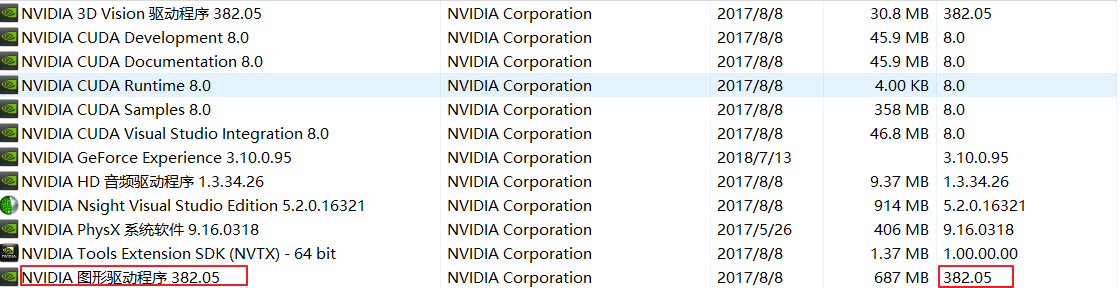
caffe-windows - nvidia driver: gtx 1060 382.05 (gtx 970m)
- GPU arch(s): sm_61 (sm_52)
- cuda: 8.0
- cudnn: 5.0.5
- opencv: 3.1.0 WITH_CUDA (compiled from source)
- other libs:
libraries_v140_x64_py27_1.1.0.tar.bz2
cuda+cudnn
(1). download and install driver by standalone for GTX 970 or GTX 1060 from here.
(2). download and install cuda_8.0.61_win10.exe, skip install nvidia driver and install toolkit only.
(3). download and install cudnn-8.0-windows10-x64-v5.0-ga.zip.
nvidia driver
driver can be installed by standalone or from
cuda_xxx_win10.exe.
we choose to install by standalone
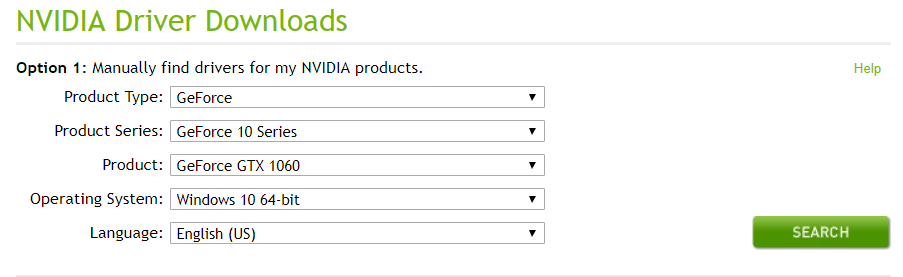
download proper driver for GTX 970 or GTX 1060 eg: 398.36-notebook-win10-64bit-international-whql.exe from https://www.nvidia.com/Download/index.aspx
cuda toolkit
cuda install guides for windows
download cuda_8.0.61_win10.exe from here
The CUDA Toolkit installs the CUDA driver and tools needed to create, build and run a CUDA application as well as libraries, header files, CUDA samples source code, and other resources
cuda_8.0.61_win10.exeincludes: Nvidia driver + toolkit.
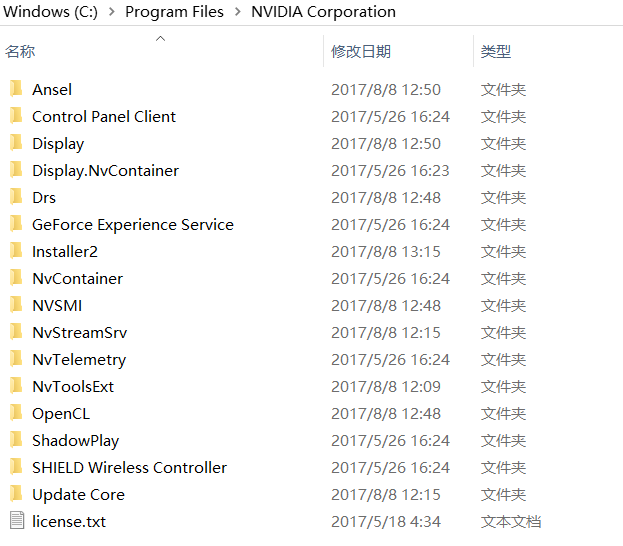
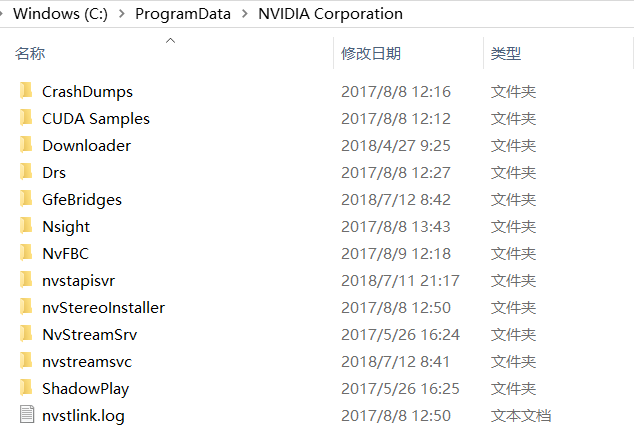
- driver install to
C:/Program Files/NVIDIA CorporationandC:/ProgramData/NVIDIA Corporation - tookit install to
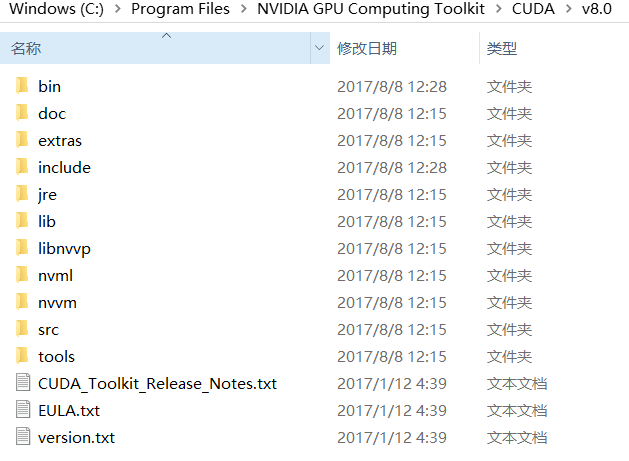
C:/Program Files/NVIDIA GPU Computing Toolkit,which contains headers,libs,tools for compiling CUDA applications.C:/ProgramData/NVIDIA GPU Computing Toolkitcontains cuda plugins for Visual Studio.

verify
cd C:\ProgramData\NVIDIA Corporation\CUDA Samples\v9.2\bin\win64\Release

./deviceQuery.exe
cudnn
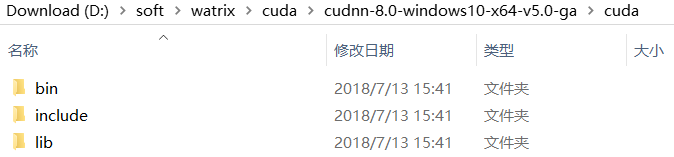
extract cudnn-8.0-windows10-x64-v5.0-ga.zip and copy include,liband bin to C:\Program Files\NVIDIA GPU Computing Toolkit\CUDA\v8.0
check cuda
compile
download
place caffe-windows at C:/compile/caffe-windows
extract libraries_v140_x64_py27_1.1.0.tar.bz2 to C:\Users\zunli\.caffe\dependencies\libraries_v140_x64_py27_1.1.0\libraries
config
edit C:\Users\zunli\.caffe\dependencies\libraries_v140_x64_py27_1.1.0\libraries\caffe-builder-config.cmake
# BOOST config

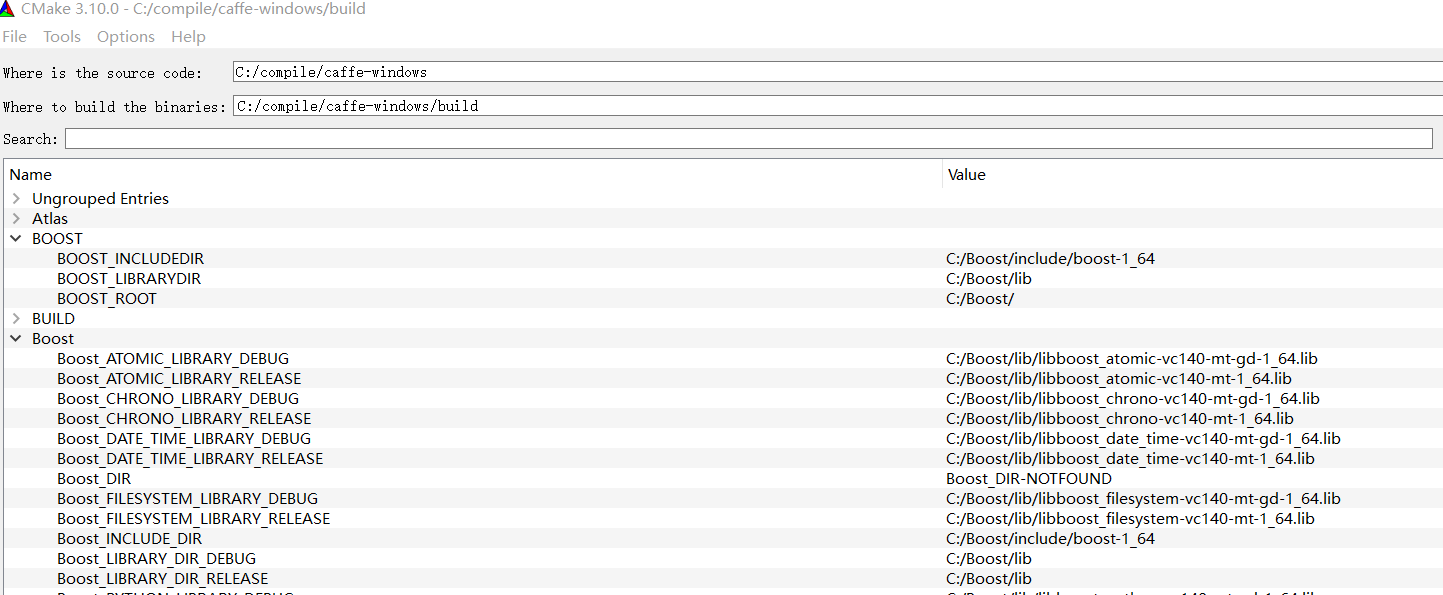
set(BOOST_ROOT "C:/Boost/")

set(BOOST_INCLUDEDIR ${BOOST_ROOT}/include/boost-1_64 CACHE PATH "")

set(BOOST_LIBRARYDIR ${BOOST_ROOT}/lib CACHE PATH "")

set(Boost_USE_MULTITHREADED ON CACHE BOOL "")

set(Boost_USE_STATIC_LIBS ON CACHE BOOL "")

set(Boost_USE_STATIC_RUNTIME OFF CACHE BOOL "")
vim caffe-windows/cmake/Dependencies.cmake
set(Boost_USE_STATIC_LIBS ON)

find_package(Boost 1.64 REQUIRED COMPONENTS system thread filesystem)
Tips:
(1) we useC:\Boost\1.64 to replace caffe dependenciesC:\Users\zunli\.caffe\dependencies\libraries_v140_x64_py27_1.1.0\libraries\1.61, because we have compilePCL 1.8.1withBoost 1.64 static.
(2) we use caffeC:\Users\zunli\.caffe\dependencies\libraries_v140_x64_py27_1.1.0\libraries\x64\vc14\libto replaceC:/Program Files/opencv. (opencv3.1 <====opencv3.4)
cd caffe

mkdir build && cd build && cmake-gui ..
with options
BLAS                 Open # Atlas, Open, MKL

BUILD_SHARED_LIBS        OFF # build static library

CMAKE_CONFIGURATION_TYPES   Release

CMAKE_CXX_RELEASE_FLAGS    /MD /O2 /Ob2 /DNDEBUG /MP

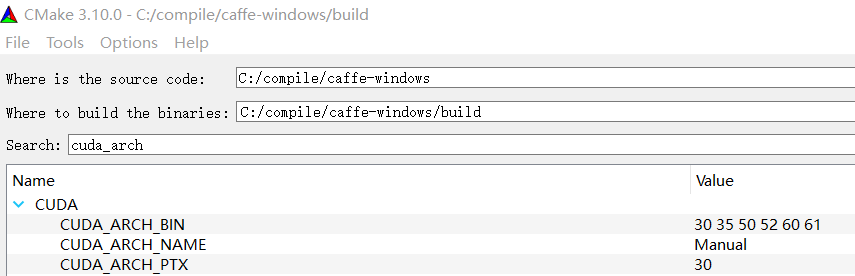
CUDA_ARCH_BIN  3.0 3.5 5.0 5.2 6.0 6.1 # very time-consuming

CUDA_ARCH_NAME Manual

CUDA_ARCH_PTX 3.0


Selecting Windows SDK version 10.0.14393.0 to target Windows 10.0.15063.

Boost version: 1.64.0

Found the following Boost libraries:

  system

  thread

  filesystem

  chrono

  date_time

  atomic

Found gflags  (include: C:/Users/zunli/.caffe/dependencies/libraries_v140_x64_py27_1.1.0/libraries/include, library: gflags_shared)

Found glog    (include: C:/Users/zunli/.caffe/dependencies/libraries_v140_x64_py27_1.1.0/libraries/include, library: glog)

Found PROTOBUF Compiler: C:/Users/zunli/.caffe/dependencies/libraries_v140_x64_py27_1.1.0/libraries/bin/protoc.exe

Found lmdb    (include: C:/Users/zunli/.caffe/dependencies/libraries_v140_x64_py27_1.1.0/libraries/include, library: lmdb)

Found LevelDB (include: C:/Users/zunli/.caffe/dependencies/libraries_v140_x64_py27_1.1.0/libraries/include, library: leveldb)

Found Snappy  (include: C:/Users/zunli/.caffe/dependencies/libraries_v140_x64_py27_1.1.0/libraries/include, library: snappy_static;optimized;C:/Users/zunli/.caffe/dependencies/libraries_v140_x64_py27_1.1.0/libraries/lib/caffezlib.lib;debug;C:/Users/zunli/.caffe/dependencies/libraries_v140_x64_py27_1.1.0/libraries/lib/caffezlibd.lib)

CUDA detected: 8.0

Found cuDNN: ver. 5.0.5 found (include: C:/Program Files/NVIDIA GPU Computing Toolkit/CUDA/v8.0/include, library: C:/Program Files/NVIDIA GPU Computing Toolkit/CUDA/v8.0/lib/x64/cudnn.lib)

Added CUDA NVCC flags for: sm_61

OpenCV found (C:/Users/zunli/.caffe/dependencies/libraries_v140_x64_py27_1.1.0/libraries)

Found OpenBLAS libraries: C:/Users/zunli/.caffe/dependencies/libraries_v140_x64_py27_1.1.0/libraries/lib/libopenblas.dll.a

Found OpenBLAS include: C:/Users/zunli/.caffe/dependencies/libraries_v140_x64_py27_1.1.0/libraries/include

NumPy ver. 1.11.3 found (include: C:/Python27/lib/site-packages/numpy/core/include)

Boost version: 1.64.0

Found the following Boost libraries:

  python

******************* Caffe Configuration Summary *******************

General:

  Version           :   1.0.0

  Git               :   unknown

  System            :   Windows

  C++ compiler      :   C:/Program Files (x86)/Microsoft Visual Studio 14.0/VC/bin/x86_amd64/cl.exe

  Release CXX flags :   /MD /O2 /Ob2 /DNDEBUG /MP /DWIN32 /D_WINDOWS /W3 /GR /EHsc

  Debug CXX flags   :   /MDd /Zi /Ob0 /Od /RTC1 /DWIN32 /D_WINDOWS /W3 /GR /EHsc

  Build type        :   Release

  BUILD_SHARED_LIBS :   OFF

  BUILD_python      :   ON

  BUILD_matlab      :   OFF

  BUILD_docs        :

  CPU_ONLY          :   OFF

  USE_OPENCV        :   ON

  USE_LEVELDB       :   ON

  USE_LMDB          :   ON

  USE_NCCL          :   OFF

  ALLOW_LMDB_NOLOCK :   OFF

Dependencies:

  BLAS              :   Yes (Open)

  Boost             :   Yes (ver. 1.64)

  glog              :   Yes

  gflags            :   Yes

  protobuf          :   Yes (ver. 3.1.0)

  lmdb              :   Yes (ver. 0.9.70)

  LevelDB           :   Yes (ver. 1.18)

  Snappy            :   Yes (ver. 1.1.1)

  OpenCV            :   Yes (ver. 3.1.0)

  CUDA              :   Yes (ver. 8.0)

NVIDIA CUDA:

  Target GPU(s)     :   Auto

  GPU arch(s)       :   sm_61

  cuDNN             :   Yes (ver. 5.0.5)

Python:

  Interpreter       :   C:/Python27/python.exe (ver. 2.7.13)

  Libraries         :   C:/Python27/libs/python27.lib (ver 2.7.13)

  NumPy             :   C:/Python27/lib/site-packages/numpy/core/include (ver 1.11.3)

Install:

  Install path      :   C:/car_libs/caffe

Configuring done
build and install
tips: Visual Studio 2015 can not generate shared library. So we build static caffe library.
CMake Error at CMakeLists.txt:66 (message):

  The Visual Studio generator cannot build a shared library.  Use the Ninja

  generator instead.
Build with Release x64 with Visual Studio 2015 and 38 modules will be generated and We Install to C:/car_libs/caffe/.
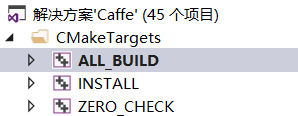
build result.

install to C:/car_libs/caffe.
caffe usage
CMakeLists.txt
# Boost

if(MSVC)

	# use static boost on windows

	set(Boost_USE_STATIC_LIBS ON) #

else()

	# use release boost on linux

	set(Boost_USE_STATIC_LIBS OFF)

endif(MSVC)

set(Boost_USE_MULTITHREAD ON)

# Find Boost package 1.64 (caffe also use Boost 1.64)

find_package(Boost 1.64 REQUIRED COMPONENTS serialization date_time system filesystem thread timer math_tr1)

# opencv

SET(OpenCV_DIR "C:/Users/zunli/.caffe/dependencies/libraries_v140_x64_py27_1.1.0/libraries/")

find_package(OpenCV REQUIRED COMPONENTS core highgui imgproc features2d calib3d) # nofree for 2.4

# caffe

set(Caffe_DIR "C:/car_libs/caffe/share/Caffe/")

find_package(Caffe)
when we use caffe lib in our program, errors will occur. And we need to fix CaffeTargets-release.cmake file。
usage error fix
(1) error with shared.lib
LNK1181 unable to open“gflags_shared.lib”
solution:
vim C:/car_libs/caffe/share/Caffe/CaffeTargets-release.cmake

# remove _shared -shared

:1,$s/_shared//g

:1,$s/-shared//g
(2) error with hdf5
hdf5.lib=>libcaffehdf5.lib
hdf5_hl.lib=>libcaffehdf5_hl.lib
:1,$s/hdf5/libcaffehdf5/g
(3) error with libopenblas
LNK1181 unable to open“libopenblas.dll.a.lib”
solution:
cd C:\Users\zunli\.caffe\dependencies\libraries_v140_x64_py27_1.1.0\libraries\lib and
- copy
libopenblas.a===>libopenblas.a.lib - copy
libopenblas.dll.a===>libopenblas.dll.a.lib
(4) error NtClose
error LNK2019: 无法解析的外部符号 NtClose,该符号在函数 mdb_env_map 中被引用
solution:
copy `C:/Program Files (x86)/Windows Kits/10/Lib/10.0.14393.0/um/x64/ntdll.lib` to `C:\Users\zunli\.caffe\dependencies\libraries_v140_x64_py27_1.1.0\libraries\lib`

copy `C:\Windows\SysWOW64\ntdll.dll` to `C:\Users\zunli\.caffe\dependencies\libraries_v140_x64_py27_1.1.0\libraries\bin`
CaffeTargets-release.cmake
cd C:\car_libs\caffe\share\Caffe\CaffeTargets-release.cmake
#----------------------------------------------------------------

# Generated CMake target import file for configuration "Release".

#----------------------------------------------------------------

# Commands may need to know the format version.

set(CMAKE_IMPORT_FILE_VERSION 1)

# Import target "caffe" for configuration "Release"

set_property(TARGET caffe APPEND PROPERTY IMPORTED_CONFIGURATIONS RELEASE)

set_target_properties(caffe PROPERTIES

  IMPORTED_LINK_INTERFACE_LANGUAGES_RELEASE "CXX"

  IMPORTED_LINK_INTERFACE_LIBRARIES_RELEASE

"caffeproto;C:/Boost/lib/libboost_system-vc140-mt-1_64.lib;C:/Boost/lib/libboost_thread-vc140-mt-1_64.lib;C:/Boost/lib/libboost_filesystem-vc140-mt-1_64.lib;C:/Boost/lib/libboost_chrono-vc140-mt-1_64.lib;C:/Boost/lib/libboost_date_time-vc140-mt-1_64.lib;C:/Boost/lib/libboost_atomic-vc140-mt-1_64.lib;C:/Boost/lib/libboost_python-vc140-mt-1_64.lib;caffehdf5.lib;caffehdf5_cpp.lib;caffehdf5_hl.lib;caffehdf5_hl_cpp.lib;caffezlib.lib;caffezlibstatic.lib;gflags;glog;leveldb.lib;libcaffehdf5.lib;libcaffehdf5_cpp.lib;libcaffehdf5_hl.lib;libcaffehdf5_hl_cpp.lib;libprotobuf.lib;libprotoc.lib;lmdb.lib;snappy.lib;snappy_static.lib;libopenblas.dll.a.lib;ntdll.lib;C:/Program Files/NVIDIA GPU Computing Toolkit/CUDA/v8.0/lib/x64/cudart.lib;C:/Program Files/NVIDIA GPU Computing Toolkit/CUDA/v8.0/lib/x64/curand.lib;C:/Program Files/NVIDIA GPU Computing Toolkit/CUDA/v8.0/lib/x64/cublas.lib;C:/Program Files/NVIDIA GPU Computing Toolkit/CUDA/v8.0/lib/x64/cublas_device.lib;C:/Program Files/NVIDIA GPU Computing Toolkit/CUDA/v8.0/lib/x64/cudnn.lib;opencv_core;opencv_highgui;opencv_imgproc;opencv_imgcodecs;C:/Python27/libs/python27.lib;"

  IMPORTED_LOCATION_RELEASE "${_IMPORT_PREFIX}/lib/caffe.lib"

  )

list(APPEND _IMPORT_CHECK_TARGETS caffe )

list(APPEND _IMPORT_CHECK_FILES_FOR_caffe "${_IMPORT_PREFIX}/lib/caffe.lib" )

# Import target "caffeproto" for configuration "Release"

set_property(TARGET caffeproto APPEND PROPERTY IMPORTED_CONFIGURATIONS RELEASE)

set_target_properties(caffeproto PROPERTIES

  IMPORTED_LINK_INTERFACE_LANGUAGES_RELEASE "CXX"

  IMPORTED_LINK_INTERFACE_LIBRARIES_RELEASE "C:/Users/zunli/.caffe/dependencies/libraries_v140_x64_py27_1.1.0/libraries/lib/libprotobuf.lib"

  IMPORTED_LOCATION_RELEASE "${_IMPORT_PREFIX}/lib/caffeproto.lib"

  )

list(APPEND _IMPORT_CHECK_TARGETS caffeproto )

list(APPEND _IMPORT_CHECK_FILES_FOR_caffeproto "${_IMPORT_PREFIX}/lib/caffeproto.lib" )

# Commands beyond this point should not need to know the version.

set(CMAKE_IMPORT_FILE_VERSION)
comiple errors with caffe.pb.h
tips: sometimes we not need to do this.
CMakeLists.txt
add_definitions( -DGLOG_NO_ABBREVIATED_SEVERITIES )

add_definitions( -DNOMINMAX )  # for pcl min,max

add_definitions( -DWIN32_LEAN_AND_MEAN )

#add_definitions( -DNO_STRICT ) # no use for caffe.pb.h
vim C:\car_libs\caffe\include\caffe\proto\caffe.pb.h
typedef ParamSpec_DimCheckMode DimCheckMode;

static const DimCheckMode STRICT = ParamSpec_DimCheckMode_STRICT;

static const DimCheckMode PERMISSIVE = ParamSpec_DimCheckMode_PERMISSIVE;

typedef V1LayerParameter_DimCheckMode DimCheckMode;

static const DimCheckMode STRICT = V1LayerParameter_DimCheckMode_STRICT;

static const DimCheckMode PERMISSIVE = V1LayerParameter_DimCheckMode_PERMISSIVE;
replace STRICT and PERMISSIVE to _STRICT and _PERMISSIVE.
typedef ParamSpec_DimCheckMode DimCheckMode;

static const DimCheckMode _STRICT = ParamSpec_DimCheckMode_STRICT;

static const DimCheckMode _PERMISSIVE = ParamSpec_DimCheckMode_PERMISSIVE;

typedef V1LayerParameter_DimCheckMode DimCheckMode;

static const DimCheckMode _STRICT = V1LayerParameter_DimCheckMode_STRICT;

static const DimCheckMode _PERMISSIVE = V1LayerParameter_DimCheckMode_PERMISSIVE;
run exe
- copy
C:/car_libs/caffe/bin/*.dlldlls tobin/releasefolder. - copy
Opencvdlls tobin/releasefolder.
Reference
History
- 20180413 created.
Copyright
- Post author: kezunlin
- Post link: https://kezunlin.me/post/1739694c/
- Copyright Notice: All articles in this blog are licensed under CC BY-NC-SA 3.0 unless stating additionally.
windows 10安装和配置caffe教程 | Install and Configure Caffe on windows 10的更多相关文章
- ubuntu 16.04源码编译和配置caffe详细教程 | Install and Configure Caffe on ubuntu 16.04
本文首发于个人博客https://kezunlin.me/post/b90033a9/,欢迎阅读! Install and Configure Caffe on ubuntu 16.04 Series ...
- [Part 1] Ubuntu 16.04安装和配置QT5 | Part-1: Install and Configure Qt5 on Ubuntu 16.04
本文首发于个人博客https://kezunlin.me/post/91842b71/,欢迎阅读! Part-1: Install and Configure Qt5 on Ubuntu 16.04 ...
- MinGW - 安装和配置 / MinGW - Howto Install And Configure
MinGW在线安装程序下载地址:http://sourceforge.net/projects/mingw/files/Automated%20MinGW%20Installer/mingw-get- ...
- Tableau Server注册安装及配置详细教程
Tableau Server注册安装及配置详细教程 本文讲解的是 Tableau Server 10.0 版本的安装及配置 这里分享的 TableauServer 安装版本为64位的10.0版本Ser ...
- opencv学习(1.2) - Windows 10 安装OpenCV &配置VS 2015
windows 10 安装OpenCV&配置VS 2015 环境 系统:Windows 10 OpenCV版本:3.4.1 开发IDE:VS2015 社区版 下载安装 下载OpenCV 3.4 ...
- MySQL5.7免安装版配置图文教程
MySQL5.7免安装版配置图文教程 更新时间:2017年09月06日 10:22:11 作者:吾刃之所向 我要评论 Mysql是一个比较流行且很好用的一款数据库软件,如下记录了我学习总结的 ...
- CentOS 6.5系统使用yum方式安装LAMP环境和phpMyAdmin,mysql8.0.1/mysql5.7.22+centos7,windows mysql安装、配置
介绍如何在CentOs6.2下面使用YUM配置安装LAMP环境,一些兄弟也很喜欢使用编译的安装方法,个人觉得如果不是对服务器做定制,用yum安装稳定简单,何必去download&make&am ...
- win7下IIS的安装和配置 图文教程
转自 http://www.jb51.net/article/29787.htm 最近工作需要IIS,自己的电脑又是Windows7系统,找了下安装的方法,已经安装成功.在博客里记录一下,给需要的 ...
- PHP学习之-Mongodb在Windows下安装及配置
Mongodb在Windows下安装及配置 1.下载 下载地址:http://www.mongodb.org/ 建议下载zip版本. 2.安装 下载windows版本安装就和普通的软件一样,直接下一步 ...
随机推荐
- Typora忘记保存的文件怎么找回
打开Typora,选择文件--偏好设置,在通用设置下点击恢复未保存的草稿,就可以找到你所有未保存的文件.
- 玩转u8g2 OLED库 MAX7219_32X8点阵模块
u8g2 OLED库 + MAX7219_32X8点阵模块 理论基础 玩转u8g2 OLED库,一篇就够 玩转u8g2 OLED库,一篇就够(字数太多 要分篇) 实验内容 Full screen bu ...
- Ubuntu svn 安装 Rabbitvcs
先添加源 sudo add-apt-repository ppa:rabbitvcs/ppa 必要的话在源清单里面也添加一下 sudo gedit /etc/apt/sources.list 内容是 ...
- spring cloud 2.x版本 Feign服务发现教程(内含集成Hystrix熔断机制)
前言 本文采用Spring cloud本文为2.1.8RELEASE,version=Greenwich.SR3 本文基于前两篇文章eureka-server和eureka-client的实现. 参考 ...
- Django学习day3——Django的简单使用
开始一个项目 切换到django的虚拟环境中 执行: django-admin startproject mysite 创建第一个django项目mysite django生成的目录如下: E:. └ ...
- Java 实现一个 能够 进行简单的增删改查的 超市管理系统
1. 首先编写一个 Fruitltem 的商品类, 描述 商品的基本信息. 代码如下: 保证详细, 运行的起来, 有什么 问题也可以评论留言. /* * 自定义类, 描述商品信息 * * 商品的属性: ...
- 【解决】Got permission denied while trying to connect to the Docker daemon socket at......dial unix /var/run/docker.sock: permission denied
>>> 问题:搭建Portainer时,选择本地连接报错? >>>分析: 根据报错信息可知是权限问题. 可能原因一:使用了非root用户启用或连接docker &g ...
- CSS3解决字母不换行的方法
CSS3解决字母不换行的方法 <pre>word-wrap: break-word;</pre>
- IDEA Debug 无法进入断点的解决方法
文章来源: https://studyidea.cn/idea_breakpoint_not_use 前言 某个多模块项目中使用多个版本的 Spring,如 Spring 4,Spring 5,在使用 ...
- SpringBoot Web篇(二)
摘要 继上一篇 SpringBoot Web篇(一) 文件上传 当我们服务器需要接收用户上传的文件时,就需要使用MultipartFile作为参数接收文件.如下: @PostMapping(" ...