
1.9TF的过拟合-dropout
不带dropout程序并通过tensorboard查看loss的图像
"""

Please note, this code is only for python 3+. If you are using python 2+, please modify the code accordingly.

"""

from __future__ import print_function

import tensorflow as tf

from sklearn.datasets import load_digits

from sklearn.cross_validation import train_test_split

from sklearn.preprocessing import LabelBinarizer

# load data

digits = load_digits()

X = digits.data

y = digits.target

y = LabelBinarizer().fit_transform(y)

X_train, X_test, y_train, y_test = train_test_split(X, y, test_size=.3)

def add_layer(inputs, in_size, out_size, layer_name, activation_function=None, ):

    # add one more layer and return the output of this layer

    Weights = tf.Variable(tf.random_normal([in_size, out_size]))

    biases = tf.Variable(tf.zeros([1, out_size]) + 0.1, )

    Wx_plus_b = tf.matmul(inputs, Weights) + biases

    # here to dropout

    if activation_function is None:

        outputs = Wx_plus_b

    else:

        outputs = activation_function(Wx_plus_b, )

    tf.summary.histogram(layer_name + '/outputs', outputs)

    return outputs

# define placeholder for inputs to network

xs = tf.placeholder(tf.float32, [None, 64])  # 8x8

ys = tf.placeholder(tf.float32, [None, 10])

# add output layer

l1 = add_layer(xs, 64, 50, 'l1', activation_function=tf.nn.tanh)

prediction = add_layer(l1, 50, 10, 'l2', activation_function=tf.nn.softmax)

# the loss between prediction and real data

cross_entropy = tf.reduce_mean(-tf.reduce_sum(ys * tf.log(prediction),

                                              reduction_indices=[1]))  # loss

tf.summary.scalar('loss', cross_entropy)

train_step = tf.train.GradientDescentOptimizer(0.5).minimize(cross_entropy)

sess = tf.Session()

merged = tf.summary.merge_all()

# summary writer goes in here

train_writer = tf.summary.FileWriter("logs/train", sess.graph)

test_writer = tf.summary.FileWriter("logs/test", sess.graph)

# tf.initialize_all_variables() no long valid from

# 2017-03-02 if using tensorflow >= 0.12

if int((tf.__version__).split('.')[1]) < 12 and int((tf.__version__).split('.')[0]) < 1:

    init = tf.initialize_all_variables()

else:

    init = tf.global_variables_initializer()

sess.run(init)

for i in range(500):

    # here to determine the keeping probability

    sess.run(train_step, feed_dict={xs: X_train, ys: y_train})

    if i % 50 == 0:

        # record loss

        train_result = sess.run(merged, feed_dict={xs: X_train, ys: y_train})

        test_result = sess.run(merged, feed_dict={xs: X_test, ys: y_test})

        train_writer.add_summary(train_result, i)

        test_writer.add_summary(test_result, i)
执行完之后在执行目录之下有一个log目录生成了对应的tensorboard显示文件
使用 tensorboard --logdir="logs/" --port=8011 即可在浏览器访问
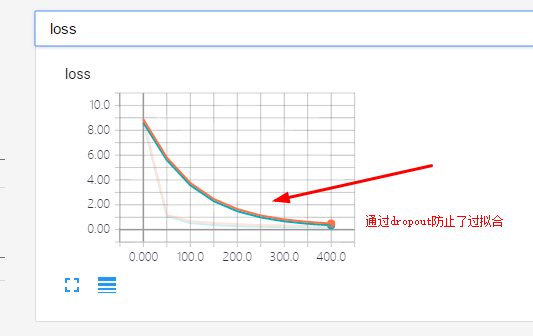
带有dropout的程序并通过tensoeboard生成loss图像观察
"""

Please note, this code is only for python 3+. If you are using python 2+, please modify the code accordingly.

"""

from __future__ import print_function

import tensorflow as tf

from sklearn.datasets import load_digits

from sklearn.cross_validation import train_test_split

from sklearn.preprocessing import LabelBinarizer

# load data

digits = load_digits()

X = digits.data

y = digits.target

y = LabelBinarizer().fit_transform(y)

X_train, X_test, y_train, y_test = train_test_split(X, y, test_size=.3)

def add_layer(inputs, in_size, out_size, layer_name, activation_function=None, ):

    # add one more layer and return the output of this layer

    Weights = tf.Variable(tf.random_normal([in_size, out_size]))

    biases = tf.Variable(tf.zeros([1, out_size]) + 0.1, )

    Wx_plus_b = tf.matmul(inputs, Weights) + biases

    # here to dropout

    Wx_plus_b = tf.nn.dropout(Wx_plus_b, keep_prob)

    if activation_function is None:

        outputs = Wx_plus_b

    else:

        outputs = activation_function(Wx_plus_b, )

    tf.summary.histogram(layer_name + '/outputs', outputs)

    return outputs

# define placeholder for inputs to network

keep_prob = tf.placeholder(tf.float32)  #dropout

xs = tf.placeholder(tf.float32, [None, 64])  # 8x8

ys = tf.placeholder(tf.float32, [None, 10])

# add output layer

l1 = add_layer(xs, 64, 50, 'l1', activation_function=tf.nn.tanh)

prediction = add_layer(l1, 50, 10, 'l2', activation_function=tf.nn.softmax)

# the loss between prediction and real data

cross_entropy = tf.reduce_mean(-tf.reduce_sum(ys * tf.log(prediction),

                                              reduction_indices=[1]))  # loss

tf.summary.scalar('loss', cross_entropy)

train_step = tf.train.GradientDescentOptimizer(0.5).minimize(cross_entropy)

sess = tf.Session()

merged = tf.summary.merge_all()

# summary writer goes in here

train_writer = tf.summary.FileWriter("logs/train", sess.graph)

test_writer = tf.summary.FileWriter("logs/test", sess.graph)

# tf.initialize_all_variables() no long valid from

# 2017-03-02 if using tensorflow >= 0.12

if int((tf.__version__).split('.')[1]) < 12 and int((tf.__version__).split('.')[0]) < 1:

    init = tf.initialize_all_variables()

else:

    init = tf.global_variables_initializer()

sess.run(init)

for i in range(500):

    # here to determine the keeping probability

    sess.run(train_step, feed_dict={xs: X_train, ys: y_train, keep_prob: 0.5})

    if i % 50 == 0:

        # record loss

        train_result = sess.run(merged, feed_dict={xs: X_train, ys: y_train, keep_prob: 1})

        test_result = sess.run(merged, feed_dict={xs: X_test, ys: y_test, keep_prob: 1})

        train_writer.add_summary(train_result, i)

        test_writer.add_summary(test_result, i)
图片显示:
1.9TF的过拟合-dropout的更多相关文章
- 理解dropout——本质是通过阻止特征检测器的共同作用来防止过拟合 Dropout是指在模型训练时随机让网络某些隐含层节点的权重不工作,不工作的那些节点可以暂时认为不是网络结构的一部分,但是它的权重得保留下来(只是暂时不更新而已),因为下次样本输入时它可能又得工作了
理解dropout from:http://blog.csdn.net/stdcoutzyx/article/details/49022443 http://www.cnblogs.com/torna ...
- [CS231n-CNN] Training Neural Networks Part 1 : parameter updates, ensembles, dropout
课程主页:http://cs231n.stanford.edu/ ___________________________________________________________________ ...
- [DeeplearningAI笔记]改善深层神经网络1.4_1.8深度学习实用层面_正则化Regularization与改善过拟合
觉得有用的话,欢迎一起讨论相互学习~Follow Me 1.4 正则化(regularization) 如果你的神经网络出现了过拟合(训练集与验证集得到的结果方差较大),最先想到的方法就是正则化(re ...
- Dropout原理分析
工作流程 dropout用于解决过拟合,通过在每个batch中删除某些节点(cell)进行训练,从而提高模型训练的效果. 通过随机化一个伯努利分布,然后于输入y进行乘法,将对应位置的cell置零.然后 ...
- Python机器学习笔记:不得不了解的机器学习面试知识点(1)
机器学习岗位的面试中通常会对一些常见的机器学习算法和思想进行提问,在平时的学习过程中可能对算法的理论,注意点,区别会有一定的认识,但是这些知识可能不系统,在回答的时候未必能在短时间内答出自己的认识,因 ...
- 深度学习(六)keras常用函数学习
原文作者:aircraft 原文链接:https://www.cnblogs.com/DOMLX/p/9769301.html Keras是什么? Keras:基于Theano和TensorFlow的 ...
- 截图:【炼数成金】深度学习框架Tensorflow学习与应用
创建图.启动图 Shift+Tab Tab 变量介绍: F etch Feed 简单的模型构造 :线性回归 MNIST数据集 Softmax函数 非线性回归神经网络 MINIST数据集分类器简单版 ...
- Tensorflow 之模型内容可视化
TensorFlow模型保存和提取方法 1. tensorflow实现 卷积神经网络CNN:Tensorflow实现(以及对卷积特征的可视化) # 卷积网络的训练数据为MNIST(28*28灰度单色图 ...
- CNN卷积神经网络的构建
1.卷积神经网络由输入层,卷积层,激活函数,池化层,全连接层组成. input(输入层)--conv(卷积层)--relu(激活函数)--pool(池化层)--fc(全连接层) 2.卷积层: 主要用来 ...
随机推荐
- Connect to a ROS Network---2
原创博文:转载请标明出处(周学伟):http://www.cnblogs.com/zxouxuewei/tag/ 一.Introduction ROS网络由单个ROS主机和多个ROS节点组成. ROS ...
- OpenVPN多处理之-多队列TUN多实例
两年前我以前提到了多个OpenVPN共享一个tun虚拟网卡,旨在降低管理开销和切换开销,由于我讨厌在外面对一大堆网卡做Bridge或者Bonding,除了初衷不同,其实的关于TUN的进展一直没有偏离我 ...
- ios开发之NSString用strong还是用copy?
代码如下: 1,声明 @property(nonatomic,strong)NSString *firstName; @property(nonatomic,copy)NSString *second ...
- 使用librtmp进行H264与AAC直播
libx264 版本是 128libfaac 版本是 1.28 1.帧的划分 1.1 H.264 帧 对于 H.264 而言每帧的界定符为 00 00 00 01 或者 00 00 01. 比如下面的 ...
- [Ubuntu] 解决 pip 安装 lxml 出现 x86_64-linux-gnu-gcc 异常
安装 pip : $ wget https://bootstrap.pypa.io/get-pip.py ... $ sudo python get-pip.py install 使用 pip 安装/ ...
- javascript的实现事件的一些实例
嘿嘿,今天学习到了事件,其实在C#中事件只需要我们触发即可实现,但是在javascript并不是这样的,在这里,事件是javascript与html的交互,就是文档或者浏览器窗口发生的一件特定的交互瞬 ...
- Qt——布局管理器
教程地址 运行截图: 代码: #include "mainwindow.h" #include <QApplication> #include <QHBoxLay ...
- WP8.1学习系列(第二十二章)——在页面之间导航
在本文中 先决条件 创建导航应用 Frame 和 Page 类 页面模板中的导航支持 在页面之间传递信息 缓存页面 摘要 后续步骤 相关主题 重要的 API Page Frame Navigation ...
- 日记整理---->2016-11-25
2017-03-02开始,记录的一些知识点.岁月长,三更漏.漫漫回廊,依稀人空瘦.借酒消愁入断肠,倚剑笑我,我独自寻殇. 一.vx中的v-bind和{{}}的区别 <td class=" ...
- 使用import取代require
首先,Module 语法是 JavaScript 模块的标准写法,坚持使用这种写法.使用import取代require. // bad const moduleA = require('moduleA ...