
Git安装遇到的问题fatal: Could not read from remote repository.的解决办法
转自:https://blog.csdn.net/huahua78/article/details/52330792
查看远端地址 git remote –v
查看配置 git config --list

git status
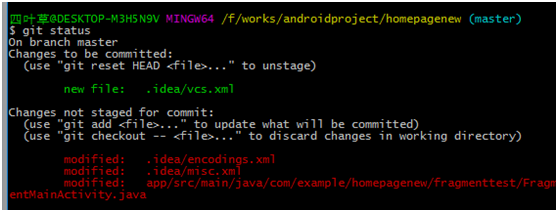
 git add .  // 暂存所有的更改

 git checkout . // 丢弃所有的更改

 git status // 查看文件状态

 git commit -m "本次要提交的概要信息" // 提交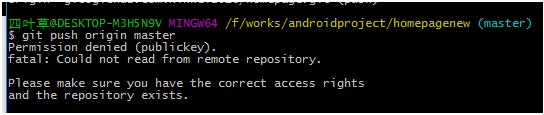
设置远端仓库地址 git remote set-url origin 你的远端地址
git push origin master出现以下情况:

解决办法:删除当前key,然后重新生成key,
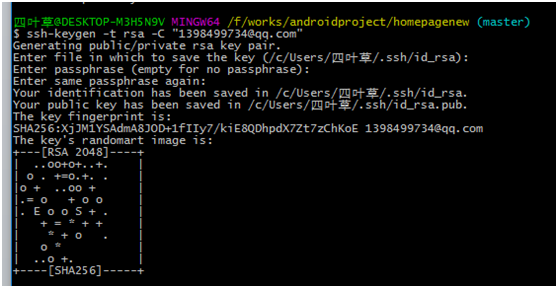
会在本地C:\Users\你的用户名.ssh生成文件夹,里面有id_rsa和id_rsa.pub两个文件
然后复制id_rsa.pub文件里面的内容,到https://github.com/settings/keys新建一个, 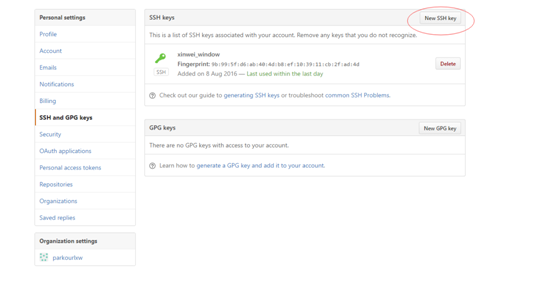
设置远程地址:(上面新建的)
git remote add origin_new 新的地址
git remote –v查看
git push origin_new master重新推送
下面是设置用户名
Git config –global user.name “用户名”
git config –global user.email 邮箱地址
设置代理:
git config –global https.proxy http://127.0.0.1:1080
取消设置代理:
git config –global –unset https.proxy
取消git init操作时出现 rm: cannot remove ‘.git’: Is a directory
是因为输入的命令是: rm -f .git
解决办法:rm -rf .git 即删除整个.git目录
failed to push some refs to ‘git@github.com:*.git’ hint: Updates were rejected ···
使用git push origin master的时候出现一下错误:
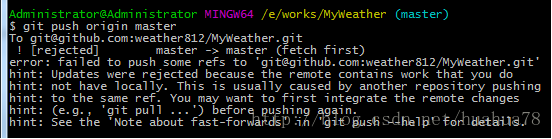
解决办法:
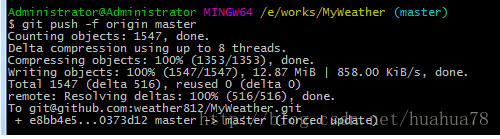
git push -f origin master或者git pull下
恢复不小心删除的 git stash 文件:
git fsck  //找到dangling的对象

git show id  //上面列出的每一条记录的最后一个字符串,按 enter 查看具体信息

git stash apply id
git 回滚提交
//reset将一个分支的末端指向另一个提交。这可以用来移除当前分支的一些提交, 让master分支向后回退了两个提交

git checkout master

git reset HEAD~2

//Revert撤销一个提交的同时会创建一个新的提交, 找出倒数第二个提交,然后创建一个新的提交来撤销这些更改,然后把这个提交加入项目中。

git revert HEAD~2
错误:Please enter a commit message to explain why this merge is necessary. 解决办法:
1. (可选)按键盘字母 i 进入insert模式
2. (可选)修改最上面那行黄色合并信息
3. 按键盘左上角”Esc” (退出insert模式)
4. 输入”:wq”,按回车键即可(提交)
gitignore notworking:
git rm -r --cached .

git add .

git commit -m "fixed untracked files"
git Failed to connect to www.google.com port 80: Timed out 可能是因为设置了代理:
git config --global http.proxy          //查看代理

git config --global --unset http.proxy  //取消代理
HTTP Basic access denied on Git:
git config --global --unset credential.helper

git clone '···'

login username,password
rebase 和 merge 区别
git pull --rebase origin masterrebase 选项告诉 Git 把你的提交移到同步了中央仓库修改后的 master 分支的顶部。rebase 操作过程是把本地提交一次一个地迁移到更新了的中央仓库master分支之上。这意味着可能要解决在迁移某个提交时出现的合并冲突,而不是解决包含了所有提交的大型合并时所出现的冲突。这样的方式让你尽可能保持每个提交的聚焦和项目历史的整洁。反过来,简化了哪里引入Bug的分析,如果有必要,回滚修改也可以做到对项目影响最小。
git pull origin master如果没有 rebase, pull 操作仍然可以完成,但每次 pull 操作要同步中央仓库中别人修改时,提交历史会以一个多余的『合并提交』结尾。
合并玩冲突之后,git rebase --continue,Git 会继续一个一个地合并后面的提交,如其它的提交有冲突就重复这个过程。
如果你碰到了冲突,但发现搞不定,不要惊慌。只要执行下面这条命令,就可以回到你执行git pull –rebase命令前的样子:git rebase --abort
Git安装遇到的问题fatal: Could not read from remote repository.的解决办法的更多相关文章
- fatal: Could not read from remote repository.的解决办法
1. git remote –v查看远端地址或者查看配置 git config –list 2. git status 3. git add . git status git commit -m “本 ...
- git clone ssh 时出现 fatal: Could not read from remote repository
一.问题及解决办法参考: 在 ubuntu 中,要把 GitHub 上的储存库克隆到计算机上时,执行如下命令: git clone git@github.com:USER-NAME/REPOSITOR ...
- gitlab 安装遇到 fatal:does not appear to be a git repository fatal: Could not read from remote repository. 问题
Cloning into 'door_lock_bsp'... git@192.168.1.5's password: fatal: 'door_lock/door_lock_bsp.git' do ...
- git pull 出错 fatal: Could not read from remote repository.Please make sure you have the correct access rights.and the repository exists.
Warning: Permanently added the RSA host key for IP address '192.30.252.131' to the list of known hos ...
- git提示错误关于错误:ssh: Could not resolve hostname github.com: Name or service not known.fatal: Could not read from remote repository.
关于 Git 使用中出现的错误 饥人谷_楠柒 关注 2016.11.02 15:33* 字数 746 阅读 3607评论 5喜欢 10赞赏 1 关于错误:ssh: Could not resolve ...
- 用ssh进行git clone出现 fatal: Could not read from remote repository.
问题:在通过MobaXterm进行ssh连接的服务器上用ssh进行git clone出现 fatal: Could not read from remote repository. 解决方法:prox ...
- git之fatal: Could not read from remote repository
问题背景:在git bash中使用hexo g -d命令进行文章发布 详细错误信息: fatal: Could not read from remote repository. Please make ...
- fatal:'origin' does not appear to be a git repository fatal:Could not read from remote repository
天gitlab中遇到的问题: 当 git push origin branch_name时遇到报错如下: fatal:'origin' does not appear to be a git repo ...
- 【git基础】Permission denied (publickey). fatal: Could not read from remote repository
运行以下git命令的时候出现错误 git push -u origin master error The authenticity of host 'github.com (13.250.177.22 ...
随机推荐
- struts2(三) 输入校验和拦截器
前面知道了struts2的架构图和struts2的自动封装表单参数和数据类型自动转换,今天来学struts2的第三第四个东西,输入校验和拦截器, --WH 一.输入校验 在以前我们写一个登录页面时,并 ...
- ios使用kvc机制简化对json的解析
在 ios开发中,我们经常需要对服务器的传回来的json进行解析,特别是对哪些字段特别多的就会又烦躁的情绪.tmd都是一样的东西,要为每个property赋值,真是累人啊.举个简单的例子吧.服务器会过 ...
- LeetCode263——Ugly Number
Write a program to check whether a given number is an ugly number. Ugly numbers are positive numbers ...
- 如何理解java泛型类
//泛型代码 public class Pair<T>{ private T first=null; private T second=null; public Pair(T fir,T ...
- django rest_framework入门
1.rest_framework的作用 1)可以对orm和非orm资源序列化 2)支持restful风格编程(POST,PUT,PATCH) 3)使用类视图编写API的view,而不是函数视图,类视图 ...
- java8新特性(六):Stream多线程并行数据处理
转:http://blog.csdn.net/sunjin9418/article/details/53143588 将一个顺序执行的流转变成一个并发的流只要调用 parallel()方法 publi ...
- spark on alluxio和MR on alluxio测试(改进版)【转】
转自:http://kaimingwan.com/post/alluxio/spark-on-alluxiohe-mr-on-alluxioce-shi-gai-jin-ban 1. 介绍 2. 准备 ...
- js生成二维码实例
<!DOCTYPE html><html><head> <title></title> <meta charset=&qu ...
- LeetCode: Search a 2D Matrix 解题报告
Search a 2D Matrix Write an efficient algorithm that searches for a value in an m x n matrix. This m ...
- 在pycharm中启动Django服务器
1.要是直接运行manage.py程序的话 会提示一大堆东西,那无非是提示没有传入参数.先打开mange.py,然后再运行,会提示一堆东西,表示没有配置参数.在pycharm右上角点击edit con ...