
SpringBoot集成Mybatis并具有分页功能PageHelper
SpringBoot集成Mybatis并具有分页功能PageHelper
- SET FOREIGN_KEY_CHECKS=0;
- -- ----------------------------
- -- Table structure for user
- -- ----------------------------
- DROP TABLE IF EXISTS `user`;
- CREATE TABLE `user` (
- `test_id` bigint(20) NOT NULL COMMENT '主键ID',
- `tenant_id` bigint(20) NOT NULL COMMENT '租户ID',
- `name` varchar(30) DEFAULT NULL COMMENT '名称',
- `age` int(11) DEFAULT NULL COMMENT '年龄',
- `test_type` int(11) DEFAULT NULL COMMENT '测试下划线字段命名类型',
- `test_date` datetime DEFAULT NULL COMMENT '日期',
- `role` bigint(20) DEFAULT NULL COMMENT '测试',
- `phone` varchar(11) DEFAULT NULL COMMENT '手机号码',
- PRIMARY KEY (`test_id`)
- ) ENGINE=InnoDB DEFAULT CHARSET=utf8;
- -- ----------------------------
- -- Records of user
- -- ----------------------------
- INSERT INTO `user` VALUES ('0', '1', '雷锋', '1', '1', '2017-01-01 01:01:01', '1', '10010');
- INSERT INTO `user` VALUES ('1', '1', '三毛', '2', '1', '2017-02-02 01:01:01', '1', '10086');
- INSERT INTO `user` VALUES ('2', '1', '小马', '1', '1', '2017-03-03 01:01:01', '1', '10000');
- INSERT INTO `user` VALUES ('3', '2', '麻花藤', '1', '1', '2017-03-03 01:01:01', '1', '10000');
- INSERT INTO `user` VALUES ('4', '2', '东狗', '2', '1', '2017-03-03 01:01:01', '1', '10086');
- INSERT INTO `user` VALUES ('5', '1', '王五', '2', '1', '2017-03-03 01:01:01', '1', '10010');
- INSERT INTO `user` VALUES ('6', '1', '小小三毛', '2', '1', '2017-02-02 01:01:01', '1', '10086');
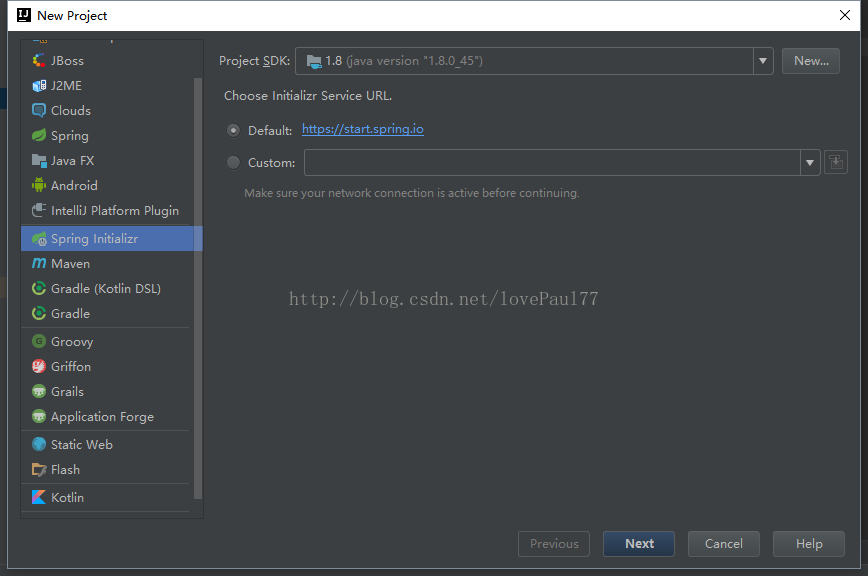
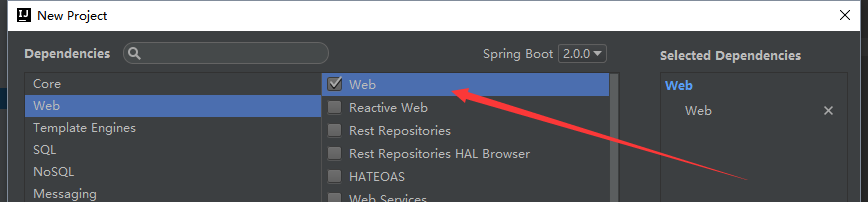
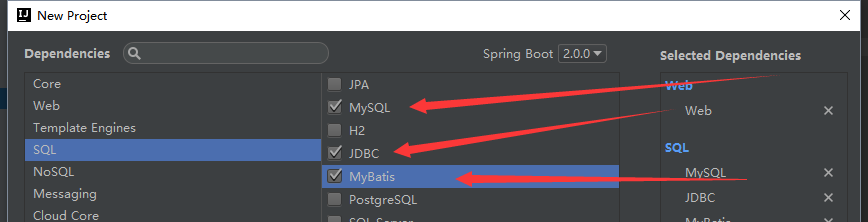
<dependency>

   <groupId>com.github.pagehelper</groupId>

   <artifactId>pagehelper-spring-boot-starter</artifactId>

   <version>1.2.3</version>

</dependency>
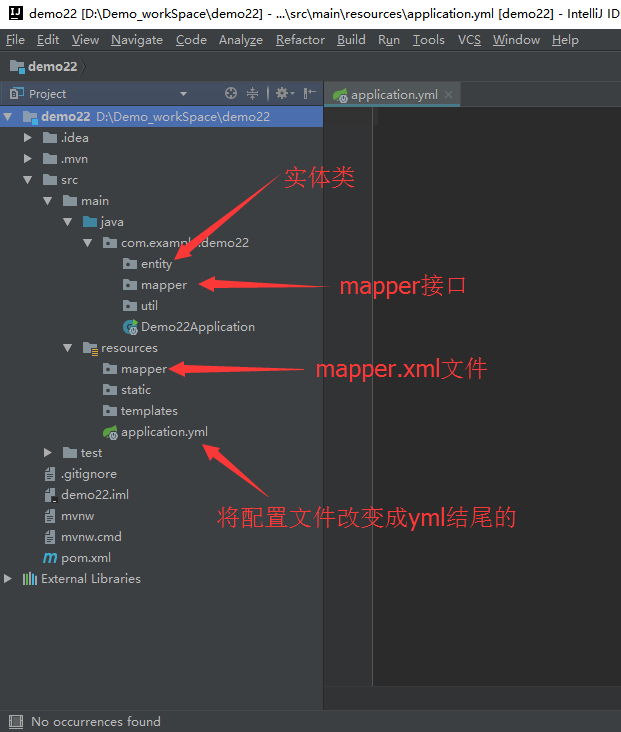
package com.example.demo.entity;

import lombok.Data;

import java.util.Date;

@Data

public class User {

    private Integer testId;

    private Integer tenantId;

    private String name;

    private Integer age;

    private Integer testType;

    private Date testDate;

    private Integer role;

    private String phone;

    @Override

    public String toString() {

        return "User{" +

                "testId=" + testId +

                ", tenantId=" + tenantId +

                ", name='" + name + '\'' +

                ", age=" + age +

                ", testType=" + testType +

                ", testDate=" + testDate +

                ", role=" + role +

                ", phone='" + phone + '\'' +

                '}';

    }

}
#运行的端口

server:

  port: 8088

#数据库连接池

spring:

  datasource:

    driver-class-name: com.mysql.jdbc.Driver

    username: root

    password: 521521

    url: jdbc:mysql://localhost:3306/springmvc?characterEncoding=utf-8&useSSL=false

#让mybatis知道mapper在哪里

mybatis:

    mapper-locations: classpath:mapper/*.xml

#分页的配置

pagehelper:

  offset-as-page-num: true

  row-bounds-with-count: true

  reasonable: true
package com.example.demo.mapper;

import com.example.demo.entity.User;

import org.apache.ibatis.annotations.Mapper;

import org.springframework.stereotype.Component;

import java.util.List;

@Mapper

@Component

public interface UserDao {

    List<User> findAll();

}
<?xml version="1.0" encoding="UTF-8" ?>

<!DOCTYPE mapper PUBLIC "-//mybatis.org//DTD Mapper 3.0//EN" "http://mybatis.org/dtd/mybatis-3-mapper.dtd" >

<mapper namespace="com.example.demo.mapper.UserDao">

    <select id="findAll" resultType="com.example.demo.entity.User">

        SELECT

            u.test_id   AS testId,

            u.age,

            u.name,

            u.phone,

            u.role,

            u.tenant_id AS tenantId,

            u.test_date AS testDate

        FROM user u

    </select>

</mapper>
package com.example.demo.mapper;

import com.example.demo.entity.User;

import com.github.pagehelper.PageHelper;

import org.junit.Test;

import org.junit.runner.RunWith;

import org.springframework.beans.factory.annotation.Autowired;

import org.springframework.boot.test.context.SpringBootTest;

import org.springframework.test.context.junit4.SpringRunner;

import java.util.List;

@RunWith(SpringRunner.class)

@SpringBootTest

public class UserDaoTest {

    @Autowired

    private UserDao userDao;

    @Test

    public void findAll() {

        PageHelper.startPage(4, 2);

        List<User> all = userDao.findAll();

        for (User user : all) {

            System.out.println(user);

        }

    }

}
SpringBoot集成Mybatis并具有分页功能PageHelper的更多相关文章
- BindingException: Invalid bound statement (not found)问题排查:SpringBoot集成Mybatis重点分析
重构代码,方法抛出异常:BindingException: Invalid bound statement (not found) 提示信息很明显:mybatis没有提供某方法 先不解释问题原因和排查 ...
- 0120 springboot集成Mybatis和代码生成器
在日常开发中,数据持久技术使用的架子使用频率最高的有3个,即spring-jdbc , spring-jpa, spring-mybatis.详情可以看我之前的一篇文章spring操作数据库的3个架子 ...
- SpringBoot集成MyBatis底层原理及简易实现
MyBatis是可以说是目前最主流的Spring持久层框架了,本文主要探讨SpringBoot集成MyBatis的底层原理.完整代码可移步Github. 如何使用MyBatis 一般情况下,我们在Sp ...
- springboot集成mybatis(逆向工程),热部署以及整合Swagger2
本文是作者原创,版权归作者所有.若要转载,请注明出处. springboot集成mybatis和mybatis-generator插件 1.新建Springboot项目(略) 2.导入相关依赖 < ...
- springboot集成mybatis(二)
上篇文章<springboot集成mybatis(一)>介绍了SpringBoot集成MyBatis注解版.本文还是使用上篇中的案例,咱们换个姿势来一遍^_^ 二.MyBatis配置版(X ...
- springboot集成mybatis(一)
MyBatis简介 MyBatis本是apache的一个开源项目iBatis, 2010年这个项目由apache software foundation迁移到了google code,并且改名为MyB ...
- Mybatis Generator实现分页功能
Mybatis Generator实现分页功能 分类: IBATIS2013-07-17 17:03 882人阅读 评论(1) 收藏 举报 mybatisibatisgeneratorpage分页 众 ...
- SpringBoot 集成Mybatis 连接Mysql数据库
记录SpringBoot 集成Mybatis 连接数据库 防止后面忘记 1.添加Mybatis和Mysql依赖 <dependency> <groupId>org.mybati ...
- SpringBoot Mybatis整合(注解版),SpringBoot集成Mybatis(注解版)
SpringBoot Mybatis整合(注解版),SpringBoot集成Mybatis(注解版) ================================ ©Copyright 蕃薯耀 2 ...
随机推荐
- 捋一捋Spring Web的源码思路
Servlet前提 Java规定了Servlet Container为每一个web app创建一个Servlet Context:而Servlet Context中又包含了诸多Servlet -- 其 ...
- SQL数据查询之——单表查询
一.SQL数据查询的一般格式 数据查询是数据库的核心操作.SQL提供了SELECT语句进行数据查询,其一般格式为: SELECT [ALL | DISTINCT]<目标列表达式>[,< ...
- discuz 模板中如何使用方法和语言标签?
第一个问题:如何调用方法? 关于模板中eval的使用{eval php 语句}比如:<!--{eval echo "Hello World!"}--> 工作中遇到一个小 ...
- (转)st(state-threads) coroutine调度
目录(?)[-] EPOLL和TIMEOUT TIME TIMEOUT Deviation st(state-threads) https://github.com/winlinvip/state ...
- log4net 日志配置及使用
一.log4net按照不同的[LEVEL]级别输出到不同文件 <log4net> <!--错误日志:::记录错误日志--> <!--按日期分割日志文件 一天一个--> ...
- 利用neon技术对矩阵旋转进行加速(2)
上次介绍的是顺时针旋转90度,最近用到了180度和270度,在这里记录一下. 1.利用neon技术将矩阵顺时针旋转180度: 顺时针旋转180度比顺时针旋转90度容易很多,如下图 A1 A2 A3 A ...
- lnmp手动新建虚拟机
1.在home/wwwroot/zhongjie 新建zhongjie文件夹 2.在usr/local/nginx/conf/vhost/zhongjie.conf 新建配置文件zhongj ...
- Oracle高级查询之CONNECT BY
为了方便大家学习和测试,所有的例子都是在Oracle自带用户Scott下建立的. Oracle中的select语句可以用start with ... connect by prior ...子句实现递 ...
- 利用opencv从USB摄像头获取图片
由于opencv自带的VideoCapture函数直接从usb摄像头获取视频数据,所以用这个来作为实时的图像来源用于实体检测识别是很方便的. 1. 安装opencv 安装的步骤可以按照之前这个文章操作 ...
- 获取微信小程序源码
https://blog.csdn.net/aaron9185/article/details/80576183 http://lrdcq.com/me/read.php/66.htm https:/ ...