
UniMelb Comp30022 IT Project (Capstone) - 2.Vuforia in Unity
2 Vuforia in Unity
Tutorial: https://www.youtube.com/watch?v=X6djed8e4n0&t=213s
Preparation:
Download "Vuforia for Unity" from https://developer.vuforia.com/downloads/sdk?d=windows-30-16-4815&retU
import Vuforia into Unity by dragging "vuforia-unity-xxx.unitypackage" into Unity project window
AR Camera:
Assets > Vuforia > Prefabs > drag ARCamera into the scene & save as ufoScene
Add a license key in https://developer.vuforia.com/targetmanager/licenseManager/licenseListing
Select ARCamera object and Open Vuforia Configuration in the inspector window, and put in app license key
save and run, the camera is on~
Import Game Asset: http://wirebeings.com/markerless-gps-ar.html
extract it and drag it into unity
drag a flying disk into the scene; scale to 0.1; position to (4.3, 29.7, 200)
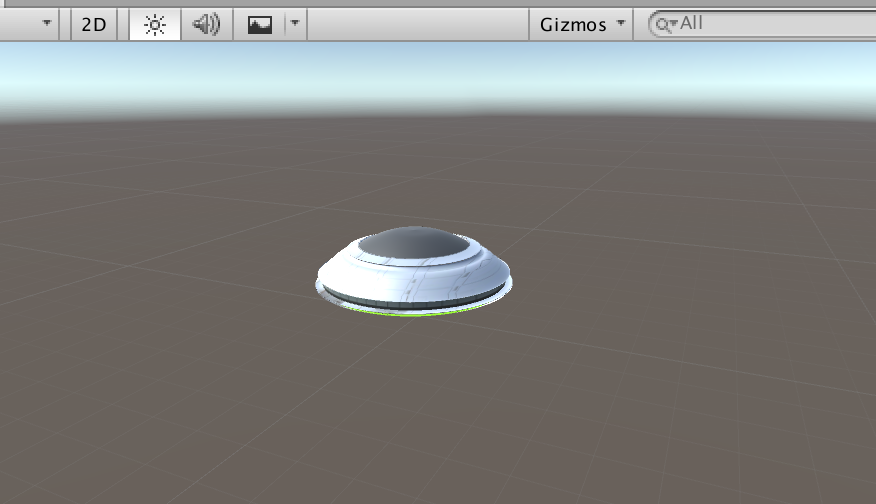
now the ufo is fixed on the center of the screen
For the purpose of fixing the position of the ufo at the geolocation in reality:
Change World Center Mode to "Device Tracking"
Open Vuforia Configuration and tick Enable device pose track
UI Text: to show the distance
add UI > Text called distance, and adjust the position and change the text color and content, change Horizontal Overflow to overflow
add a UI Image as the background for the UI Text, adjust the position and change the color and transparent
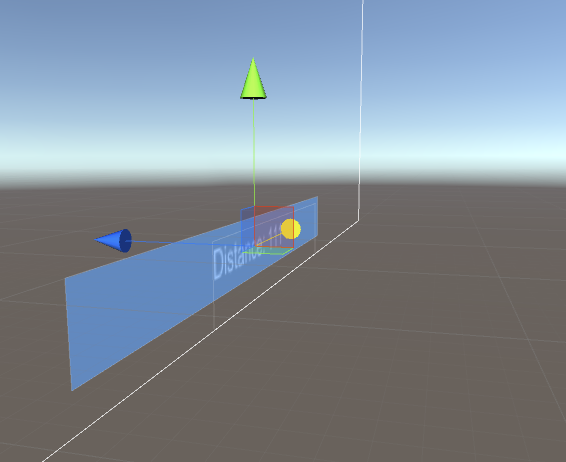
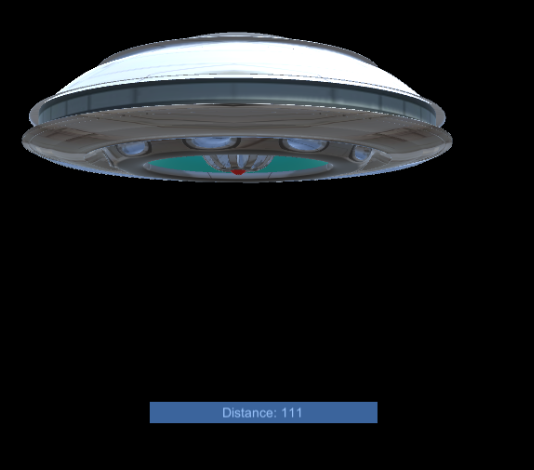
add a tag called distanceText and set the tag of Text distance to it
Script:
add a script called AugmentedScript to Flying Disk object
ref: http://wirebeings.com/markerless-gps-ar.html
using UnityEngine;

using System.Collections;

using UnityEngine.UI;

public class AugmentedScript : MonoBehaviour

{

  private float originalLatitude;

  private float originalLongitude;

  private float currentLongitude;

  private float currentLatitude;

  private GameObject distanceTextObject;

  private double distance;

  private bool setOriginalValues = true;

  private Vector3 targetPosition;

  private Vector3 originalPosition;

  private float speed = .1f;

  IEnumerator GetCoordinates()

  {

    // update/get device's gps coordinates

  }

  public void Calc(float lat1, float lon1, float lat2, float lon2)

  {// calculates distance between two sets of coordinates, taking into account the curvature of the earth

  }

  void Start(){

    // initialization

  }

  void Update(){

    // update each frame

  }

}
Script Comments:
void start(): initialization
void Start(){

    // get the reference to UIText distance to get the user gps coordinates

    distanceTextObject = GameObject.FindGameObjectWithTag ("distanceText");

    // keep getting the gps coordinates from the phone

    StartCoroutine ("GetCoordinates");

    // initialize target and original position, transform refers to the flying disk

    targetPosition = transform.position;

    originalPosition = transform.position;

}
void update(): update each frame
void Update(){

    // linearly interpolate from current position to target position

    transform.position = Vector3.Lerp(transform.position, targetPosition, speed);

    // rotate by 1 degree about the y axis every frame

    transform.eulerAngles += new Vector3 (, 1f, );

}
a and b by the interpolant t (t = [0,1])
t = 0 returns a. When t = 1 returns b. When t = 0.5 returns the point midway between a and b.IEnumerator GetCoordinates(): update/get device's gps coordinates
IEnumerator GetCoordinates()

{

    // while true so this function keeps running once started.

    while (true) {

        // code from LocationService.Start documentation sample

        // https://docs.unity3d.com/ScriptReference/LocationService.Start.html

        // check if user has location service enabled

        if (!Input.location.isEnabledByUser)

            yield break;

        // Start service before querying location

        Input.location.Start (1f, 0.1f);

        // Wait until service initializes

        int maxWait = ;

        while (Input.location.status == LocationServiceStatus.Initializing && maxWait > ) {

            yield return new WaitForSeconds ();

            maxWait--;

        }

        // Service didn't initialize in 20 seconds

        if (maxWait < ) {

            print ("Timed out");

            yield break;

        }

        // Connection has failed

        if (Input.location.status == LocationServiceStatus.Failed) {

            print ("Unable to determine device location");

            yield break;

        } else {

            // start doing the device's coordinates processing

            // Access granted and location value could be retrieved

            print ("Location: " + Input.location.lastData.latitude + " " + Input.location.lastData.longitude + " " + Input.location.lastData.altitude + " " + Input.location.lastData.horizontalAccuracy + " " + Input.location.lastData.timestamp);

            // if original value has not yet been set, then save player's coordinates when app starts

            if (setOriginalValues) {

                // "private bool setOriginalValues = true;" at the start

                originalLatitude = Input.location.lastData.latitude;

                originalLongitude = Input.location.lastData.longitude;

                setOriginalValues = false;

            }

            //overwrite current lat and lon everytime

            currentLatitude = Input.location.lastData.latitude;

            currentLongitude = Input.location.lastData.longitude;

            //calculate the distance between where the player was when the app started and where they are now.

            Calc (originalLatitude, originalLongitude, currentLatitude, currentLongitude);

        }

        Input.location.Stop();

    }

}
Input.location.Start(): https://docs.unity3d.com/ScriptReference/LocationService.Start.html
public void Calc(float lat1, float lon1, float lat2, float lon2): calculates distance between two sets of coordinates, taking into account the curvature of the earth
public void Calc(float lat1, float lon1, float lat2, float lon2)

{

    var R = 6378.137; // Radius of earth in KM

    var dLat = lat2 * Mathf.PI /  - lat1 * Mathf.PI / ;

    var dLon = lon2 * Mathf.PI /  - lon1 * Mathf.PI / ;

    float a = Mathf.Sin(dLat / ) * Mathf.Sin(dLat / ) +

            Mathf.Cos(lat1 * Mathf.PI / ) * Mathf.Cos(lat2 * Mathf.PI / ) * Mathf.Sin(dLon / ) * Mathf.Sin(dLon / );

    var c =  * Mathf.Atan2(Mathf.Sqrt(a), Mathf.Sqrt( - a));

    distance = R * c;

    distance = distance * 1000f; // meters

    //set the distance text on the canvas

    distanceTextObject.GetComponent<Text> ().text = "Distance: " + distance;

    //convert distance from double to float

    float distanceFloat = (float)distance;

    //set the target position of the ufo, this is where we lerp to in the update function

    targetPosition = originalPosition - new Vector3 (, , distanceFloat * );

    //distance was multiplied by 12 so I didn't have to walk that far to get the UFO to show up closer

}
Build:
switch platform in build settings to Android
in player settings >
Identification > packageName: com.Company.ProductName
Build
Install:
go to .../Android/sdk/platform-tools
confirm your mobile device by ./adb devices
install the signed .apk by ./adb install apk_dir

and it works!
Oh...not really. The geo-location can not be access since there is no permission for the app to access gps service
if (!Input.location.isEnabledByUser) yield break;
http://answers.unity3d.com/questions/38222/android-plugin-and-permissions.html
--> set permissions in manifest.xml
Assets > Plugins > Android > AndroidManifest.xml
add <uses-permission android:name="android.permission.ACCESS_FINE_LOCATION" />
https://docs.unity3d.com/Manual/android-manifest.html;
https://developer.android.com/reference/android/Manifest.permission.html
And then I figure out the solution showed above is not a solution.
what actually happened in my device is the "Time Out", rather than "isEnabledByUser"
UniMelb Comp30022 IT Project (Capstone) - 2.Vuforia in Unity的更多相关文章
- UniMelb Comp30022 IT Project (Capstone) - 1.Android入门
1. Android入门 Android系统架构 Android系统:四层架构.五块区域 1. Linux内核层 Linux Kernel:为Android设备的硬件提供了底层驱动 2. 系统运行库层 ...
- 基于Vuforia的Hololens图像识别
微软官方Hololens开发文档中有关于Vuforia的内容,https://developer.microsoft.com/en-us/windows/holographic/getting_sta ...
- Vuforia开发完全指南---不懂编程也能做AR程序
不懂编程也能做AR程序 可能一听到要做AR程序,很多人都会想到这是程序员的事.如果不懂编程,不会写代码,是做不了AR程序的.其实,Vuforia的Unity SDK非常人性化,即使你不会编程,也能做出 ...
- HoloLens开发手记 - 开始使用Vuforia Getting started with Vuforia
Vuforia在6.1版本的Unity SDK里实现了对HoloLens的支持. 查看 Developing for Windows 10 in Unity 这篇文章来了解如何配置Unity和Visu ...
- Vuforia开发完全指南---Vuforia概述
Vuforia概述 AR(Augmented Reality)增强现实,想必大家都已经很熟悉了.这是当下最热的技术之一,是利用计算机视觉和计算机图像学领域的相关知识将虚拟世界融入到现实生活当中.AR和 ...
- Unity 3D-AR开发-Vuforia教程手册
Unity 开发AR之 Vuforia 本文提供全流程,中文翻译. Chinar 坚持将简单的生活方式,带给世人!(拥有更好的阅读体验 -- 高分辨率用户请根据需求调整网页缩放比例) Chinar - ...
- 一、Vuforia_AR
一.AR概念: 增强现实(Augmented Reality,简称AR),是一种将虚拟信息与真实世界巧妙融合的技术,广泛运用了多媒体.三维建模.实时跟踪及注册.智能交互.传感等多种技术手段,将计算机生 ...
- Jenkins 搭建U3D自动发布 Android
工具 [u3d相关的PostProcessBuildPlayer,PerformBuild.cs] 1.Jenkins 开源包 Java -jar jenkins.war,参考链接 http://w ...
- 从3D Studio Max导入物体 Importing Objects From 3D Studio Max
原地址:http://game.ceeger.com/Manual/HOWTO-ImportObjectMax.html If you make your 3D objects in 3dsMax, ...
随机推荐
- JAVA Collections常用方法
/* 集合框架的工具类 Collections: */ import java.util.*; class Test { public static void main(String [] args) ...
- Xcode7解决VVDocumenter 不能使用的方案
Xcode7解决VVDocumenter 不能使用的方案 VVDocumenter-Xcode是Xcode上一款快速添加标准注释,并可以自动生成文档的插件.有了VVDocumenter-Xcode,规 ...
- java 时间日期
Java 日期时间 java.util 包提供了 Date 类来封装当前的日期和时间. Date 类提供两个构造函数来实例化 Date 对象. 第一个构造函数使用当前日期和时间来初始化对象. Date ...
- JAVA揭竿而起总要有名号
古代揭竿而起总要有个响亮的名号,这可不是随便的哦,比如 苍天已死,黄天当立... 玩JAVA里面形形色色的名字,都是有套路的,至于名字怎么起法,那得问问标识符 标识符 用作给变量.类和方法命名.注意 ...
- 谨慎修改Oracle数据库字符集(UTF8<->ZHS16GBK)
Preface Today,I'm gonna say something what is related with the character set in Oracle datab ...
- Spring知识点小结(四)
一.JdbcTemplate(jdbc模版--抽取的工具) web阶段DBUtils: QueryRunner runner = new QueryRunner(dataSource); ...
- python+selenium webdriver.firefox()方式配置浏览器设置
webdriver.firefox() 爬虫需求: (其实是输入参数可获取.zip/pdf 文件,然后点击下载) ——但是firefox浏览器有Bug,点击下载之后会有弹出窗口,需要你点击确定,这怎 ...
- PHP array_reduce()函数的应用解析
实例 向用户自定义函数发送数组中的值,并返回一个字符串: <?php function myfunction($v1,$v2) { return $v1 . "-" . $v ...
- Dijkstra算法堆优化(vector建图)
#include<iostream> #include<algorithm> #include<string.h> #include<stdio.h> ...
- 实验1 查看CPU和内存,用机器指令和汇编指令编程
·实验任务 (1)使用Debug,用E命令和A命令以两种方式将指令写入内存 机器码 汇编指令 b8 20 4e mov ax,4e20h 05 16 14 add ax,14 ...