
HTML+JS = 网站注册界面源代码
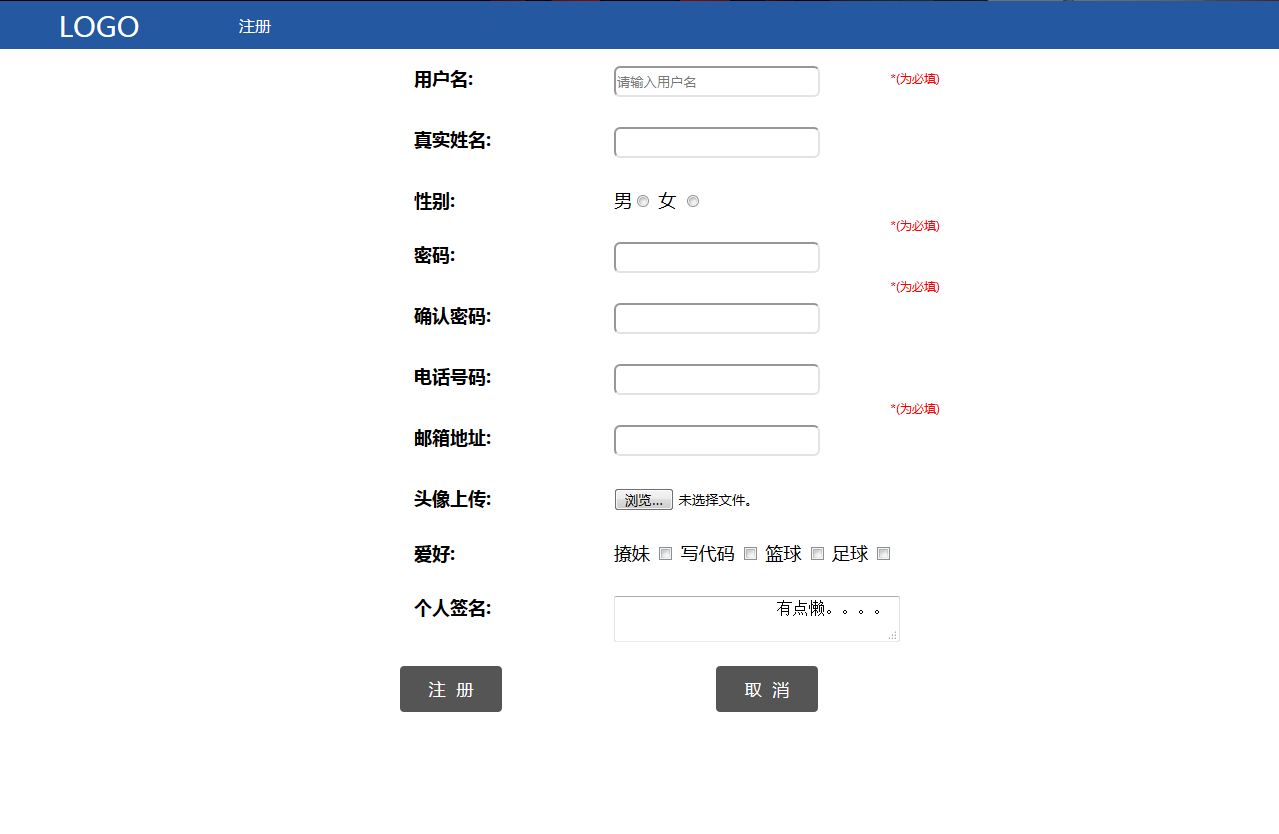
本注册页面未设置编码方式和兼容性,已测试,在Chrome浏览器显示正常
<!DOCTYPE html>

<html>

<head>

    <title>注册页面</title>

<style>

        .pg_header{

            position: fixed;

            height: 48px;

            top: 0;

            left: 0;

            right: 0;

            background-color: #2459a2;

            line-height: 48px;

        }

        .pg_header .logo{

            margin: 0 auto;

            float: left;

            width: 200px;

            text-align: center;

            line-height: 48px;

            font-size: 28px;

            color: white;

        }

        .pg_dl{

            left: 400px;

            display: inline-block;

            padding: 0 40px;

            color: white;

        }

        .pg_header .pg_dl:hover{

            background-color: #2459fb;

            cursor: pointer;

        }

        .left{

            margin-top: 20px;

            width: 400px;

            display: inline-block;

            float: left;

        }

        .pg_body{

            margin-top: 50px;

            font-size: 18px;

            display: inline-block;

            width: 200px;

        }

        .pg_body .menu{

            width: 800px;

            padding: 15px;

            float: left;

            font-weight: bold;

        }

        input[type="text"]{

            width: 200px;

            height: 25px;

            border-radius: 6px;

        }

        input[type="password"]{

            width: 200px;

            height: 25px;

            border-radius: 6px;

        }

        input[type="button"]{

            background-color: #555555;

               border: none;

            color: white;

            padding: 12px 29px;

            text-align: center;

            text-decoration: none;

            display: inline-block;

            font-size: 17px;

            margin: 4px 2px;

            cursor: pointer;

            border-radius: 4px;

        }

        input[type="submit"]{

            background-color: #555555;

               border: none;

            color: white;

            padding: 12px 29px;

            text-align: center;

            text-decoration: none;

            display: inline-block;

            font-size: 17px;

            margin: 4px 2px;

            cursor: pointer;

            border-radius: 4px;

        }

        .kong{

            margin-top: -54px;

            margin-left: 200px;

            float:left;

            padding: 15px;

        }

        .img{

            width: 50px;

            height: 40px;

        }

        .can{

            width: 1220px;

            height: 40px;

            line-height: 40px;

            margin: 0 auto;

            text-align: center;

            display: inline-block;

        }

        .tian{

            color: red;

            float: right;

            font-size: 12px;

            margin-right: -120px;

            margin-top: -25px;

        }

    </style>

</head>

<body id="i88" style="margin: 0">

    <div class = "pg_header">

        <a class = "logo">LOGO</a>

        <a class="pg_dl" id="i77">注册</a>

    </div>

    <form name="tijiao" method="post" onsubmit="return check()" action="winford.top">

        <div class="left"></div>

        <div class="pg_body">

                <div class="menu">用户名:</div>

                    <div class="kong">

                        <input id="text1" type="text" name="01" placeholder="请输入用户名" onblur="check()"><span id="div1" class="tian" style="margin-top: 4px">*(为必填)<span>

                    </div>

                <div class="menu">真实姓名:</div>

                    <div class="kong">

                        <input id="i2" type="text" name="01">

                    </div>

                <div class="menu">性别:</div>

                    <div class="kong" style="width:200px;">

                         男<input type="radio" name="gender" value="1">

                         女 <input type="radio" name="gender" value="2">

                    </div>

                <div class="menu">密码:</div>

                    <div class="kong">

                        <input id="text2" type="password" name="02" onblur="check()">

                        <span id="div2" class="tian" style="margin-top: -25px">*(为必填)<span>

                    </div>

                <div class="menu">确认密码:</div>

                    <div class="kong">

                        <input id="text3" type="password" name="01" onblur="check()">

                        <span id="div3" class="tian">*(为必填)<span>

                    </div>

                <div class="menu">电话号码:</div>

                    <div class="kong">

                        <input id="i5" type="text" name="01">

                    </div>

                <div class="menu">邮箱地址:</div>

                    <div class="kong">

                        <input id="text4" type="text" name="01" onblur="check()">

                        <span id="div4" class="tian">*(为必填)<span>

                    </div>

                <div class="menu">头像上传:    </div>

                    <div class="kong">

                        <input type="file" name="file" value="选择头像" accept="image/*">

                </div>

                <div class="menu">爱好:</div>

                    <div class="kong" style="width: 300px;">

                        撩妹 <input type="checkbox" name="favor">

                        写代码 <input type="checkbox" name="favor">

                        篮球 <input type="checkbox" name="favor">

                        足球 <input type="checkbox" name="favor">

                    </div>

                <div class="menu">个人签名:</div>

                <div class="kong">

                    <textarea name="meno" style="width: 280px;height: 40px;">

                    有点懒。。。。

                    </textarea>

                </div>

        </div>

        <div class="can">

            <input id="i111" type="submit" name="002" value="注  册">

            <p style="width: 200px;display: inline-block;"></p>

            <input id="i222" type="button" name="004" value="取  消">

        </div>

    </form>

    <script type="text/javascript">

            //刷新or取消

            document.getElementById('i77').onclick = function(){

                location.reload();

            }

            document.getElementById('i222').onclick = function(){

                location.reload();

            }

            //用户名验证

            function checkname(){

                var div = document.getElementById("div1");

                div.innerHTML = "";

                var name1 = document.tijiao.text1.value;

                if (name1 == "") {

                div.innerHTML = "用户名不能为空!";

                document.tijiao.text1.focus();

                return false;

            }

                if (name1.length < 4 || name1.length > 16) {

                div.innerHTML = "长度4-16个字符";

                document.tijiao.text1.select();

                return false;

            }

                var charname1 = name1.toLowerCase();

                for (var i = 0; i < name1.length; i++) {

                var charname = charname1.charAt(i);

                if (!(charname >= 0 && charname <= 9) && (!(charname >= 'a' && charname <= 'z')) && (charname != '_')) {

                    div.innerHTML = "用户名包含非法字符";

                    document.form1.text1.select();

                    return false;

                }

            }

                return true;

        }

            //密码验证

            function checkpassword(){

                var div = document.getElementById("div2");

                div.innerHTML = "";

                var password = document.tijiao.text2.value;

                if (password == "") {

                div.innerHTML = "密码不能为空";

                document.tijao.text2.focus();

                return false;

            }

                if (password.length < 4 || password.length > 16) {

                div.innerHTML = "密码长度为4-16位";

                document.tijiao.text2.select();

                return false;

                }

                return true;

        }

            function checkrepassword(){

                var div = document.getElementById("div3");

                div.innerHTML = "";

                var password = document.tijiao.text2.value;

                var repass = document.tijiao.text3.value;

                if (repass == "") {

                div.innerHTML = "密码不能为空";

                document.tijiao.text3.focus();

                return false;

            }

                if (password != repass) {

                div.innerHTML = "密码不一致";

                document.tijiao.text3.select();

                return false;

            }

                return true;

        }

        //邮箱验证

        function checkEmail(){

            var div = document.getElementById("div4");

            div.innerHTML = "";

            var email = document.tijiao.text5.value;

            var sw = email.indexOf("@", 0);

            var sw1 = email.indexOf(".", 0);

            var tt = sw1 - sw;

            if (email.length == 0) {

            div.innerHTML = "邮箱不能为空";

            document.tijiao.text5.focus();

            return false;

        }

            if (email.indexOf("@", 0) == -1) {

            div.innerHTML = "必须包含@符号";

            document.tijiao.text5.select();

            return false;

        }

            if (email.indexOf(".", 0) == -1) {

            div.innerHTML = "必须包含.符号";

            document.tijiao.text5.select();

            return false;

        }

            if (tt == 1) {

            div.innerHTML = "@和.不能一起";

            document.tijiao.text5.select();

            return false;

        }

            if (sw > sw1) {

            div.innerHTML  = "@符号必须在.之前";

            document.tijiao.text5.select();

            return false;

        }

            else {

            return true;

            }

        return ture;

        }

            function check(){

            if (checkname() && checkpassword() && checkrepassword() && checkEmail()) {

            return true;

            }

            else {

            return false;

        }

    }

    </script>

</body>

</html>
HTML+JS = 网站注册界面源代码的更多相关文章
- Web前端-网站首页和注册界面的实现
首页用到的知识如下: 1.bootstrap框架 2.jQuerry实现页面定时弹出广告 注册界面用到的知识: 1.bootstrap框架 2.jQuerry实现省市联动操作 3.jQuerry实现表 ...
- Node.js~在linux上的部署~外网不能访问node.js网站的解决方法
这是上一篇node.js部署到linux上的后续文章,当我们安装完node.js之后,建立了sailsjs的网站,然后在外面电脑上无法访问这个网站,这个问题我们如何去解决? 解决思路: 查看linux ...
- 使用Boostrap框架写一个登录\注册界面
Bootstrap是一个Web前端开发框架,使用它提供的css.js文件可以简单.方便地美化HTML控件.一般情况下,对控件的美化需要我们自己编写css代码,并通过标签选择器.类选择器.ID选择器为指 ...
- JFinal Web开发学习(五)注册界面和后端验证
效果: 直接点击注册后 : 后端验证是可靠地,前端js验证是不可靠的.只需要在浏览器删除js验证代码即可突破js验证. 1.注册界面 在WebRoot下新建regist.jsp <%@ page ...
- JS判定注册表单的几个方式 及 Ajax进行用户名存在判定
最近感觉不赶紧把代码逻辑记一下梳理一下,再做的时候就容易进入"逻辑误区". 有个表单,简单点. <!DOCTYPE html> <!-- 注册表单验证,用户名格式 ...
- 014——VUE中v-if语法在网站注册中的实际应用
<!DOCTYPE html> <html> <head> <meta charset="UTF-8"> <title> ...
- amazeui-datatables(登录注册界面用到)
amazeui-datatables(登录注册界面用到) 一.总结 amazeui-datatables:DataTables 插件 Amaze UI 集成,只修改了样式和默认显示语言,其他参数同官方 ...
- java注册界面及mysql连接
题目要求 完成注册界面及添加功能 1登录账号:要求由6到12位字母.数字.下划线组成,只有字母可以开头:(1分) 2登录密码:要求显示“• ”或“*”表示输入位数,密码要求八位以上字母.数字组成.(1 ...
- 使用AJAX实现用户名的唯一性校验(注册界面)-JAVA(新手)
(1)实现用户名的唯一性校验 所需要准备的: Servlet 注册界面的JSP 接口和实现类 所需要的接口和实现类: 接口: /* * 用户注册 * 账号的唯一性校验,需要传参(username) * ...
随机推荐
- 美化浏览器JSON格式
工具下载地址: https://github.com/weibanggang/JSON-handle 原始 优化后 直接将文件拖到浏览器即可
- EF Core 2.1 中的 Eager loading、Explicit loading和LazyLoading (转自MSDN)
Entity Framework Core allows you to use the navigation properties in your model to load related enti ...
- C# 泛型的协变和逆变 (转载)
1. 可变性的类型:协变性和逆变性 可变性是以一种类型安全的方式,将一个对象当做另一个对象来使用.如果不能将一个类型替换为另一个类型,那么这个类型就称之为:不变量. 协变和逆变是两个相互对立的概念: ...
- Matplotlib——中级
关于Matplotlib的愚见 初级中,我只是简单介绍了Matplotlib的使用方法,在中级部分,我系统地说一下我总结的内容. 上图是我画的关于Matplotlib几个对象之间的关系图.它们都来自于 ...
- 随机数使用不当引发的生产bug
前几天负责的理财产品线上出现问题:一客户赎回失败,查询交易记录时显示某条交易记录为其他人的卡号. 交易的链路如下: 出现该问题后,我们对日志进行了分析,发现主站收到的两笔流水号完全相同,然而主站却没有 ...
- Memcache随笔
Tip01: Memcache 中记录的缓存如果你设置了失效时间,之后如果你在系统时间中将时间修改为超过失效时间,再次访问之前你设置的资源,Memcache 会认为你设置的缓存已失效: Tip02: ...
- 【最新】LuaJIT 32/64 位字节码,从编译到使用全纪录
网上关于 LuaJIT 的讨论,已经显得有些陈旧.如果你对 LuaJIT 编译 Lua 源文件为具体的 32位或64位字节码,极其具体使用感兴趣的话,不妨快速读一下这篇文章.此文章针对尝试在 iOS ...
- 苹果内购小结 - iOS
此篇针对 iOS 支付进行一次小结,很久没碰这块了,有些方法 Apple 官方也进行了优化,故也将随之进行更新. 首先,code 部分将分为两部分,一部分在 appdelegate 中,另一部分单独封 ...
- Ajax请求(415 Unsupported Media Type)
Unsupported media type-415(不支持的媒体类型) 该错误类型是后台接收参数为json类型的,然而ajax提交的类型不对,如下: 异常代码: $.ajax({ url: api ...
- 通过遍历JSON键值对获取包含某字符串的键的值_电脑计算机编程入门教程自学
首发于:Aardio通过遍历JSON键值对获取包含某字符串的键的值_电脑计算机编程入门教程自学 http://jianma123.com/viewthread.aardio?threadid=429 ...