
WPF弹性、惯性效果应用
WPF弹性、惯性效果。已发布在了一些网站,都是这里写的
代码改编自微软示例代码库
// Copyright © Microsoft Corporation. All Rights Reserved.
// This code released under the terms of the
// Microsoft Public License (MS-PL, http://opensource.org/licenses/ms-pl.html.)
就3个函数
/// </summary>

    /// <param name="translation_control">需动画的组件</param>

    /// <param name="mode">模式:0-弹性,2-惯性</param>

    /// <param name="orientation">方向:0-正向,1-反向</param>

    /// <param name="axis">轴:0-左右,1-上下</param>

    /// <param name="delay">延时</param>

    /// <param name="_begin">开始动画位置</param>

    /// <param name="_end">结束动画位置</param>

    /// <param name="amplitude">振幅</param>

    /// <param name="suppression">硬度</param>

    public void Translation(FrameworkElement translation_control, int mode, int orientation, int axis, double delay, double _begin, double _end, double amplitude = 8, double suppression = 3)

    /// </summary>

    /// <param name="main">在哪个Grid内</param>

    /// <param name="width">组件宽度</param>

    /// <param name="height">组件高度</param>

    /// <param name="direction">方向:0-横向,1-纵向</param>

    /// <param name="rotate_control">组件</param>

    /// <param name="begin_angel">起始角度</param>

    /// <param name="timeDelay">延时</param>

    public CushionRotate(Grid main, double width, double height, int direction, UserControl rotate_control, double begin_angel, double timeDelay)

    /// </summary>

    /// <param name="mode">模式:0-弹性,1-惯性</param>

    /// <param name="amplitude">振幅</param>

    /// <param name="suppression">硬度</param>

    public void Rotate(int mode, double amplitude = 8, double suppression = 3)
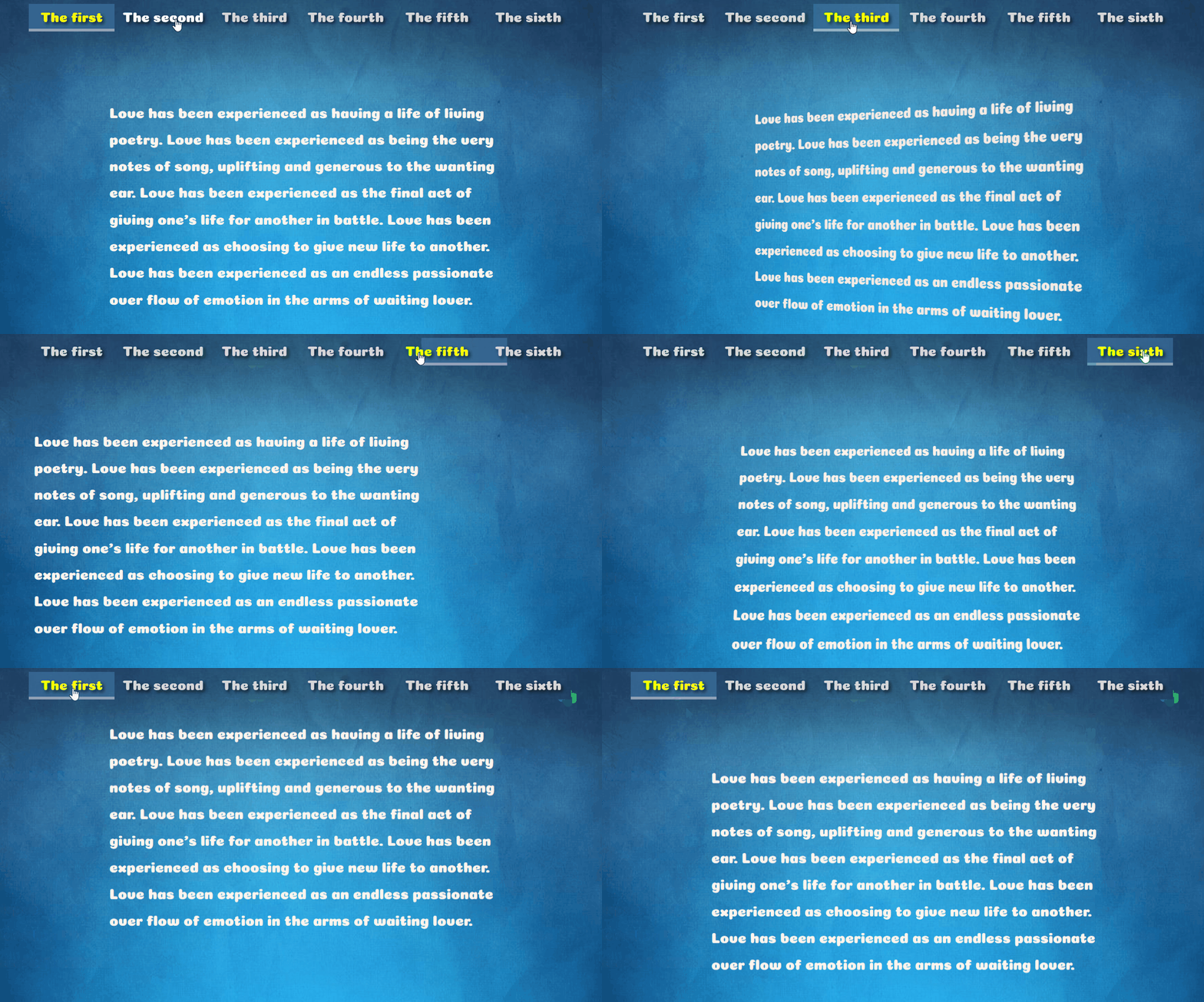
效果如图
基本代码
using System;

using System.Windows;

using System.Windows.Media.Animation;

public class BounceDoubleAnimation : DoubleAnimationBase

{

    public enum EdgeBehaviorEnum

    {

        EaseIn, EaseOut, EaseInOut

    }

    public static readonly DependencyProperty EdgeBehaviorProperty =

        DependencyProperty.Register("EdgeBehavior",

            typeof(EdgeBehaviorEnum),

            typeof(BounceDoubleAnimation),

            new PropertyMetadata(EdgeBehaviorEnum.EaseInOut));

    public static readonly DependencyProperty BouncesProperty =

        DependencyProperty.Register("Bounces",

            typeof(int),

            typeof(BounceDoubleAnimation),

            new PropertyMetadata(5));

    public static readonly DependencyProperty BouncinessProperty =

        DependencyProperty.Register("Bounciness",

            typeof(double),

            typeof(BounceDoubleAnimation),

            new PropertyMetadata(3.0));

    public static readonly DependencyProperty FromProperty =

        DependencyProperty.Register("From",

            typeof(double?),

            typeof(BounceDoubleAnimation),

            new PropertyMetadata(null));

    public static readonly DependencyProperty ToProperty =

        DependencyProperty.Register("To",

            typeof(double?),

            typeof(BounceDoubleAnimation),

            new PropertyMetadata(null));

    public EdgeBehaviorEnum EdgeBehavior

    {

        get

        {

            return (EdgeBehaviorEnum)GetValue(EdgeBehaviorProperty);

        }

        set

        {

            SetValue(EdgeBehaviorProperty, value);

        }

    }

    public int Bounces

    {

        get

        {

            return (int)GetValue(BouncesProperty);

        }

        set

        {

            if (value > 0)

            {

                SetValue(BouncesProperty, value);

            }

            else

            {

                throw new ArgumentException("can't set the bounces to " + value);

            }

        }

    }

    public double Bounciness

    {

        get

        {

            return (double)GetValue(BouncinessProperty);

        }

        set

        {

            if (value > 0)

            {

                SetValue(BouncinessProperty, value);

            }

            else

            {

                throw new ArgumentException("can't set the bounciness to " + value);

            }

        }

    }

    public double? From

    {

        get

        {

            return (double?)GetValue(FromProperty);

        }

        set

        {

            SetValue(FromProperty, value);

        }

    }

    public double? To

    {

        get

        {

            return (double?)GetValue(ToProperty);

        }

        set

        {

            SetValue(ToProperty, value);

        }

    }

    protected override double GetCurrentValueCore(

        double defaultOriginValue,

        double defaultDestinationValue,

        AnimationClock clock)

    {

        double returnValue;

        double start = From != null ? (double)From : defaultOriginValue;

        double delta = To != null ? (double)To - start : defaultOriginValue - start;

        switch (this.EdgeBehavior)

        {

            case EdgeBehaviorEnum.EaseIn:

                returnValue = easeIn(clock.CurrentProgress.Value, start, delta, Bounciness, Bounces);

                break;

            case EdgeBehaviorEnum.EaseOut:

                returnValue = easeOut(clock.CurrentProgress.Value, start, delta, Bounciness, Bounces);

                break;

            case EdgeBehaviorEnum.EaseInOut:

            default:

                returnValue = easeInOut(clock.CurrentProgress.Value, start, delta, Bounciness, Bounces);

                break;

        }

        return returnValue;

    }

    protected override Freezable CreateInstanceCore()

    {

        return new BounceDoubleAnimation();

    }

    private static double easeOut(double timeFraction, double start, double delta, double bounciness, int bounces)

    {

        double returnValue = 0.0;

        returnValue = Math.Abs(Math.Pow((1 - timeFraction), bounciness)

                      * Math.Cos(2 * Math.PI * timeFraction * bounces));

        returnValue = delta - (returnValue * delta);

        returnValue += start;

        return returnValue;

    }

    private static double easeIn(double timeFraction, double start, double delta, double bounciness, int bounces)

    {

        double returnValue = 0.0;

        returnValue = Math.Abs(Math.Pow((timeFraction), bounciness)

                      * Math.Cos(2 * Math.PI * timeFraction * bounces));

        returnValue = returnValue * delta;

        returnValue += start;

        return returnValue;

    }

    private static double easeInOut(double timeFraction, double start, double delta, double bounciness, int bounces)

    {

        double returnValue = 0.0;

        if (timeFraction <= 0.5)

        {

            returnValue = easeIn(timeFraction * 2, start, delta / 2, bounciness, bounces);

        }

        else

        {

            returnValue = easeOut((timeFraction - 0.5) * 2, start, delta / 2, bounciness, bounces);

            returnValue += delta / 2;

        }

        return returnValue;

    }

}

/// <summary>

///

/// </summary>

public class BackDoubleAnimation : DoubleAnimationBase

{

    public enum EdgeBehaviorEnum

    {

        EaseIn, EaseOut, EaseInOut

    }

    public static readonly DependencyProperty EdgeBehaviorProperty =

        DependencyProperty.Register("EdgeBehavior", typeof(EdgeBehaviorEnum), typeof(BackDoubleAnimation), new PropertyMetadata(EdgeBehaviorEnum.EaseIn));

    public static readonly DependencyProperty AmplitudeProperty =

        DependencyProperty.Register("Amplitude", typeof(double), typeof(BackDoubleAnimation), new PropertyMetadata(4.0));

    public static readonly DependencyProperty SuppressionProperty =

        DependencyProperty.Register("Suppression", typeof(double), typeof(BackDoubleAnimation), new PropertyMetadata(2.0));

    public static readonly DependencyProperty FromProperty =

        DependencyProperty.Register("From",

            typeof(double?),

            typeof(BackDoubleAnimation),

            new PropertyMetadata(null));

    public static readonly DependencyProperty ToProperty =

        DependencyProperty.Register("To",

            typeof(double?),

            typeof(BackDoubleAnimation),

            new PropertyMetadata(null));

    public EdgeBehaviorEnum EdgeBehavior

    {

        get

        {

            return (EdgeBehaviorEnum)GetValue(EdgeBehaviorProperty);

        }

        set

        {

            SetValue(EdgeBehaviorProperty, value);

        }

    }

    public double Amplitude

    {

        get

        {

            return (double)GetValue(AmplitudeProperty);

        }

        set

        {

            SetValue(AmplitudeProperty, value);

        }

    }

    public double Suppression

    {

        get

        {

            return (double)GetValue(SuppressionProperty);

        }

        set

        {

            SetValue(SuppressionProperty, value);

        }

    }

    public double? From

    {

        get

        {

            return (double?)GetValue(FromProperty);

        }

        set

        {

            SetValue(FromProperty, value);

        }

    }

    public double? To

    {

        get

        {

            return (double?)GetValue(ToProperty);

        }

        set

        {

            SetValue(ToProperty, value);

        }

    }

    protected override double GetCurrentValueCore(double defaultOriginValue, double defaultDestinationValue, AnimationClock clock)

    {

        double returnValue;

        double start = From != null ? (double)From : defaultOriginValue;

        double delta = To != null ? (double)To - start : defaultOriginValue - start;

        switch (this.EdgeBehavior)

        {

            case EdgeBehaviorEnum.EaseIn:

                returnValue = easeIn(clock.CurrentProgress.Value, start, delta, Amplitude, Suppression);

                break;

            case EdgeBehaviorEnum.EaseOut:

                returnValue = easeOut(clock.CurrentProgress.Value, start, delta, Amplitude, Suppression);

                break;

            case EdgeBehaviorEnum.EaseInOut:

            default:

                returnValue = easeInOut(clock.CurrentProgress.Value, start, delta, Amplitude, Suppression);

                break;

        }

        return returnValue;

    }

    protected override Freezable CreateInstanceCore()

    {

        return new BackDoubleAnimation();

    }

    private static double easeOut(double timeFraction, double start, double delta, double amplitude, double suppression)

    {

        double returnValue = 0.0;

        double frequency = 0.5;

        returnValue = Math.Pow((timeFraction), suppression)

                      * amplitude * Math.Sin(2 * Math.PI * timeFraction * frequency) + timeFraction;

        returnValue = (returnValue * delta);

        returnValue += start;

        return returnValue;

    }

    private static double easeIn(double timeFraction, double start, double delta, double amplitude, double suppression)

    {

        double returnValue = 0.0;

        double frequency = 0.5;

        returnValue = Math.Pow((1 - timeFraction), suppression)

                      * amplitude * Math.Sin(2 * Math.PI * timeFraction * frequency) * -1 + timeFraction;

        returnValue = (returnValue * delta);

        returnValue += start;

        return returnValue;

    }

    private static double easeInOut(double timeFraction, double start, double delta, double amplitude, double suppression)

    {

        double returnValue = 0.0;

        if (timeFraction <= 0.5)

        {

            return easeIn(timeFraction * 2, start, delta / 2, amplitude, suppression);

        }

        else

        {

            returnValue = easeOut((timeFraction - 0.5) * 2, start, delta / 2, amplitude, suppression);

            returnValue += (delta / 2);

        }

        return returnValue;

    }

}
例如旋转惯性
using System;

using System.Windows;

using System.Windows.Controls;

using System.Windows.Media;

using System.Windows.Media.Media3D;

public class CushionRotate

{

    private AxisAngleRotation3D axisAngleRotation;

    private double b_angel, delay;

    public CushionRotate(Grid main, double width, double height, int direction, UserControl rotate_control, double begin_angel, double timeDelay)

    {

        delay = timeDelay;

        b_angel = begin_angel;

        double Mesh_Width = width / 2;

        double Mesh_Height = height / 2;

        Viewport3D viewport3D = new Viewport3D();

        PerspectiveCamera perspectiveCamera = new PerspectiveCamera()

        {

            Position = new Point3D(0, 0, width * 2),

            LookDirection = new Vector3D(0, 0, -1),

            NearPlaneDistance = 100

        };

        viewport3D.Camera = perspectiveCamera;

        ContainerUIElement3D containerUIElement3D = new ContainerUIElement3D();

        DiffuseMaterial diffuseMaterial = new DiffuseMaterial();

        Viewport2DVisual3D.SetIsVisualHostMaterial(diffuseMaterial, true);

        MeshGeometry3D meshGeometry3D = new MeshGeometry3D()

        {

            TriangleIndices = new Int32Collection(new int[] { 0, 1, 2, 0, 2, 3 }),

            TextureCoordinates = new PointCollection(new Point[] { new Point(0, 0), new Point(0, 1), new Point(1, 1), new Point(1, 0) }),

            Positions = new Point3DCollection(new Point3D[] {

                    new Point3D(-Mesh_Width, Mesh_Height, 0), new Point3D(-Mesh_Width, -Mesh_Height, 0),

                    new Point3D(Mesh_Width, -Mesh_Height, 0), new Point3D(Mesh_Width, Mesh_Height, 0)

                })

        };

        Viewport2DVisual3D viewport2DVisual3D = new Viewport2DVisual3D()

        {

            Geometry = meshGeometry3D,

            Visual = rotate_control,

            Material = diffuseMaterial

        };

        PointCollection Direction;

        Vector3D vector3D;

        if (direction == 0)

        {

            Direction = new PointCollection(new Point[] { new Point(0, 0), new Point(0, 1), new Point(1, 1), new Point(1, 0) });

            vector3D = new Vector3D(0, 1, 0);

        }

        else

        {

            Direction = new PointCollection(new Point[] { new Point(1, 1), new Point(1, 0), new Point(0, 0), new Point(0, 1) });

            vector3D = new Vector3D(1, 0, 0);

        }

        containerUIElement3D.Children.Add(viewport2DVisual3D);

        axisAngleRotation = new AxisAngleRotation3D()

        {

            Angle = begin_angel,

            Axis = vector3D

        };

        RotateTransform3D rotateTransform3D = new RotateTransform3D()

        {

            Rotation = axisAngleRotation

        };

        containerUIElement3D.Transform = rotateTransform3D;

        ModelVisual3D modelVisual3D = new ModelVisual3D()

        {

            Content = new DirectionalLight(Colors.Transparent, new Vector3D(0, 0, -1))

        };

        viewport3D.Children.Add(containerUIElement3D);

        viewport3D.Children.Add(modelVisual3D);

        main.Children.Add(viewport3D);

    }

    public void Rotate(int mode, double amplitude = 8, double suppression = 3)

    {

        if (mode == 0)

        {

            BounceDoubleAnimation bounceDoubleAnimation = new BounceDoubleAnimation()

            {

                From = b_angel,

                To = 0,

                Duration = new Duration(TimeSpan.Parse("0:0:" + delay.ToString())),

                EdgeBehavior = BounceDoubleAnimation.EdgeBehaviorEnum.EaseOut,

            };

            axisAngleRotation.BeginAnimation(AxisAngleRotation3D.AngleProperty, bounceDoubleAnimation);

        }

        if (mode == 1)

        {

            BackDoubleAnimation backDoubleAnimation = new BackDoubleAnimation()

            {

                From = b_angel,

                To = 0,

                Duration = new Duration(TimeSpan.Parse("0:0:" + delay.ToString())),

                EdgeBehavior = BackDoubleAnimation.EdgeBehaviorEnum.EaseOut,

                Amplitude = amplitude,

                Suppression = suppression,

            };

            axisAngleRotation.BeginAnimation(AxisAngleRotation3D.AngleProperty, backDoubleAnimation);

        }

    }

}
整例下载及代码下载:
https://pan.baidu.com/s/129O9eYXF8zJ8eJYDDpI4LQ
WPF弹性、惯性效果应用的更多相关文章
- WPF Multi-Touch 开发:惯性效果(Inertia)
原文 WPF Multi-Touch 开发:惯性效果(Inertia) 从上一篇实例可以发现在图片移动过程中如果将手指移开屏幕则图片会立刻停止,根据这种情况WPF 提供另外一种惯性效果(Inertia ...
- WPF提示框效果
WPF提示框效果 1,新建WPF应用程序 2,添加用户控件Message 3,在Message中编写如下代码 <Border x:Name="border" BorderTh ...
- wpf 模拟3D效果(和手机浏览图片效果相似)(附源码)
原文 wpf 模拟3D效果(和手机浏览图片效果相似)(附源码) pf的3D是一个很有意思的东西,类似于ps的效果,类似于电影动画的效果,因为动画的效果,(对于3D基础的摄像机,光源,之类不介绍,对于依 ...
- [WPF] 圆形等待效果
原文:[WPF] 圆形等待效果 自己做着玩儿的,留着以后用,效果类似下面的 GIF 动画. <Grid Width="35" Height="35"> ...
- WPF实现射线效果动画
原文:WPF实现射线效果动画 最近的一个项目中有个需求是:从一个点向其它多个点发出射线,要求这些射线同时发出,同时到达. 我就想到了用WPF的动画来实现.WPF中有Line类用于绘制直线,但这个类中好 ...
- WPF 的毛玻璃效果
原文:WPF 的毛玻璃效果 版权声明:本文为博主原创文章,未经博主允许不得转载. https://blog.csdn.net/koloumi/article/details/76917519 其实很简 ...
- WPF InkCanvas 毛笔效果
原文:WPF InkCanvas 毛笔效果 1.先来看看InkCanvas的一般用法: <InkCanvas> <InkCanvas.DefaultDrawingAttrib ...
- WPF实现抽屉效果
原文:WPF实现抽屉效果 界面代码(xaml): <Window x:Class="TransAnimation.MainWindow" xmlns="http:/ ...
- WPF 实现水纹效果
原文:WPF 实现水纹效果 鼠标滑过产生水纹,效果图如下: XMAL就放置了一个img标签 后台主要代码 窗体加载: private void Window_Loaded(object s ...
随机推荐
- Vue路由-详细总结
Vue路由vue-router 前面的话 在Web开发中,路由是指根据URL分配到对应的处理程序.对于大多数单页面应用,都推荐使用官方支持的vue-router.Vue-router通过管理URL ...
- Python 3.9 beta2 版本发布了,看看这 7 个新的 PEP 都是什么?
原作:Jake Edge 译者:豌豆花下猫@Python猫 英文:https://lwn.net/Articles/819853/ 随着 Python 3.9.0b1 的发布,即开发周期中计划的四个 ...
- MySQL数据库基础知识复习
现在是2020年寒假,这也是新年写的第一篇博客,用了十几天的时间自学了数据库基础部分,想总结一下得失同时并通过写博客来复习前面学的知识点. 个人: 1.本来是计划一周学完基础部分的178p但没能完成这 ...
- 解决错误【selenium.common.exceptions.SessionNotCreatedException】
以前能用,突然不能用了,是浏览器版本可能升级了,与原来的weddriver驱动版本不符合 解决办法:1.更新浏览器驱动, 2.降低浏览器版本
- PageHelper支持GreenPlum
greenplum是pivotal在postgresql的基础上修改的一个数据库,语法和postgresql通用.使用PageHelper做分页插件的时候,发现目前没有针对greenplum做支持,但 ...
- cb09a_c++_顺序容器的操作2-在顺序容器中添加元素_插入数据
cb09a_c++_顺序容器的操作2在顺序容器中添加元素vector不能向前插入数据,list可以用insertc.push_back(t);c.push_front(t);c.insert(p,t) ...
- Java多线程与并发基础
CS-LogN思维导图:记录专业基础 面试题 开源地址:https://github.com/FISHers6/CS-LogN 多线程与并发基础 实现多线程 面试题1:有几种实现线程的方法,分别是什么 ...
- CSV文件导入到数据库中读取数据详解(接着上个帖子)
一.controller层 二.SERVICE层 @Overridepublic Result importJinjiangAssessResult(MultipartFile file) throw ...
- postman使用小结(一)
postman可以用来做接口测试. 下面是使用的基本步骤: 1新建http请求: 2设置请求类型get/post/put/delete...: 3设置请求的url: 4设置请求的Header头部信息, ...
- VS2017 快捷键
VS2017注释:先CTRL+K 然后CTRL+C (ctrl按住不松,松开k按c) 取消注释:先CTRL+K,然后CTRL+U (ctrl按住不松,松开k按c)