
Communicating to 2 SPI Slaves with USART & SPI ports on Atmega16U2
原文来自:https://www.avrfreaks.net/comment/2236256
I'm writing code for an embedded chip that consists of an Atmega16U2 connected to two devices via the port B SPI pins and the Port D USART pins (which can be used for SPI comms as well).
I'm a bit confused: is the SPCR register a shared resource that will be used for communications to both my Port B and Port D SPI slaves?
Also, i'm a bit stuck on the nitty gritty of how to send data to a specific slave. Since I have two SS lines (DDD4 and DDB0) connected to the uC do I just bit shift one of them low and start calling my writeSPI() function? What would my readSPI() function look like?
C Code:
void SetupSPIHardware(void)

{

	/* Set MOSI and SCK output, all others input */

	DDRB = (1 << DDB2)|(1 << DDB1);

	DDRD = (1 << DDD3)|(1 << DDD5);

	/* Enable SPI, Master, set clock rate fck/16 */

	SPCR = (1 << SPE)|(1 << MSTR)|(1 << SPR0);

}

void writeSPI(char cData)

{

	/* Start transmission */

	SPDR = cData;

	/* Wait for transmission complete */

	while(!(SPSR & (1<<SPIF)))

	;

}

Why do you want to use both the spi and usart for the same thing? You can have a number of slaves on the one spi master, but they must have individual slave selects.
uint8_t SPI(uint8_t cData)

{

	/* Start transmission */

	SPDR = cData;

	/* Wait for transmission complete */

	while(!(SPSR & (1<<SPIF)));

return SPDR;

}
SPI needs to send a byte to receive a byte, so you really only need one function.
'bit shift' is not quite the right term. Basically if you want to talk to device #1, make it's SS pin low. Make it high when finished. Similarly for device #2, make it's SS pin low when you want to talk to it. High when finished.
Regarding SPI and USART - the SPDR register is NOT shared. The USART has it's own registers.
Also, i'm a bit stuck on the nitty gritty of how to send data to a specific slave
Do some research and try some things before asking questions.
There surely are plenty datasheets, application notes, libs, examples, tutorials about SPI.
And then, when you get stuck, ask more specific questions.
There is even a tutorial about how to ask questions on a forum and why asking "help me" is not helping anybody.
Doing magic with a USD 7 Logic Analyser: https://www.avrfreaks.net/comment/2421756#comment-2421756
Bunch of old projects with AVR's: http://www.hoevendesign.com

https://en.wikipedia.org/wiki/Serial_Peripheral_Interface_Bus#Independent_slave_configuration
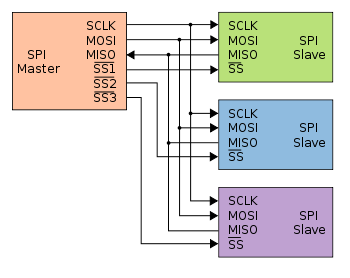
Addendum - highlighting the different Slave-Select (SS) lines:

#SPISlaveSelect
Top Tips:
- How to properly post source code - see: https://www.avrfreaks.net/comment... - also how to properly include images/pictures
- "Garbage" characters on a serial terminal are (almost?) invariably due to wrong baud rate - see: https://learn.sparkfun.com/tutorials/serial-communication
- Wrong baud rate is usually due to not running at the speed you thought; check by blinking a LED to see if you get the speed you expected
- Difference between a crystal, and a crystal oscillator: https://www.avrfreaks.net/comment...
- When your question is resolved, mark the solution: https://www.avrfreaks.net/comment...
- Beginner's "Getting Started" tips: https://www.avrfreaks.net/comment...
- 1
- 2
- 3
- 4
- 5
Ah interesting, it sounds like I may have made a mistake in trying to utilize the USART pins for SPI, seems like I don't want that after all.
Given my schematic below you will see that i've connected my CAP1188 slave to the PORT D USART pins that also support Master SPI Mode. If I was to simplify my design I would connect the MISO/MOSI/SCK lines at PD2,3,5 to those SPI pins on PortB. I'm a little confused though; what line would be good for my CAP1188s SS? Could I just choose any digital I/O pin?


- 1
- 2
- 3
- 4
- 5
The High Septon wrote:Also, i'm a bit stuck on the nitty gritty of how to send data to a specific slave
Do some research and try some things before asking questions.
There surely are plenty datasheets, application notes, libs, examples, tutorials about SPI.
And then, when you get stuck, ask more specific questions.
There is even a tutorial about how to ask questions on a forum and why asking "help me" is not helping anybody.
That's why I didn't say "help me"... I gave a very clear question with background explanation and a code example. Relax dude.
Communicating to 2 SPI Slaves with USART & SPI ports on Atmega16U2的更多相关文章
- ARM与FPGA通过spi通信设计2.spi master的实现
这里主要放两个代码第一个是正常的不使用状态机的SPI主机代码:第二个是状态机SPI代码 1.不使用状态机:特权同学<深入浅出玩转FPGA>中DIY数码相框部分代码: /////////// ...
- ARM与FPGA通过spi通信设计1.spi基础知识
SPI(Serial Peripheral Interface--串行外设接口)总线系统是一种同步串行外设接口,它可以使MCU与各种外围设备以串行方式进行通信以交换信息.SPI总线可直接与各个厂家生产 ...
- dubbo源码分析2——SPI机制中的SPI实现类的读取和预处理
SPI机制中的SPI实现类的读取和预处理是由ExtensionLoader类的loadFile方法来完成的 loadFile方法的作用是读取dubbo的某个SPI接口的spi描述文件,然后进行缓存,缓 ...
- Linux spi驱动分析(二)----SPI核心(bus、device_driver和device)
一.spi总线注册 这里所说的SPI核心,就是指/drivers/spi/目录下spi.c文件中提供给其他文件的函数,首先看下spi核心的初始化函数spi_init(void).程序如下: 点击(此处 ...
- UART,USART,SPI,I2C等总线的介绍与区别20160526
首先来说一下UART和USART的区别: 1.字面意义: UART:universal asynchronous receiver and transmitter通用异步收发器: USART:univ ...
- 使用STM32的USART的同步模式Synchronous调戏SPI[2] 【实现spi 9bit】
[原创出品§转载请注明出处] 出处:http://www.cnblogs.com/libra13179/p/7064533.html 上回说道使用USART的来模拟SPI通讯.说说一下我什么写这个的原 ...
- SPI总线协议及SPI时序图详解
SPI,是英语Serial Peripheral Interface的缩写,顾名思义就是串行外围设备接口.SPI,是一种高速的,全双工,同步的通信总线,并且在芯片的管脚上只占用四根线,节约了芯片的管脚 ...
- [SPI&I2C]I2C和SPI协议介绍
IIC vs SPI 现今,在低端数字通信应用领域,我们随处可见IIC (Inter-Integrated Circuit) 和 SPI (Serial Peripheral Interface)的身 ...
- spi数据KL25用SPI操作nor flash
最近研究spi数据,稍微总结一下,以后继续补充: KL25的SPI连接一个nor flash.该flash型号为FM25F04,支撑SPI的模式0和模式3,要求高位先发送,在上升沿采集数据. 通常,S ...
随机推荐
- 【pytest】(三) pytest运行多个文件
1.运行多个测试文件 pytest 会运行 test_ 开头 或者 _test 结尾的文件,在当前目录和子目录中 2. 一个类下的多个用例的运行, pytest会找到 test_ 开头的方法 impo ...
- Selenium学习整理(Python)
1 准备软件 Selenium IDE firebug-2.0.19.xpi firepath-0.9.7-fx.xpi Firefox_46.0.1.5966_setup.exe 由于火狐浏览器高版 ...
- Q200510-02: 重复的DNA序列 程序解法
问题: 重复的DNA序列 所有 DNA 都由一系列缩写为 A,C,G 和 T 的核苷酸组成,例如:“ACGAATTCCG”.在研究 DNA 时,识别 DNA 中的重复序列有时会对研究非常有帮助. 编 ...
- ZT:15 个你非了解不可的 Linux 特殊字符
https://os.51cto.com/art/202003/611595.htm 不知道大家接触 Linux 系统有多久了,可曾了解过 Linux 中有哪些特殊的字符呢?其实啊,那些特殊字符都大有 ...
- IDEA里如何引入JQuery
HTML页面的JavaScript里一般可以直接使用类似:<script src="js/jquery.js"></script>语句可以直接引入,但是会遇 ...
- composer browse 查看包的存储库和主页
composer browse 用于打开或查看包的存储库和主页 1. 使用示例 browse 命令官方手册:https://getcomposer.org/doc/03-cli.md#browse-h ...
- 5分钟掌握企业LVM磁盘划分
逻辑卷管理LVM是一个多才多艺的硬盘系统工具.无论在Linux或者其他类似的系统,都是非常的好用.传统分区使用固定大小分区,重新调整大小十分麻烦.但是,LVM可以创建和管理“逻辑”卷,而不是直接使用物 ...
- 教务管理系统(node+express+mysql)
模块拆分 现在将教务系统拆分成九个模块: 教务系统教师业务:师资管理.教学计划管理.排课管理 教务系统学生业务:考试管理.毕业生管理.学生综合测评 信息查询:自习室查询.课程表查询 考试系统:实现学生 ...
- softmax交叉熵损失函数求导
来源:https://www.jianshu.com/p/c02a1fbffad6 简单易懂的softmax交叉熵损失函数求导 来写一个softmax求导的推导过程,不仅可以给自己理清思路,还可以造福 ...
- JavaScript 流程控制-循环
1.循环 循环目的 在实际问题中,有许多具有规律性的重复操作,因此在程序中要完成这类操作就需要重复执行某些语句 JS中的循环 在JS中,主要有三种类型的循环语句: for循环 while循环 do.. ...