
Dynamics365 Field Service Work Order Theory
Come from :https://neilparkhurst.com/2016/08/20/field-service-work-order-theory/
In this post I aim to continue my series covering all aspects of Field Service for Microsoft Dynamics CRM, work orders are the primary entity within Field Service. Think of them as the “essence” of all information needed complete a service request.
Note: If you have previously used FieldOne Sky then you will find most of the theory connected with work orders to be very similar. Except some related entities now have different names!
In this post I specifically cover these questions on work orders;
- What are they?
- What is the work order life cycle?
- How do work orders relate to other Field Service entities?
It is important to appreciate the information in this post before continuing to configure Field Service as you’ll need to understand these base concepts to be able to appreciate the implications of any configuration work.
Work Orders – What are they?
A work order is used to coordinate and schedule resources and activities. The work orders can be for differing types of work including installations, repairs or preventative maintenance. (The types can be configured to reflect whatever services a particular organization performs.)
A work order can contain;
- A description of issue or work to be completed
- Customer details include service and billing accounts
- Equipment affected
- Location
- Parts, products and services needed
- Tasks to follow
- Priority and estimated duration
- Characteristics (skills) required to complete the work order
What is the work order life cycle?
A work order will have a lifecycle in that they are created, scheduled, Dispatched, Serviced, Review / Approval, invoiced (& inventory adjusted)
One very important difference between Field Service and FieldOne is the additional of a business process flow that is used to progress the work order life cycle. Making the process much simpler from a user point of view.

Creation
Work orders can be created in four ways.
- From an agreement, this might be an on-going contract involving regular service visits for preventative maintenance.
- From a case, a case might be created in the contact center. If the case can’t be resolved locally and a field engineer is required, then work order(s) can be created directly from the case.
- From a sales opportunity.
- Manually directly within the Field Service options in CRM or from the Field Service Mobile application.
When a work order is created it can contain many fields, including the service and billing account details, incident type plus details of the services and products required.
When a work order is created its status is initially “Open Unscheduled”.
Scheduled
After a work order has been created it can then be scheduled to a resource. A work order can be scheduled in four ways;
- Manually by a dispatcher from the schedule board.
- Manually by a field agent from the Field Service mobile application.
- By a dispatcher using the scheduling assistant.
- By using the Field Service routing engine to automatically schedule.
Once a booking (work order schedule) is created the status on the work order changes to “Open Scheduled”.
One work order can have many resource bookings (schedules), as a separate schedule will be created for each resource needed on a work order.
Note: If you have previously used FieldOne you need to be aware that work order schedules are now called resource bookings.
Dispatched
After a work order schedule has been created a specific resource will be dispatched.
Once assigned to a resource (field agent), the field agent will be notified and they can accept or reject the work order schedule.
When dispatched the work orders retains the status of “Open Scheduled” but the work order schedule is changed to be scheduled, accepted or declined.
Note: You can also create customer work order schedule status values beyond the defaults of schedules, accepted or declined.
Serviced
This stage reflects the processes that would happen whilst the work order is in progress. Such as on route, in progress etc.
The work order status changes from “Open Scheduled” to “Open Complete” once the service has been completed.
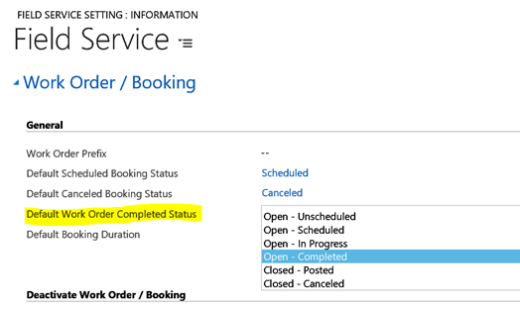
Changing the status to “Open Complete” is the default out of the box behavior. It is however possible to alter the Field Service setting to assign a different status if required. You could, for example, jump straight to Closed – Posted.
Review / Approval
After the service has been completed a manager or the dispatcher will review the work order and confirm the required services have been correctly completed and all the information correctly entered.
Once reviewed the work order status changes to “Closed – Posted”. From this point onwards the work order cannot be changed.
invoiced (& inventory adjusted)
Finally, Field Service will automatically create any invoices required and adjust inventory.
Optionally parts used can be logged against as customer a “customer equipment”. Useful scheduling future maintenance work.

How do work orders relate to other Field Service entities?
Below is a summary of the key relationships between a work order and the other Field Service entities.
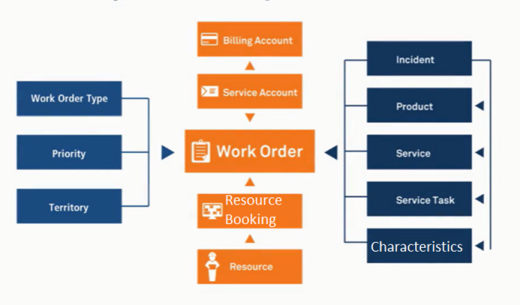

- Each work order will have one service account.
- The service account is Geo Coded and is used to decided where the work order should be performed.
- Optionally a work order can have a billing account. (The billing account is the service account if not defined.)
- Each work order will have one or many resource booking records.
- The resource bookings contain details of when & who should complete the work order.
- Each resource booking will have a resource. This could be a person, crew or piece of equipment
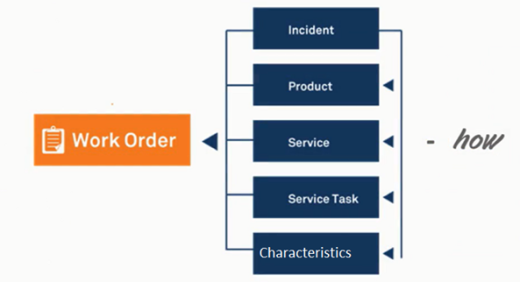
Each work order can be assigned an incident type. The incident entity is used to “bundle together all the products, services, service tasks and resource characterictics (skills) needed to complete that incident. Using incidents to bundle these items like this makes the process of creating work orders much easier. Meaning the use of incidents isn’t mandatory with Field Service but they are highly recommended.

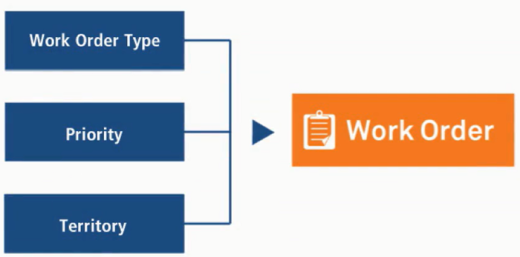
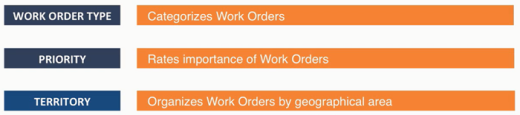
The last group if entities, work order type, priority and territory are used mainly for information purposes,
Hopefully this post has given you some useful information about work order theory. As I produce more posts about Field Service I will build on this theory.
Dynamics365 Field Service Work Order Theory的更多相关文章
- Dynamics 365 CRM 在 Connected Field Service 中部署 IoT Central (三)- 发送 work order 和 booking 信息给 IoT Central
首先, 我们可以打开IoT alert, 并且点击上的 create a flow. 接下来,我们使用微软准备好的模板:Sample Contoso- When a work order is cre ...
- S/4HANA Service Management和SAP Field Service Management的集成
经常有朋友提出这样的问题:"SAP Business Suite里的CRM的Service模块已经通过Addon的方式迁移到了S/4HANA上,并且SAP之前又收购了一家专门做Service ...
- Dynamics 365 CRM 配置field service mobile
配置field service mobile其实微软是有官方文档的, 但是没有坑的微软产品不是好产品. 一些细节设置文中还是没有考虑到的. 所以这里带大家配置一下field service mobil ...
- Dynamics 365 CRM 在 Connected Field Service 中部署 IoT Central (一)- 配置 IoT Central和IoT alert
今天这个系列给大家带来怎样在connected field service中部署IoT Central 并且做连接. 首先, 这里提供微软官方的tutorial的链接https://docs.micr ...
- MB2-718 Certification: (Microsoft Dynamics 365 Customer Service) – Field Service, Customer Assets
Come from : https://neilparkhurst.com/2018/02/25/mb2-718-certification-microsoft-dynamics-365-custom ...
- Dynamics 365 CRM Connected Field Service 自动发送command
上期降到了怎样部署connected field service(CFS) 我们假设现在IoT 设备是温度监控器, 当温度触发我们之前预设的温度值, IoT会通过IoT Hub 发送IoT Alert ...
- Dynamics 365 CRM 部署 Connected Field Service
微软 Connected Field Service 是一个提供Azure IoT 和 Dynamics 365 连接的这样一个框架 有两种方式部署CFS, 一种是用IoT Hub PaaS, 一种是 ...
- How to solve the error "Field service in com.xx.xxx.xxxx required a bean of type 'com.aa.bb.cc' that could not be found."
When runung a SpringBoot demo, I got a error as following: *************************** APPLICATION ...
- Dynamics 365 CRM 在 Connected Field Service 中部署 IoT Central (二)- 匹配设备
上个blog中介绍了我们怎么去部署IoT central和 connected field service做连接. 我们这次介绍怎么把IoT设备在CRM中怎么去注册. 首先我们打开devices,再选 ...
随机推荐
- 从零创建发布属于自己的composer包
原文地址:https://www.wjcms.net/archives/从零创建发布属于自己的composer包 今天给大家讲解一下如何从零创建发布属于自己的composer包. composer包用 ...
- 16进制字符串转BCD码
15位IMEI字符串转8位BCD码 public static string SwapStr(string str) { return (str.Substring(1, 1) + str.Subst ...
- 一、python 基础之基础语法
一.变量命名规则 1.驼峰命名 大驼峰 MyName = 'leon' 小驼峰 myName = 'Amy' 2.下划线命名 my_name = 'jack' 建议:变量名或者文件名使用下划线命名方式 ...
- Python并发编程05 /死锁现象、递归锁、信号量、GIL锁、计算密集型/IO密集型效率验证、进程池/线程池
Python并发编程05 /死锁现象.递归锁.信号量.GIL锁.计算密集型/IO密集型效率验证.进程池/线程池 目录 Python并发编程05 /死锁现象.递归锁.信号量.GIL锁.计算密集型/IO密 ...
- 计算机网络学习socket--day3
1.REUSEADDR(地址重复利用) 1.REUSEADDR解决服务器关闭后重新绑定地址,在day3中知道服务器端必须绑定地址 2.服务器端尽可能使用REUSEADDR 3.在绑定之前尽可能调用se ...
- oracle数据库备份还原命令
oracle数据库备份命令exp 用户名/密码@orcl file=d:\xxxxxx.dmp owner=用户名 oracle数据库还原命令sqlplus conn / as sysdba drop ...
- Ethical Hacking - NETWORK PENETRATION TESTING(6)
Creating a fake access point (honeypot) Fake access points can be handy in many scenarios, one examp ...
- 【Python学习笔记六】获取百度搜索结果以及百度返回“百度安全验证”问题解决
1.获取百度搜索结果页面主要是修改百度搜索url中的参数实现,例如查询的关键字为wd: 举例:https://www.baidu.com/s?wd=python",这样就可以查询到‘pyth ...
- k8s教程:Kubernetes集群使用网络存储NFS
NFS存储 NFS即网络文件系统Network File System,它是一种分布式文件系统协议,最初是由Sun MicroSystems公司开发的类Unix操作系统之上的一款经典网络存储方案,其功 ...
- Python 3.x 安装PyQt5
一. 安装PyQt5 官方要求Python版本:Python >=3.5 打开命令行 输入 pip install PyQt5 PyQt5安装成功 安装完成功PyQt5后发现没有design ...