
微信小程序一周时间表
   <view class="dateView">

        <image class="dateLeft" bindtap="prevWeek" src="../../res/imgs/dateLeft.png"></image>

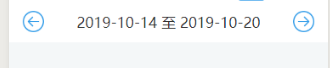
        <view>{{dateStart}} 至 {{dateEnd}}</view>

        <image class="dateRight" bindtap="nextWeek" src="../../res/imgs/dateRight.png"></image>

      </view>
.dateView{

  padding:0 32rpx;

  height:98rpx;

  display: flex;

  align-items: center;

  background:#fff;

}

.dateView>image{

  width:50rpx;

  height:50rpx;

}

.dateView>view{

  flex: 1;

  text-align: center;

  color:#333;

  font-size: 34rpx;

}
const GetPeriod = require("../../utils/getperiod.js");

Page({

  /**

   * 页面的初始数据

   */

  data: {

    currentTab: 1,

    dateStart:'2019-10-16',

    dateEnd: '2019-10-16',

  },

  /**

   * 生命周期函数--监听页面加载

   */

  onLoad: function(options) {

    let that = this;

    that.getWeekStartDate(0)

  },

  //获取本周的开始日期

  getWeekStartDate(numDay) {

    let that = this;

    this.now = new Date();

    this.nowYear = this.now.getYear(); //当前年

    this.nowMonth = this.now.getMonth(); //当前月

    this.nowDay = this.now.getDate(); //当前日

    this.nowDayOfWeek = this.now.getDay(); //今天是本周的第几天

    this.nowYear += (this.nowYear < 2000) ? 1900 : 0;

    let dateStart = GetPeriod.formatDate(new Date(this.nowYear, this.nowMonth, this.nowDay - this.nowDayOfWeek + 1 + numDay));

    let dateEnd = GetPeriod.formatDate(new Date(this.nowYear, this.nowMonth, this.nowDay - this.nowDayOfWeek + 7 + numDay));

    // console.log(dateStart)

    // 获取今天日期

    let now = GetPeriod.formatDate(new Date(this.nowYear, this.nowMonth, this.nowDay));

    now = now.replace(/-/g, "/");

    now = now.substring(5);

    this.setData({

      dateStart: dateStart,

      dateEnd: dateEnd,

      now: now,

      dates: now,

    })

    // 初始化数据(历史纪录)

    var timestamp = Date.parse(new Date(this.data.dateStart));

    timestamp = timestamp / 1000;

    // console.log(timestamp);

    that.setData({

      timestamp: timestamp

    })

  },
})
function constructor1 (){

  this.now = new Date();

  this.nowYear = this.now.getYear(); //当前年

  this.nowMonth = this.now.getMonth(); //当前月

  this.nowDay = this.now.getDate(); //当前日

  this.nowDayOfWeek = this.now.getDay(); //今天是本周的第几天

  this.nowYear += (this.nowYear < 2000) ? 1900 : 0;

}

//格式化数字

function formatNumber (n) {

  n = n.toString()

  return n[1] ? n : '0' + n

}

//格式化日期

function formatDate(date){

  let myyear = date.getFullYear();

  let mymonth = date.getMonth() + 1;

  let myweekday = date.getDate();

  return [myyear, mymonth, myweekday].map(this.formatNumber).join('-');

}

//获取某月的天数

function getMonthDays (myMonth) {

  let monthStartDate = new Date(this.nowYear, myMonth, 1);

  let monthEndDate = new Date(this.nowYear, myMonth + 1, 1);

  let days = (monthEndDate - monthStartDate) / (1000 * 60 * 60 * 24);

  return days;

}

//获取本季度的开始月份

function getQuarterStartMonth (){

  let startMonth = 0;

  if (this.nowMonth < 3) {

    startMonth = 0;

  }

  if (2 < this.nowMonth && this.nowMonth < 6) {

    startMonth = 3;

  }

  if (5 < this.nowMonth && this.nowMonth < 9) {

    startMonth = 6;

  }

  if (this.nowMonth > 8) {

    startMonth = 9;

  }

  return startMonth;

}

//获取本周的开始日期

function getWeekStartDate() {

  return this.formatDate(new Date(this.nowYear, this.nowMonth, this.nowDay - this.nowDayOfWeek + 1));

}

//获取本周的结束日期

function getWeekEndDate() {

  return this.formatDate(new Date(this.nowYear, this.nowMonth, this.nowDay + (6 - this.nowDayOfWeek + 1)));

}

//获取今天的日期

function getNowDate() {

  return this.formatDate(new Date(this.nowYear, this.nowMonth, this.nowDay));

}

function formatTime(date) {

  var year = date.getFullYear()

  var month = date.getMonth() + 1

  var day = date.getDate()

  var hour = date.getHours()

  var minute = date.getMinutes()

  var second = date.getSeconds()

  return [year, month, day].map(formatNumber).join('/') + ' ' + [hour, minute, second].map(formatNumber).join(':')

}

module.exports = {

  formatNumber: formatNumber,

  constructor1: constructor1,

  formatDate: formatDate,

  getMonthDays: getMonthDays,

  getQuarterStartMonth: getQuarterStartMonth,

  getWeekStartDate: getWeekStartDate,

  getNowDate: getNowDate,

  getWeekEndDate: getWeekEndDate,

  formatTime: formatTime

}
效果展示
微信小程序一周时间表的更多相关文章
- 微信小程序半周问题总结
新产品要做一个微信小程序,不想吐槽老板没给任何准备就给出了需求和原型图,好像默认小程序闭着眼睛就可以很顺利开发好.现在半周下来(五一结束开始到今天)完成了差不多所有的界面,网络请求部分还跟服务端兄弟耗 ...
- 两周撸一个掘金微信小程序
利益相关 无 声明 这并不是掘金官方小程序(貌似没有搜到掘金 APP 对应的官方小程序),完全为第三者开发者开发,仅用于学习交流,禁止用于其他用途.若要使用官方正版,可访问掘金 官方网站,或下载掘金官 ...
- 微信小程序开发初探
一.关于微信小程序 1.1 小程序诞生的背景 张小龙说道: (1)一切以用户价值为依归→用户是微信的核心,所以微信中没有很多与客户无关的功能,比如QQ中的乱七八糟一系列东西. (2)让创造发挥价值→所 ...
- 微信小程序热点云笔记demo 开源总结
因为公司的项目需要,我们自己开发了一个微信小程序的云笔记 开源地址 https://github.com/hotapp888/hotapp-notepad 云笔记功能特点:(1)自动微信登录(2)笔记 ...
- 微信小程序与传统APP十大优劣对比
随着微信公众平台的开放,微信端小程序涌现市场,带来很很多便利和简单的原生操作,询:微信端小程序是否会替代传统的APP应用?两者的优劣如何?我们一起来看看传统APP与微信端小程序十大优劣对比 ...
- 原创:经验分享:微信小程序外包接单常见问题及流程
从九月底内测到现在已经三个半月.凌晨一点睡觉已经习以为常,也正是这样,才让无前端经验的我做微信小程序开发并不感到费劲.最近才开始接微信小程序的外包项目,目前已经签下了五份合同,成品出了两个.加上转给朋 ...
- 【转】微信小程序给程序员带来的可能是一个赚钱的机遇
自上周被微信小程序刷屏之后,这周大家都在谈微信小程序能够带来哪些红利的话题,其实我想从程序员的角度来谈谈,带给我们程序员来的红利,或许是我们程序员创业或者赚钱的机遇. 其实我从<作为移动开发程序 ...
- 一个小时快速搭建微信小程序教程
「小程序」这个划时代的产品发布快一周了,互联网技术人都在摩拳擦掌,跃跃欲试.可是小程序目前还在内测,首批只发放了 200 个内测资格(泪流满面).本以为没有 AppID 这个月就与小程序无缘了,庆幸的 ...
- 微信小程序(应用号)资源汇总整理
微信小应用资源汇总整理 开源项目 WeApp - 微信小程序版的微信 wechat-weapp-redux-todos - 微信小程序集成Redux实现的Todo list wechat-weapp- ...
随机推荐
- fiddler抓包+安卓机 完成手机app抓包的配置 遇到的一些问题
fiddler抓包+安卓模拟器完成手机app抓包的配置:fiddler抓包+雷电模拟器 完成手机app抓包的配置 其实在安卓真机上弄比在虚拟机上弄更麻烦一点,它们的步骤都差不多一样,就是在安卓真机上弄 ...
- hdu3635 Dragon Balls
Problem Description Five hundred years later, the number of dragon balls will increase unexpectedly, ...
- Successor HDU - 4366 分块
代码+注释: 1 /* 2 题意: 3 一共有n个人,其中0号是总裁(金字塔顶尖).后面输入其他n-1个人的信息啊a.b.c,分别代表第i个人的上级是a,他的 4 忠诚度为b,他的能力为c.后面有m次 ...
- EF Core数据访问入门
重要概念 Entity Framework (EF) Core 是轻量化.可扩展.开源和跨平台的数据访问技术,它还是一 种对象关系映射器 (ORM),它使 .NET 开发人员能够使用面向对象的思想处理 ...
- 大数据开发-Spark-初识Spark-Graph && 快速入门
1.Spark Graph简介 GraphX 是 Spark 一个组件,专门用来表示图以及进行图的并行计算.GraphX 通过重新定义了图的抽象概念来拓展了 RDD: 定向多图,其属性附加到每个顶点和 ...
- 包机制和javadoc
包机制 一般用公司域名倒置作为包名: eg com.baidu.www 可以在src里自己鼠标右键建立包,包内可以存放代码, 包的路径必须在最上面, eg:package com.kuang; (自动 ...
- 爬虫入门三 scrapy
title: 爬虫入门三 scrapy date: 2020-03-14 14:49:00 categories: python tags: crawler scrapy框架入门 1 scrapy简介 ...
- github 无法访问
描述: 1. ping 丢失 100% 2. git 失败 Failed to connect to github.com port 443: Timed out 3.打开网站 超时 解决: http ...
- leetcode 22. 括号生成 dfs
先思考符合要求的串是什么样子的 任意时刻,(数量大于),且最后(==)==n即可 考虑下一个加入string的字符时(或者)即可 dfs class Solution { public: vector ...
- codeforces 1042C Array Product【构造】
题目:戳这里 题意:n个数,两种操作,第一种是a[i]*a[j],删掉a[i],第一种是直接删除a[i](只能用一次)剩下的数序列号不变.操作n-1次,使最后剩下的那个数最大化. 解题思路: 正数之间 ...