
springboot:异步调用@Async
在后端开发中经常遇到一些耗时或者第三方系统调用的情况,我们知道Java程序一般的执行流程是顺序执行(不考虑多线程并发的情况),但是顺序执行的效率肯定是无法达到我们的预期的,这时就期望可以并行执行,常规的做法是使用多线程或线程池,需要额外编写代码实现。在spring3.0后引入了@Async注解,使用该注解可以达到线程池的执行效果,而且在开发上非常简单。
一、概述
springboot是基于spring框架的,在springboot环境下演示@Async注解的使用方式。先看下该注解的定义,
@Target({ElementType.METHOD, ElementType.TYPE})

@Retention(RetentionPolicy.RUNTIME)

@Documented

public @interface Async {

    /**

     * A qualifier value for the specified asynchronous operation(s).

     * <p>May be used to determine the target executor to be used when executing this

     * method, matching the qualifier value (or the bean name) of a specific

     * {@link java.util.concurrent.Executor Executor} or

     * {@link org.springframework.core.task.TaskExecutor TaskExecutor}

     * bean definition.

     * <p>When specified on a class level {@code @Async} annotation, indicates that the

     * given executor should be used for all methods within the class. Method level use

     * of {@code Async#value} always overrides any value set at the class level.

     * @since 3.1.2

     */

    String value() default "";

}
可以看到该注解只有一个属性,那就是value,从注释上知道value指定的是执行该任务的线程池,也就是说我们可以使用子定义的线程池执行我们的任务,而不是系统默认的。在看该注解上的注解,
@Target({ElementType.METHOD, ElementType.TYPE})

@Retention(RetentionPolicy.RUNTIME)

@Documented
也就是说该注解可以用在方法和类上。标记在类上表示类中的所有方法都以异步方式执行,也就是提交到线程池执行。
二、详述
上面简单对@Async注解进行了解释,下面看用法。
1、@EnableAsync注解
在springboot中要使用@Async注解必须在springboot启动类上使用@EnableAsync注解,开启@Async注解的自动配置,如下,
package com.example.demo;

import com.example.demo.properties.ApplicationPro;

import org.springframework.boot.SpringApplication;

import org.springframework.boot.autoconfigure.SpringBootApplication;

import org.springframework.boot.context.properties.ConfigurationProperties;

import org.springframework.boot.context.properties.EnableConfigurationProperties;

import org.springframework.scheduling.annotation.EnableAsync;

import org.springframework.scheduling.annotation.EnableScheduling;

@SpringBootApplication

@EnableConfigurationProperties({ApplicationPro.class})

//开启@Async注解的自动配置

@EnableAsync

public class DemoApplication {

    public static void main(String[] args) {

        SpringApplication.run(DemoApplication.class, args);

    }

}
只有在启动类上使用@EnableAsync注解,@Async注解才会生效。
2、@Async注解
上面使用@EnableAsync注解已经开启了对@Async注解的配置,下面看具体的异步调用类,
package com.example.demo.service;

import com.example.demo.Student;

import org.springframework.scheduling.annotation.Async;

import org.springframework.scheduling.annotation.AsyncResult;

import org.springframework.stereotype.Service;

import java.util.concurrent.Future;

@Service

@Async

public class AsyncService {

    public Future<Student> get(){

        Student stu=new Student("1","3");

        try {

            Thread.sleep(10000l);

        } catch (InterruptedException e) {

            e.printStackTrace();

        }

        return AsyncResult.forValue(stu);

    }

    public void  executeRemote(){

        try {

            Thread.sleep(10000l);

        } catch (InterruptedException e) {

            e.printStackTrace();

        }

    }

}
首先,要使该类让spring管理必须使用@Service注解(或其他注解也可以),然后在类上标记@Async注解,前面说过@Async注解可以在方法或类上使用,在类上使用则表示类中的所有方法均使用异步执行的方式。异步执行类中有两个方法,每个方法为了演示执行的耗时操作均睡眠10s。这两个方法一个是有返回值的,另一个是无返回值的,重点看有返回值的,
public Future<Student> get(){

        Student stu=new Student("1","3");

        try {

            Thread.sleep(10000l);

        } catch (InterruptedException e) {

            e.printStackTrace();

        }

        return AsyncResult.forValue(stu);

    }
为什么方法的返回值是Future,在@Async注释上有下面这句话,
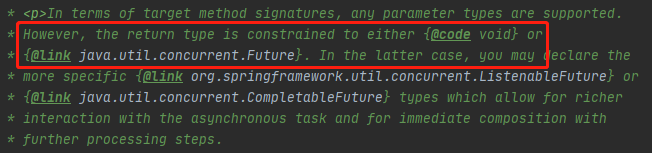
从上面的注解正好可以说明返回Future是没问题,但是我们的方法就是一个普通的方法,要怎么才能返回Future类那,不慌,spring针对@Async注解提供了AsyncResult类,从类名就知道该类就是为了@Async注解准备的,
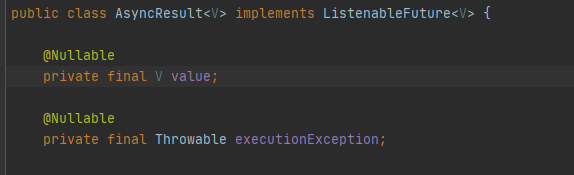
使用其中的forValue方法,便可以返回一个带有泛型的Future类了。
看下测试类,
package com.example.demo.controller;

import com.example.demo.Student;

import com.example.demo.service.AsyncService;

import org.springframework.beans.factory.annotation.Autowired;

import org.springframework.stereotype.Controller;

import org.springframework.web.bind.annotation.RequestMapping;

import org.springframework.web.bind.annotation.ResponseBody;

import java.util.concurrent.ExecutionException;

import java.util.concurrent.Future;

@Controller

@RequestMapping("async")

public class ControllerAsyncTest {

    @Autowired

    private AsyncService asyncService;

    @RequestMapping("/test")

    @ResponseBody

    public Student get(){

        try {

        long start=System.currentTimeMillis();
        //调用带有返回值的get方法

        Future<Student> result=asyncService.get();
        //调用无返回值的executeRemote方法

        asyncService.executeRemote();

        Student student=result.get();

        long end=System.currentTimeMillis();

        System.out.println("执行时间:"+(end-start));

        return  student;

        } catch (InterruptedException e) {

            e.printStackTrace();

        } catch (ExecutionException e) {

            e.printStackTrace();

        }

        return null;

    }

}
测试类就是一个简单的controller,调用了get和executeRemote方法,这两个方法分别会睡眠10s,而且get会有返回值,下面看是否可以拿到get的返回值,并看下调用这两个方法的时间,
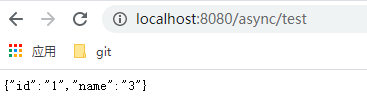
可以成功拿到返回值,看执行时间,
2020-12-12 21:37:43.556  INFO 11780 --- [nio-8080-exec-1] o.s.web.servlet.DispatcherServlet        : Completed initialization in 5 ms

执行时间:10006
执行时间是10006ms,也就是10s多,按照上面的分析两个方法分别睡眠了10s,如果同步执行那肯定是20s,把@Async注解去掉看执行时间,
2020-12-12 21:41:07.840  INFO 11584 --- [nio-8080-exec-1] o.s.web.servlet.DispatcherServlet        : Completed initialization in 5 ms

执行时间:20001
执行时间是20001ms,算上两个方法睡眠的时间,和测试类本身的时间,20001ms是没错的。从这里可以看出@Async注解的作用,把每个方法当作任务提交给了线程池,提高了任务执行的时间。
另外,在获取异步的执行结果使用了下面的方法,
Future<Student> result=asyncService.get();

asyncService.executeRemote();

//获得执行结果

Student student=result.get();
由于在主线程要获得任务的执行结果,使用Future类的get方法获得结果,该结果需要等到任务执行完以后才可以获得。
三、总结
本文讲解了异步调用@Async注解的使用,
1、使用@EnableAsync注解开启对@Async注解的支持;
2、在类或方法上使用@Async注解;
有不当之处,欢迎指正,谢谢!
springboot:异步调用@Async的更多相关文章
- SpringBoot学习笔记(七):SpringBoot使用AOP统一处理请求日志、SpringBoot定时任务@Scheduled、SpringBoot异步调用Async、自定义参数
SpringBoot使用AOP统一处理请求日志 这里就提到了我们Spring当中的AOP,也就是面向切面编程,今天我们使用AOP去对我们的所有请求进行一个统一处理.首先在pom.xml中引入我们需要的 ...
- springboot 异步调用Async使用方法
引言: 在Java应用中,绝大多数情况下都是通过同步的方式来实现交互处理的:但是在处理与第三方系统交互的时候,容易造成响应迟缓的情况,之前大部分都是使用多线程来完成此类任务,其实,在spring 3. ...
- SpringBoot异步调用--@Async详解
1. 概述 在日常开发中,为了提高主线程的效率,往往需要采用异步调用处理,例如系统日志等.在实际业务场景中,可以使用消息中间件如RabbitMQ.RocketMQ.Kafka等来解决.假如对高可用 ...
- springboot之异步调用@Async
原文:http://www.cnblogs.com/xuwenjin/p/8858050.html 引言: 在Java应用中,绝大多数情况下都是通过同步的方式来实现交互处理的:但是在处理与第三方系统交 ...
- SpringBoot系列:Spring Boot异步调用@Async
在实际开发中,有时候为了及时处理请求和进行响应,我们可能会多任务同时执行,或者先处理主任务,也就是异步调用,异步调用的实现有很多,例如多线程.定时任务.消息队列等, 这一章节,我们就来讲讲@Async ...
- SpringBoot集成篇(二) 异步调用Async
什么是异步调用? 异步调用是相对于同步调用而言的,同步调用是指程序按预定顺序一步步执行,每一步必须等到上一步执行完后才能执行,异步调用则无需等待上一步程序执行完即可执行. 如何实现异步调用? 多线程, ...
- 170719、springboot编程之异步调用@Async
1.在pom.xml中增加依赖 <dependency> <groupId>org.springframework.boot</groupId> <artif ...
- nodejs异步调用async
犹豫nodejs是异步编程模型,有一些在同步编程中很容易做到的事情,现在却变得很麻烦,async的流程控制就是为了简化这些操作var async = require('async'); 1.serie ...
- SpringBoot异步使用@Async原理及线程池配置
前言 在实际项目开发中很多业务场景需要使用异步去完成,比如消息通知,日志记录,等非常常用的都可以通过异步去执行,提高效率,那么在Spring框架中应该如何去使用异步呢 使用步骤 完成异步操作一般有两种 ...
随机推荐
- C++深拷贝与浅拷贝区别
浅拷贝只是对指针的拷贝,浅拷贝后两个指针指向同一个内存空间: 深拷贝不仅对指针进行拷贝,而且对指针指向的内容进行拷贝,经深拷贝后的指针是指向两个不同地址的指针. 当对一个已知对象进行拷贝时,编译系统会 ...
- springboot使用swagger2生成开发文档
一.引入jar包 <dependency> <groupId>io.springfox</groupId> <artifactId>springfox- ...
- 不会吧,你连Java 多线程线程安全都还没搞明白,难怪你面试总不过
什么是线程安全? 当一个线程在同一时刻共享同一个全局变量或静态变量时,可能会受到其他线程的干扰,导致数据有问题,这种现象就叫线程安全问题. 为什么有线程安全问题? 当多个线程同时共享,同一个全局变量或 ...
- BT下载器Folx标签功能怎么实现自动的资源分类
很多经典的电影作品,比如魔戒三部曲.蜘蛛侠系列.漫威动画系列等,在一个系列中都会包含多个作品.如果使用Folx bt种子下载器自带的电影标签的话,会将这些系列电影都归为"电影"标签 ...
- 二 HTML文档基本结构
2.1 HTML5文档结构: HTML5文档结构包括头部(head).主体(body)两大部分. 2.1.1<!DOCTYPE>声明 引用官方的DTD文件,在HTML5之前版本,如xHTM ...
- 【电子取证:FTK Imager篇】DD、E01系统镜像仿真
星河滚烫,人生有理想! ---[suy999] DD.E01系统镜像动态仿真 (一)使用到的软件 1.FTK Imager (v4.5.0.3) 2.VMware Workstation 15 P ...
- sentinel--初级使用篇
1.官方资料 github官网地址:https://github.com/alibaba/Sentinel wiki:https://github.com/alibaba/Sentinel/wiki/ ...
- 企业安全01-Apache solr XML实体注入漏洞CVE-2017-12629
Apache solr XML 实体注入漏洞CVE-2017-12629 一.简介 Apache Solr 是一个开源的搜索服务器.Solr 使用 Java 语言开发,主要基于 HTTP 和 Apac ...
- C# WinForm UDP 发送和接收消息
using System; using System.Net; using System.Net.Sockets; using System.Text; using System.Threading; ...
- 「刷题笔记」哈希,kmp,trie
Bovine Genomics 暴力 str hash+dp 设\(dp[i][j]\)为前\(i\)组匹配到第\(j\)位的方案数,则转移方程 \[dp[i][j+l]+=dp[i-1][j] \] ...