
微信公众号-开发者-自定义菜单-CLICK事件处理
想点击菜单,推送消息。功能很简单,坑了我一天时间。在此笔记。
菜单代码:
{

     "button":[

     {

          "type":"click",

          "name":"今日歌曲",

          "key":"V1001_TODAY_MUSIC"

      },

      {

           "name":"菜单",

           "sub_button":[

           {

               "type":"view",

               "name":"搜索",

               "url":"http://www.soso.com/"

            },

            {

               "type":"view",

               "name":"视频",

               "url":"http://v.qq.com/"

            },

            {

               "type":"click",

               "name":"赞一下我们",

               "key":"V1001_GOOD"

            }]

       }]

 }
菜单生成好了以后,如何处理“赞一下我们”相应事件呢?
引用方倍工作室的代码修改如下:
<?php

/*

    方倍工作室

    CopyRight 2014 All Rights Reserved

*/

define("TOKEN", "weixin");

$wechatObj = new wechatCallbackapiTest();

if (!isset($_GET['echostr'])) {

    $wechatObj->responseMsg();

}else{

    $wechatObj->valid();

}

class wechatCallbackapiTest

{

    //验证签名

    public function valid()

    {

        $echoStr = $_GET["echostr"];

        $signature = $_GET["signature"];

        $timestamp = $_GET["timestamp"];

        $nonce = $_GET["nonce"];

        $token = TOKEN;

        $tmpArr = array($token, $timestamp, $nonce);

        sort($tmpArr);

        $tmpStr = implode($tmpArr);

        $tmpStr = sha1($tmpStr);

        if($tmpStr == $signature){

            echo $echoStr;

            exit;

        }

        $siteURL='http://210.14.148.180/kdjy/';

    }

    public function responseMsg()

    {

        $postStr = $GLOBALS["HTTP_RAW_POST_DATA"];

        if (!empty($postStr)){

            $this->logger("R ".$postStr);

            $postObj = simplexml_load_string($postStr, 'SimpleXMLElement', LIBXML_NOCDATA);

            $RX_TYPE = trim($postObj->MsgType);

            $result = "";

            switch ($RX_TYPE)

            {

                case "event":

                    $result = $this->receiveEvent($postObj);

                    break;

                case "text":

                    $result = $this->receiveText($postObj);

                    break;

            }

            $this->logger("T ".$result);

            echo $result;

        }else {

            echo "";

            exit;

        }

    }

    private function receiveEvent($object)

    {

        switch ($object->Event)

        {

            case "subscribe":

                $content = "欢迎关注方倍工作室 ";

            //------------------- 赞一下 start ------------------------

            case "CLICK":   //这里是大写‘CLICK’

                $content = $object->EventKey; // 获取key

                if($content=='V1001_GOOD'){

                    $content = '谢谢支持!!!';

                }

            //------------------- 赞一下 end ------------------------

                break;

        }

        $result = $this->transmitText($object, $content);

        return $result;

    }

    private function receiveText($object)

    {

        $keyword = trim($object->Content);

            $url = "http://apix.sinaapp.com/weather/?appkey=".$object->ToUserName."&city=".urlencode($keyword);

            $output = file_get_contents($url);

            $content = json_decode($output, true);

            $result = $this->transmitNews($object, $content);

        return $result;

    }

    private function transmitText($object, $content)

    {

        if (!isset($content) || empty($content)){

            return "";

        }

        $textTpl = "<xml>

<ToUserName><![CDATA[%s]]></ToUserName>

<FromUserName><![CDATA[%s]]></FromUserName>

<CreateTime>%s</CreateTime>

<MsgType><![CDATA[text]]></MsgType>

<Content><![CDATA[%s]]></Content>

</xml>";

        $result = sprintf($textTpl, $object->FromUserName, $object->ToUserName, time(), $content);

        return $result;

    }

    private function transmitNews($object, $newsArray)

    {

        if(!is_array($newsArray)){

            return "";

        }

        $itemTpl = "    <item>

        <Title><![CDATA[%s]]></Title>

        <Description><![CDATA[%s]]></Description>

        <PicUrl><![CDATA[%s]]></PicUrl>

        <Url><![CDATA[%s]]></Url>

    </item>

";

        $item_str = "";

        foreach ($newsArray as $item){

            $item_str .= sprintf($itemTpl, $item['Title'], $item['Description'], $item['PicUrl'], $item['Url']);

        }

        $newsTpl = "<xml>

<ToUserName><![CDATA[%s]]></ToUserName>

<FromUserName><![CDATA[%s]]></FromUserName>

<CreateTime>%s</CreateTime>

<MsgType><![CDATA[news]]></MsgType>

<Content><![CDATA[]]></Content>

<ArticleCount>%s</ArticleCount>

<Articles>

$item_str</Articles>

</xml>";

        $result = sprintf($newsTpl, $object->FromUserName, $object->ToUserName, time(), count($newsArray));

        return $result;

    }

    private function logger($log_content)

    {

    }

}

?>
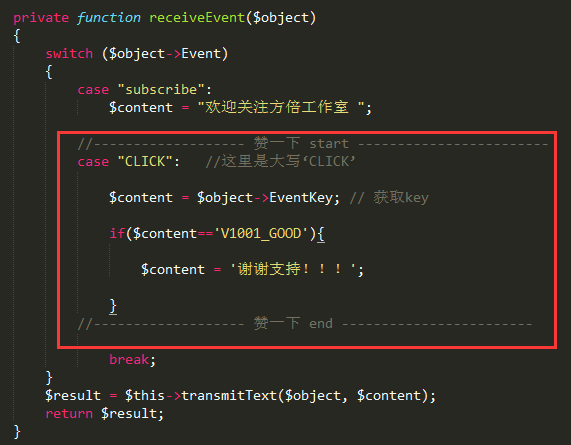
加入如下代码,注意CLICK是大写。
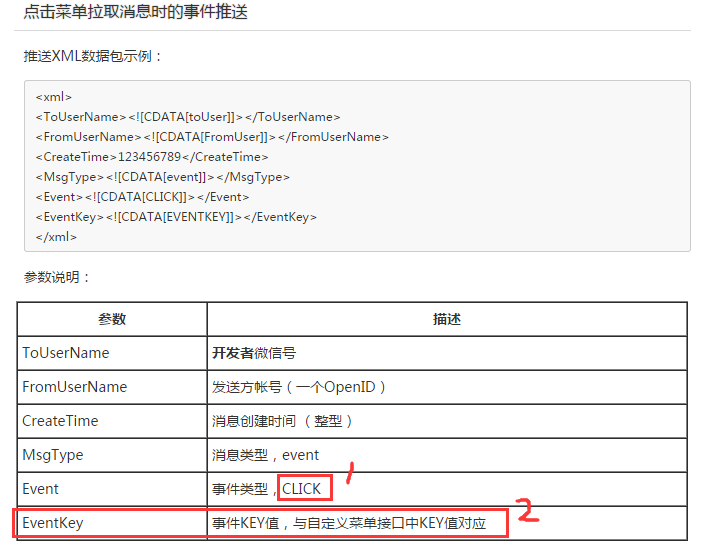
PS:为找这个key,找了半天,我是小学生,官方不能写个demo吗?
微信公众号-开发者-自定义菜单-CLICK事件处理的更多相关文章
- php 开启微信公众号开发者模式
php 开启微信公众号开发者模式<pre><?php/** * wechat php test */header('Content-type:text');//define your ...
- tp6微信公众号开发者模式自定义菜单
1,参考上篇博客,获取access_token https://www.cnblogs.com/xiaoyantongxue/p/15803334.html 2:控制器写以下代码 /* * 获取普通a ...
- 微信公众平台创建自定义菜单的PHP代码
授人以鱼不如授人以渔.在方倍工作室上问了一下,创建自定义菜单的代码多少钱,一张口就一百,好吧,那我就给你们一人省一百块钱吧,你们说该如何谢谢我?事先说明一下啊,你的PHP版本要高于4.0.2才支持cU ...
- 使用Java语言开发微信公众平台(八)——自定义菜单功能
随着上一篇文章的结束,我们已经实现了所有消息的类型的回复功能.今天,我们来学习更加高大上,也更加重要的自定义菜单功能. 一.了解自定义菜单 自定义菜单是微信公众平台最常用也是最重要的功能之一.根据微信 ...
- tp6微信公众号开发者模式token认证
微信公众号开发完整教程(一) PHP7.0版本,TP5.0框架 技术标签: 微信公众号开发 因为工作的需要,这一两年对微信公众号和小程序,项目制作的比较多.所以我才打算写一篇全面的 ...
- java开发微信公众号----开发者基本配置的
首先附上微信公众平台开发技术文档地址:https://mp.weixin.qq.com/wiki?t=resource/res_main&id=mp1472017492_58YV5 本文主要描 ...
- tp6微信公众号开发者模式基础消息
官方文档 https://developers.weixin.qq.com/doc/offiaccount/Message_Management/Receiving_standard_messages ...
- tp6微信公众号开发者模式获取access_token
1:config 文件下新建一个文件wechat.php,将个人id和秘钥写入配置文件 网址: https://developers.weixin.qq.com/doc/offiaccount/Bas ...
- 微信公众号开发者模式自定义菜单 node
纯属分享 var config = require('./admin/wx/config/config'); var API = require('wechat-api'); var api = ne ...
随机推荐
- 强烈推荐240多个jQuery插件提供下载
jQuery 是继 prototype 之后又一个优秀的 Javascript 框架.其宗旨是—写更少的代码,做更多的事情.它是轻量级的 js 库(压缩后只有21k) ,这是其它的 js 库所不及 的 ...
- 一天一个mysql函数(二) FIND_IN_SET()
in和FILD_IN_SET() 的区别: select id, list, name from table where FIND_IN_SET( 'daodao' , list) 所以如果list是 ...
- 琐碎-关于hadoop的GenericOptionsParser类
GenericOptionsParser 命令行解析器 是hadoop框架中解析命令行参数的基本类.它能够辨别一些标准的命令行参数,能够使应用程序轻易地指定namenode,jobtracker,以及 ...
- CollatingOfData 之 JsonHelper
1 using System; using System.Collections.Generic; using System.Linq; using System.Web; using System. ...
- jq层次选择器
二. 层次选择器 1. parent > child(直系子元素) $(document).ready(function () { // 选取div下的第一代span元素,将字体颜色设为红色 $ ...
- 编写一个单独的Web Service for Delphi
早段时间看了一篇好文章,对其整理成以下几步 1新建一个SOAP Server Application,在提示输入接口时输入MyHello,把所有文件保存在一个叫Ser的目录下,其中一个包含TWebMo ...
- PHP代码加密 -- php_strip_whitespace函数,去掉源代码所有注释和空格并显示在一行
<?php function stripCommentAndWhitespace($path = '') { if (empty($path)) { echo '请指定要操作的文件路径'; re ...
- Adobe Edge Animate –使用css制作菜单
Adobe Edge Animate –使用css制作菜单 版权声明: 本文版权属于 北京联友天下科技发展有限公司. 转载的时候请注明版权和原文地址. 效果图:
- 网页播放amr格式文件
mp3格式大家都知道,amr格式就陌生了,至少我没听过.百度一下,先给自己扫盲: AMR(Adaptive Multi-Rate):nokia为WB-AMR格式(AWB)的铃声所作的商业命名,以被3G ...
- html5 js os build
1.NodeJS6.6 install https://nodejs.org/en/ c:\nodejs>npm install -g grunt-cliC:\Users\police\Ap ...