
Visual Studio 2008 – ASP.NET “System.Runtime.InteropServices.COMException”
The Issue
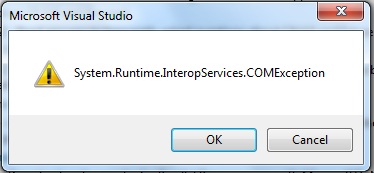
When openning an existing ASP.NET project for the first time in Visual Studio 2008 it returns the error “System.Runtime.InteropServices.COMException” without any HRESULT code. The problem I experienced was specificly on a Windows 7 machine, but the same solutions should work on Vista as well.
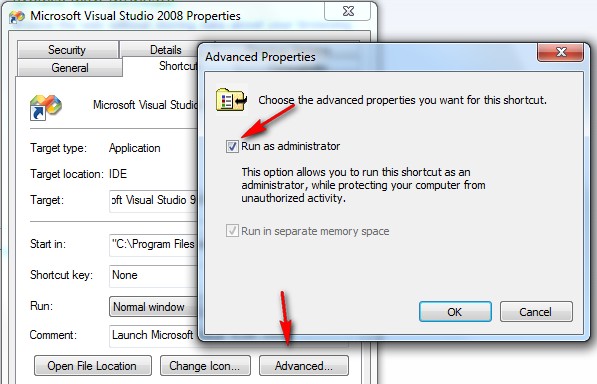
1.Administrator – Visual Studio has to be “run as administrator” to acccess IIS applications, in Windows Vista and Windows 7. This is true even if you are logged into the computer as an Administrator. To run as an administrator, right click the Visual Studio shortcut and select “Run as Administrator”
You can also setup Visual Studio to always run as Administrator
- Right click the Visual Studio shortcut.
- Select properties
- Click the advanced button
- Check “Run as Administrator”.
- Click OK
2.只需要打开项目配置文件*.csproj,将<UseIIS>True</UseIIS> 改为 False,然后可以正常加载项目,接着重新配置为正常的IIS
Visual Studio 2008 – ASP.NET “System.Runtime.InteropServices.COMException”的更多相关文章
- System.Runtime.InteropServices.COMException: Exception from HRESULT: 0x800AC472
更新至服务器后运行出错: System.Runtime.InteropServices.COMException: Exception from HRESULT: 0x800AC472 解决方法 注册 ...
- System.Runtime.InteropServices.COMException (0x800706BA) 解决方法
提示“操作失败:无法获取MAC地址.”错误的解决方法. .NET 获取 MAC地址可能会遇到 System.Runtime.InteropServices.COMException (0x8007 ...
- VS2008,System.Runtime.InteropServices.COMException (0x800401F3): Invalid class string (Exception from HRESULT: 0x800401F3 (CO_E_CLASSSTRING))
在VS2008环境中编译调试运行不报错,但在发布的exe文件运行就报错 System.Runtime.InteropServices.COMException (0x800401F3): Invali ...
- System.Runtime.InteropServices.COMException (0x800A03EC): 无法访问文件
使用Microsoft.Office.Interop.Excel 操作 今天在服务器部署,操作程序csv文件转xsl文件的时候,遇到一下问题: System.Runtime.InteropServic ...
- System.Runtime.InteropServices.COMException 检索COM类工厂中CLSID{xxxxxxxxx}的组件时失败解决方法
iis7.5中设定应用程序池中<进程模型>中<标识>为localSystem 提示:System.Runtime.InteropServices.COMException: 命 ...
- excel System.Runtime.InteropServices.COMException (0x80010105): 服务器出现意外情况。 (异常来自 HRESULT:0x80010105 (RPC_E
System.Runtime.InteropServices.COMException (0x80010105): 服务器出现意外情况. (异常来自 HRESULT:0x80010105 (RPC_E ...
- “System.Runtime.InteropServices.COMException”类型的第一次机会异常在 System.Windows.Forms.dll 中发生
最近做一个winform项目,在里面用了webbrowser控件进行html文档打印,遇到了标题所示问题.根据查到的一些资料,在调试>异常>查找中输入“System.Runtime.Int ...
- “System.Runtime.InteropServices.COMException (0x80070422): 无法启动服务”解决方法
应用程序中发生了无法处理的异常.如果单击“退出”,应用程序将立即关闭.无法启动服务,原因可能是已被禁用或其相关联设备没有启动.(异常来自HRESULT:0X80070422).点击详细内容:有关调用实 ...
- System.Runtime.InteropServices.COMException
System.Runtime.InteropServices.COMException (0x80040154): Retrieving the COM class factory for compo ...
随机推荐
- HDU2110+母函数
/* 母函数(生成函数) 题意: 有n种资产,每种资产num份,每份有val的价值 问取出总价值的1/3有多少种方案 */ #include<stdio.h> #include<st ...
- javaweb学习总结(四十四)——监听器(Listener)学习
一.监听器介绍 1.1.监听器的概念
- ANDROID_MARS学习笔记_S01_004dpi、dp(dip)及计算
一.dpi.dp介绍 sp会随着用户在手机中设置字体大小而改变,而dp不会 二.1.dpsp_layout.xml <?xml version="1.0" encoding= ...
- 安装Hadoop系列 — 安装Eclipse
1.下载 Eclipse从 http://www.eclipse.org/downloads/index-developer.php下载合适版本,如:Eclipse IDE for C/C++ Dev ...
- hadoop之eclipse环境的配置
http://hi.baidu.com/kongxianghe123/item/ea352e1040cdeffd86ad4e28
- 对C#中的web访问mysql数据库的一些知识点进行了整理归纳总结
基本对比 使用方式 使用场合 优缺点 是否需要安装 需要的dll网址 引用方式 程序内引用 程序初期确定使用MySql,前期添加引用 大多数情况下使用在类文件内,多数使用于aspx,ashx等带有后置 ...
- MQ-传输方式Topic和Queue的对比
Jms规范里的两种message传输方式Topic和Queue,两者的对比如下表(): Topic Queue 概要 Publish Subscribe messaging 发布订阅消息 Poi ...
- 对DataTable里数据进行排序
在日常开发过程中,有一个DataTable集合,里面有很多字段,现在要求针对某一列进行排序,如果该列为数字的话,进行ASC即可实现,但是该字段类型为string,此时排序就有点不正确了. 我也不多废话 ...
- 8.3-8.7 usaco
summary:38 vijos1002:青蛙跳河. dp+压缩.距离大于100可以直接%100.然后数据范围小了很多可以dp了. #include<cstdio> #include< ...
- 如何创建,增加swap
使用分区做为SWAP比较好,速度比文件的快,也不容易产生磁盘碎片所有应该尽量使用分区作为SWAP. 先说说使用文件做为SWAP吧:一.因为做为SWAP的文件,必须是连续的,所以需要使用dd命令创建:[ ...