
VS2008,System.Runtime.InteropServices.COMException (0x800401F3): Invalid class string (Exception from HRESULT: 0x800401F3 (CO_E_CLASSSTRING))
在VS2008环境中编译调试运行不报错,但在发布的exe文件运行就报错
System.Runtime.InteropServices.COMException (0x800401F3): Invalid class string (Exception from HRESULT: 0x800401F3 (CO_E_CLASSSTRING)),不得其解。
See the end of this message for details on invoking
just-in-time (JIT) debugging instead of this dialog box.
************** Exception Text **************
System.Runtime.InteropServices.COMException (0x800401F3): Invalid class string (Exception from HRESULT: 0x800401F3 (CO_E_CLASSSTRING))
at OPCAutomation.OPCServerClass.Connect(String ProgID, Object Node)
at PlantAdminForPierburg.MainForm.ConnectToOPC(String OPCServerName, String OPCServerNode) in C:\Users\user\Desktop\IPCForPIERBURGSUV2018\PlantAdminForPIERBURG\MainForm.vb:line 1908
at PlantAdminForPierburg.MainForm.MainForm_Load(Object sender, EventArgs e) in C:\Users\user\Desktop\IPCForPIERBURGSUV2018\PlantAdminForPIERBURG\MainForm.vb:line 64
at System.EventHandler.Invoke(Object sender, EventArgs e)
at System.Windows.Forms.Form.OnLoad(EventArgs e)
at System.Windows.Forms.Form.OnCreateControl()
at System.Windows.Forms.Control.CreateControl(Boolean fIgnoreVisible)
at System.Windows.Forms.Control.CreateControl()
at System.Windows.Forms.Control.WmShowWindow(Message& m)
at System.Windows.Forms.Control.WndProc(Message& m)
at System.Windows.Forms.ScrollableControl.WndProc(Message& m)
at System.Windows.Forms.ContainerControl.WndProc(Message& m)
at System.Windows.Forms.Form.WmShowWindow(Message& m)
at System.Windows.Forms.Form.WndProc(Message& m)
at System.Windows.Forms.Control.ControlNativeWindow.OnMessage(Message& m)
at System.Windows.Forms.Control.ControlNativeWindow.WndProc(Message& m)
at System.Windows.Forms.NativeWindow.Callback(IntPtr hWnd, Int32 msg, IntPtr wparam, IntPtr lparam)
************** Loaded Assemblies **************
mscorlib
Assembly Version: 2.0.0.0
Win32 Version: 2.0.50727.8784 (QFE.050727-8700)
CodeBase: file:///C:/Windows/Microsoft.NET/Framework/v2.0.50727/mscorlib.dll
----------------------------------------
PlantAdminForPierburg
Assembly Version: 1.0.0.0
Win32 Version: 1.0.0.0
CodeBase: file:///C:/Users/user/Desktop/IPCForPIERBURGSUV2018/PlantAdminForPIERBURG/bin/Release/PlantAdminForPierburg.exe
----------------------------------------
Microsoft.VisualBasic
Assembly Version: 8.0.0.0
Win32 Version: 8.0.50727.5483 (Win7SP1GDR.050727-5400)
CodeBase: file:///C:/Windows/assembly/GAC_MSIL/Microsoft.VisualBasic/8.0.0.0__b03f5f7f11d50a3a/Microsoft.VisualBasic.dll
----------------------------------------
System
Assembly Version: 2.0.0.0
Win32 Version: 2.0.50727.8770 (QFE.050727-8700)
CodeBase: file:///C:/Windows/assembly/GAC_MSIL/System/2.0.0.0__b77a5c561934e089/System.dll
----------------------------------------
System.Windows.Forms
Assembly Version: 2.0.0.0
Win32 Version: 2.0.50727.5491 (Win7SP1GDR.050727-5400)
CodeBase: file:///C:/Windows/assembly/GAC_MSIL/System.Windows.Forms/2.0.0.0__b77a5c561934e089/System.Windows.Forms.dll
----------------------------------------
System.Drawing
Assembly Version: 2.0.0.0
Win32 Version: 2.0.50727.5495 (Win7SP1GDR.050727-5400)
CodeBase: file:///C:/Windows/assembly/GAC_MSIL/System.Drawing/2.0.0.0__b03f5f7f11d50a3a/System.Drawing.dll
----------------------------------------
System.Configuration
Assembly Version: 2.0.0.0
Win32 Version: 2.0.50727.5483 (Win7SP1GDR.050727-5400)
CodeBase: file:///C:/Windows/assembly/GAC_MSIL/System.Configuration/2.0.0.0__b03f5f7f11d50a3a/System.Configuration.dll
----------------------------------------
System.Xml
Assembly Version: 2.0.0.0
Win32 Version: 2.0.50727.8773 (QFE.050727-8700)
CodeBase: file:///C:/Windows/assembly/GAC_MSIL/System.Xml/2.0.0.0__b77a5c561934e089/System.Xml.dll
----------------------------------------
System.Runtime.Remoting
Assembly Version: 2.0.0.0
Win32 Version: 2.0.50727.8771 (QFE.050727-8700)
CodeBase: file:///C:/Windows/assembly/GAC_MSIL/System.Runtime.Remoting/2.0.0.0__b77a5c561934e089/System.Runtime.Remoting.dll
----------------------------------------
System.Data
Assembly Version: 2.0.0.0
Win32 Version: 2.0.50727.8762 (QFE.050727-8700)
CodeBase: file:///C:/Windows/assembly/GAC_32/System.Data/2.0.0.0__b77a5c561934e089/System.Data.dll
----------------------------------------
Interop.OPCAutomation
Assembly Version: 1.0.0.0
Win32 Version: 1.0.0.0
CodeBase: file:///C:/Users/user/Desktop/IPCForPIERBURGSUV2018/PlantAdminForPIERBURG/bin/Release/Interop.OPCAutomation.DLL
----------------------------------------
************** JIT Debugging **************
To enable just-in-time (JIT) debugging, the .config file for this
application or computer (machine.config) must have the
jitDebugging value set in the system.windows.forms section.
The application must also be compiled with debugging
enabled.
For example:
<configuration>
<system.windows.forms jitDebugging="true" />
</configuration>
When JIT debugging is enabled, any unhandled exception
will be sent to the JIT debugger registered on the computer
rather than be handled by this dialog box.
如下图所示,在app.config里配置一行即可。
<system.windows.forms jitDebugging="true" />
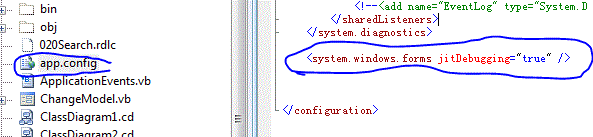
加完这个记录后就正常了。。。。
VS2008,System.Runtime.InteropServices.COMException (0x800401F3): Invalid class string (Exception from HRESULT: 0x800401F3 (CO_E_CLASSSTRING))的更多相关文章
- System.Runtime.InteropServices.COMException: Exception from HRESULT: 0x800AC472
更新至服务器后运行出错: System.Runtime.InteropServices.COMException: Exception from HRESULT: 0x800AC472 解决方法 注册 ...
- System.Runtime.InteropServices.COMException (0x800706BA) 解决方法
提示“操作失败:无法获取MAC地址.”错误的解决方法. .NET 获取 MAC地址可能会遇到 System.Runtime.InteropServices.COMException (0x8007 ...
- Visual Studio 2008 – ASP.NET “System.Runtime.InteropServices.COMException”
The Issue When openning an existing ASP.NET project for the first time in Visual Studio 2008 it retu ...
- System.Runtime.InteropServices.COMException (0x800A03EC): 无法访问文件
使用Microsoft.Office.Interop.Excel 操作 今天在服务器部署,操作程序csv文件转xsl文件的时候,遇到一下问题: System.Runtime.InteropServic ...
- System.Runtime.InteropServices.COMException 检索COM类工厂中CLSID{xxxxxxxxx}的组件时失败解决方法
iis7.5中设定应用程序池中<进程模型>中<标识>为localSystem 提示:System.Runtime.InteropServices.COMException: 命 ...
- excel System.Runtime.InteropServices.COMException (0x80010105): 服务器出现意外情况。 (异常来自 HRESULT:0x80010105 (RPC_E
System.Runtime.InteropServices.COMException (0x80010105): 服务器出现意外情况. (异常来自 HRESULT:0x80010105 (RPC_E ...
- “System.Runtime.InteropServices.COMException”类型的第一次机会异常在 System.Windows.Forms.dll 中发生
最近做一个winform项目,在里面用了webbrowser控件进行html文档打印,遇到了标题所示问题.根据查到的一些资料,在调试>异常>查找中输入“System.Runtime.Int ...
- “System.Runtime.InteropServices.COMException (0x80070422): 无法启动服务”解决方法
应用程序中发生了无法处理的异常.如果单击“退出”,应用程序将立即关闭.无法启动服务,原因可能是已被禁用或其相关联设备没有启动.(异常来自HRESULT:0X80070422).点击详细内容:有关调用实 ...
- System.Runtime.InteropServices.COMException
System.Runtime.InteropServices.COMException (0x80040154): Retrieving the COM class factory for compo ...
随机推荐
- Appium测试,定位H5元素(HTML5)
代码如下: public static void main(String[] args) { try { AndroidDriver driver; ...
- I/O模型之一:Unix的五种I/O模型
目录: <I/O模型之一:Unix的五种I/O模型> <I/O模型之二:Linux IO模式及 select.poll.epoll详解> <I/O模型之三:两种高性能 I ...
- Jenkins-在windows上配置自动化部署(Jenkins+Bonobo.Git.Server)
本文配置Jenkins.git服务器采用 Bonobo.Git.Server 1. 登录后,打开Jenkins界面,新建一个任务 2. 配置信息 3. 配置git项目地址,我们先进行其他配置,等会再继 ...
- 在Mac下安装mongodb
本来想用brew一键安装的,但是一直不成功,解决了一个问题随即又抛出一个问题,后来只好老老实实去官网下载安装包了,解压到/usr/local目录下. 之前下载压缩包时忘记下载到/usr/local目录 ...
- js介绍,js三种引入方式,js选择器,js四种调试方式,js操作页面文档DOM(修改文本,修改css样式,修改属性)
js介绍 js运行编写在浏览器上的脚本语言(外挂,具有逻辑性) 脚本语言:运行在浏览器上的独立的代码块(具有逻辑性) 操作BOM 浏览器对象盒子 操作DOM 文本对象 js三种引入方式 (1)行间式: ...
- JavaScript 基本包装类型,包装对象
前言 javascript对象是一种复合值,它是属性或已命名值的集合.通过'.'符号来引用属性值.当属性值是一个函数时,称其为方法.通过o.m()来调用对象o中的方法.我们发现,字符串也同样具有属性和 ...
- HTML(五)HTML表格
标准表格 <table border="1"> <caption>Monthly savings</caption> <tr> &l ...
- [Android] Android GreenDao 保存 JavaBean 或者List <JavaBean>类型数据
Android GreenDao 保存 JavaBean 或者List <JavaBean>类型数据 简介 数据库存储数据基本上每个APP都有用到,GreenDAO 是一个将对象映射到 S ...
- JDBC事务管理
JDBC事务管理 概念回顾: 事务:一个包含多个步骤的业务操作,如果这个业务操作被事务管理,那么这个业务操作的多个步骤要么同时失败,要么同时成功 事务操作: 开启事务 提交事务 回滚事务 使用Conn ...
- [再寄小读者之数学篇](2014-05-23 $\ln x-ax=0$ 有两个根时的估计)
已知函数 $f(x)=\ln x-ax$, 其中 $a$ 为常数. 如果 $f(x)$ 有两个零点 $x_1,x_2$. 试证: $x_1x_2>e^2$. 证明: 由 $$\bex \ln x ...