
JMS笔记(二)
接上篇 JMS笔记(一),启动ActiveMQ后,打开http://127.0.0.1:8161/admin管理界面,用户名admin密码admin,点击上面的Queues菜单,创建一个q_test_20160108,之后就可以向这个queue写东西了
1. P2P模式
生产者示例代码:
  @Test

    public void testActiveMqSend(){

        // ConnectionFactory :连接工厂,JMS 用它创建连接

        ConnectionFactory connectionFactory;

        // Connection :JMS 客户端到JMS Provider 的连接

        Connection connection = null;

        // Session: 一个发送或接收消息的线程

        Session session;

        // Destination :消息的目的地;消息发送给谁.

        Destination destination;

        // MessageProducer:消息发送者

        MessageProducer producer;

        // TextMessage message;

        // 构造ConnectionFactory实例对象,此处采用ActiveMq的实现jar

        connectionFactory = new ActiveMQConnectionFactory(

                ActiveMQConnection.DEFAULT_USER,

                ActiveMQConnection.DEFAULT_PASSWORD,

                "tcp://127.0.0.1:61616");

        try {

            // 构造从工厂得到连接对象

            connection = connectionFactory.createConnection();

            // 启动

            connection.start();

            // 获取操作连接

            session = connection.createSession(Boolean.TRUE, Session.AUTO_ACKNOWLEDGE);

            // 获取session注意参数值q_test_20160108是一个服务器的queue,须在在ActiveMq的console配置

            destination = session.createQueue("q_test_20160108");

            // 得到消息生成者【发送者】

            producer = session.createProducer(destination);

            // 设置不持久化,实际根据项目决定

            producer.setDeliveryMode(DeliveryMode.NON_PERSISTENT);

            // 构造消息,

            sendMessage(session, producer);

            session.commit();

        } catch (Exception e) {

            e.printStackTrace();

        } finally {

            try {

                if (null != connection)

                    connection.close();

            } catch (Throwable ignore) {

            }

        }

    }

private static final int SEND_NUMBER = 5;

public static void sendMessage(Session session, MessageProducer producer)

        throws Exception {

    for (int i = 1; i <= SEND_NUMBER; i++) {

        TextMessage message = session.createTextMessage("ActiveMq 发送的消息" + i);

        // 发送消息到目的地方

        System.out.println("发送消息:" + "ActiveMq 发送的消息" + i);

        producer.send(message);

    }

}
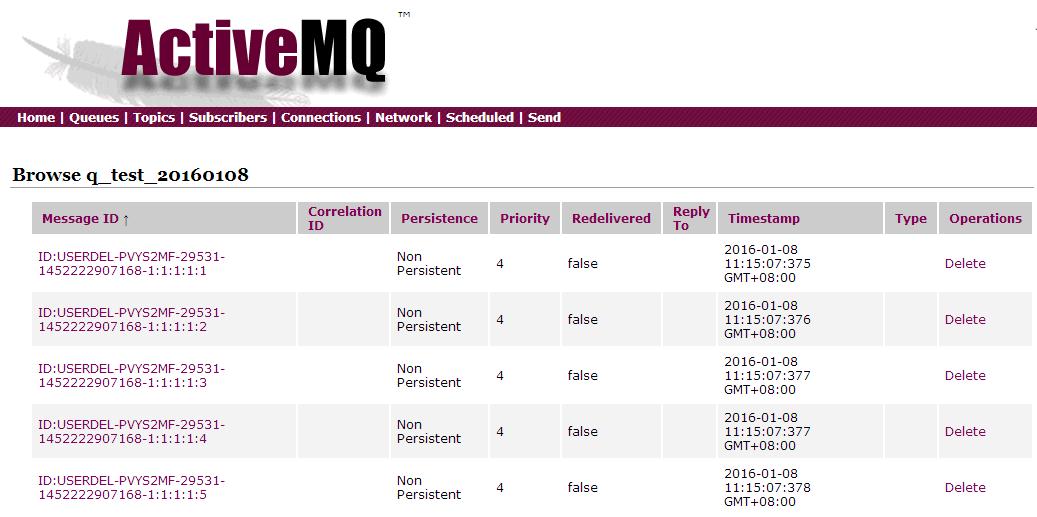
运行完以上代码去管理界面查看q_test_20160108
消费者示例代码:
  @Test

    public void testActiveMqReceive(){

        // ConnectionFactory :连接工厂,JMS 用它创建连接

        ConnectionFactory connectionFactory;

        // Connection :JMS 客户端到JMS Provider 的连接

        Connection connection = null;

        // Session: 一个发送或接收消息的线程

        Session session;

        // Destination :消息的目的地;消息发送给谁.

        Destination destination;

        // 消费者,消息接收者

        MessageConsumer consumer;

        connectionFactory = new ActiveMQConnectionFactory(

                ActiveMQConnection.DEFAULT_USER,

                ActiveMQConnection.DEFAULT_PASSWORD,

                "tcp://127.0.0.1:61616");

        try {

            // 构造从工厂得到连接对象

            connection = connectionFactory.createConnection();

            // 启动

            connection.start();

            // 获取操作连接

            session = connection.createSession(Boolean.FALSE, Session.AUTO_ACKNOWLEDGE);

            // 获取session注意参数值q_test_20160108是一个服务器的queue,须在在ActiveMq的console配置

            destination = session.createQueue("q_test_20160108");

            consumer = session.createConsumer(destination);

            while (true) {

                //设置接收者接收消息的时间,为了便于测试,这里设定为100s

                TextMessage message = (TextMessage) consumer.receive(100000);

                if (null != message) {

                    System.out.println("收到消息" + message.getText());

                } else {

                    break;

                }

            }

        } catch (Exception e) {

            e.printStackTrace();

        } finally {

            try {

                if (null != connection)

                    connection.close();

            } catch (Throwable ignore) {

            }

        }

    }
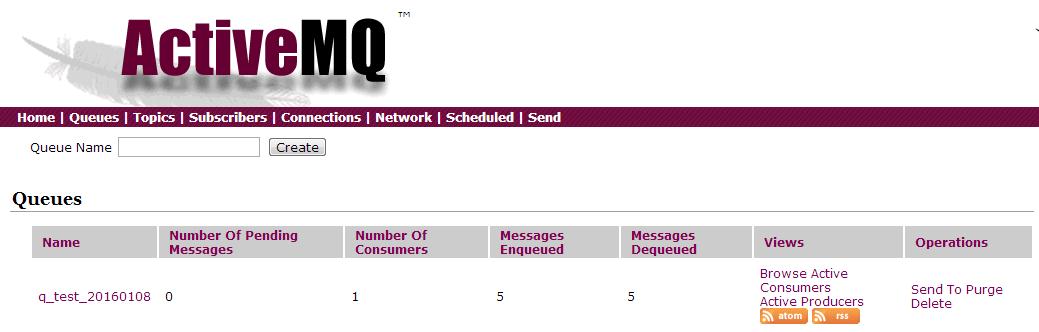
以上代码去mq取消息,运行完之后,再去管理界面查看q_test_20160108,刚刚的消息没有了,但是能够看到统计,有多少消息进来,多少消息出去,当前还有多少消息
,当前多少消费者等
2. pub/sub模式
发布者示例:
   @Test

    public void testActiveMqSend(){

        // ConnectionFactory :连接工厂,JMS 用它创建连接

        ConnectionFactory connectionFactory;

        // Connection :JMS 客户端到JMS Provider 的连接

        Connection connection = null;

        // Session: 一个发送或接收消息的线程

        Session session;

        // Destination :消息的目的地;消息发送给谁.

        Destination destination;

        // MessageProducer:消息发送者

        MessageProducer producer;

        // TextMessage message;

        // 构造ConnectionFactory实例对象,此处采用ActiveMq的实现jar

        connectionFactory = new ActiveMQConnectionFactory(

                ActiveMQConnection.DEFAULT_USER,

                ActiveMQConnection.DEFAULT_PASSWORD,

                "tcp://127.0.0.1:61616");

        try {

            // 构造从工厂得到连接对象

            connection = connectionFactory.createConnection();

            // 启动

            connection.start();

            // 获取操作连接

            session = connection.createSession(Boolean.TRUE, Session.AUTO_ACKNOWLEDGE);

            destination = session.createTopic("topic_1");

            // 得到消息生成者【发送者】

            producer = session.createProducer(destination);

            // 设置不持久化,此处学习,实际根据项目决定

            producer.setDeliveryMode(DeliveryMode.NON_PERSISTENT);

            // 构造消息,此处写死,项目就是参数,或者方法获取

            sendMessage(session, producer);

            session.commit();

        } catch (Exception e) {

            e.printStackTrace();

        } finally {

            try {

                if (null != connection)

                    connection.close();

            } catch (Throwable ignore) {

            }

        }

    }

    private static final int SEND_NUMBER = 5;

    public static void sendMessage(Session session, MessageProducer producer)

            throws Exception {

        for (int i = 1; i <= SEND_NUMBER; i++) {

            TextMessage message = session.createTextMessage("ActiveMq 发送的消息" + i);

            // 发送消息到目的地方

            System.out.println("发送消息:" + "ActiveMq 发送的消息" + i);

            producer.send(message);

        }

    }
执行完以上语句,在管理界面点击topics菜单,可以看到topic_1
订阅者示例:
@Test

    public void testActiveMqReceive(){

        // ConnectionFactory :连接工厂,JMS 用它创建连接

        ConnectionFactory connectionFactory;

        // Connection :JMS 客户端到JMS Provider 的连接

        Connection connection = null;

        // Session: 一个发送或接收消息的线程

        Session session;

        // Destination :消息的目的地;消息发送给谁.

        Destination destination;

        // 消费者,消息接收者

        MessageConsumer consumer;

        connectionFactory = new ActiveMQConnectionFactory(

                ActiveMQConnection.DEFAULT_USER,

                ActiveMQConnection.DEFAULT_PASSWORD,

                "tcp://127.0.0.1:61616");

        try {

            // 构造从工厂得到连接对象

            connection = connectionFactory.createConnection();
       //持久化订阅必须使用下语句!!!!参数是clientid

            connection.setClientID("mysub_3");

            // 启动

            connection.start();

            // 获取操作连接

            session = connection.createSession(Boolean.FALSE, Session.AUTO_ACKNOWLEDGE);

            destination = session.createTopic("topic_1");

            //consumer = session.createConsumer(destination);普通订阅
       //持久化订阅!!!第二个参数是clientid

            consumer = session.createDurableSubscriber((Topic) destination,"mysub_3");

            while (true) {

                //设置接收者接收消息的时间,为了便于测试,这里设定为100s

                TextMessage message = (TextMessage) consumer.receive(100000);

                if (null != message) {

                    System.out.println("收到消息" + message.getText());

                } else {

                    break;

                }

            }

        } catch (Exception e) {

            e.printStackTrace();

        } finally {

            try {

                if (null != connection)

                    connection.close();

            } catch (Throwable ignore) {

            }

        }

    }
发现一个问题,运行以上代码,不能收到topic_1上的消息,开始一直以为有什么东西有问题,纠结了一阵子,后来想通了,对持久订阅理解不对,持久订阅从你订阅开始收到消息,离线了,然后在上线,期间的消息是可以收到了,但是你订阅之前的就不能收到了
在管理界面Subscribers菜单下可以看到订阅者列表

参考文章
JMS笔记(二)的更多相关文章
- 《CMake实践》笔记二:INSTALL/CMAKE_INSTALL_PREFIX
<CMake实践>笔记一:PROJECT/MESSAGE/ADD_EXECUTABLE <CMake实践>笔记二:INSTALL/CMAKE_INSTALL_PREFIX &l ...
- jQuery源码笔记(二):定义了一些变量和函数 jQuery = function(){}
笔记(二)也分为三部分: 一. 介绍: 注释说明:v2.0.3版本.Sizzle选择器.MIT软件许可注释中的#的信息索引.查询地址(英文版)匿名函数自执行:window参数及undefined参数意 ...
- Mastering Web Application Development with AngularJS 读书笔记(二)
第一章笔记 (二) 一.scopes的层级和事件系统(the eventing system) 在层级中管理的scopes可以被用做事件总线.AngularJS 允许我们去传播已经命名的事件用一种有效 ...
- Python 学习笔记二
笔记二 :print 以及基本文件操作 笔记一已取消置顶链接地址 http://www.cnblogs.com/dzzy/p/5140899.html 暑假只是快速过了一遍python ,现在起开始仔 ...
- WPF的Binding学习笔记(二)
原文: http://www.cnblogs.com/pasoraku/archive/2012/10/25/2738428.htmlWPF的Binding学习笔记(二) 上次学了点点Binding的 ...
- webpy使用笔记(二) session/sessionid的使用
webpy使用笔记(二) session的使用 webpy使用系列之session的使用,虽然工作中使用的是django,但是自己并不喜欢那种大而全的东西~什么都给你准备好了,自己好像一个机器人一样赶 ...
- AJax 学习笔记二(onreadystatechange的作用)
AJax 学习笔记二(onreadystatechange的作用) 当发送一个请求后,客户端无法确定什么时候会完成这个请求,所以需要用事件机制来捕获请求的状态XMLHttpRequest对象提供了on ...
- 《MFC游戏开发》笔记二 建立工程、调整窗口
本系列文章由七十一雾央编写,转载请注明出处. http://blog.csdn.net/u011371356/article/details/9300383 作者:七十一雾央 新浪微博:http:/ ...
- JavaScript基础笔记二
一.函数返回值1.什么是函数返回值 函数的执行结果2. 可以没有return // 没有return或者return后面为空则会返回undefined3.一个函数应该只返回一种类型的值 二.可变 ...
随机推荐
- iOS 8 Xcode6 设置Launch Image 启动图片<转>
Step1 1.点击Image.xcassets 进入图片管理,然后右击,弹出"New Launch Image" 2.如图,右侧的勾选可以让你选择是否要对ipad,横屏,竖屏,以 ...
- Juicer javascript 模板引擎
模板引擎是为了使用户界面与业务数据(内容)分离而产生的,它可以生成特定格式的文档,用于网站的模板引擎就会生成一个标准的HTML文档. js模板引擎包括如下:template官方参考:http://au ...
- Linux服务器集群系统(一)(转)
add by zhj:虽然是2002年的文章,但读来还是收益良多.在 章文嵩:谈LVS及阿里开源背后的精彩故事 中LVS发起人及主要贡献者谈了LVS的开发过程及阿里开源的一些故事 原文:http:// ...
- codeforces 629BFar Relative’s Problem
B. Far Relative’s Problem time limit per test 2 seconds memory limit per test 256 megabytes input st ...
- oracle 监测数据库是否存在指定字段
public static bool ExistColumn(string tableName, string columnName, string connStr) { using (OracleC ...
- opencv 模板匹配与滑动窗口(单匹配) (多匹配)
1单匹配: 测试图片: code: #include <opencv\cv.h> #include <opencv\highgui.h> #include <open ...
- HDU1028Ignatius and the Princess III(母函数)
http://acm.hdu.edu.cn/showproblem.php?pid=1028 母函数: 例1:若有1克.2克.3克.4克的砝码各一 枚,能称出哪几种重量?各有几种可能方案? 如何解决这 ...
- HTTP Header 简介
HTTP Header 简介 HTTP(HyperTextTransferProtocol)即超文本传输协议,目前网页传输的的通用协议.HTTP协议采用了请求/响应模型,浏览器或其他客户端发出请求,服 ...
- 【JDBC】预编译SQL与防注入式攻击
在JDBC编程中,常用Statement.PreparedStatement 和 CallableStatement三种方式来执行查询语句,其中 Statement 用于通用查询, PreparedS ...
- HR(人事管理)
HRMS(Human Resource Management System) --人员 per_people_f --人员分配 per_all_assignments_f --要素 DECLARE l ...