
NopCommerce——Web层中的布局页
援引上一篇文章关于nopcommerce源代码结构的翻译:“Nop.Web也是一个MVC Web应用程序项目,一个公有区域的展示层。它就是你实际能够运行的应用程序。它是应用程序的启动项目”。对于nopcommerce这样电子商务系统来说,Nop.Web是我们用户所看到的界面,比如商品列表。
一 概况
nopcommerce其布局页文件分布在Nop.Web/Views/shared当中,主要涉及到五个布局文件:_Root.Head.cshtml、_Root.cshtml、_ColumnsOne.cshtml、_ColumnsTwo.cshtml、_ColumnsThree.cshtml。_ColumnsOne(Two/Three).cshtml三个布局页继承自_Root.cshtml、_Root.cshtml继承自_Root.Head.cshtml。
所有继承_Root.Head.cshtml的页面将会使用相同的<head>标签内容,<body>体由它的子布局页来进一步细化。
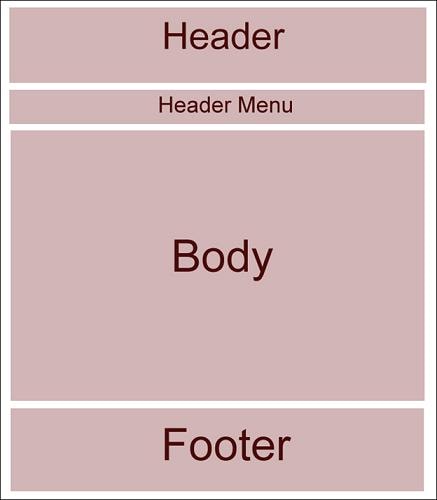
_Root.cshtml此页面替换掉_Root.Head.cshtml中@RenderBody(),大致结构如下图:
nopcommerc有三个不同的具体布局页:_ColumnsOne(Two/Three).cshtml,三者形式如下:
1._ColumnsOne.cshtml
<body>结构与_Root.cshtml一致。
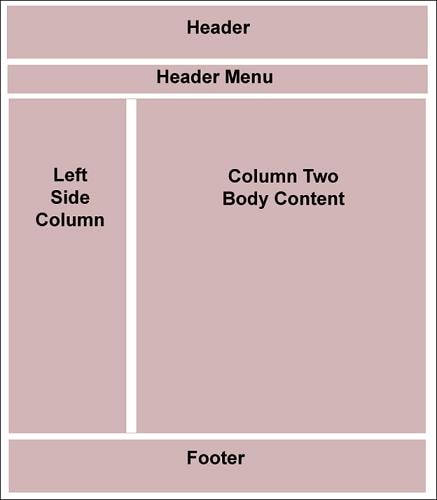
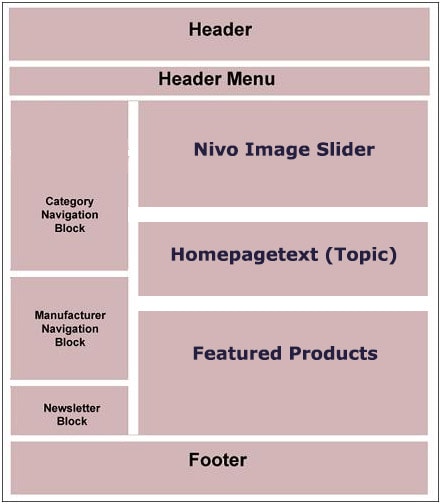
2._ColumnsTwo.cshtml
<body>有两种:
3._ColumnsThree.cshml Layout
而到了这里,其结构就有三种:
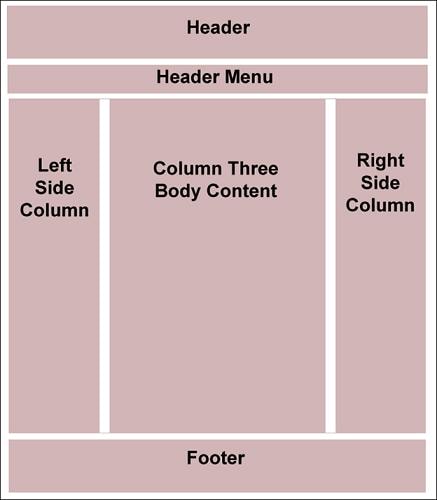
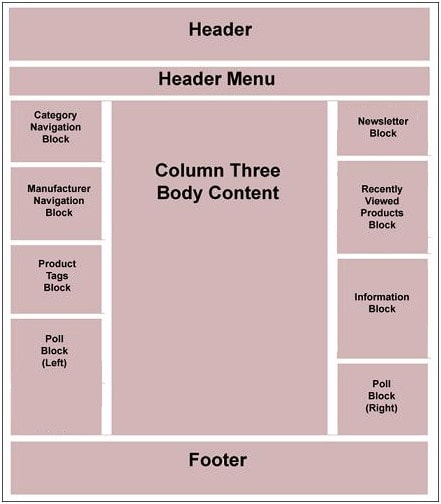
也就是说_Root.Head主要管<head>中内容设置,以及全局CSS、JS文件引入;_Root.cshtml将网页主体内容<body>设计完成;_ColumnsOne(Two/Three).cshtml对_Root.cshtml变形处理。
二 、细读
1._Root.Head.cshtml
顶层_Root.Head.cshtml内容如下:
_Root.Head.cshtml
在程序中,已经写了一些注释供大家参考。
1.1. Html.AppendCssFileParts() 与AppendScriptParts()
两个方法都是nop为HtmlHelper类定义拓展方法。见名知意,AppendCssFileParts附加CSS文件,AppendScriptParts附加脚本文件:
  // private readonly Dictionary<ResourceLocation, List<string>> _cssParts;

  public virtual void AppendCssFileParts(ResourceLocation location, string part)

         {

             if (!_cssParts.ContainsKey(location))

                 _cssParts.Add(location, new List<string>());

             if (string.IsNullOrEmpty(part))

                 return;

             _cssParts[location].Insert(, part);

         }
AppendCssFileParts
_cssParts为字典类型,根据传入的location确定键值,而字符串参数 part是CSS文件的路径。此方法最终就是将传入的CSS文件路径附加到_cssParts Dictionary当中。
与此对应还有一个AddCssFileParts。
  public virtual void AddCssFileParts(ResourceLocation location, string part)

         {

             if (!_cssParts.ContainsKey(location))

                 _cssParts.Add(location, new List<string>());

             if (string.IsNullOrEmpty(part))

                 return;

              //注意这里

             _cssParts[location].Add(part);

         }
AddCssFileParts
注意到两者的差别仅仅是给Dictionary<ResourceLocation, List<string>>添加值顺序的不同,Append在Dictionary索引为0处添加,Add在队列末尾添加。因此产生的效果是:AppendCssFileParts()调用越靠后,在界面上显示反而越靠前。大家在_Root.Head.cshtml代码中可以看到 jquery-1.7.1.min.js的引用是在最后,但是通常我们是应该将其引用位置尽量考前。
AppendScriptParts()与AppendCssFileParts()非常相似,这里就不再贴代码说明。
1.2 @Html.Partial("LanguageAttributes")
就是字符串:
 @if (this.ShouldUseRtlTheme())

 {

     <text>dir="rtl"</text>

     //<text>dir="rtl" xml:lang="he" lang="he"</text>

 }
LanguageAttributes.cshtml
ShouldUseRtlTheme()方法从当前用户的配置信息中读取其阅读方式是左到右,还是右到左,其实现依托<html>标签 的dir属性。
1.3 @(Html.NopMetaDescription()
NopMetaDescription方法中调用下面关键方法:
 // private readonly List<string> _metaDescriptionParts;

 public virtual string GenerateMetaDescription()

         {

             var metaDescription = string.Join(", ", _metaDescriptionParts.AsEnumerable().Reverse().ToArray());

             var result = !String.IsNullOrEmpty(metaDescription) ? metaDescription : _seoSettings.DefaultMetaDescription;

             return result;

         }
GenerateMetaDescription
DefaultMetaDescription是属性,从数据库中查取。
1.4 @Html.Action("RssHeaderLink", "News")、@Html.Action("RssHeaderLink", "Blog")
返回形如这样的字符串:<link href="xx" rel="alternate" ……>,用于RSS。
1.5 @Html.Action("Favicon", "Common")
返回的字符串形式这样: <link rel="shortcut icon" href="XX" />,href属性默认寻找Nop.Web根目录下名字为favicon.ico文件。
2._Root.cshtml
_Root.cshtml内容如下:
 @{

     Layout = "~/Views/Shared/_Root.Head.cshtml";

 }

 @Html.Widget("body_start_html_tag_after")

 @Html.Partial("_Notifications")

 @Html.Action("AdminHeaderLinks", "Common")

 <div class="master-wrapper-page">

     @Html.Action("JavaScriptDisabledWarning", "Common")

     <div class="master-wrapper-content">

         <script type="text/javascript">

             AjaxCart.init(false, '.header-links .cart-qty', '.header-links .wishlist-qty', '#flyout-cart');

         </script>

         @Html.Partial("Header")

         <div class="header-menu">

             @Html.Action("Menu", "Common")

         </div>

         @Html.Widget("content_before")

         @*ajax loading window*@

         <div class="ajax-loading-block-window" style="display: none">

             <div class="loading-image">

             </div>

         </div>

         <div class="master-wrapper-main">

             @RenderBody()

         </div>

         @Html.Widget("content_after")

        @* Eu Cookie Law 欧盟cookie新法:http://www.theeucookielaw.com/ 在用户机器上替换cookie前必须先通知客户*@

         @Html.Action("EuCookieLaw", "Common")

     </div>

     @Html.Action("Footer", "Common")

 </div>

 @Html.Widget("body_end_html_tag_before")
_Root.cshtml
2.1 @Html.Action("JavaScriptDisabledWarning", "Common")
返回一个PartialView:
 @model dynamic

 @*此标签详情:http://www.w3school.com.cn/tags/tag_noscript.asp*@

 <noscript>

     <div class="noscript">

         <p>

             <strong>JavaScript seem to be disabled in your browser.</strong></p>

         <p>

             You must have JavaScript enabled in your browser to utilize the functionality of

             this website.</p>

     </div>

 </noscript>
JavaScriptDisabledWarning
其目的就是检测是否禁用JS,如果禁用就提示。
2.2 @Html.Partial("_Notifications")
弹出提示:
 @{

     //success messages

     var successMessages = new List<string>();

     if (TempData[string.Format("nop.notifications.{0}", NotifyType.Success)] != null)

     {

         successMessages.AddRange(TempData[string.Format("nop.notifications.{0}", NotifyType.Success)] as IList<string>);

     }

     if (ViewData[string.Format("nop.notifications.{0}", NotifyType.Success)] != null)

     {

         successMessages.AddRange(ViewData[string.Format("nop.notifications.{0}", NotifyType.Success)] as IList<string>);

     }

     //error messages

     var errorMessages = new List<string>();

     if (TempData[string.Format("nop.notifications.{0}", NotifyType.Error)] != null)

     {

         errorMessages.AddRange(TempData[string.Format("nop.notifications.{0}", NotifyType.Error)] as IList<string>);

     }

     if (ViewData[string.Format("nop.notifications.{0}", NotifyType.Error)] != null)

     {

         errorMessages.AddRange(ViewData[string.Format("nop.notifications.{0}", NotifyType.Error)] as IList<string>);

     }

 }

 @*TODO use "displayPopupNotification" java-script function*@

 @if (successMessages.Count > )

 {

     <script type="text/javascript">

         $(document).ready(function () {

             $("#dialog-notifications-success").dialog({ modal: true });

         });

     </script>

 }

 @if (errorMessages.Count > )

 {

     <script type="text/javascript">

         $(document).ready(function () {

             $("#dialog-notifications-error").dialog({ modal: true });

         });

     </script>

 }

 <div id="dialog-notifications-success" title="@T("Common.Notification")" style="display:none;">

     @foreach (var message in successMessages)

     {

         <p>@message</p>

     }

 </div>

 <div id="dialog-notifications-error" title="@T("Common.Error")" style="display:none;">

     @foreach (var message in errorMessages)

     {

         <p>@message</p>

     }

 </div>

 <div id="bar-notification" class="bar-notification">

     <img src="@Url.Content("~/Content/Images/ico-close-notification-bar.png")" class="close" alt="Close" title="Close" />

 </div>

 @Html.Widget("notifications")
_Notifications
通知内容通过TempData[nop.notifications.sucess]获取,注意到使用的是TempData,所以nop的通知是跨action的。
2.3 @Html.Partial("Header")
对应第一部分图中header,包含了头部链接、搜索框等内容。
2.4 @Html.Action("Menu", "Common")
菜单,对应第一部分图中的Menu,这个好理解。
Widget还搞不清楚啥玩意,待研究。记得大牛说过,看框架先横向再纵向,所以……。
2013-12-09
NopCommerce——Web层中的布局页的更多相关文章
- 在WEB工程的web层中的编程技巧
本篇以看传智播客方立勋老师的<JDBC入门>之<实现客户关系管理案例>视频有感,从中提取方老师在设计管理系统的简单案例中对自己比较有用的部分,以便日后在开发过程中希望能有所帮助 ...
- 在ABP的Web层中实现复杂请求跨域访问
在最近的项目中,后端使用ABP,前端采用React,前后端完全分离.其中大部分接口都通过WebApi层调用,项目中未使用Session.但最后在添加一个网站的验证码验证留言功能时,使用了Session ...
- MVC视图布局页常用代码
1.在视图 Views 中新建文件夹 Shared 2.在 Shared 中新建布局页-母版页 _Layout.cshtml @{ Layout = null; } <!DOCTYPE h ...
- 【asp.net core 系列】5 布局页和静态资源
0. 前言 在之前的4篇的内容里,我们较为详细的介绍了路由以及控制器还有视图之间的关系.也就是说,系统如何从用户的HTTP请求解析到控制器里,然后在控制器里处理数据,并返回给视图,在视图中显示出来.这 ...
- css3中的布局相关样式
web页面中的布局是指在页面中如何对标题.导航栏.主要内容.脚注.表单等各种构成要素进行合理编辑.在css3之前,主要使用float属性或position属性进行页面中的简单布局,但是也存在一些缺点, ...
- web项目中web.xml简介
什么是 XML? XML 指可扩展标记语言(EXtensible Markup Language) XML 是一种标记语言,很类似 HTML XML 的设计宗旨是传输数据,而非显示数据 XML 标签没 ...
- Jsp在Web.xml中的配置
以下列出web.xml经常使用的标签元素及这些标签元素的功能: 1.指定欢迎页面.比如: <welcome-file-list> <welcome-file-list> < ...
- 如何在ASP.NET Web站点中统一页面布局[Creating a Consistent Layout in ASP.NET Web Pages(Razor) Sites]
如何在ASP.NET Web站点中统一页面布局[Creating a Consistent Layout in ASP.NET Web Pages(Razor) Sites] 一.布局页面介绍[Abo ...
- IDEA项目搭建十四——Web站点Controller基类及布局页静态资源设计
一.简介 站点搭建完成后,编写页面时一般会有如下几个需求 1.嵌套静态页面时有很大一部分通用代码,如css.js这部分可以使用thymeleaf的局部片段代码块组成 2.这些静态资源默认放在程序中,但 ...
随机推荐
- PHP面向对象之将数据库的查询结果序列化成json格式
<?php class link_mysql{ private $host,$uid,$pwd,$db,$link,$res; function link_mysql($_host,$_uid, ...
- TouchAndGuest触摸事件和手势
//// nextViewController.m#import "nextViewController.h"#import "my.h"@interface ...
- 【学习笔记】【C语言】字符串数组
1.使用场合 * 一维字符数组中存放一个字符串,比如一个名字char name[20] = "mj" * 如果要存储多个字符串,比如一个班所有学生的名字,则需要二维字符数组,cha ...
- 【学习笔记】Mac OS X系统介绍
一.Dock *相当于Windows的快速启动栏,用来存放常用软件的图标 *单击软件图标即可打开相应的软件 *右击软件图标还有其他菜单选项:比如退出软件 *图标下边的黑点代表程序正在运行中,并没有完全 ...
- Weex
今天在群友发的那个掘金技术网站里头看到这个weex,感觉还不错 阿里负责的一个开源项目 源码地址: http://alibaba.github.io/weex/index.html 是用来做app的 ...
- Linux man 用法小结(Linux指令学习笔记)
今天买了一本<<Linux命令行与shell脚本编程大全>>,想利用暑假放假的时间系统的学习一下 Linux的shell脚本.今天看了一下书,才发现我之前学习,把Linux s ...
- CentOS 5.8 升级php版本
一:我们都知道系统的yum源安装出来的php版本不是5.1的就是5.3 那就是说 有些程序不支持那么低的版本的呢 那我们该怎么办呢 接下来 简单的说下php的版本升级 编译升级太慢了 这里我们选择 ...
- 利用VSCode进行.Net Core初尝试
1.下载.Net Core,https://www.microsoft.com/net/core#windows,按照页面提示进行SDK的安装. 2.下载VsCode,https://www.visu ...
- MongoDB 备份方法
翻译自 http://docs.mongodb.org/manual/core/backups/ 有以下几种方法来备份MongoDB群集: 通过复制底层数据文件来备份 通过mongodump来备份 通 ...
- jquery hover事件冒泡解决方法
$(this).hover(function(event){ $(this).addClass("cur"); event.stopPropagation(); ...