
一款基于jQuery/CSS3实现拼图效果的相册
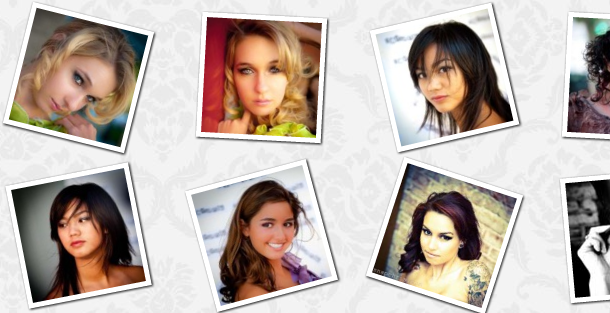
之前为大家介绍了 HTML5 3D立体图片相册, HTML5图片相册重力感应特效, 基于CSS3图片可倾斜摆放的动画相册 今天我们要来分享一款很酷的jQuery相册插件,首先相册中的图片会以一定的角度倾斜放置在页面上,点击图片缩略图就可以展开图片,并且图片是由所有缩略图拼接而成,图片展开和收拢的动画效果也非常不错。当然图片倾斜需要CSS3支持。效果图如下:
实现的代码。
html代码:
 <div id="im_wrapper" class="im_wrapper">

        <div style="background-position: 0px 0px;">

            <img src="data:images/thumbs/1.jpg" alt="" /></div>

        <div style="background-position: -125px 0px;">

            <img src="data:images/thumbs/2.jpg" alt="" /></div>

        <div style="background-position: -250px 0px;">

            <img src="data:images/thumbs/3.jpg" alt="" /></div>

        <div style="background-position: -375px 0px;">

            <img src="data:images/thumbs/4.jpg" alt="" /></div>

        <div style="background-position: -500px 0px;">

            <img src="data:images/thumbs/5.jpg" alt="" /></div>

        <div style="background-position: -625px 0px;">

            <img src="data:images/thumbs/6.jpg" alt="" /></div>

        <div style="background-position: 0px -125px;">

            <img src="data:images/thumbs/7.jpg" alt="" /></div>

        <div style="background-position: -125px -125px;">

            <img src="data:images/thumbs/8.jpg" alt="" /></div>

        <div style="background-position: -250px -125px;">

            <img src="data:images/thumbs/9.jpg" alt="" /></div>

        <div style="background-position: -375px -125px;">

            <img src="data:images/thumbs/10.jpg" alt="" /></div>

        <div style="background-position: -500px -125px;">

            <img src="data:images/thumbs/11.jpg" alt="" /></div>

        <div style="background-position: -625px -125px;">

            <img src="data:images/thumbs/12.jpg" alt="" /></div>

        <div style="background-position: 0px -250px;">

            <img src="data:images/thumbs/13.jpg" alt="" /></div>

        <div style="background-position: -125px -250px;">

            <img src="data:images/thumbs/14.jpg" alt="" /></div>

        <div style="background-position: -250px -250px;">

            <img src="data:images/thumbs/15.jpg" alt="" /></div>

        <div style="background-position: -375px -250px;">

            <img src="data:images/thumbs/16.jpg" alt="" /></div>

        <div style="background-position: -500px -250px;">

            <img src="data:images/thumbs/17.jpg" alt="" /></div>

        <div style="background-position: -625px -250px;">

            <img src="data:images/thumbs/18.jpg" alt="" /></div>

        <div style="background-position: 0px -375px;">

            <img src="data:images/thumbs/19.jpg" alt="" /></div>

        <div style="background-position: -125px -375px;">

            <img src="data:images/thumbs/20.jpg" alt="" /></div>

        <div style="background-position: -250px -375px;">

            <img src="data:images/thumbs/21.jpg" alt="" /></div>

        <div style="background-position: -375px -375px;">

            <img src="data:images/thumbs/22.jpg" alt="" /></div>

        <div style="background-position: -500px -375px;">

            <img src="data:images/thumbs/23.jpg" alt="" /></div>

        <div style="background-position: -625px -375px;">

            <img src="data:images/thumbs/24.jpg" alt="" /></div>

    </div>

    <div id="im_loading" class="im_loading">

    </div>

    <div id="im_next" class="im_next">

    </div>

    <div id="im_prev" class="im_prev">

    </div>

    <div>

    </div>
js代码:
(function ($, sr) {
var debounce = function (func, threshold, execAsap) {
var timeout;
return function debounced() {
var obj = this, args = arguments;
function delayed() {
if (!execAsap)
func.apply(obj, args);
timeout = null;
};
if (timeout)
clearTimeout(timeout);
else if (execAsap)
func.apply(obj, args);
timeout = setTimeout(delayed, threshold || 100);
};
}
//smartresize
jQuery.fn[sr] = function (fn) { return fn ? this.bind('resize', debounce(fn)) : this.trigger(sr); };
})(jQuery, 'smartresize');
</script>
<script type="text/javascript">
$(function () {
//check if the user made the
//mistake to open it with IE
var ie = false;
if ($.browser.msie)
ie = true;
//flag to control the click event
var flg_click = true;
//the wrapper
var $im_wrapper = $('#im_wrapper');
//the thumbs
var $thumbs = $im_wrapper.children('div');
//all the images
var $thumb_imgs = $thumbs.find('img');
//number of images
var nmb_thumbs = $thumbs.length;
//image loading status
var $im_loading = $('#im_loading');
//the next and previous buttons
var $im_next = $('#im_next');
var $im_prev = $('#im_prev');
//number of thumbs per line
var per_line = 6;
//number of thumbs per column
var per_col = Math.ceil(nmb_thumbs / per_line)
//index of the current thumb
var current = -1;
//mode = grid | single
var mode = 'grid';
//an array with the positions of the thumbs
//we will use it for the navigation in single mode
var positionsArray = [];
for (var i = 0; i < nmb_thumbs; ++i)
positionsArray[i] = i;
//preload all the images
$im_loading.show();
var loaded = 0;
$thumb_imgs.each(function () {
var $this = $(this);
$('<img/>').load(function () {
++loaded;
if (loaded == nmb_thumbs * 2)
start();
}).attr('src', $this.attr('src'));
$('<img/>').load(function () {
++loaded;
if (loaded == nmb_thumbs * 2)
start();
}).attr('src', $this.attr('src').replace('/thumbs', ''));
});
//starts the animation
function start() {
$im_loading.hide();
//disperse the thumbs in a grid
disperse();
}
//disperses the thumbs in a grid based on windows dimentions
function disperse() {
if (!flg_click) return;
setflag();
mode = 'grid';
//center point for first thumb along the width of the window
var spaces_w = $(window).width() / (per_line + 1);
//center point for first thumb along the height of the window
var spaces_h = $(window).height() / (per_col + 1);
//let's disperse the thumbs equally on the page
$thumbs.each(function (i) {
var $thumb = $(this);
//calculate left and top for each thumb,
//considering how many we want per line
var left = spaces_w * ((i % per_line) + 1) - $thumb.width() / 2;
var top = spaces_h * (Math.ceil((i + 1) / per_line)) - $thumb.height() / 2;
//lets give a random degree to each thumb
var r = Math.floor(Math.random() * 41) - 20;
/*
now we animate the thumb to its final positions;
we also fade in its image, animate it to 115x115,
and remove any background image of the thumb - this
is not relevant for the first time we call disperse,
but when changing from single to grid mode
*/
if (ie)
var param = {
'left': left + 'px',
'top': top + 'px'
};
else
var param = {
'left': left + 'px',
'top': top + 'px',
'rotate': r + 'deg'
};
$thumb.stop()
.animate(param, 700, function () {
if (i == nmb_thumbs - 1)
setflag();
})
.find('img')
.fadeIn(700, function () {
$thumb.css({
'background-image': 'none'
});
$(this).animate({
'width': '115px',
'height': '115px',
'marginTop': '5px',
'marginLeft': '5px'
}, 150);
});
});
}
//controls if we can click on the thumbs or not
//if theres an animation in progress
//we don't want the user to be able to click
function setflag() {
flg_click = !flg_click
}
/*
when we click on a thumb, we want to merge them
and show the full image that was clicked.
we need to animate the thumbs positions in order
to center the final image in the screen. The
image itself is the background image that each thumb
will have (different background positions)
If we are currently seeing the single image,
then we want to disperse the thumbs again,
and with this, showing the thumbs images.
*/
$thumbs.bind('click', function () {
if (!flg_click) return;
setflag();
var $this = $(this);
current = $this.index();
if (mode == 'grid') {
mode = 'single';
//the source of the full image
var image_src = $this.find('img').attr('src').replace('/thumbs', '');
$thumbs.each(function (i) {
var $thumb = $(this);
var $image = $thumb.find('img');
//first we animate the thumb image
//to fill the thumbs dimentions
$image.stop().animate({
'width': '100%',
'height': '100%',
'marginTop': '0px',
'marginLeft': '0px'
}, 150, function () {
//calculate the dimentions of the full image
var f_w = per_line * 125;
var f_h = per_col * 125;
var f_l = $(window).width() / 2 - f_w / 2
var f_t = $(window).height() / 2 - f_h / 2
/*
set the background image for the thumb
and animate the thumbs postions and rotation
*/
if (ie)
var param = {
'left': f_l + (i % per_line) * 125 + 'px',
'top': f_t + Math.floor(i / per_line) * 125 + 'px'
};
else
var param = {
'rotate': '0deg',
'left': f_l + (i % per_line) * 125 + 'px',
'top': f_t + Math.floor(i / per_line) * 125 + 'px'
};
$thumb.css({
'background-image': 'url(' + image_src + ')'
}).stop()
.animate(param, 1200, function () {
//insert navigation for the single mode
if (i == nmb_thumbs - 1) {
addNavigation();
setflag();
}
});
//fade out the thumb's image
$image.fadeOut(700);
});
});
}
else {
setflag();
//remove navigation
removeNavigation();
//if we are on single mode then disperse the thumbs
disperse();
}
});
//removes the navigation buttons
function removeNavigation() {
$im_next.stop().animate({ 'right': '-50px' }, 300);
$im_prev.stop().animate({ 'left': '-50px' }, 300);
}
//add the navigation buttons
function addNavigation() {
$im_next.stop().animate({ 'right': '0px' }, 300);
$im_prev.stop().animate({ 'left': '0px' }, 300);
}
//User clicks next button (single mode)
$im_next.bind('click', function () {
if (!flg_click) return;
setflag();
++current;
var $next_thumb = $im_wrapper.children('div:nth-child(' + (current + 1) + ')');
if ($next_thumb.length > 0) {
var image_src = $next_thumb.find('img').attr('src').replace('/thumbs', '');
var arr = Array.shuffle(positionsArray.slice(0));
$thumbs.each(function (i) {
//we want to change each divs background image
//on a different point of time
var t = $(this);
setTimeout(function () {
t.css({
'background-image': 'url(' + image_src + ')'
});
if (i == nmb_thumbs - 1)
setflag();
}, arr.shift() * 20);
});
}
else {
setflag();
--current;
return;
}
});
//User clicks prev button (single mode)
$im_prev.bind('click', function () {
if (!flg_click) return;
setflag();
--current;
var $prev_thumb = $im_wrapper.children('div:nth-child(' + (current + 1) + ')');
if ($prev_thumb.length > 0) {
var image_src = $prev_thumb.find('img').attr('src').replace('/thumbs', '');
var arr = Array.shuffle(positionsArray.slice(0));
$thumbs.each(function (i) {
var t = $(this);
setTimeout(function () {
t.css({
'background-image': 'url(' + image_src + ')'
});
if (i == nmb_thumbs - 1)
setflag();
}, arr.shift() * 20);
});
}
else {
setflag();
++current;
return;
}
});
//on windows resize call the disperse function
$(window).smartresize(function () {
removeNavigation()
disperse();
});
//function to shuffle an array
Array.shuffle = function (array) {
for (
var j, x, i = array.length; i;
j = parseInt(Math.random() * i),
x = array[--i], array[i] = array[j], array[j] = x
);
return array;
};
});
via:http://www.w2bc.com/Article/17969
一款基于jQuery/CSS3实现拼图效果的相册的更多相关文章
- 基于jQuery/CSS3实现拼图效果的相册插件
今天我们要来分享一款很酷的jQuery相册插件,首先相册中的图片会以一定的角度倾斜放置在页面上,点击图片缩略图就可以展开图片,并且图片是由所有缩略图拼接而成,图片展开和收拢的动画效果也非常不错.当然图 ...
- 30款基于 jQuery & CSS3 的加载动画和进度条插件
我们所生活每一天看到的新技术或新设计潮流的兴起,Web 开发正处在上升的时代.HTML5 & CSS3 技术的发展让 Web 端可以实现的功能越来越强大. 加载动画和进度条使网站更具吸引力.该 ...
- 推荐20款基于 jQuery & CSS 的文本效果插件
jQuery 和 CSS 可以说是设计和开发行业的一次革命.这一切如此简单,快捷的一站式服务.jQuery 允许你在你的网页中添加一些真正令人惊叹的东西而不用付出很大的努力,要感谢那些优秀的 jQue ...
- 一款基于jQuery Ajax的等待效果
特别提示:本人博客部分有参考网络其他博客,但均是本人亲手编写过并验证通过.如发现博客有错误,请及时提出以免误导其他人,谢谢!欢迎转载,但记得标明文章出处:http://www.cnblogs.com/ ...
- 基于jQuery+CSS3实现人物跳动特效
分享一款基于jQuery+CSS3实现人物跳动特效.这是一款类似gif图片效果的CSS3动画特效代码.效果图如下: 在线预览 源码下载 实现的代码. html代码: <div class=& ...
- 基于jQuery标题有打字效果的焦点图
给大家分享一款基于jQuery标题有打字效果的焦点图.之前为大家分享了好多jquery的焦点图.这款焦点图适用浏览器:IE8.360.FireFox.Chrome.Safari.Opera.傲游.搜狗 ...
- 基于jQuery CSS3鼠标点击动画效果
分享基于jQuery CSS3鼠标点击动画效果支持图片或内容滑动,允许设置动画延迟效果.效果图如下: 在线预览 源码下载 实现的代码. html代码: <div class="co ...
- 一款基于jquery和css3的头像恶搞特效
今天给大家分享一款基于jquery和css3的头像恶搞特效.这款实例中,一个头像在画面中跳舞,头像还有可爱的帽子,单击下面的按钮可以为头像切换不同的帽子.效果图如下: 在线预览 源码下载 实现的代 ...
- 一款基于jquery和css3的响应式二级导航菜单
今天给大家分享一款基于jquery和css3的响应式二级导航菜单,这款导航是传统的基于顶部,鼠标经过的时候显示二级导航,还采用了当前流行的响应式设计.效果图如下: 在线预览 源码下载 实现的代码. ...
随机推荐
- Classic Source Code Collected
收藏一些经典的源码,持续更新!!! 1.深度学习框架(Deep Learning Framework). A:Caffe (Convolutional Architecture for Fast Fe ...
- gem 相关命令
gem #查看gem源 gem sources # 删除默认的gem源 gem sources --remove http://rubygems.org/ # 增加taobao作为gem源 gem s ...
- RVM 安装&卸载
安装: curl -L https://get.rvm.io | bash -s stable --autolibs=enabled [--ruby] [--rails] [—trace] $ cur ...
- poj 1552 Doubles
#include <stdio.h> #include <stdlib.h> ]; int cmp(const void *a, const void *b) { return ...
- Time vs Story Points Estimation [转]
One of the most common questions we get is whether to estimate in time or points. It seems like poin ...
- POJ 3177 Redundant Paths POJ 3352 Road Construction
这两题是一样的,代码完全一样. 就是给了一个连通图,问加多少条边可以变成边双连通. 去掉桥,其余的连通分支就是边双连通分支了.一个有桥的连通图要变成边双连通图的话,把双连通子图收缩为一个点,形成一颗树 ...
- labview事件结构
等待事件发生,并执行相应条件分支,处理该事件.事件结构 包括一个或多个子程序框图或事件分支,结构处理时间时,仅有一个子程序框图或分支在执行.等待事件通知时,该结构可超时. 连线边框左上角的“超时”接线 ...
- oracle学习 三(持续更新中)
关于ora 01219问题的解决 之前学习oracle的时候练习去建立表空间,建了很多之后手动删除了,之后再使用自己创建的用户名登陆数据库就会造成数据库 ORA-01031: ORACLE initi ...
- HDU2819Swap(二分图最大匹配)
题目链接 http://acm.hdu.edu.cn/showproblem.php?pid=2819 题目大意很明确,交换图的某些行或者是某些列(可以都换),使得这个N*N的图对角线上全部都是1. ...
- windows win7 win10 多系统启动菜单 多系统引导设置
win键+R 输入msconfig 根据显示的程序设置(除非你看不懂文字)