
advanced dom scripting dynamic web design techniques Chapter 2 CREATING YOUR OWN REUSABLE OBJECTS
JavaScript is all about objects. Objects are the foundation of everything, so if you’re unfamiliar with objects, you’re going to learn quickly. The goal of this book is not to be a JavaScript or DOM code reference, but in order to make sure you understand a lot of the examples and ideas I’ll be presenting, we’ll spend a little time discussing objects. A strong understanding of how objects work, specifically in JavaScript, and how fundamental they are will also go a long way in allowing you to create generic,reusable code that saves you time and money.
I need to introduce you to a few key things to remember when working with objects:
What objects are and how they’re constructed
The difference between static, public, private, and privileged members
What this refers to
A bit more about the scope chain
A bit about object context
At the end of this chapter, we’ll build a custom debugging log object to put all this to good use and show how proper definition of members creates a clean, public application programming interface (API) for your objects.
What’s in an object?
You’ve already used objects even though you may not know it. An object, in simplistic terms, is an instance of a contained set of variables, known as properties, combined with functions, known as methods. Objects are usually based on a description called as a class that defines what properties and methods the object will have. Your script can be considered object oriented (OO), as it is constructed using the interaction of various objects. In particular, JavaScript is a prototype-style OO language where there are no classes, and everything is based on a copy of an existing object. Everything from a function to a string is actually an object, and that’s what makes JavaScript powerful and frustrating at the same time. Most objects can be grouped into two types:
Function objects, such as the alert() function, allow you to use arguments to alter the functionality of the object:
alert('argument');
Object objects, such as the obj represented in the following snippet, can’t be called like functions and have a fixed functionality unless they contain additional Function objects, which
you’ll see in the “Understanding object members” section:
var obj = new Object();
obj('argument'); //will error as obj is not a Function
Function objects can also be divided into two subgroups:
Function instances, such as alert(), are invoked using arguments.
Functions that are constructors must be instantiated with the new operator.
To help you out, JavaScript also comes with several built-in objects such as the following:
Object is the generic base object you can use to create simple static objects.
Function is the object cloned by all objects that use arguments and is the object you create when defining all the functions in your scripts.
Array is a special grouping of properties and methods, such as length, that give you iterative access to the object and allow you to access the properties using square bracket notation.
String, Boolean, and Number are the objects representing all your string, Boolean, and number values respectively.
Math, Date, RegExp, and several others are included; each has its own unique uses, but we won’t get into them all here.
All these built-in objects are instantiated with the new keyword or some other special syntax, such as the function keyword for the Function object, curly brace short form ({}) for Object, and bracket short form ([]) for Array. What’s important is that each of these objects provides a set of properties and methods that allow you to manipulate the object in a different way, depending on the object’s intended use.
We’ll discuss the new operator and instantiation when you create your own object later in the chapter.
Inheritance
Object inheritance is an important part of object-oriented programming. When creating your own objects, you can extend or inherit properties and methods from existing objects. This inheritance provides a convenient way to reuse the functionality of existing objects, so you can be free to focus on the new and improved code.
Unlike traditional class-based object-oriented languages, there is no underlying class structure to extend one class from another. In JavaScript, inheritance is simply done by copying
the methods from one object prototype to another, but the resulting concept is the same:
// Create a person object instance

var person = {};

person.getName = function() { ... };

person.getAge = function() { ... };

// Create an employee object instance

var employee = {};

employee.getTitle = function() { ... };

employee.getSalary = function() { ... };

// Inherit methods from person

employee.getName = person.getName;

employee.getAge = person.getAge;
Each higher object inherits all of the properties and methods of the lower objects, as shown in Figure 2-1.
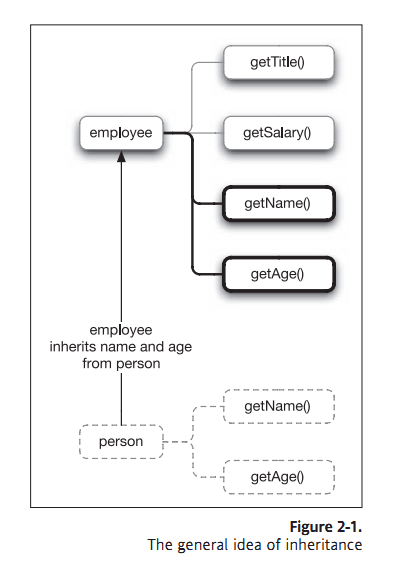
For more on the specifics of inheritance and some fancy methods that allow you to achieve a close approximation to the classical method, I suggest you check out Douglas Crockford’s explanation of “Classical Inheritance in JavaScript” at http://www.crockford.com/javascript/inheritance.html.
Understanding object members
You’re already familiar with plain old functions such as alert(). Functions are just the simple reusable containers that allow you to avoid redundancy in your code. Likewise, you’re already familiar with objects, properties, and methods, but you may not know it. When you use something like the body property of a document:
document.body
or the getElementById() method of a document:
document.getElementById('example');
you’re accessing a member of the document object. Properties and methods are collectively referred to as the members of the object, because they belong to that parent object, in this case document. The body member is a property, because it simply references a single value, whereas the getElementById() member is a method, because it accepts arguments and can manipulate the internal state of the object.
Properties themselves are really just instances of the Object object or another object that extends from Object, such as String or Number. Likewise, methods also extend from the Object object, but because they accept arguments, they’re instances of the Function object, so they can also return a value.
You can see the type of object for both body and getElementById by trying the following in the load event in the test document in chapter2/types/types.html:
ADS.addEvent(window,'load', function() {

alert('document.body is a: ' + document.body);

});
advanced dom scripting dynamic web design techniques Chapter 2 CREATING YOUR OWN REUSABLE OBJECTS的更多相关文章
- advanced dom scripting dynamic web design techniques Part One DOM SCRIPTING IN DETAIL CHAPTER 1 DO IT RIGHT WITH BEST PRACTICES
You’re excited; your client is excited. All is well. You’ve just launched the client’s latest websit ...
- TEST DESIGN TECHNIQUES: AN OVERVIEW
TEST DESIGN TECHNIQUES: AN OVERVIEW -Test note of “Essential Software Test Design” 2015-11-16 目录: 7. ...
- 《DOM Scripting》 - 阅读笔记
DOM Scripting - Web Design with JavaScript and the Document Object Model,Jeremy Keith中文名:JavaScript ...
- Understanding Responsive Web Design: Cross-browser Compatibility
http://www.sitepoint.com/understanding-responsive-web-design-cross-browser-compatibility/ In the las ...
- 转:15 Best Responsive Web Design Testing Tools
Responsive Web Design is regarded as being the approach which suggests that web design and developme ...
- 《DOM Scripting》学习笔记-——第二章 js语法
<Dom Scripting>学习笔记 第二章 Javascript语法 本章内容: 1.语句. 2.变量和数组. 3.运算符. 4.条件语句和循环语句. 5.函数和对象. 语句(stat ...
- Test Design Techniques - STATE BASED TESTING
Test Design Techniques - STATE BASED TESTING -Test note of “Essential Software Test Design” 2015-08- ...
- 零元学Expression Design 4 - Chapter 1 入门界面简介
原文:零元学Expression Design 4 - Chapter 1 入门界面简介 Expression Design 是Expression系列里面的一员,更是Blend跟Web的好帮手 而在 ...
- Want To Become A Web Design Expert? Read This Piece
Want To Become A Web Design Expert? Read This Piece It can be very expensive to hire a web design fi ...
随机推荐
- jquery 之事件 多库共存(noConflict)
/*jquery 之 简单事件jquery 与其它库共存,提供了 .noConflict() 方法,用法如下<script src="jquery 库"><scr ...
- Invoke()方法的使用
在多线程编程中,我们经常要在工作线程中去更新界面显示,而在多线程中直接调用界面控件的方法是错误的做法,Invoke 和 BeginInvoke 就是为了解决这个问题而出现的,使你在多线程中安全的更新界 ...
- django 自定义标签
Context和RequestContext都能被Template 进行render RequestContext类接受reqest,字典,processors 实例化.并被TEMPLATE_CONT ...
- 3D 服务器端以向量计算为主的角色位置的算法
把我以前学习过的一个东西拿出来分享下~ 3D服务器端玩家行走处理是服务器端根据客户端行走路径.玩家行走时间以及速度(包括变化速度)计算得出玩家的当前位置. 由于客户端行走是一条路径,不使用2D中的格子 ...
- 树莓派上搭建基于Python+web.py+fastcgi+lighttpd的网站
最近在网上淘了一个树莓派,什么是树莓派?这里是他的官方网站你可以去看看. 简单的说就是一块使用了ARM11的CPU,具有256MB或512MB内存的具有两个USB接口,一个RJ45接口,HDMI输出和 ...
- Java多线程初学者指南(6):慎重使用volatile关键字
volatile关键字相信了解Java多线程的读者都很清楚它的作用,和sychnorized 一样用于多线程的同步.volatile关键字用于声明简单类型变量,如int.float.boolean等数 ...
- C# XML与对象互相转换
using System; using System.Collections.Generic; using System.Text; using System.Xml.Serialization; u ...
- bzoj 3572: [Hnoi2014]世界树 虚树 && AC500
3572: [Hnoi2014]世界树 Time Limit: 20 Sec Memory Limit: 512 MBSubmit: 520 Solved: 300[Submit][Status] ...
- 【2011 Greater New York Regional 】Problem B The Rascal Triangle
一个简单的规律题,每一列都是一个等差数列: 代码: #include<cstdio> #define ll long long using namespace std; int main( ...
- Standford CoreNLP--Sentiment Analysis初探
Stanford CoreNLP功能之一是Sentiment Analysis(情感分析),可以标识出语句的正面或者负面情绪,包括:Positive,Neutral,Negative三个值. 运行有两 ...