
spring环境搭建
1.导入jar包:
2.配置文件 — applicationContext.xml:
添加schema约束,位置:spring-framework-3.2.0.RELEASE—》docs—》spring-framework-reference—》html—》xsd-config.html
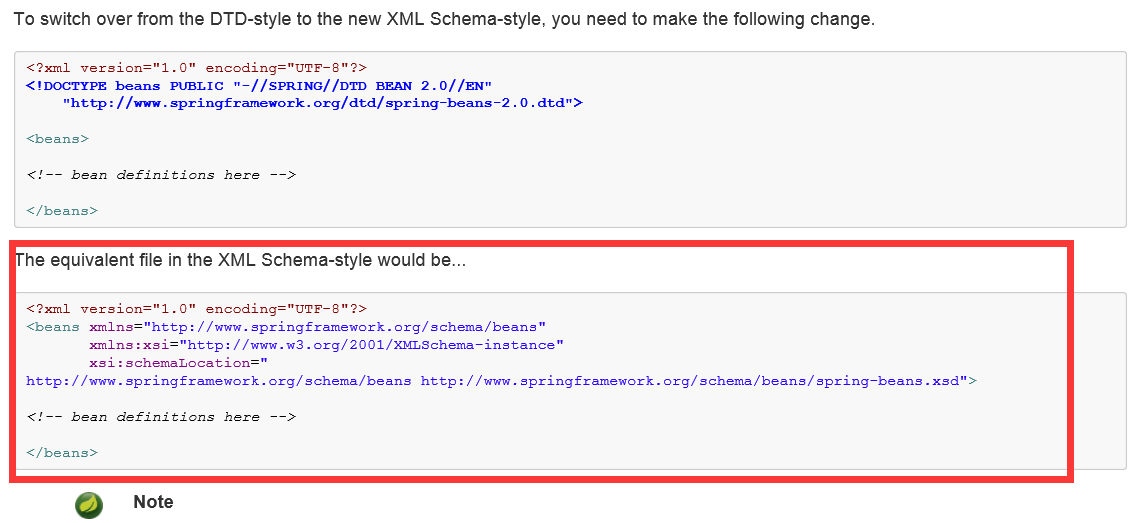
再配置service
<?xml version="1.0" encoding="UTF-8"?>

<beans xmlns="http://www.springframework.org/schema/beans"

       xmlns:xsi="http://www.w3.org/2001/XMLSchema-instance"

       xsi:schemaLocation="http://www.springframework.org/schema/beans

                              http://www.springframework.org/schema/beans/spring-beans.xsd">

    <!-- 配置service

        <bean> 配置需要创建的对象

            id :用于之后从spring容器获得实例时使用的

            class :需要创建实例的全限定类名

    -->

    <bean id="userServiceId" class="com.itheima.a_ioc.UserServiceImpl"></bean>

</beans>
applicationContext.xml
其次,里面可以配置加载jdbc属性文件、数据源、spring框架用于整合Hibernate的工厂bean、事务管理器、组件扫描、引入注解解析器、 事务注解 等。如:
<?xml version="1.0" encoding="UTF-8"?>

<beans xmlns="http://www.springframework.org/schema/beans"

    xmlns:xsi="http://www.w3.org/2001/XMLSchema-instance"

    xmlns:context="http://www.springframework.org/schema/context"

    xmlns:aop="http://www.springframework.org/schema/aop"

    xmlns:tx="http://www.springframework.org/schema/tx"

    xsi:schemaLocation="http://www.springframework.org/schema/beans

                        http://www.springframework.org/schema/beans/spring-beans.xsd

                        http://www.springframework.org/schema/context

                        http://www.springframework.org/schema/context/spring-context.xsd

                        http://www.springframework.org/schema/aop

                        http://www.springframework.org/schema/aop/spring-aop.xsd

                        http://www.springframework.org/schema/tx

                        http://www.springframework.org/schema/tx/spring-tx.xsd">

    <!-- 加载jdbc属性文件 -->

    <context:property-placeholder location="classpath:jdbc.properties"/>

    <!-- 数据源 -->

    <bean id="dataSource" class="com.mchange.v2.c3p0.ComboPooledDataSource">

        <property name="driverClass" value="${driverClass}"/>

        <property name="jdbcUrl" value="${jdbcUrl}"/>

        <property name="user" value="${user}"/>

        <property name="password" value="${password}"/>

    </bean>

    <!-- spring框架用于整合Hibernate的工厂bean -->

    <bean id="sessionFactory" class="org.springframework.orm.hibernate3.LocalSessionFactoryBean">

        <property name="dataSource" ref="dataSource"/>

        <!-- 注入Hibernate相关的属性 -->

        <property name="hibernateProperties">

            <props>

                <prop key="hibernate.dialect">org.hibernate.dialect.MySQL5Dialect</prop>

                <prop key="hibernate.show_sql">true</prop>

                <prop key="hibernate.format_sql">true</prop>

                <prop key="hibernate.hbm2ddl.auto">update</prop>

            </props>

        </property>

        <!-- 注入Hibernate的映射文件 -->

        <property name="mappingDirectoryLocations">

            <list>

                <value>classpath:com/itheima/bos/domain</value>

            </list>

        </property>

    </bean>

    <!-- 事务管理器 -->

    <bean id="transactionManager" class="org.springframework.orm.hibernate3.HibernateTransactionManager">

        <property name="sessionFactory" ref="sessionFactory"/>

    </bean>

    <!-- 组件扫描 -->

    <context:component-scan base-package="com.itheima.bos"/>

    <!-- 引入注解解析器 -->

    <context:annotation-config/>

    <!-- 事务注解 -->

    <tx:annotation-driven />

</beans>
applicationContext.xml
spring环境搭建的更多相关文章
- Spring环境搭建之:导入jar包、配置文件名称及放置位置
Spring环境搭建之:导入jar包.配置文件名称及放置位置 现在项目开发中spring框架应用的还是比较多的,自己用的还不太熟练,每次用的时候总配置半天,总有些配置弄错,就找个时间总结以下,方便以后 ...
- 【Spring学习笔记-1】Myeclipse下Spring环境搭建
*.hl_mark_KMSmartTagPinkImg{background-color:#ffaaff;}*.hl_mark_KMSmartTagBlueImg{background-color:# ...
- 【Spring环境搭建】在Myeclipse下搭建Spring环境-web开发
<?xml version="1.0" encoding="UTF-8"?> <web-app version="3.0" ...
- Spring之Spring环境搭建
Spring之Spring环境搭建 一.什么是Spring? Spring框架是由于软件开发的复杂性而创建的.Spring使用的是基本的JavaBean来完成以前只可能由EJB完成的事情.然而,Spr ...
- SSH环境搭建之Spring环境搭建篇
SSH环境搭建之Spring环境搭建篇 一.引入Spring所使用的JAR文件 二.在src目录下创建beans.xml(Spring的容器文件) <?xml version="1.0 ...
- Spring环境搭建及简单demo
1. Spring框架简介(以下这段话可用于面试求职) Spring为JavaEE开发提供了一个轻量级的解决方案,主要表现为, IOC(或者叫做DI)的核心机制,提供了bean工厂(Spring容器) ...
- eclipse Spring环境搭建 spring tool suite
1.期初用intellij社区版,发现收费版才能开发Java EE. 2.使用eclipse按照网上的教程,在help->eclipse marketplace中搜索sts安装spring工具套 ...
- 01、Spring环境搭建
环境:SpringSource-Tool-3.9.9.Eclipse4.10.0 首先,我们需要解决的是Spring包的问题,我看了百度.CSDN很多都是直接一上来随便丢个包就可以安装了,搞得我弄了一 ...
- 一、spring 环境搭建
一.springtoolSuite4下载 1.概述 Spring Tools 4 是适用于您最喜欢的编码环境的下一代 Spring 工具.它主要从头开始重建,为开发基于 Spring 的企业应用程序提 ...
- spring环境搭建需要的插件-------Spring Tool Suite™ Downloads
下载地址http://spring.io/tools/sts/all 上面的是集成了eclipse的,所以文件比较大,下面的是单独的插件,下载之后打开eclipse,help->installN ...
随机推荐
- Java基础之流程控制
一.顺序结构 顺序结构的程序语句只能被执行一次.如果您想要同样的操作执行多次,,就需要使用循环结构. if-else-if 语句 语法: if(条件){ 当条件为true时,执行大括号内的代码 }el ...
- Windows 2008 r2上安装MySQL
用MSI安装包安装 根据自己的操作系统下载对应的32位或64位安装包.按如下步骤操作: MySQL数据库官网的下载地址http://dev.mysql.com/downloads/mysql,第一步: ...
- Mybatis的updateByExampleSelective方法
好久没些项目,一些基础框架的功能都忘记了,慢慢边做边回忆,果然自己是三流的(某个大佬说过三流的程序员看CSDN和博客) API:可以只更新传入的参数 updateByExampleSelective( ...
- 转-->>mysql的bin log
binlog 基本认识 MySQL的二进制日志可以说是MySQL最重要的日志了,它记录了所有的DDL和DML(除了数据查询语句)语句,以事件形式记录,还包含语句所执行的消耗的时间,MySQL的二进制日 ...
- MAC 终端走代理服务器
问题描述: MAC 终端,默认不走代理服务器:即浏览器已经可以FQ,但是终端不行: 解决方案:直接设置终端的代理,本文 用的是 shadowSocksX: 打开终端,直接执行:(执行后,只对当前终端起 ...
- git for linux使用
1 Linux下Git和GitHub环境的搭建 第一步: 安装Git,使用命令 “sudo apt-get install git” 第二步: 创建GitHub帐号 第三步: 生成ssh key,使用 ...
- 可能是最简单的把C++Lib包装成C#可用dll的方法
(想直接看结果的直接翻到最后) 之前对C++接触不多,最近工作需要,第三方给了一个C++的lib库,我们需要把它封装一下在C#中调用.对方要是直接给Dll就省事了... 研究了一下,基本有三个方向: ...
- SQL中内连接和外连接的区别
数据表的连接有: 1.内连接(自然连接): 只有两个表相匹配的行才能在结果集中出现 2.外连接: 包括 (1)左外连接(左边的表不加限制) (2)右外连接(右边的表不加限制) (3)全外连接(左右两表 ...
- spring mvc get请求中文乱码问题
使用Spring MVC进行get请求时发现get请求带上中文参数,后台收到的是乱码,即使加了encoding filter也没用. 原因是,encoding filter 是针对post请求的,to ...
- 用AOP记录操作日志,并写进数据库。
先用AOP注解 1 package com.vlandc.oss.apigate.log.aspect; import java.util.Map; import java.util.Optional ...