
使用ML.NET和Azure Function进行机器学习 - 第1部分
介绍
一提到机器学习,总是让人望而生畏。幸运的是,Azure正在想方设法让开发人员更容易进入机器学习。ML.NET是Microsoft Research专为.NET开发人员开发的机器学习框架,因此您可以在Visual Studio中完成所有工作。如果你还没有玩过它,我想你会爱上它。当您准备好部署ML.NET算法时,您可以通过Azure Function使用无服务器架构- 而不必担心运行时会把服务器和容器弄得一团糟。
无服务器机器学习
受到Luis Quintanilla的文章启发,有关ML.NET与Azure Function,我们尝试把二者结合起来使用。您将在本地使用ML.NET来训练您的机器学习模型。然后,您将创建一个Azure环境,其中包含存储帐户和Azure Function,以托管您的机器学习应用程序。使用您的模型构建应用程序的最后一步将在下一篇文章中介绍。
创建您的模型
对于这个快速项目的ML.NET部分,让我们从ML.NET10分钟入门教程中构建鸢尾花分类模型。作为先决条件,您需要安装Azure CLI 2.0, Azure Function Core Tools和最新版本的.NET Core。
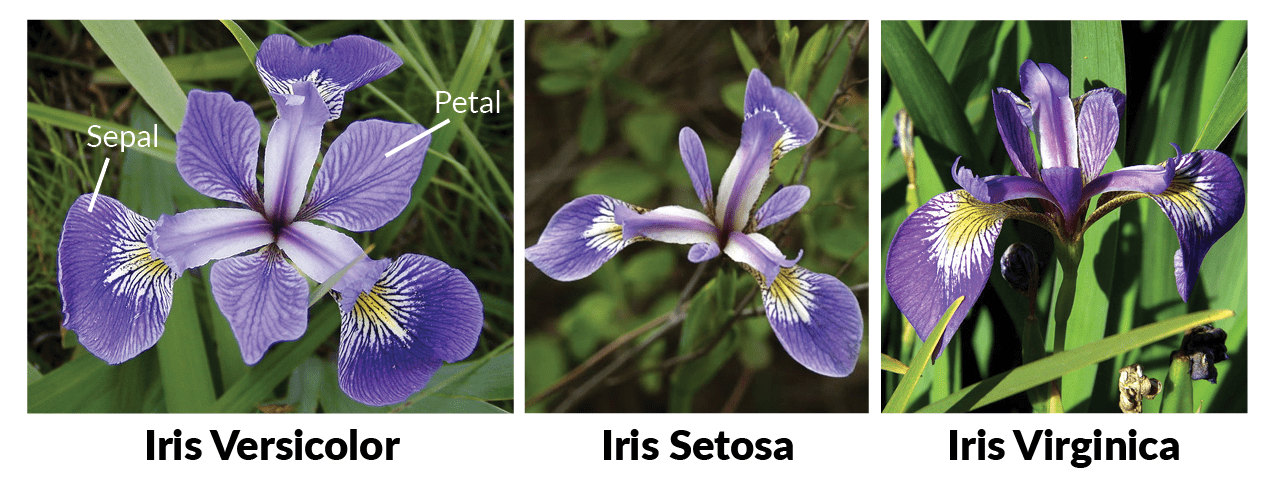
打开命令提示符并为ML.NET项目创建一个新文件夹。
> mkdir demo

> cd demo
接下来,创建一个新的解决方案以及一个新的控制台项目并安装ML.NET包。
> dotnet new solution

> dotnet new console -o model

> dotnet sln add model/model.csproj

> cd model

> dotnet add package Microsoft.ML --version 0.4.

> dotnet restore
在模型下创建数据目录。
> mkdir data
打开UCI机器学习库:Iris数据集,将数据复制并粘贴到VS Code或TextEdit或Notepad中,并将其保存为数据目录中的iris-data.txt。现在是时候写一些代码了。在Visual Studio Code中打开项目并创建几个数据结构类:IrisData.cs和IrisPrediction.cs。
using Microsoft.ML.Runtime.Api;

        public class IrisData

        {

            [Column("")]

            public float SepalLength;

            [Column("")]

            public float SepalWidth;

            [Column("")]

            public float PetalLength;

            [Column("")]

            public float PetalWidth;

            [Column("")]

            [ColumnName("Label")]

            public string Label;

        }

        public class IrisPrediction

        {

            [ColumnName("PredictedLabel")]

            public string PredictedLabels;

        }
添加模型类以执行机器学习训练。
using System.Threading.Tasks;

using Microsoft.ML;

using Microsoft.ML.Data;

using Microsoft.ML.Trainers;

using Microsoft.ML.Transforms;

    class Model

    {

        public static async Task<PredictionModel<IrisData, IrisPrediction>> Train(LearningPipeline pipeline, string dataPath, string modelPath)

        {

            // Load Data

            pipeline.Add(new TextLoader(dataPath).CreateFrom<IrisData>(separator: ','));

            // Transform Data

            // Assign numeric values to text in the "Label" column, because

            // only numbers can be processed during model training

            pipeline.Add(new Dictionarizer("Label"));

            // Vectorize Features

            pipeline.Add(new ColumnConcatenator("Features", "SepalLength", "SepalWidth", "PetalLength", "PetalWidth"));

            // Add Learner

            pipeline.Add(new StochasticDualCoordinateAscentClassifier());

            // Convert Label back to text

            pipeline.Add(new PredictedLabelColumnOriginalValueConverter() { PredictedLabelColumn = "PredictedLabel" });

            // Train Model

            var model = pipeline.Train<IrisData, IrisPrediction>();

            // Persist Model

            await model.WriteAsync(modelPath);

            return model;

        }

    }
将您的逻辑放在Program.cs文件中以运行该过程:
 class Program

    {

        static void Main(string[] args)

        {

            string dataPath = "/Users/mbcrump/Documents/demo/model/data/iris-data.txt";

            string modelPath = "/Users/mbcrump/Documents/demo/model/model.zip";

            var model = Model.Train(new LearningPipeline(), dataPath, modelPath).Result;

            // Test data for prediction

            var prediction = model.Predict(new IrisData()

            {

                SepalLength = 3.3f,

                SepalWidth = 1.6f,

                PetalLength = 0.2f,

                PetalWidth = 5.1f

            });

            Console.WriteLine($"Predicted flower type is: {prediction.PredictedLabels}");

        }

    }
运行模型项目以在根目录中创建新的model.zip文件。以下是我得到的结果。
Michaels-MacBook-Pro:model mbcrump$ dotnet run

Automatically adding a MinMax normalization transform, use 'norm=Warn' or 'norm=No' to turn this behavior off.

Using  threads to train.

Automatically choosing a check frequency of .

Auto-tuning parameters: maxIterations = .

Auto-tuning parameters: L2 = 2.668802E-05.

Auto-tuning parameters: L1Threshold (L1/L2) = .

Using best model from iteration .

Not training a calibrator because it is not needed.

Predicted flower type is: Iris-virginica
恭喜!您已经使用ML.NET对机器学习模型进行了培训,对鸢尾花进行了分类。
使用Cloud Shell设置Azure环境
我们将使用Azure Cloud Shell,它使用Azure CLI来设置我们的Azure环境。最简单的方法是登录Azure门户帐户,然后单击下面显示的Cloud Shell图标以打开bash shell或转到shell.azure.com。

登录后,在bash shell中为此项目创建一个新资源组(并用您自己的一个替换“mlnetdemo”以及该位置)。
$ az group create --name mlnetdemo --location westus
将存储添加到此资源组。
注意:您必须将以下名称更改为唯一的名称
$ az storage account create --name mlnetdemostorage --location westus --resource-group mlnetdemo --sku Standard_LRS
创建Azure Function并将其配置为使用支持.NET Core的beta运行时。
注意:您必须将以下名称更改为唯一的名称
 $ az functionapp create --name mlnetdemoazfunction1 --storage-account mlnetdemostorage1 --consumption-plan-location westus --resource-group mlnetdemo

 $ az functionapp config appsettings set --name mlnetdemoazfunction1 --resource-group mlnetdemo --settings FUNCTIONS_EXTENSION_VERSION=beta
部署您的机器学习模型
要将模型部署到服务器,您需要获取存储帐户的密钥。在bash窗口中使用以下命令来获取它。
$ az storage account keys list --account-name mlnetdemostorage1 --resource-group mlnetdemo
你会看到以下内容:
[

  {

    "keyName": "key1",

    "permissions": "Full",

    "value": "YOURKEY"

  },

  {

    "keyName": "key2",

    "permissions": "Full",

    "value": "NONEYOBUSINESS"

  }

]
使用以下命令基于您的帐户密钥创建一个名为models的新目录,用于放入模型(可以在设置|访问键下的导航窗口中找到)。
$ az storage container create --name models --account-key YOURKEY --account-name mlnetdemostorage1

由于我们使用的是Cloud Shell,因此在此步骤中使用Azure Portal会更容易。如果您愿意,也可以使用Azure CLI。浏览到您的mlnetdemo资源组版本,并深入查看您之前创建的存储资源。以这些blob进行训练前,您会看到models文件夹下新的子目录,在硬盘上找到model.zip上传到这里。
在第2部分中,我们将介绍构建由Azure Function托管的应用程序,该应用程序将针对您的鸢尾花图像进行分类。
使用ML.NET和Azure Function进行机器学习 - 第1部分的更多相关文章
- 使用ML.NET和Azure Function进行机器学习 - 第2部分
本文是<使用ML.NET和AzureFunction进行机器学习 - 第1部分>的续篇. 像机器一样识别鸢尾花 回顾第1部分,您将使用Visual Studio创建一个新的Azure Fu ...
- 创建Azure Function
azure function的用途在于运行一些逻辑简单的执行逻辑,比如batch job,定时任务,webhook等等.1. 创建azure function创建完毕后,进入app service,选 ...
- 使用Azure Function玩转Serverless
Serverless&Azure Functions 通过无服务器计算,开发者无需管理基础结构,从而可以更快构建应用程序.通过无服务器应用程序,将由云服务提供商自动预配.缩放和管理运行代码所需 ...
- 【Azure Application Insights】在Azure Function中启用Application Insights后,如何配置不输出某些日志到AI 的Trace中
问题描述 基于.NET Core的Function App如果配置了Application Insights之后,每有一个函数被执行,则在Application Insights中的Logs中的tra ...
- 【Azure 应用服务】App Service/Azure Function的出站连接过多而引起了SNAT端口耗尽,导致一些新的请求出现超时错误(Timeout)
问题描述 当需要在应用中有大量的出站连接时候,就会涉及到SNAT(源地址网络转换)耗尽的问题.而通过Azure App Service/Function的默认监控指标图表中,却没有可以直接查看到SNA ...
- 【Azure 应用服务】Azure Function集成虚拟网络,设置被同在虚拟网络中的Storage Account触发,遇见Function无法触发的问题
一切为了安全,所有的云上资源如支持内网资源访问,则都可以加入虚拟网络 问题描述 使用Azure Function处理Storage Account中Blob 新增,更新,删除等情况.Storage A ...
- 【Azure 应用服务】Azure Function App 执行PowerShell指令[Get-Azsubscription -TenantId $tenantID -DefaultProfile $cxt]错误
问题描述 使用PowerShell脚本执行获取Azure订阅列表的指令(Get-Azsubscription -TenantId $tenantID -DefaultProfile $cxt).在本地 ...
- 【Azure 应用服务】Azure Function App使用SendGrid发送邮件遇见异常消息The operation was canceled,分析源码逐步最终源端
问题描述 在使用Azure Function App的SendGrid Binging功能,调用SendGrid服务器发送邮件功能时,有时候遇见间歇性,偶发性异常.在重新触发SendGrid部分的Fu ...
- 【Azure 应用服务】Azure Function HTTP 触发后, 230秒就超时。而其他方式触发的Function, 执行5分钟后也超时,如何调整超时时间?
问题描述 Azure Function HTTP 触发后, 230秒就超时,而其他方式触发的Function, 执行5分钟后也超时,如何调整超时时间? 问题分析 查阅官方文档,对函数应用超时持续时间有 ...
随机推荐
- SVM原理 (转载)
1. 线性分类SVM面临的问题 有时候本来数据的确是可分的,也就是说可以用 线性分类SVM的学习方法来求解,但是却因为混入了异常点,导致不能线性可分,比如下图,本来数据是可以按下面的实线来做超平面分离 ...
- scala_1
scala 开发spark可以使用哪些语言: Python开发45% scala % java % 一.scala的概述 java基础上代码的简化版.功能的加强版 隐式转换 高阶函数 一个函数的参数是 ...
- 图形上下文导论(Introduction to SWT Graphics)zz
图形上下文导论(Introduction to SWT Graphics) 摘要: org.eclipse.swt.graphics包(package),包含了管理图形资源的类.只要实现了org.ec ...
- git commit时暂时忽略已提交的文件
当正在修改某文件A,此时需要commit,但是A没修改完暂时不能一起commit. 执行: git update-index --assume-unchanged A的路径 git暂时会忽略该文件的修 ...
- Git提交代码(要有GitHub账号)
分享一下Git提交模式代码(只是提交到GitHub仓库而已,没有其他的操作) 这个的前提是你已经安装了Node.js.Git 下面来看: 1. cd进入目录 2. 把当前目录变成git可以管理的仓 ...
- 雕刻机制作 PCB 指南
之前使用过感光蓝油制作过 PCB,虽然感光法精度高,但个人制作耗时耗力,发给厂家周期又很长.看到国外的网友使用雕刻机制作 PCB 视频之后.几番周折之后还是成功了.有感于网上几乎没有一份完整的雕刻机 ...
- IntelliJ IDEA最新破解版2018.3.1(附2018.2.2 完美破解教程)
2018.3.1最新版破解 1.官网下载IDEA 2018.3.1的商业版本点我去下载 2.破解jar下载:JetbrainsIdesCrack-3.4-release-enc.jar点我去下载 3. ...
- 将python2代码转为python3
将python2代码转为python3 1.2to3在anaconda的/bin文件夹下: 2.打印帮助信息 2to3 --help 3.使用2to3 -W [要转换的python2文件目录] 4.转 ...
- 三、糖醋鲤鱼(Sweet and sour carp)
糖醋鲤鱼是用鲤鱼制作的一道山东济南传统名菜,为鲁菜的代表菜品之一 ,色泽金黄,外焦内嫩,酸甜可口,香鲜味美. 菜品历史 <诗经>载:岂食其鱼,必河之鲤.<济南府志>上早有&qu ...
- mybatis的配置和使用
mybatis的配置和使用 MyBatis 是支持定制化 SQL.存储过程以及高级映射的优秀的持久层框架.MyBatis 避免了几乎所有的 JDBC 代码和手动设置参数以及获取结果集.MyBatis ...