
【Azure 应用服务】Azure Function App 执行PowerShell指令[Get-Azsubscription -TenantId $tenantID -DefaultProfile $cxt]错误
问题描述
使用PowerShell脚本执行获取Azure订阅列表的指令(Get-Azsubscription -TenantId $tenantID -DefaultProfile $cxt)。在本地调试后,指令成功运行。
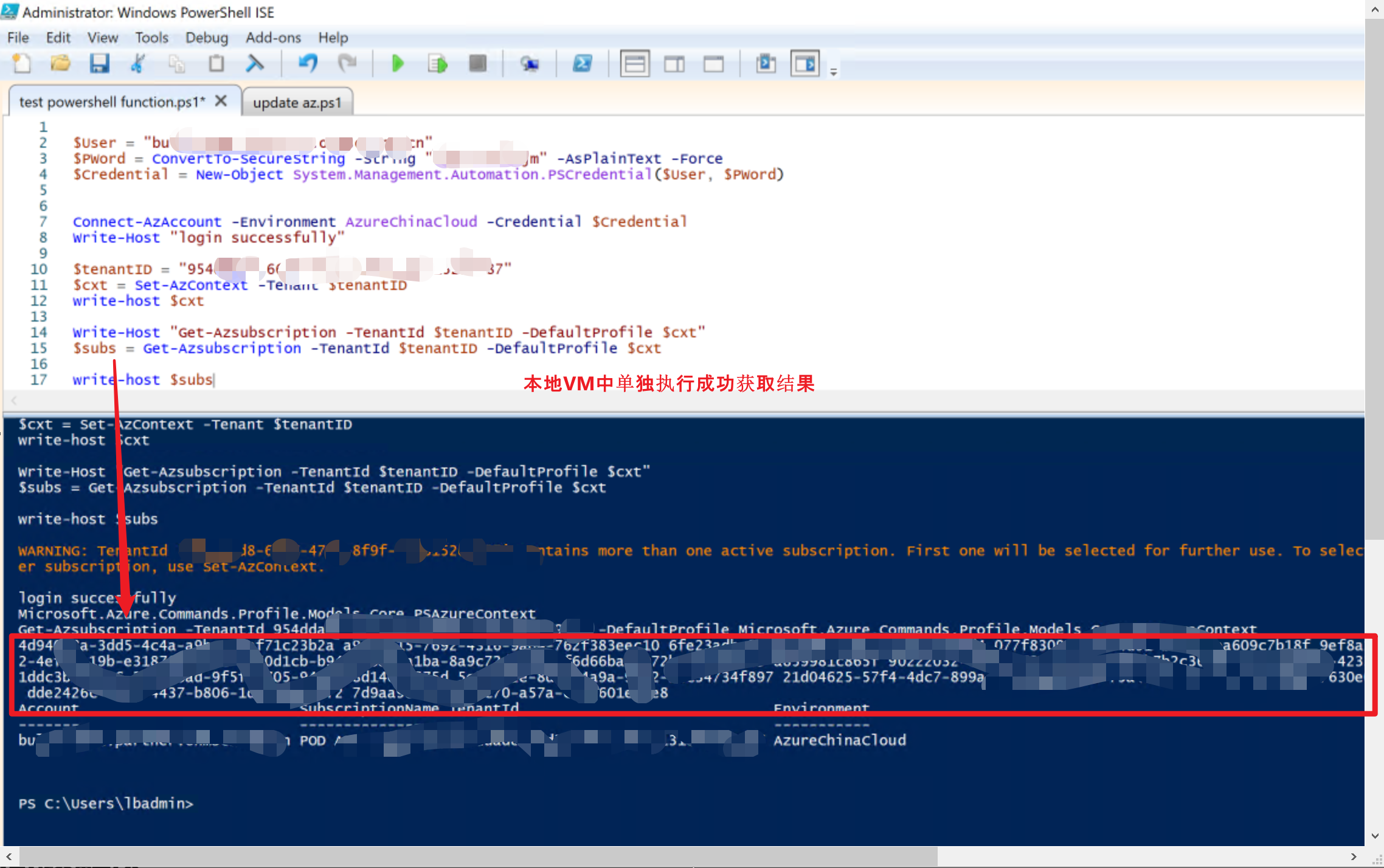
但是当指令并运行在Azure Function时,则出现了异常:
详细的异常信息为
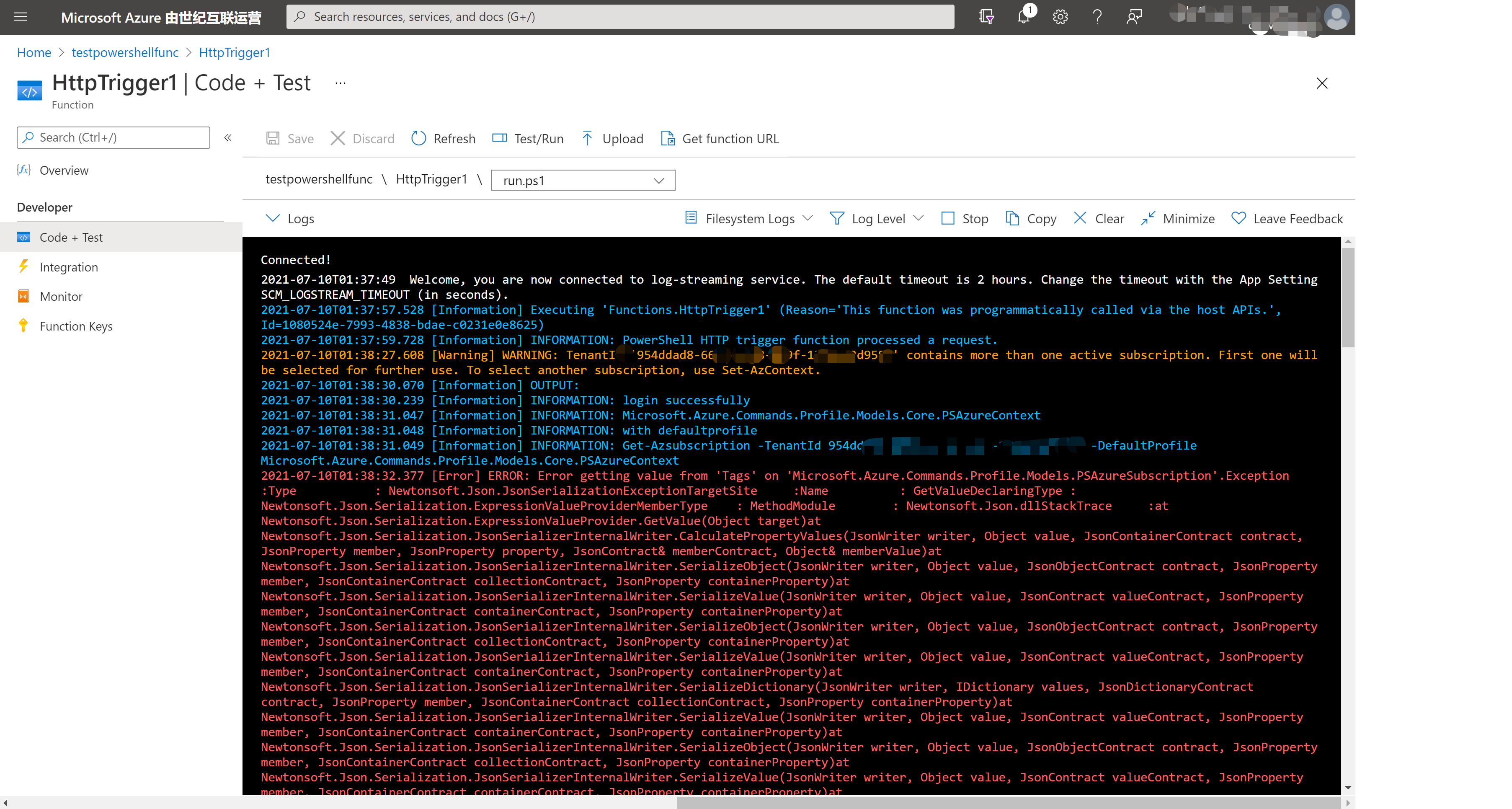
完成的错误信息为: "Error getting value from 'Tags' on 'Microsoft.Azure.Commands.Profile.Models.PSAzureSubscription'."
Microsoft.Azure.WebJobs.Script.Workers.Rpc.RpcException : Result: ERROR: Error getting value from 'Tags' on 'Microsoft.Azure.Commands.Profile.Models.PSAzureSubscription'.

Exception             :

    Type           : Newtonsoft.Json.JsonSerializationException

    TargetSite     :

        Name          : GetValue

        DeclaringType : Newtonsoft.Json.Serialization.ExpressionValueProvider

        MemberType    : Method

        Module        : Newtonsoft.Json.dll

    StackTrace     :

   at Newtonsoft.Json.Serialization.ExpressionValueProvider.GetValue(Object target)

   at Newtonsoft.Json.Serialization.JsonSerializerInternalWriter.CalculatePropertyValues(JsonWriter writer, Object value, JsonContainerContract contract, JsonProperty member, JsonProperty property, JsonContract& memberContract, Object& memberValue)

   at Newtonsoft.Json.Serialization.JsonSerializerInternalWriter.SerializeObject(JsonWriter writer, Object value, JsonObjectContract contract, JsonProperty member, JsonContainerContract collectionContract, JsonProperty containerProperty)

   at Newtonsoft.Json.Serialization.JsonSerializerInternalWriter.SerializeValue(JsonWriter writer, Object value, JsonContract valueContract, JsonProperty member, JsonContainerContract containerContract, JsonProperty containerProperty)

   at Newtonsoft.Json.Serialization.JsonSerializerInternalWriter.SerializeObject(JsonWriter writer, Object value, JsonObjectContract contract, JsonProperty member, JsonContainerContract collectionContract, JsonProperty containerProperty)

   at Newtonsoft.Json.Serialization.JsonSerializerInternalWriter.SerializeValue(JsonWriter writer, Object value, JsonContract valueContract, JsonProperty member, JsonContainerContract containerContract, JsonProperty containerProperty)

   at Newtonsoft.Json.Serialization.JsonSerializerInternalWriter.SerializeDictionary(JsonWriter writer, IDictionary values, JsonDictionaryContract contract, JsonProperty member, JsonContainerContract collectionContract, JsonProperty containerProperty)

   at Newtonsoft.Json.Serialization.JsonSerializerInternalWriter.SerializeValue(JsonWriter writer, Object value, JsonContract valueContract, JsonProperty member, JsonContainerContract containerContract, JsonProperty containerProperty)

   at Newtonsoft.Json.Serialization.JsonSerializerInternalWriter.SerializeObject(JsonWriter writer, Object value, JsonObjectContract contract, JsonProperty member, JsonContainerContract collectionContract, JsonProperty containerProperty)

   at Newtonsoft.Json.Serialization.JsonSerializerInternalWriter.SerializeValue(JsonWriter writer, Object value, JsonContract valueContract, JsonProperty member, JsonContainerContract containerContract, JsonProperty containerProperty)

   at Newtonsoft.Json.Serialization.JsonSerializerInternalWriter.Serialize(JsonWriter jsonWriter, Object value, Type objectType)

   at Newtonsoft.Json.JsonSerializer.SerializeInternal(JsonWriter jsonWriter, Object value, Type objectType)

   at Newtonsoft.Json.JsonSerializer.Serialize(JsonWriter jsonWriter, Object value, Type objectType)

   at Newtonsoft.Json.JsonConvert.SerializeObjectInternal(Object value, Type type, JsonSerializer jsonSerializer)

   at Newtonsoft.Json.JsonConvert.SerializeObject(Object value, Type type, Formatting formatting, JsonSerializerSettings settings)

   at Newtonsoft.Json.JsonConvert.SerializeObject(Object value, Formatting formatting, JsonConverter[] converters)

   at Microsoft.Azure.Commands.Common.Authentication.Models.AzureRmProfile.ToString(Boolean serializeCache)

   at Microsoft.Azure.Commands.Common.Authentication.Models.AzureRmProfile.ToString()

   at System.Management.Automation.ParameterBinderBase.CoerceTypeAsNeeded(CommandParameterInternal argument, String parameterName, Type toType, ParameterCollectionTypeInformation collectionTypeInfo, Object currentValue)

   at System.Management.Automation.ParameterBinderBase.BindParameter(CommandParameterInternal parameter, CompiledCommandParameter parameterMetadata, ParameterBindingFlags flags)

   at System.Management.Automation.CmdletParameterBinderController.BindParameter(CommandParameterInternal argument, MergedCompiledCommandParameter parameter, ParameterBindingFlags flags)

   at System.Management.Automation.CmdletParameterBinderController.BindParameter(UInt32 parameterSets, CommandParameterInternal argument, MergedCompiledCommandParameter parameter, ParameterBindingFlags flags)

   at System.Management.Automation.CmdletParameterBinderController.BindParameters(UInt32 parameterSets, Collection`1 arguments)

   at System.Management.Automation.CmdletParameterBinderController.BindCommandLineParametersNoValidation(Collection`1 arguments)

   at System.Management.Automation.CmdletParameterBinderController.BindCommandLineParameters(Collection`1 arguments)

   at System.Management.Automation.CommandProcessor.BindCommandLineParameters()

   at System.Management.Automation.CommandProcessor.Prepare(IDictionary psDefaultParameterValues)

   at System.Management.Automation.CommandProcessorBase.DoPrepare(IDictionary psDefaultParameterValues)

   at System.Management.Automation.Internal.PipelineProcessor.Start(Boolean incomingStream)

   at System.Management.Automation.Internal.PipelineProcessor.SynchronousExecuteEnumerate(Object input)

   at System.Management.Automation.PipelineOps.InvokePipeline(Object input, Boolean ignoreInput, CommandParameterInternal[][] pipeElements, CommandBaseAst[] pipeElementAsts, CommandRedirection[][] commandRedirections, FunctionContext funcContext)

   at System.Management.Automation.Interpreter.ActionCallInstruction`6.Run(InterpretedFrame frame)

   at System.Management.Automation.Interpreter.EnterTryCatchFinallyInstruction.Run(InterpretedFrame frame)

   at System.Management.Automation.Interpreter.EnterTryCatchFinallyInstruction.Run(InterpretedFrame frame)

    Message        : Error getting value from 'Tags' on 'Microsoft.Azure.Commands.Profile.Models.PSAzureSubscription'.

    Data           : System.Collections.ListDictionaryInternal

    InnerException :

        Type       : System.ArgumentNullException

        Message    : Value cannot be null. (Parameter 'value')

        ParamName  : value

        TargetSite :

            Name          : ArgumentNotNull

            DeclaringType : Newtonsoft.Json.Utilities.ValidationUtils, Newtonsoft.Json, Version=12.0.0.0, Culture=neutral, PublicKeyToken=30ad4fe6b2a6aeed

            MemberType    : Method

            Module        : Newtonsoft.Json.dll

        StackTrace :

   at Newtonsoft.Json.Utilities.ValidationUtils.ArgumentNotNull(Object value, String parameterName)

   at Newtonsoft.Json.JsonConvert.DeserializeObject(String value, Type type, JsonSerializerSettings settings)

   at Newtonsoft.Json.JsonConvert.DeserializeObject[T](String value, JsonSerializerSettings settings)

   at Newtonsoft.Json.JsonConvert.DeserializeObject[T](String value)

   at Microsoft.Azure.Commands.Common.Authentication.Abstractions.AzureSubscriptionExtensions.GetTags(IAzureSubscription subscription)

   at lambda_method(Closure , Object )

   at Newtonsoft.Json.Serialization.ExpressionValueProvider.GetValue(Object target)

        Source     : Newtonsoft.Json

        HResult    : -2147467261

    Source         : Newtonsoft.Json

    HResult        : -2146233088

CategoryInfo          : OperationStopped: (:) [], JsonSerializationException

FullyQualifiedErrorId : Newtonsoft.Json.JsonSerializationException

InvocationInfo        :

    ScriptLineNumber : 26

    OffsetInLine     : 1

    HistoryId        : -1

    ScriptName       : D:\home\site\wwwroot\HttpTrigger1\run.ps1

    Line             : $subs = Get-Azsubscription -TenantId $tenantID -DefaultProfile $cxt

    PositionMessage  : At D:\home\site\wwwroot\HttpTrigger1\run.ps1:26 char:1

                       + $subs = Get-Azsubscription -TenantId $tenantID -DefaultProfile $cxt

                       + ~~~~~~~~~~~~~~~~~~~~~~~~~~~~~~~~~~~~~~~~~~~~~~~~~~~~~~~~~~~~~~~~~~~

    PSScriptRoot     : D:\home\site\wwwroot\HttpTrigger1

    PSCommandPath    : D:\home\site\wwwroot\HttpTrigger1\run.ps1

    CommandOrigin    : Internal

ScriptStackTrace      : at <ScriptBlock>, D:\home\site\wwwroot\HttpTrigger1\run.ps1: line 26
问题分析及临时解决方案
对比以上本地可以成功运行,而在Azure Function中确出现JSON格式解析错误,所以排查PowerShell脚本错误问题。 那么就定位在运行脚本的环境问题。
第一步:排查PowerShell版本,及az 模块的版本
通过 $PSVersionTable 打出PowerShell版本,通过 Get-InstalledModule -name az 和 Get-InstalledModule -name az.* 打印出当前环境的版本号。
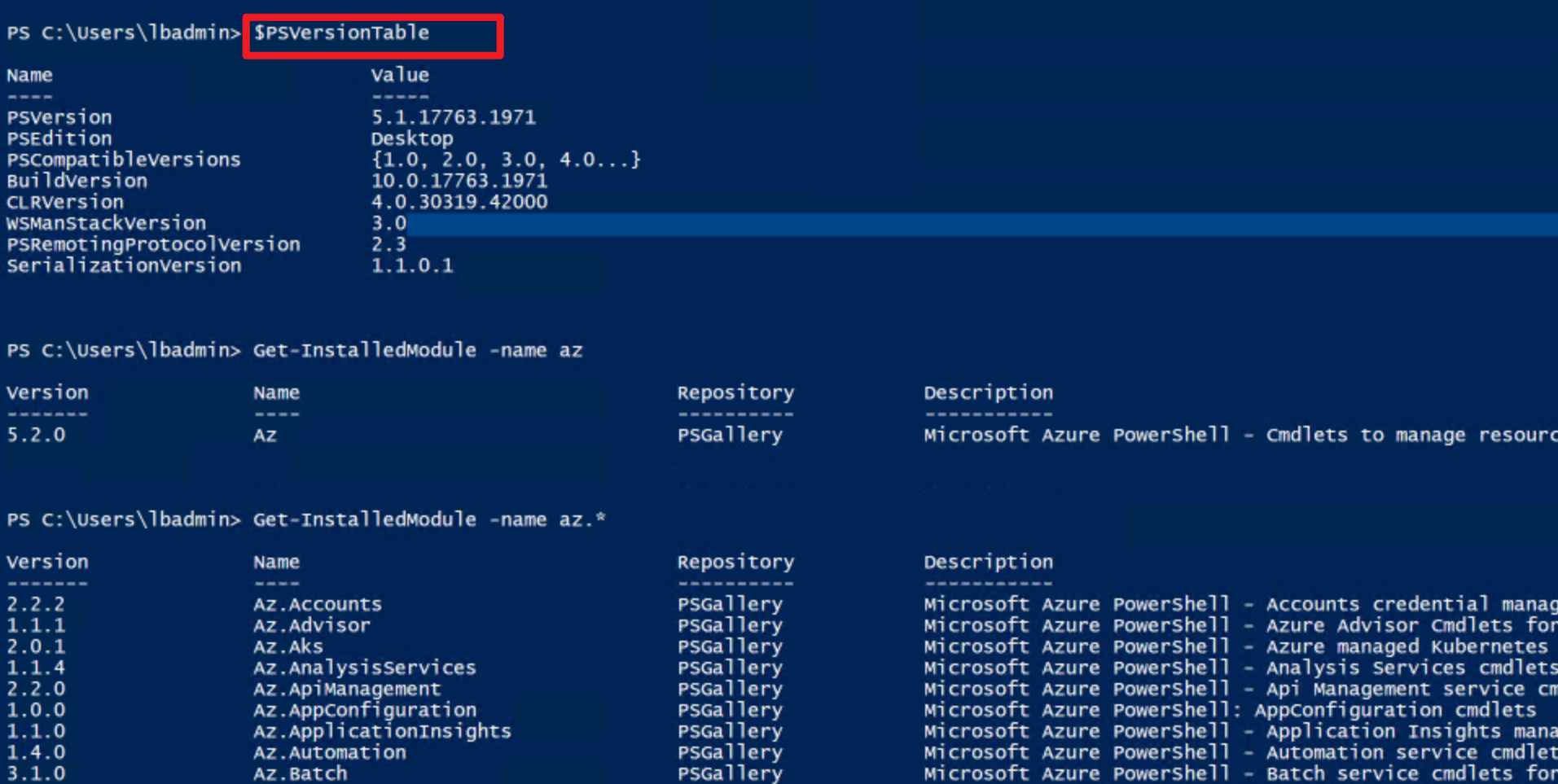
经过对比,发现本地VM与Azure Function中Powershell和az 模块的版本都不同.
第二步:寻找临时的解决方案
由于Azure Function中PowerShell的版本从平台级别无法更改(可以修改PS脚本中所使用的az模块版本,修改方式见附件一)。所以主要的寻找发向为:基于现在的版本,从Get-Azsubscription指令本身来寻找Workaround呢?查看Get-Azsubscription指令,发现它使用的是当前登录用户的权限去获取所有的订阅号,指定TenantID是表明只获取当前TenantID下的所有订阅号。而参数DefaultProfile也是只携带用户认证信息,与当前登录的用户所有的认证信息重复。
|
Get-AzSubscription |
Get subscriptions that the current account can access |
| -TenantId |
Specifies the ID of the tenant that contains subscriptions to get |
| -DefaultProfile |
The credentials, tenant and subscription used for communication with azure |
如果不添加-DefaultProfile参数,是否同样由异常呢? 经过验证执行成功并返回结果正确。所以作为Workaround的代码为:
# Write to the Azure Functions log stream.

Write-Host "PowerShell HTTP trigger function processed a request."

$User = "XXXXXXXXXXXXXxxxxxxxx"

$PWord = ConvertTo-SecureString -String "XXXXXXXXXXXXXxxxxxxxx" -AsPlainText -Force

$Credential = New-Object System.Management.Automation.PSCredential($User, $PWord)

Connect-AzAccount -Environment AzureChinaCloud -Credential $Credential

Write-Host "login successfully"

$tenantID = "xxxxxxx-xxxx-xxxx-xxxx-xxxxxxxxxxxx"

$cxt = Set-AzContext -Tenant $tenantID

write-host $cxt

write-host "no defaultprofile"

Write-Host "Get-Azsubscription -TenantId $tenantID"

#$subs = Get-Azsubscription -TenantId $tenantID -DefaultProfile $cxt

Get-Azsubscription -TenantId $tenantID

write-host "========================="

write-host $subs
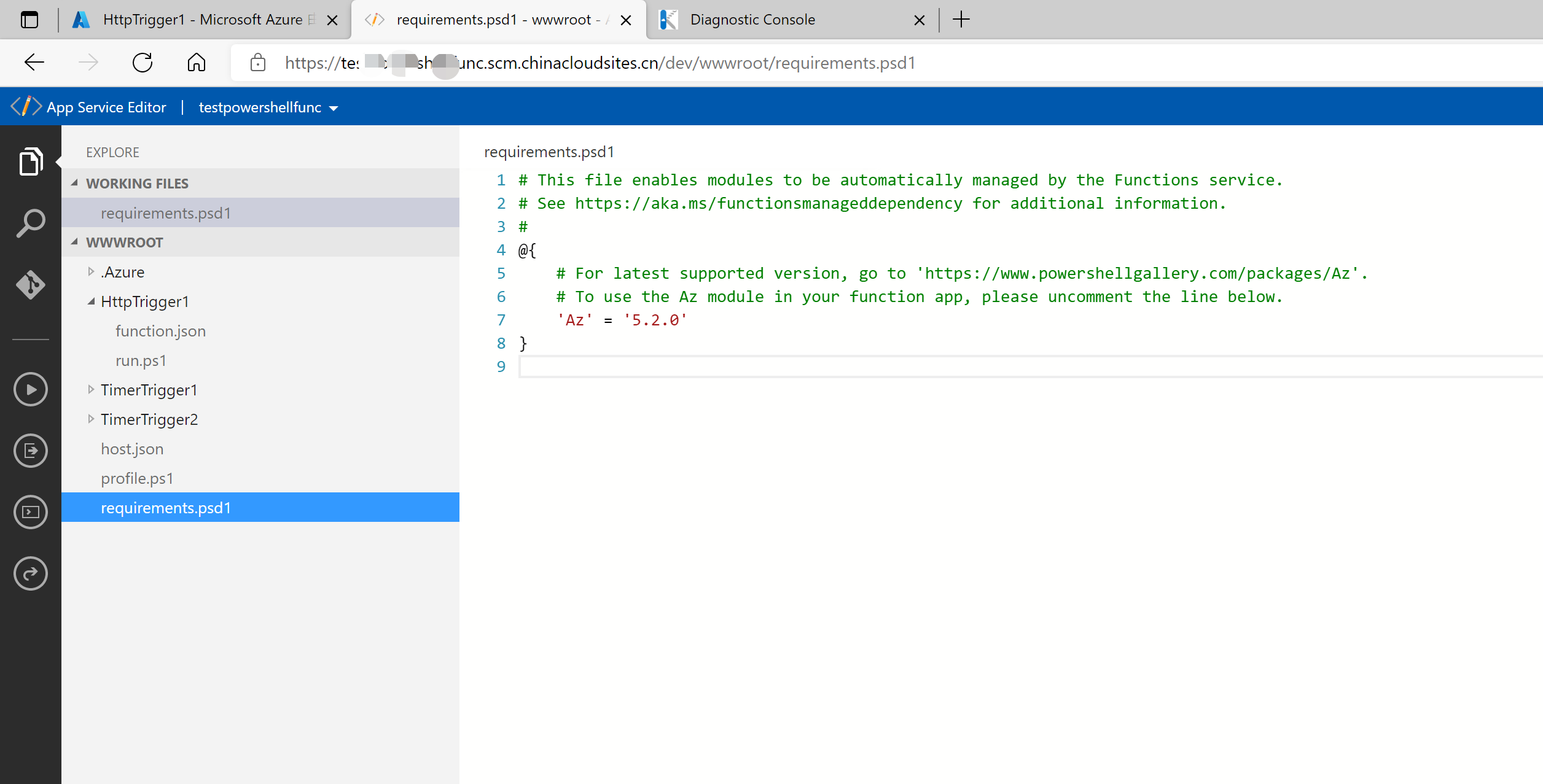
附件一:在Azure Funciton中修改az的版本号为5.2.0, 问题也得到解决。
在Azure Function 门户页面,点击“App Service Editor (Preview)” 目录,进入Editor页面,在文件requirements.psd1文件中,修改az的版本号为5.2.0. 保存后,回到Azure Function页面。重启Function. 修改页面如下:
结论: 解决办法有两种
- 修改az的版本号为5.2.0,修改办法见附件一
- 修改Get-Azsubscription指令,去掉参数 -DefaultProfile $cxt
参考资料
Get-AzSubscription : https://docs.microsoft.com/en-us/powershell/module/az.accounts/get-azsubscription?view=azps-6.2.0
【Azure 应用服务】Azure Function App 执行PowerShell指令[Get-Azsubscription -TenantId $tenantID -DefaultProfile $cxt]错误的更多相关文章
- 【Azure 应用服务】一个 App Service 同时部署运行两个及多个 Java 应用程序(Jar包)
问题描述 如何在一个AppService下同时部署运行多个Java 应用程序呢? 问题解答 因为App Service的默认根目录为 wwwroot.如果需要运行多个Java 应用程序,需要在 www ...
- 【Azure 应用服务】在 App Service for Windows 中自定义 PHP 版本的方法
问题描述 在App Service for Windows的环境中,当前只提供了PHP 7.4 版本的选择情况下,如何实现自定义PHP Runtime的版本呢? 如 PHP Version 8.1.9 ...
- 【Azure Developer】调用SDK的runPowerShellScript方法,在Azure VM中执行PowerShell脚本示例
当需要通过代码的方式执行PowerShell脚本时,可以参考以下的示例. Azure SDK中提供了两个方法来执行PowerShell脚本 (SDK Source Code: https://gith ...
- 【Azure 应用服务】Azure Function 启用 Managed Identity后, Powershell Funciton出现 ERROR: ManagedIdentityCredential authentication failed
问题描述 编写Powershell Function,登录到China Azure并获取Azure AD User信息,但是发现遇见了 [Error] ERROR: ManagedIdentityCr ...
- 【Azure 应用服务】App Service/Azure Function的出站连接过多而引起了SNAT端口耗尽,导致一些新的请求出现超时错误(Timeout)
问题描述 当需要在应用中有大量的出站连接时候,就会涉及到SNAT(源地址网络转换)耗尽的问题.而通过Azure App Service/Function的默认监控指标图表中,却没有可以直接查看到SNA ...
- 【Azure 应用服务】Azure Function HTTP 触发后, 230秒就超时。而其他方式触发的Function, 执行5分钟后也超时,如何调整超时时间?
问题描述 Azure Function HTTP 触发后, 230秒就超时,而其他方式触发的Function, 执行5分钟后也超时,如何调整超时时间? 问题分析 查阅官方文档,对函数应用超时持续时间有 ...
- 【Azure 应用服务】Azure Function App使用SendGrid发送邮件遇见异常消息The operation was canceled,分析源码逐步最终源端
问题描述 在使用Azure Function App的SendGrid Binging功能,调用SendGrid服务器发送邮件功能时,有时候遇见间歇性,偶发性异常.在重新触发SendGrid部分的Fu ...
- 【Azure 应用服务】部署Kafka Trigger Function到Azure Function服务中,解决自定义域名解析难题
问题描述 经过前两篇文章,分别使用VM搭建了Kafka服务,创建了Azure Function项目,并且都在本地运行成功. [Azure Developer]在Azure VM (Windows) 中 ...
- 【Azure App Service For Container】创建ASP.NET Core Blazor项目并打包为Linux镜像发布到Azure应用服务
欢迎使用 Blazor!Blazor 是一个使用 .NET 生成交互式客户端 Web UI 的框架: 使用 C# 代替 JavaScript 来创建信息丰富的交互式 UI. 共享使用 .NET 编写的 ...
随机推荐
- ubuntu中软件的升级管理-(转自Josh_)
给Ubuntu软件升级命令 sudo apt-get update --更新软件源 sudo apt-get upgrade -更新已经安装的软件 以非root用户更新系统 sudo: sudo是l ...
- Mybatis Mapper 映射文件(xxxMapper.xml)
什么是 Mapper 映射文件 Mapper 映射文件是 Mybatis 用于实现 ORM 映射规则的配置文件,Mybatis 通过映射文件可将数据库查询结构映射为 Java 对象. 创建 Mappe ...
- 网上的说TB6560存在的问题
https://www.amobbs.com/thread-5506456-2-1.html
- 电压笔DIY
电压逻辑笔 http://www.cirmall.com/circuit/2279/detail?3#/details http://www.cirmall.com/circuit/7543/CD45 ...
- 七牛云-上传、删除文件,工具类(Day49)
要求: 1. java1.8以上 2. Maven: 这里的version指定了一个版本范围,每次更新pom.xml的时候会尝试去下载7.5.x版本中的最新版本,你可以手动指定一个固定的版本. < ...
- WPF 2D图形 Shape入门(一)--Shape
本文是篇WPF Shape的入门文章 Shape 首先看看shape的继承链关系: 一个Shape具有哪些重要属性: 属性 说明 DefiningGeometry 默认的几何形状 RenderedGe ...
- linux下 find命令使用
按名称查找 find . -name filename [root@vps repo]# ls README.md vps.sh[root@vps repo]# find . -iname vps ...
- MIPS指令的CPU实现:ALU设计
设计CPU的第一步,设计一个简单的逻辑运算单元ALU.同时对Verilog语言也有一定要求. 一.实验内容 如图,ALU接受两个N位的输入,得到N位的输出,通过控制信号F决定运算功能. 将ALU的输出 ...
- unity项目字符串转为Vector3和Quaternion
运用环境:一般在读取csv表格的数据时是string类型转为Vector3或者Quaternion类型 字符串格式:x,x,x /x,x,x,x (英文逗号) 方法: /// <summary& ...
- WEB安全防护相关响应头(下)
前篇"WEB安全防护相关响应头(上)"中,我们分享了 X-Frame-Options.X-Content-Type-Options.HTTP Strict Transport Se ...