
时序数据库influxDB存储数据grafana展示数据
一、influxDB简介
InfluxDB是一款用Go语言编写的开源分布式时序、事件和指标数据库,无需外部依赖。该数据库现在主要用于存储涉及大量的时间戳数据,如DevOps监控数据,APP metrics, loT传感器数据和实时分析数据。
二、安装
(py3) [root@zabbix_server src]# wget https://dl.influxdata.com/influxdb/releases/influxdb-1.1.0.x86_64.rpm

---- ::-- https://dl.influxdata.com/influxdb/releases/influxdb-1.1.0.x86_64.rpm

正在解析主机 dl.influxdata.com... 13.226.77.23, 13.226.77.76, 13.226.77.125, ...

正在连接 dl.influxdata.com|13.226.77.23|:... 已连接。

已发出 HTTP 请求,正在等待回应...  OK

长度: (15M) [application/x-redhat-package-manager]

正在保存至: “influxdb-1.1..x86_64.rpm”

% [=============================> ] ,, 1.77M/s eta(英国中部时42% [================================> ] ,, 1.80M/s eta(英国中部时51% [=======================================> ] ,, 2.01M/s eta(英国中部时57% [============================================> ] ,, 2.00M/s eta(英国中部时60% [===============================================> ] ,, 2.10M/s eta(英国中部时63% [=================================================> ] ,, 2.18M/s eta(英国中部时71% [=======================================================> ] ,, 2.58M/s eta(英国中部时74% [=========================================================> ] ,, 2.62M/s eta(英国中部时77% [============================================================> ] ,, 2.71M/s eta(英国中部时83% [================================================================> ] ,, 2.71M/s eta(英国中部时86% [===================================================================>           ] ,, 2.81M/s eta(英国中部时90% [======================================================================> ] ,, 2.75M/s eta(英国中部时94% [=========================================================================> ] ,, 2.63M/s eta(英国中部时100%[==============================================================================>] ,, 2.77M/s in .7s

-- :: (2.18 MB/s) - 已保存 “influxdb-1.1..x86_64.rpm” [/])

(py3) [root@zabbix_server src]# yum localinstall influxdb-1.1..x86_64.rpm

已加载插件:fastestmirror, security

设置本地安装进程

诊断 influxdb-1.1..x86_64.rpm: influxdb-1.1.-.x86_64

influxdb-1.1..x86_64.rpm 将被安装

Loading mirror speeds from cached hostfile

* base: mirrors.aliyun.com

* extras: mirrors.aliyun.com

* updates: mirrors.aliyun.com

* webtatic: uk.repo.webtatic.com

base | 3.7 kB :

dell-system-update_dependent | 2.3 kB :

dell-system-update_independent | 2.3 kB :

extras | 3.4 kB :

mysql-connectors-community | 2.5 kB :

mysql-tools-community | 2.5 kB :

mysql57-community | 2.5 kB :

nginx | 2.9 kB :

updates | 3.4 kB :

webtatic | 3.6 kB :

解决依赖关系

--> 执行事务检查

---> Package influxdb.x86_64 :1.1.- will be 安装

--> 完成依赖关系计算

依赖关系解决

========================================================================================================================

软件包 架构 版本 仓库 大小

========================================================================================================================

正在安装:

influxdb x86_64 1.1.- /influxdb-1.1..x86_64  M

事务概要

========================================================================================================================

Install  Package(s)

总文件大小: M

Installed size:  M

确定吗?[y/N]:y

下载软件包:

运行 rpm_check_debug

执行事务测试

事务测试成功

执行事务

正在安装 : influxdb-1.1.-.x86_64 /

Verifying : influxdb-1.1.-.x86_64 /

已安装:

influxdb.x86_64 :1.1.-

完毕!
三、文件说明
在/usr/bin目录下有如下文件
(py3) [root@zabbix_server bin]# ll inf*

-rwxr-xr-x   root root   11月   influx

-rwxr-xr-x   root root  11月   influxd

-rwxr-xr-x   root root   11月   influx_inspect

-rwxr-xr-x   root root   11月   influx_stress

-rwxr-xr-x   root root  11月   influx_tsm

-rwxr-xr-x.  root root    8月    info

-rwxr-xr-x.  root root     3月    infocmp

-rwxr-xr-x.  root root     8月    infokey

lrwxrwxrwx.  root root         11月   infotocap -> tic
influxd:服务器 influx:客户端 数据文件存放在 /var/lib/influxdb/目录下
四、数据库操作
启动服务器
(py3) [root@zabbix_server influxdb]# influxd

            .d888                    8888888b.  888888b.

               d88P"  888                   888  "Y88b   "88b

                                             .88P

      88888b.               8888888K.

       "88b 888    888 888  888  Y8bd8P' 888    888 888  "Y88b

                   X88K

              Y88b  .d8""8b.   .d88P    d88P

           "Y88888 888  888 8888888P"  8888888P"

[run] // :: InfluxDB starting, version 1.1., branch master, commit 800da5732b91c816b0a097acf8887fa2af1efa1a

[run] // :: Go version go1.7.3, GOMAXPROCS set to

[run] // :: Using configuration at: /etc/influxdb/influxdb.conf

[store] // :: Using data dir: /var/lib/influxdb/data

[subscriber] // :: opened service

[monitor] // :: Starting monitor system

[monitor] // :: 'build' registered for diagnostics monitoring

[monitor] // :: 'runtime' registered for diagnostics monitoring

[monitor] // :: 'network' registered for diagnostics monitoring

[monitor] // :: 'system' registered for diagnostics monitoring

[shard-precreation] // :: Starting precreation service with check interval of 10m0s, advance period of 30m0s

[snapshot] // :: Starting snapshot service

[continuous_querier] // :: Starting continuous query service

[httpd] // :: Starting HTTP service

[httpd] // :: Authentication enabled: false

[httpd] // :: Listening on HTTP: [::]:

[retention] // :: Starting retention policy enforcement service with check interval of 30m0s

[monitor] // :: Storing statistics in database '_internal' retention policy 'monitor', at interval 10s

// :: Sending usage statistics to usage.influxdata.com

[run] // :: Listening for signals
启动客户端
(py3) [root@zabbix_server dianwang]# influx

Visit https://enterprise.influxdata.com to register for updates, InfluxDB server management, and monitoring.

Connected to http://localhost:8086 version 1.1.0

InfluxDB shell version: 1.1.

>
创建数据库
> create database test;

> show databases;

name: databases

name

----

_internal

test
打开数据库
> use test

Using database test

>
创建表,InfluxDB没有提供单独的建表语句,可以通过并添加数据的方式建表
> insert test,province=安徽 count=

> show measurements

name: measurements

name

----

test

> select * from test

name: test

time                    count   province

----                    -----   --------

          安徽
添加数据
> insert test,province=广东 count=

> select * From  test

name: test

time                    count   province

----                    -----   --------

          安徽

         广东
删除表
> drop measurement test

> show measurements

>
五、grafana添加influxdb数据源
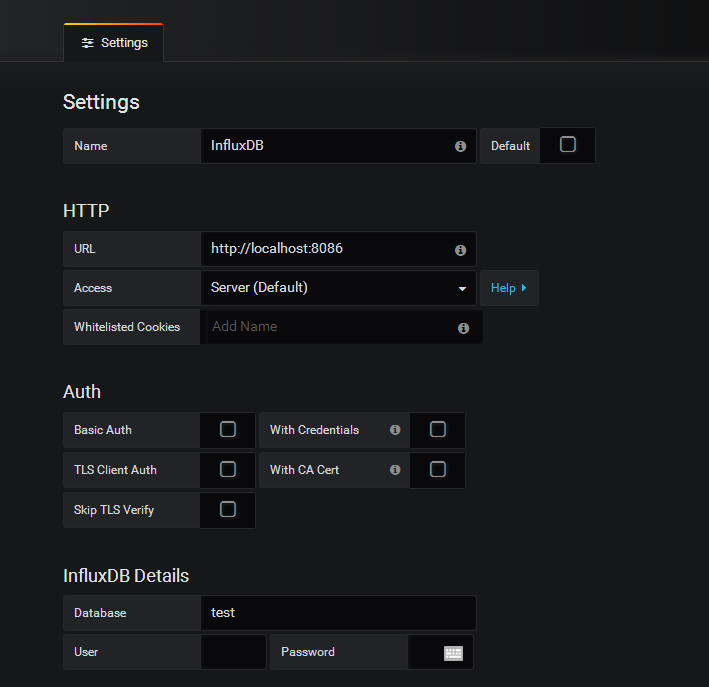
添加表格插件,设置如下:
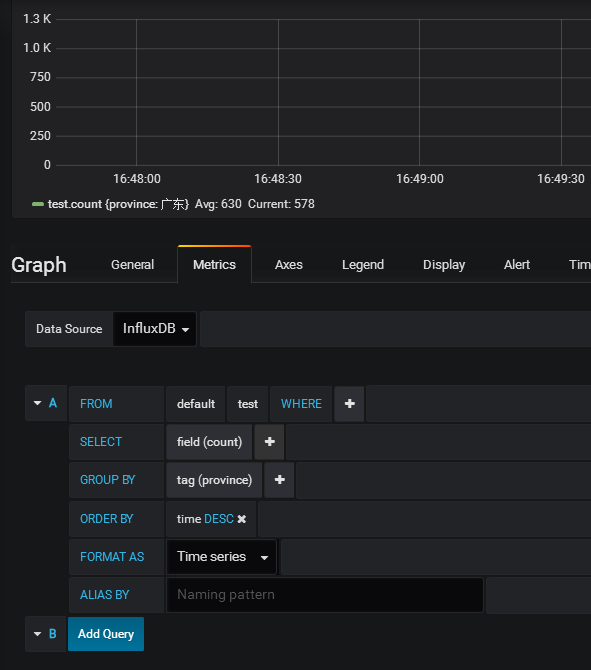
选择展示字段:count,按province分组,按时间排序
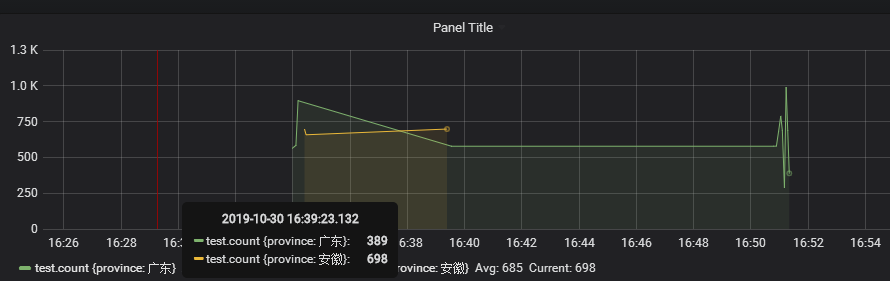
这样就完成了数据的展示。
六、安装grafana的worldsmap插件
[root@zabbix_server bin]# ./grafana-cli plugins install grafana-worldmap-panel

installing grafana-worldmap-panel @ 0.2.

from url: https://grafana.com/api/plugins/grafana-worldmap-panel/versions/0.2.1/download

into: ../data/plugins

? Installed grafana-worldmap-panel successfully

Restart grafana after installing plugins . <service grafana-server restart>
七、重启grafana服务
root@zabbix_server bin]# ./grafana-server start
查看面板

地图插件已经安装上了
八、创建地图数据表(坐标模式)
时序数据库influxDB存储数据grafana展示数据的更多相关文章
- SQLite数据库如何存储和读取二进制数据
SQLite数据库如何存储和读取二进制数据 1. 存储二进制数据 SQLite提供的绑定二进制参数接口函数为: int sqlite3_bind_blob(sqlite3_stmt*, int, co ...
- Spring Boot中使用时序数据库InfluxDB
除了最常用的关系数据库和缓存之外,之前我们已经介绍了在Spring Boot中如何配置和使用MongoDB.LDAP这些存储的案例.接下来,我们继续介绍另一种特殊的数据库:时序数据库InfluxDB在 ...
- 时序数据库InfluxDB安装及使用
时序数据库InfluxDB安装及使用 1 安装配置 安装 wget https://dl.influxdata.com/influxdb/releases/influxdb-1.3.1.x86_64. ...
- 时序数据库InfluxDB
在系统服务部署过后,线上运行服务的稳定性是系统好坏的重要体现,监控系统状态至关重要,经过调研了解,时序数据库influxDB在此方面表现优异. influxDB介绍 时间序列数据是以时间字段为每行数据 ...
- 时序数据库InfluxDB(I)- 搭建与采集信息demo操作
搭建环境:vmware workstation pro15.5.0, ubuntu18.04.3 实践时间:2019.10.12-10.27 (一)时序数据库InfluxDB准备 (1)安装 曾出现问 ...
- [Go] 时序数据库influxdb的安装
日志类的数据时候存储在时序数据库中,下面就是时序数据库influxdb的安装 curl -sL https://repos.influxdata.com/influxdb.key | apt-key ...
- 简析时序数据库 InfluxDB
时序数据基础 时序数据特点 时序数据TimeSeries是一连串随时间推移而发生变化的相关事件. 以下图的 CPU 监控数据为例,同个 IP 的相关监控数据组成了一条时序数据,不相关数据则分布在不同的 ...
- 分布式时序数据库InfluxDB
我们内部的监控系统用到分布式时序数据库InfluxDB http://www.ttlsa.com/monitor-safe/monitor/distributed-time-series-databa ...
- 【时序数据库InfluxDB】Windows环境下配置InfluxDB+数据可视化,以及使用 C#进行简单操作的代码实例
前言:如题.直接上手撸,附带各种截图,就不做介绍了. 1.influxDB的官网下载地址 https://portal.influxdata.com/downloads/ 打开以后,如下图所示,可以 ...
随机推荐
- 如何解决使用 JMeter 时遇到的问题
这是对 JMeter 官方网站上一篇文章的翻译.点击这里可以访问原文JMeterTroubleShooting. • check the log file. This is normally in t ...
- Linux安装Vmware Tools/vmtools(通用)
以下方法适用于centos/Ubuntu #新建一个临时目录,用于挂载光驱 mkdir /tmp/cdrom mount -t iso9660 /dev/cdrom /tmp/cdrom cp -r ...
- Pythoncookbook(数据结构与算法)在字典中将键映射到多个值上的方法
Python cookbook(数据结构与算法)在字典中将键映射到多个值上的方法 本文实例讲述了Python在字典中将键映射到多个值上的方法.分享给大家供大家参考,具体如下: 问题:一个能将键(key ...
- [转]【JVM】调优笔记2-----JVM在JDK1.8以后的新特性以及VisualVM的安装使用
[From]https://www.cnblogs.com/sxdcgaq8080/p/7156227.html 隔壁的,加个引用做书签! [JVM]调优笔记2-----J ...
- Debian10服务器安装
对于使用惯windows系统的人来说,刚开始接触使用linux系统一定是很不习惯,因为使用环境的变化经常会出现一些错误.当然,对于我来说,我也是刚刚才开始接触Linux,对此,有些地方想不到的,可以多 ...
- swoole前置基础知识1——1.1多进程/多线程的概念
一.为何需要多进程(或者多线程),为何需要并发? 这个问题或许本身都不是个问题.但是对于没有接触过多进程编程的朋友来说,他们确实无法感受到并发的魅力以及必要性. 我想,只要你不是整天都写那种int m ...
- 5-1 标准I/O和管道
标准I/O和管道 程序:指令+数据 读入数据:Input 输出数据:Output 打开的文件都有一个fd: file descriptor (文件描述符) Linux给程序提供三种 I/O 设备 标准 ...
- office web apps安装部署,配置https,负载均衡(二)域控制器安装并配置域账号
域控制器对服务器的要求不高,我们这里以windows server 2008R2为例 系统要求:windows server 2008R2 笔者也尝试使用了windows server 2012R2, ...
- 爱伪装(AWZ)/爱立思(ALS)改机改串一键新机原理分析
简介 爱伪装(AWZ)/爱立思(ALS)是一款iOS越狱系统上的改机工具,可以修改多种系统参数达到伪装设备型号及各种软硬件属性的目的,同时提供了防越狱检测机制,常用于iOS上的推广刷量,配合代理/VP ...
- python-Web-django-富文本编辑器
views: def gbook(request): '''''' text = request.POST.get('text') soup = BeautifulSoup(text, "h ...