
offsetWidth clientWidth scrollWidth 的区别
了解 offsetWidth clientWidth scrollWidth 的区别
最近需要清除区分开元素的width,height及相应的坐标等,当前这篇用来区分offsetWidth clientWidth scrollWidth的区别
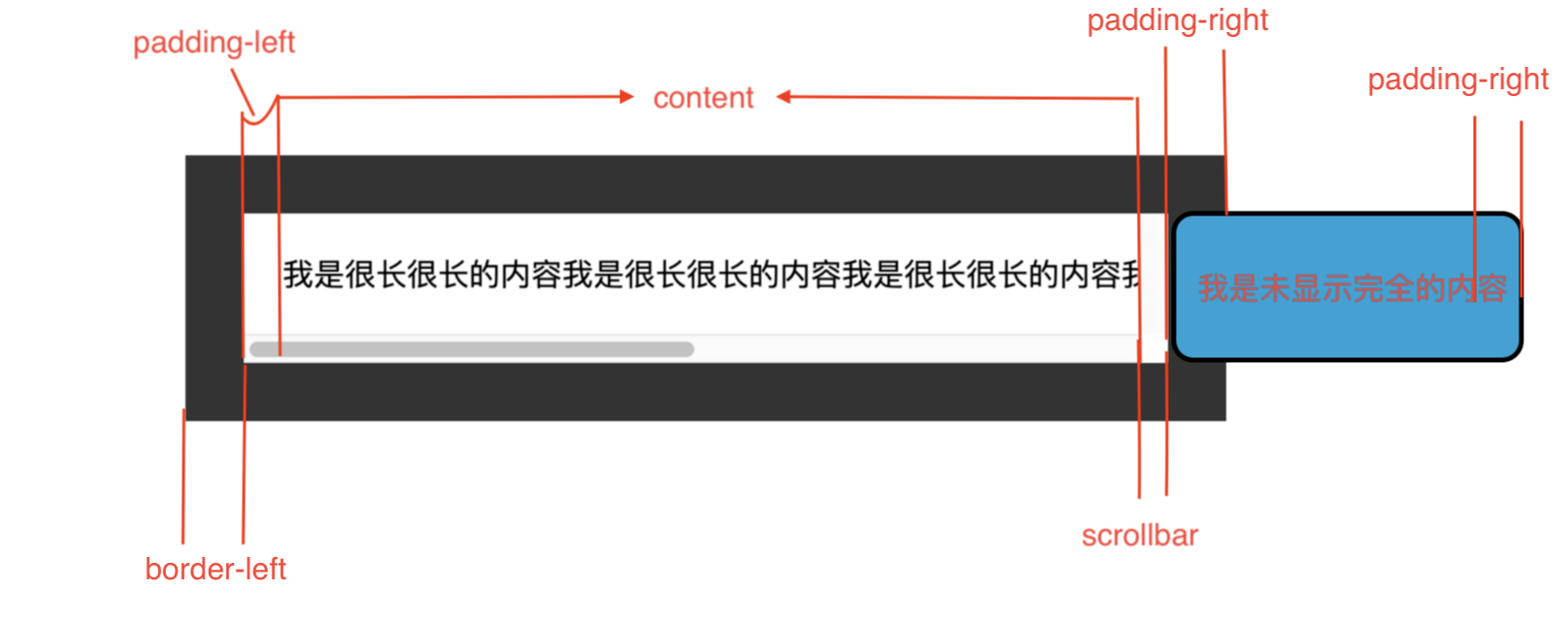
各自的概念
假设有一个元素,width有以下几个进行组合
- content
- padding-left
- padding-right
- scrollbar 垂直的滚动条宽度(假设有,没有便为0)
- border-left
- border-right
clientWidth = content + padding-left + padding-right
offsetWidth = content + padding-left + padding-right + border-left + border-right + scrollbar
scrollWidth = content + padding-left + padding-right + scrollbar + border-left + border-right +滚动进入不可见的内容
示例
在上述中,我们可以计算出
scrollbar为
const scrollbar = el.offsetWidth - (border-left + border-right) - clientWidth
html
<section class="client-xyz">

    <p>我是很长很长的内容我是很长很长的内容我是很长很长的内容我是很长很长的内容我是很长很长的内容我是很长很长的内容</p>

</section>
css
p {

    margin: 20px;

    padding: 20px;

    /* border: 30px solid #333; */

    /* border: 10vw solid #333; */

    /* border: calc(100px - 70px) solid #333; */

    border: 30px solid #333;

    word-break: keep-all;

    overflow-y: scroll;

}
js
const Box = document.querySelector('p')

let border = 0

// 获取元素的style信息

const style = window.getComputedStyle(Box, null)

// border不管设置的单位如何,最终都会转为 px

border = parseFloat(style['borderRightWidth'].replace('px', '')) + parseFloat(style['borderLeftWidth'].replace('px', ''))

const scollbar = Box.offsetWidth - Box.clientWidth - border
总结
- 知道了计算滚动条宽度,并不是简单的
el.offsetWidth - el.clientWidth而是还需要减去border的宽度 - clientWidth,offsetWidth,scrollWidth
offsetWidth clientWidth scrollWidth 的区别的更多相关文章
- offsetWidth clientWidth scrollWidth 三者之间的区别和联系
scrollWidth:对象的实际内容的宽度,不包边线宽度,会随对象中内容超过可视区后而变大. clientWidth:对象内容的可视区的宽度,不包滚动条等边线,会随对象显示大小的变化而改变. off ...
- js中clientWidth, scrollWidth, innerWidth, outerWidth,offsetWidth的区别
js中clientWidth, scrollWidth, innerWidth, outerWidth,offsetWidth的属性汇总,测试浏览器:ie7~ie11.chrome 和 firefox ...
- 四种浏览器对 clientHeight、offsetHeight、scrollHeight、clientWidth、offsetWidth 和 scrollWidth 的解释差异
网页可见区域宽:document.body.clientWidth 网页可见区域高:document.body.clientHeight 网页可见区域宽:document.body.offsetWid ...
- JS 获取浏览器窗口大小clientWidth、offsetWidth、scrollWidth
常用: JS 获取浏览器窗口大小 // 获取窗口宽度 if (windows.innerWidth) winWidth = windows.innerWidth; else if ((docume ...
- JS:body元素对象的clientWidth、offsetWidth、scrollWidth、clientLeft、offsetLeft、scrollLeft
document.body.clientWidth 获取body元素对象的内容可视区域的宽度,即clientWidth=width+padding,不包括滚动条. document.body.clie ...
- clientWidth、offsetWidth、scrollWidth……
1.元素视图属性 clientWidth:元素内容可视区宽度(水平方向 width + 左右 padding). clientHeight:元素内容可视高度(垂直方向 height + 上下paddi ...
- js的offsetWidth,clientWidth
js元素的offsetWidth与clientWidth很相似,因此放在一起记录. clientWidth与offsetWidth clientWidth=元素内容区域宽度+水平内边距padding. ...
- JS中关于clientWidth offsetWidth scrollWidth 的区别及意义
网页可见区域宽: document.body.clientWidth;网页可见区域高: document.body.clientHeight;网页可见区域宽: document.body.offset ...
- scrollWidth、clientWidth、offsetWidth、width的区别
scrollWidth:对象的实际内容的宽度,不包边线宽度,会随对象中内容超过可视区后而变大. clientWidth:对象内容的可视区的宽度,不包滚动条等边线,会随对象显示大小的变化而改变. off ...
随机推荐
- Linux系统下lz4解压缩命令小结
lz4是一个让"人见人爱.花见花开"的压缩算法,能够在多核上很好的扩展.lz4在压缩率上略微逊色, 但是在解压速度上有着惊人的优势 (大概是gzip的3倍(多次测试对比)).因为压 ...
- mysql LAST()函数 语法
mysql LAST()函数 语法 作用:返回指定的字段中最后一个记录的值. 语法:SELECT LAST(column_name) FROM table_name 注释:可使用 ORDER BY 语 ...
- 中南林业大学校赛 I 背包问题 ( 折半枚举 || 01背包递归写法 )
题目链接 题意 : 中文题 分析 : 价值和重量都太过于大,所以采用折半枚举的方法,详细可以看挑战的超大背包问题 由于 n <= 30 那么可以不必直接记录状态来优化,面对每个用例 直接采用递 ...
- Codeforces 960F Pathwalks ( LIS && 树状数组 )
题意 : 给出若干个边,每条边按照给出的顺序编号,问你找到一条最长的边权以及边的编号同时严格升序的一条路径,要使得这条路径包含的边尽可能多,最后输出边的条数 分析 : 这题和 LIS 很相似,不同的 ...
- 【Leetcode】最大的数
字符串比较大小 https://blog.csdn.net/jason_cuijiahui/article/details/79038468 http://www.cplusplus.com/refe ...
- GIL与event事件讲解
一.GIL全局解释器锁 global interpreter lock 1.GIL是一个互斥锁:保证数据的安全(以牺牲效率来换取数据的安全),阻止同一个进程内多个线程同时执行(不能并行但是能够实现并发 ...
- logstash之Filter插件
Logstash之所以强悍的主要原因是filter插件:通过过滤器的各种组合可以得到我们想要的结构化数据 1:grok正则表达式 grok**正则表达式是logstash非常重要的一个环节**:可以通 ...
- 方法二破解:Excel工作表保护密码
最简单,复制整表,粘贴在全新的表中.但是有时候会丢失一些元素 在excel2016中实测验证过有效 第1步:在工作表菜单栏上添加[开发工具].方法是:依次单击[文件]--->[选项]---> ...
- WPF WebBrowser 加载 html ,出现安全警告, 运行 脚本和 activeX 控件,
对于你的问题,只需要在你的HTML首行添加如下代码即可隐藏安全提示条: <!-- saved from url=(0014)about:internet --> 还有一个可选方案是使用Wi ...
- 阶段3 1.Mybatis_06.使用Mybatis完成DAO层的开发_6 Mybatis中使用Dao实现类的执行过程分析-增删改方法
从测试类入手,断点调试 找到实现类,进入到insert方法里面 这里是SqlSession的接口里面的方法. 我们需要找SqlSession的实现类. DefaultSqlSession 里面有两个i ...