
window和linux(centos7)安装mysql5.7
window mysql 安装步骤
社区版本下载地址: https://dev.mysql.com/downloads/file/?id=474802

下载完成后,得到mysql-installer-web-community-5.7.21.0.msi文件,双击安装

进入安装界面,下一步

勾选server only 或者 Developer Default都可以,这里勾选仅服务器形式安装,然后下一步

点击execute后,等待下载完成并自动安装

安装完成后,一直点击下一步,直到出现设置root用户密码的界面


设置完密码后,继续下一步, 到如下页面后,若白色圆圈中都是绿色则代表成功,否则出现红色就说明本地环境有问题。默认数据端口就是3306

打开开始mysql默认命令行客户端,测试是否安装成功


至此,window环境下mysql安装完成
linux mysql 安装步骤
CentOS 7 版本将MySQL数据库软件从默认的程序列表中移除,用MariaDB代替了,MariaDB数据库管理系统是MySQL的一个分支,主要由开源社区在维护,采用GPL授权许可。开发这个分支的原因之一是:甲骨文公司收购了MySQL后,有将MySQL闭源的潜在风险,因此社区采用分支的方式来避开这个风险。MariaDB的目的是完全兼容MySQL,包括API和命令行,使之能轻松成为MySQL的代替品
卸载centos7自带的MariaDB
[root@VM_0_9_centos ~]# yum list installed | grep mariadb #检查mariadb是否已安装

Repository epel is listed more than once in the configuration

mariadb-libs.x86_64                   1:5.5.52-1.el7                 @anaconda

[root@VM_0_9_centos ~]# yum -y remove mariadb*   #全部卸载

Loaded plugins: fastestmirror, langpacks

Repository epel is listed more than once in the configuration

Resolving Dependencies

--> Running transaction check

---> Package mariadb-libs.x86_64 1:5.5.52-1.el7 will be erased

--> Processing Dependency: libmysqlclient.so.18()(64bit) for package: 2:postfix-2.10.1-6.el7.x86_64

--> Processing Dependency: libmysqlclient.so.18(libmysqlclient_18)(64bit) for package: 2:postfix-2.10.1-6.el7.x86_64

--> Running transaction check

---> Package postfix.x86_64 2:2.10.1-6.el7 will be erased

--> Finished Dependency Resolution

##########################省略中间部分####################

Removed:

  mariadb-libs.x86_64 1:5.5.52-1.el7

Dependency Removed:

  postfix.x86_64 2:2.10.1-6.el7

Complete!
下载并安装mysql的YUM源
- 下载mysql的yum源
wget -P /home/wuzhazha http://dev.mysql.com/get/mysql57-community-release-el7-11.noarch.rpm
- 安装mysql的YUM源
rpm -ivh mysql57-community-release-el7-11.noarch.rpm
[root@VM_0_9_centos home]# rpm -ivh mysql57-community-release-el7-11.noarch.rpm

warning: mysql57-community-release-el7-11.noarch.rpm: Header V3 DSA/SHA1 Signature, key ID 5072e1f5: NOKEY

Preparing...                          ################################# [100%]

Updating / installing...

1:mysql57-community-release-el7-11 ################################# [100%]
- 检查mysql的YUM源是否安装成功
yum repolist enabled | grep "mysql.*-community.*"
[root@VM_0_9_centos home]# yum repolist enabled | grep "mysql.*-community.*"

Repository epel is listed more than once in the configuration

mysql-connectors-community/x86_64 MySQL Connectors Community                 131

mysql-tools-community/x86_64      MySQL Tools Community                      100

mysql57-community/x86_64          MySQL 5.7 Community Server                 384
看到上图所示表示安装成功
- 查看mysql版本
yum repolist all | grep mysql
[root@VM_0_9_centos home]# yum repolist all | grep mysql

Repository epel is listed more than once in the configuration

mysql-cluster-7.5-community/x86_64 MySQL Cluster 7.5 Community   disabled

mysql-cluster-7.5-community-source MySQL Cluster 7.5 Community - disabled

mysql-cluster-7.6-community/x86_64 MySQL Cluster 7.6 Community   disabled

mysql-cluster-7.6-community-source MySQL Cluster 7.6 Community - disabled

mysql-connectors-community/x86_64  MySQL Connectors Community    enabled:    131

mysql-connectors-community-source  MySQL Connectors Community -  disabled

mysql-tools-community/x86_64       MySQL Tools Community         enabled:    100

mysql-tools-community-source       MySQL Tools Community - Sourc disabled

mysql-tools-preview/x86_64         MySQL Tools Preview           disabled

mysql-tools-preview-source         MySQL Tools Preview - Source  disabled

mysql55-community/x86_64           MySQL 5.5 Community Server    disabled

mysql55-community-source           MySQL 5.5 Community Server -  disabled

mysql56-community/x86_64           MySQL 5.6 Community Server    disabled

mysql56-community-source           MySQL 5.6 Community Server -  disabled

mysql57-community/x86_64           MySQL 5.7 Community Server    enabled:    384

mysql57-community-source           MySQL 5.7 Community Server -  disabled

mysql80-community/x86_64           MySQL 8.0 Community Server    disabled

mysql80-community-source           MySQL 8.0 Community Server -  disabled
可以看到,默认5.7是启用的版本。可以通过类似下面的语句来启动或禁用某些版本
yum-config-manager --enable mysql57-community

yum-config-manager --disable mysql56-community
或者通过修改vim /etc/yum.repos.d/mysql-community.repo文件,改变默认安装的mysql版本。比如要安装5.6版本,将5.7源的enabled=1改成enabled=0,然后再将5.6源的enabled=0改成enabled=1即可 。
注意,任何时候,只能启用一个版本 。查看当前的启用的 MySQL 版本:
yum repolist enabled | grep mysql[root@VM_0_9_centos home]# yum repolist enabled | grep mysql
Repository epel is listed more than once in the configuration
mysql-connectors-community/x86_64 MySQL Connectors Community 131
mysql-tools-community/x86_64 MySQL Tools Community 100
mysql57-community/x86_64 MySQL 5.7 Community Server 384
安装mysql
安装过程中一直输入"y"就可以了,当出现下面的结果时,就代表mysql数据库安装成功
yum install mysql-community-server
启动mysql服务
systemctl start mysqld
进入mysql命令行
[root@VM_0_9_centos ~]# mysql

ERROR 1045 (28000): Access denied for user 'root'@'localhost' (using password: NO)
出现上述错误,说明mysql安装完后给root用户生成了一个默认密码,所以你需要使用密码登录。
为了加强安全性,MySQL5.7为root用户随机生成了一个密码,如果安装的是RPM包,则默认是在/var/log/mysqld.log中。
[root@VM_0_9_centos ~]# grep 'temporary password' /var/log/mysqld.log

2019-11-04T06:34:15.567040Z 1 [Note] A temporary password is generated for root@localhost: NsRSsti#+7Vw
密码为NsRSsti#+7Vw
[root@VM_0_9_centos ~]# mysql -uroot -pNsRSsti#+7Vw

mysql: [Warning] Using a password on the command line interface can be insecure.

Welcome to the MySQL monitor.  Commands end with ; or \g.

Your MySQL connection id is 4

Server version: 5.7.28

Copyright (c) 2000, 2019, Oracle and/or its affiliates. All rights reserved.

Oracle is a registered trademark of Oracle Corporation and/or its

affiliates. Other names may be trademarks of their respective

owners.

Type 'help;' or '\h' for help. Type '\c' to clear the current input statement.

mysql>
出现上述提示,则表示登录成功!
接下来执行
use mysql可能会出现如下错误mysql> use mysql
ERROR 1820 (HY000): You must reset your password using ALTER USER statement before executing this statement.
因此,在使用前就必须修改密码
修改mysql密码
alter user 'root'@'localhost' identified by '123456';

# mysqladmin -u root password 'Root123456'

#set password for 'root'@'localhost' = password('123456');
可能出现如下问题
mysql>alter user 'root'@'localhost' identified by 'Root123456';

ERROR 1819 (HY000): Your password does not satisfy the current policy requirements
这是由于设置的密码不符合当前的密码策略,两种处理方式:1.设置符合当前密码策略的复杂密码;2.修改策略,依然使用弱密码(自己玩的话就没啥所谓)
这里就以方式2为例:
密码策略主要跟 validate_password_policy 取值有关,默认取值为
MEDIUM,密码长度主要跟validate_password_length取值有关,默认值为8
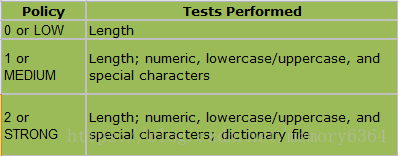
更改两个策略,1是允许弱密码,2是更改默认的密码长度
set global validate_password_policy=LOW;

set global validate_password_length=6; #最小值为4,设置小于4也会被重置为4
mysql> set global validate_password_policy=LOW;

Query OK, 0 rows affected (0.00 sec)

mysql> set global validate_password_length=6;

Query OK, 0 rows affected (0.00 sec)

mysql> SHOW VARIABLES LIKE 'validate_password%' #查看密码策略
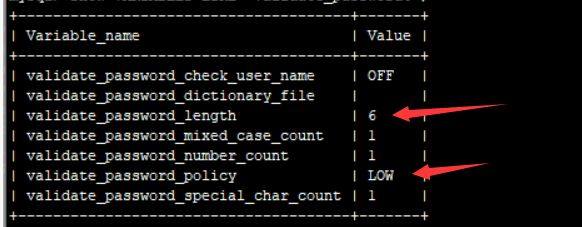
策略更改成功,继续修改密码
mysql> alter user 'root'@'localhost' identified by 'Root123456';

Query OK, 0 rows affected (0.00 sec)
如上,修改密码成功!
修改数据库字符集,默认latinl
mysql> SHOW VARIABLES LIKE 'character%'

默认服务器的字符器是 latin1 ,对中文不友好。修改 /etc/my.cnf 文件,添加字符集的设置
[root@VM_0_9_centos ~]# vim  /etc/my.cnf

[mysql]

default-character-set=utf8 # 添加部分

# For advice on how to change settings please see

# http://dev.mysql.com/doc/refman/5.7/en/server-configuration-defaults.html

[mysqld]

character_set_server=utf8 # 添加部分

#

# Remove leading # and set to the amount of RAM for the most important data

# cache in MySQL. Start at 70% of total RAM for dedicated server, else 10%.

# innodb_buffer_pool_size = 128M

#

# Remove leading # to turn on a very important data integrity option: logging

# changes to the binary log between backups.

# log_bin

#

# Remove leading # to set options mainly useful for reporting servers.

# The server defaults are faster for transactions and fast SELECTs.

# Adjust sizes as needed, experiment to find the optimal values.

# join_buffer_size = 128M

# sort_buffer_size = 2M

# read_rnd_buffer_size = 2M

datadir=/var/lib/mysql

socket=/var/lib/mysql/mysql.sock

# Disabling symbolic-links is recommended to prevent assorted security risks

symbolic-links=0

log-error=/var/log/mysqld.log

pid-file=/var/run/mysqld/mysqld.pid
修改完成后,重启mysql,
systemctl restart mysqld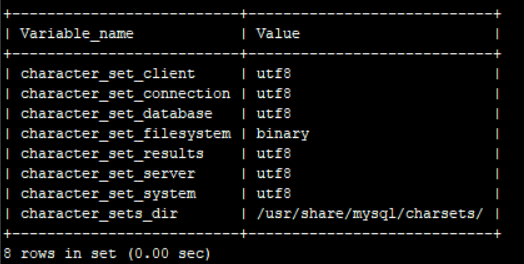
如上,更改成功!
需要开启远程访问(参考)
- 防火墙设置
#远程访问 MySQL, 需开放默认端口号 3306

firewall-cmd --permanent --zone=public --add-port=3306/tcp

firewall-cmd --permanent --zone=public --add-port=3306/udp

firewall-cmd --reload #使最新的防火墙设置规则生效
- 创建用户并授予权限
创建一个普通用户 sa ,密码是123456;给这个用户授予 SELECT,INSERT,UPDATE,DELETE 的远程访问的权限,这个账号一般用于提供给实施的系统访问
CREATE USER 'sa'@'%' IDENTIFIED BY '123456';

GRANT SELECT,INSERT,UPDATE,DELETE ON *.* TO 'sa'@'%';
创建一个管理员用户 admin 账号 ,密码是 123456 ;给这个用户授予所有的远程访问的权限。这个用户主要用于管理整个数据库、备份、还原等操作
CREATE USER 'admin'@'%' IDENTIFIED BY '123456';

GRANT ALL PRIVILEGES ON *.* TO 'admin'@'%';
- 设置用户 root 的访问权限
#可以在任意 IP 下被访问

grant all privileges on *.* to root@"%" identified by "密码";

#如果上述执行完并flush privileges还是不生效,可以换成以下方式

update user set host='%' where user='root'

#设置用户 root 可以在本地被访问

grant all privileges on *.* to root@"localhost" identified by "密码";
- 使授权立刻生效(以上授权操作最好都附加上该语句)
flush privileges;
常用命令
systemctl start mysqld  #启动mysqld

systemctl stop mysqld  #停止mysqld

systemctl restart mysqld  #重启mysqld

systemctl enable mysqld  #设置开机启动

systemctl status mysqld  #查看 MySQL Server 状态
参考
- https://blog.csdn.net/lihaiyong92/article/details/81330046 (安装部分)
- https://www.cnblogs.com/huangxinyuan650/p/6360464.html(安装部分)
- https://blog.csdn.net/qq_32786873/article/details/80664160 (密码设置)
- https://blog.csdn.net/hello_world_qwp/article/details/79551789 (密码策略)
- https://blog.csdn.net/memory6364/article/details/82426052 (密码策略)
window和linux(centos7)安装mysql5.7的更多相关文章
- linux centos7 安装mysql-5.7.17教程(图解)
1系统约定安装文件下载目录:/data/softwareMysql目录安装位置:/usr/local/mysql数据库保存位置:/data/mysql日志保存位置:/data/log/mysql 2下 ...
- Linux CentOS7 安装 Mysql5.7.19
第二次安装会安装失败 1.先停止mysql服务 service mysql stop 2.检查是否卸载干净 find / -name mysql 多用几个命令检查,不要删到其他组件的 ...
- Linux CentOS7安装Mysql5.7
一.下载mysql mkdir /home/install #创建install目录 在/home/install目录下下载mysql5.7 wget https://cdn.mysql.com//D ...
- Centos7 安装 MySQL5.7
Centos7 安装 MySQL5.7 一.环境介绍 1.安装包版本介绍 MySQL 有三种安装方式:RPM安装.二进制包安装.源码包安装.我们这篇文章以二进制方式安装MySQL 软件名称 版本 系统 ...
- 转:Linux 编译安装 Mysql5.7
http://broqiang.com/2017/04/18/Mysql-Install-5.7.18-Linux-Compile/ 原文 Linux 编译安装 Mysql5.7 Ubuntu 下快速 ...
- Linux下安装mysql5.6.11(找点有用的信息太费劲)(转)
Linux下安装mysql5.6.11(找点有用的信息太费劲) (2013-04-25 10:25:09) 1.申请阿里云Linux服务器 昨天在阿里云申请了一个免费试用5天的Linux云服务 ...
- Linux CentOS7 安装 Qt 5.9.2
Linux CentOS7 安装 Qt 5.9.2 参考链接 http://doc.qt.io/qt-5/linux.html sudo yum groupinstall "C Develo ...
- Linux下安装mysql5.7
Linux下安装mysql5.7 首先准备好mysql5.7.17的安装包,安装包放在 /data/software 目录下 进入到 /usr/local 目录下,解压mysql安装包 命令: ...
- LINUX CentOS7安装字体库
LINUX CentOS7安装字体库 2017年12月26日 17:06:07 q260996583 阅读数:4866更多 个人分类: linux JAVA画图时常用到Font 类对象 这样的对象 ...
随机推荐
- 用redlock实现redis的分布式锁
本文是一个demo,利用多进程,来模拟使用redis分布式锁的使用场景.本机需要安装redis,python3.7下运行代码.分布式锁用redlock这个包实现,实现步骤分三步: 实例化锁:rlock ...
- PHP 常用算法【总结】
一.声明数组 ini_set("max_execution_time", "12000"); $arr = [2,4,1,7,33,4,5,6,7,11,1,0 ...
- yum python mysql
lrwxrwxrwx root root Jun : pyspark -> /etc/alternatives/pyspark lrwxrwxrwx root root Jul : python ...
- ubuntu更换源
1.备份源 cd /etc/apt/ sudo cp sources.list sources.list.bak 2.更换阿里源 sudo vim /etc/apt/sources.list 中 ...
- 16/7/14-MySQL-修改mysql5.6以上版本root密码
版本更新,原来user里的password字段已经变更为authentication_string 版本更新 缘故,好多网上的教程都不适用了,甚至连官网的文档也不是能够顺利操作的. 如果 MySQL ...
- js 文件下载进度监控
var xhr = new XMLHttpRequest(); xhr.open('GET', '文件地址.mp4'); xhr.setRequestHeader("Content-type ...
- package和import语句_5
J2SDK中主要的包介绍 java.lang—包含一些Java语言的核心类,如String.Math.Integer.System和 Thread,提供常用功能. java.awt—包含了构成抽象 ...
- Zookeeper之启动常见错误及解决方法
Zookeeper启动后,有时候没有真正的启动,那我们如何查找错误呢,就可以查看zookeeper目录下面的zookeeper.out文件,就可以查看到错误了.zookeeper.out文件比较的重要 ...
- JVM中类加载器的父委托机制
类加载器 类加载器用来把类加载到Java虚拟机中. 类加载器的类型 有两种类型的类加载器: 1.JVM自带的加载器: 根类加载器(Bootstrap) 扩展类加载器(Extension) 系统类加载器 ...
- CAS无锁策略
并发编程时,对于共享资源的使用需要确保绝对的安全性.除了利用锁机制之外,还有一种无锁的概念.所谓无锁,就是假定在并发情况下,对于共享资源的访问没有冲突,线程可以一直不停的运行,无需阻塞,如果产生冲突, ...