
vue项目--vuex状态管理器
本文取之官网和其他文章结合自己的理解用简单化的语言表达。用于自己的笔记记录,也希望能帮到其他小伙伴理解,学习更多的前端知识。
Vuex 是什么?
Vuex 是一个专为 Vue.js 应用程序开发的状态管理模式。它采用集中式存储管理应用的所有组件的状态,并以相应的规则保证状态以一种可预测的方式发生变化。
官方文档: https://vuex.vuejs.org/zh/
简单的说,这个vuex可以用于存储数据的状态。例如:
我的个人信息是否完善的这个状态,可以存储在vuex中,在不同的页面可以读取、更改这个状态。这样就不用页面之间传参等方式。
当然也可以存储一些信息,例如数组、对象、字符串都可以,类似前端的数据库。如果只有这个特点的话,有的小伙伴会有疑问,那本地存储也可以做到的,现在我们就看一下vuex与本地存储的区别。
1.区别:vuex存储在内存,localstorage(本地存储)则以文件的方式存储在本地,永久保存;sessionstorage( 会话存储 ) ,临时保存。localStorage和sessionStorage只能存储字符串类型,对于复杂的对象可以使用ECMAScript提供的JSON对象的stringify和parse来处理
2.应用场景:vuex用于组件之间的传值,localstorage,sessionstorage则主要用于不同页面之间的传值。
3.永久性:当刷新页面(这里的刷新页面指的是 --> F5刷新,属于清除内存了)时vuex存储的值会丢失,sessionstorage页面关闭后就清除掉了,localstorage不会。
注:很多同学觉得用localstorage可以代替vuex, 对于不变的数据确实可以,但是当两个组件共用一个数据源(对象或数组)时,如果其中一个组件改变了该数据源,希望另一个组件响应该变化时,localstorage,sessionstorage无法做到,原因就是区别1
原始网址:https://blog.csdn.net/sinat_36729274/article/details/87433615
- vuex安装
安装命令行:npm install vuex --save

安装成功后,使用命令行:npm run dev 运行项目。接下来会在项目中使用vuex,首先,在src文件夹下新建一个名为store的文件夹,在store文件夹下新建index.js文件,index.js文件的内容分为:
import Vue from 'vue'  // 引入vue

import Vuex from 'vuex'  // 引入vuex

// 使用vuex

Vue.use(Vuex)

// 创建vuex实例

const store = new Vuex.Store({

})

export default store
然后在main.js文件中引入store文件夹下的index.js文件。main.js文件中内容如下:
import Vue from 'vue'

import App from './App'

import router from './router'

import store from './store'      // ------------ 引入store文件夹下面的index.js

Vue.config.productionTip = false

/* eslint-disable no-new */

new Vue({

  el: '#app',

  store,   //  -------------- 将store 添加到vue的实例中

  router,

  components: { App },

  template: '<App/>'

})
这样我们就在项目中引入vuex了,那怎么使用vuex呢?
vuex的核心概念是以下几个:
- State
- Getter
- Mutation
- Action
- Module
下面是具体来讲一下vuex核心概念的使用方法吧。
- State
Vuex 使用单一状态树——是的,用一个对象就包含了全部的应用层级状态。至此它便作为一个“唯一数据源 (SSOT)”而存在。这也意味着,每个应用将仅仅包含一个 store 实例。单一状态树让我们能够直接地定位任一特定的状态片段,在调试的过程中也能轻易地取得整个当前应用状态的快照。
以上是官网的说法,我的理解就是在state中声明变量,可以在全部页面都可以使用state中的变量。
现在,我们开始新建和使用state,在store文件夹下面新建state文件夹,state文件夹下面新建index.js文件,index.js文件内容如下:
const state = {

    name: 'weish',

    age: 22,

    todos: [

        { id: 1, text: '1111', done: true },

        { id: 2, text: '2222', done: false }

      ]

};

export default state;
然后将state引入到store中,所以在store文件夹下的index.js内容如下:
import Vue from 'vue'  // 引入vue

import Vuex from 'vuex'  // 引入vuex

import state from './state'   // ---------引入state

// 使用vuex

Vue.use(Vuex)

// 创建vuex实例

const store = new Vuex.Store({

    state   //     ---------将state添加到实例中

})

export default store
做完上面state中的声明与store中的引入,我们就可以在页面中使用state中的变量了。
HelloWorld.vue内容如下:
<template>

  <div class="hello">

    <h1>{{ msg }}</h1>

    <h2>state:方法一:{{this.$store.state.age}}</h2>

    <h2>state:方法二:{{age2}}</h2>

  </div>

</template>

<script>

export default {

  name: 'HelloWorld',

  data () {

    return {

      msg: 'Welcome to Your Vue.js App'

    }

  },

   computed:{

     age2(){

       return this.$store.state.age

     }

   }

}

</script>

<!-- Add "scoped" attribute to limit CSS to this component only -->

<style scoped>

</style>
使用辅助函数mapState时,HelloWorld.vue内容如下:
<template>

  <div class="hello">

    <h1>{{ msg }}</h1>

    <h2>state:方法一:{{this.$store.state.age}}</h2>

    <h2>state:方法二:{{age2}}</h2>

    <h2>state:方法三:{{age3}}</h2>

    <h2>state:方法四:{{age4}}</h2>

  </div>

</template>

<script>

// 辅助函数为 Vuex.mapState

import { mapState } from 'vuex'

export default {

  name: 'HelloWorld',

  data () {

    return {

      msg: 'Welcome to Your Vue.js App'

    }

  },

  computed: mapState({

    age2: 'age',    //方法2

    age3: (state) => state.age,  // 方法3

    age4:function () {

      return this.$store.state.age  // 普通函数的使用store的方式,方法4

    }

  })

  //没有使用mapState时,普通函数的写法

  // computed:{

  //   age5(){

  //     return this.$store.state.age   //方法5

  //   },

  //   ...mapState(['name','age'])    // 方法6

  // }

}

</script>

<!-- Add "scoped" attribute to limit CSS to this component only -->

<style scoped>

</style>
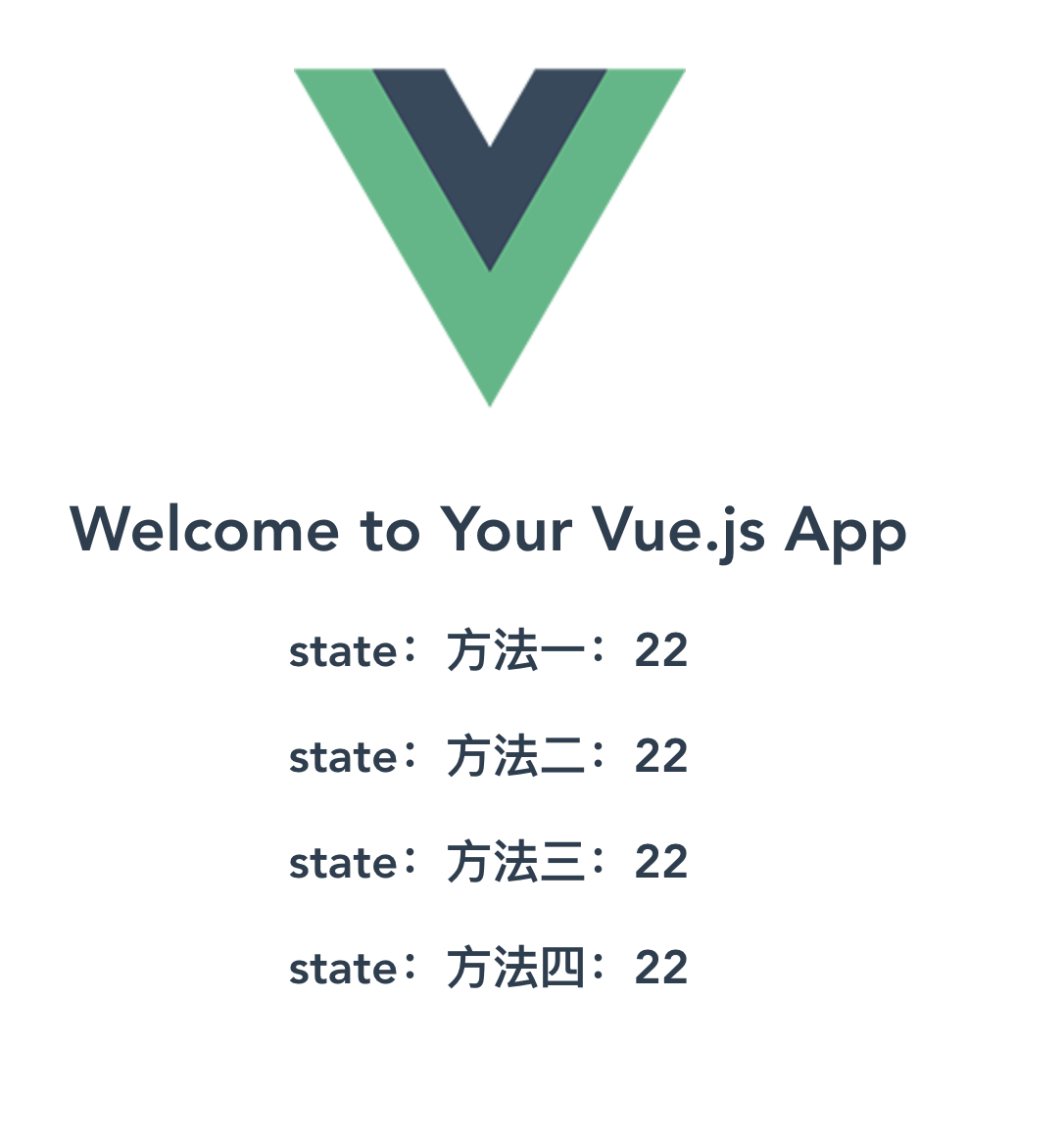
页面效果如下:
- Getter
有时候我们需要从 store 中的 state 中派生出一些状态,例如对列表进行过滤并计数:
computed: {

  doneTodosCount () {

    return this.$store.state.todos.filter(todo => todo.done).length

  }

}
如果有多个组件需要用到此属性,我们要么复制这个函数,或者抽取到一个共享函数然后在多处导入它——无论哪种方式都不是很理想。
Vuex 允许我们在 store 中定义“getter”(可以认为是 store 的计算属性)。就像计算属性一样,getter 的返回值会根据它的依赖被缓存起来,且只有当它的依赖值发生了改变才会被重新计算。
在store文件夹下新建getters文件夹,在getters文件夹下新建index.js,内容如下:
export const doneTodosCount = (state) => {

    return state.todos.filter(todo => todo.done).length;

}
在store文件夹下index.js中引入getters
import Vue from 'vue'  // 引入vue

import Vuex from 'vuex'  // 引入vuex

import state from './state'

import * as getters from './getters' // ---------引入

// 使用vuex

Vue.use(Vuex)

// 创建vuex实例

const store = new Vuex.Store({

    state,

    getters      // --------添加

})

export default store
可以通过属性访问:store.getters.doneTodosCount
<template>

  <div class="hello">

    <h1>{{ msg }}</h1>

    <h2>getters: {{Count}}</h2>

  </div>

</template>

<script>

export default {

  name: 'HelloWorld',

  data () {

    return {

      msg: 'Welcome to Your Vue.js App'

    }

  },

  computed:{

    Count() {

      return this.$store.getters.doneTodosCount   // -------1

    }

  }

}

</script>

<!-- Add "scoped" attribute to limit CSS to this component only -->

<style scoped>

</style>
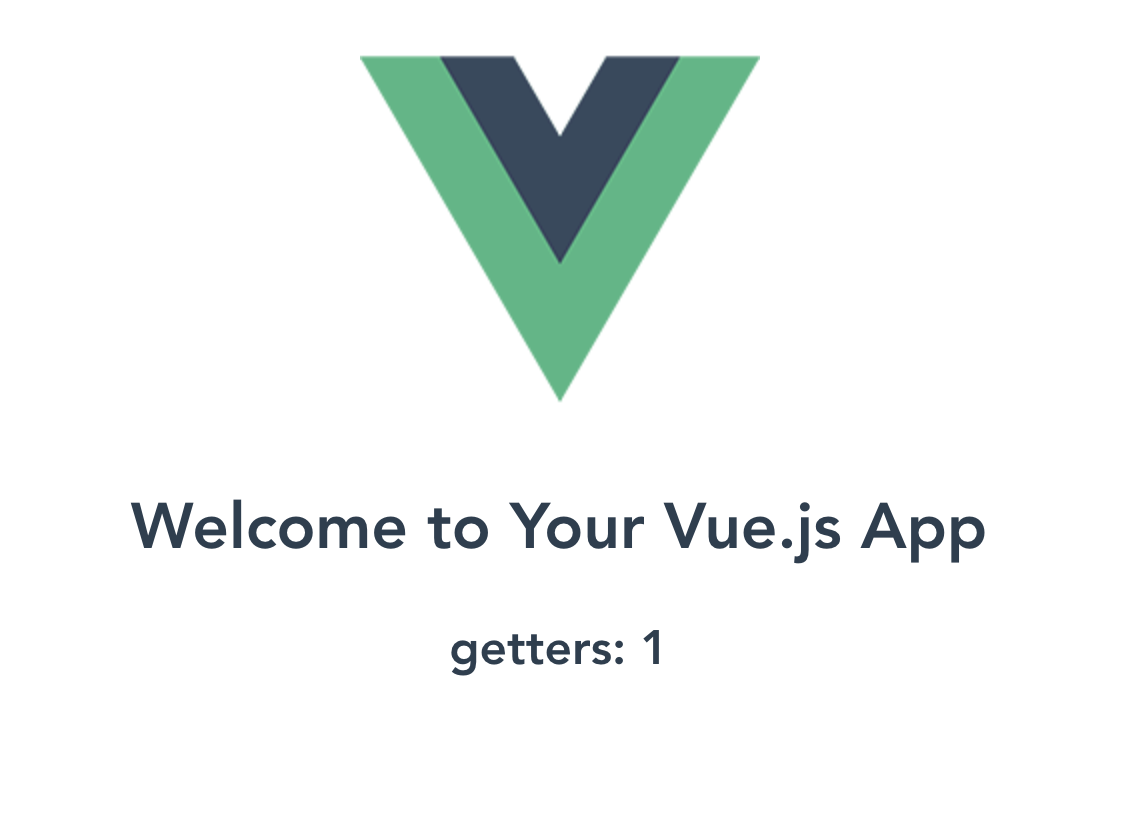
页面效果如下:
使用辅助函数mapGetters,内容如下:
<template>

  <div class="hello">

    <h1>{{ msg }}</h1>

    <h2>getters: {{Count}}</h2>

    <h2>getters:mapGetters {{doneTodosCount}}</h2>     // -----------页面中{{doneTodoCount}}

  </div>

</template>

<script>

// 在单独构建的版本中辅助函数为 Vuex.mapState 和mapGetter

import { mapState,mapGetters } from 'vuex'      // -----引入mapGetters

export default {

  name: 'HelloWorld',

  data () {

    return {

      msg: 'Welcome to Your Vue.js App'

    }

  },

  computed:{

    age(){

      return this.$store.state.age

    },

    ...mapState(['name','age','todos']),

    ...mapGetters(['doneTodosCount']),   //-----------在computed使用mapGetter

    Count() {

      return this.$store.getters.doneTodosCount

    }

  }

}

</script>

<!-- Add "scoped" attribute to limit CSS to this component only -->

<style scoped>

</style>
- Mutation
更改 Vuex 的 store 中的状态的唯一方法是提交 mutation。mutations必须是同步函数。
在store文件夹下新增mutations文件夹,在mutations文件夹下新增index.js,内容如下:
export const CACHE_AGE = (state, param) => {  // 当提交格式是简单数据格式,例如:123,'123'

    state.age += param;

}

export const newName = (state,payload) => {  // 当提交格式是对象格式

  state.name = payload.newName

}
在store文件夹下index.js中引入mutations
import Vue from 'vue'  // 引入vue

import Vuex from 'vuex'  // 引入vuex

import state from './state'

import * as getters from './getters'

import * as mutations from './mutations'   // -----------引入mutations

// 使用vuex

Vue.use(Vuex)

// 创建vuex实例

const store = new Vuex.Store({

    state,

    getters,

    mutations      //    ---------添加到实例

})

export default store
在页面中使用mutations修改state中age
<template>

  <div class="hello">

    <h1>{{ msg }}</h1>

    <h2>state:方法一:{{this.$store.state.age}}</h2>

    <h2>getters: {{Count}}</h2>

    <h2>getters:mapGetters {{doneTodosCount}}</h2>

    <div><button @click="plus()">点我age加2</button></div>

   <h2>{{name}}</h2>

   <div><button @click="changeName()">点我name修改为Alise</button></div>

  </div>

</template>

<script>

// 在单独构建的版本中辅助函数为 Vuex.mapState

import { mapState,mapGetters } from 'vuex'

export default {

  name: 'HelloWorld',

  data () {

    return {

      msg: 'Welcome to Your Vue.js App'

    }

  },

  computed:{

    age(){

      return this.$store.state.age

    },

    ...mapState(['name','age','todos']),

    ...mapGetters(['doneTodosCount']),

    Count() {

      return this.$store.getters.doneTodosCount

    }

  },

  methods:{

    plus(){

      this.$store.commit('CACHE_AGE', 2)

    },

  changeName(){

    // this.$store.commit({type:'newName',newName:'Alise'})   //--------------对象风格提交格式   方法一

    this.$store.commit('newName',{newName:'Alise'})    // -------------对象风格提交格式  方法二

  }

  }

}

</script>
- 使用常量替代Mutation事件类型
把这些常量放在单独的文件中可以让你的代码合作者对整个 app 包含的 mutation 一目了然。用不用常量取决于你——在需要多人协作的大型项目中,这会很有帮助。但如果你不喜欢,你完全可以不这样做。
在mutations文件夹下面新建mutation-types.js,内容如下:
export const CACHE_NAME_TYPE = 'CACHE_NAME_TYPE'
mutations文件夹下index.js,内容如下:
import { CACHE_NAME_TYPE } from './mutation-types'

const mutations = {

    [CACHE_NAME_TYPE](state,payload){

        state.name = payload.newName

    }

}

export default mutations

// ps:如果mutation部分写成这种格式,那么在store文件夹下的index.js中引入mutations的方式需要修改写成

// import mutations from './mutations'

// 而不是 import * as mutations from './mutations'
在页面中使用mapMutations辅助函数:
<template>

  <div class="hello">

    <h1>{{ msg }}</h1

    <h2>state:name:{{name}}</h2>

    <div><button @click="changeName()">点我store的名字变成alise</button></div>

    <div><button @click="changeName1()">点我store的名字变成Mark</button></div>

  </div>

</template>

<script>

// 在单独构建的版本中辅助函数为 Vuex.mapState

import { mapState,mapGetters,mapMutations } from 'vuex'    //  ------引入mapMutation

export default {

  name: 'HelloWorld',

  data () {

    return {

      msg: 'Welcome to Your Vue.js App'

    }

  },

computed:{

    ...mapState(['name','age','todos']),

    ...mapGetters(['doneTodosCount'])

  },

methods:{

    ...mapMutations(['CACHE_NAME']),          //    -------------在methods中映射,将this.CACHE_NAME()映射为this.$store.commit('CACHE_NAME')

    changeName(){

       this.$store.commit('newName',{newName:'Alise'})

  },

   changeName1(){

     this.CACHE_NAME({newName:'MARK'})    // -------使用

   }

  }

}

</script>
- Action
action类似mutation,不同之处在于:
- action提交的mutation,而不是直接改变的状态
- action可以包含任一异步操作
在store文件夹下新建actions文件夹,actions文件夹下新建index.js,内容如下:
export const setName = ({ commit }, param) => {

    commit('CACHE_NAME', param)

}
在store文件夹下的index.js中引入actions
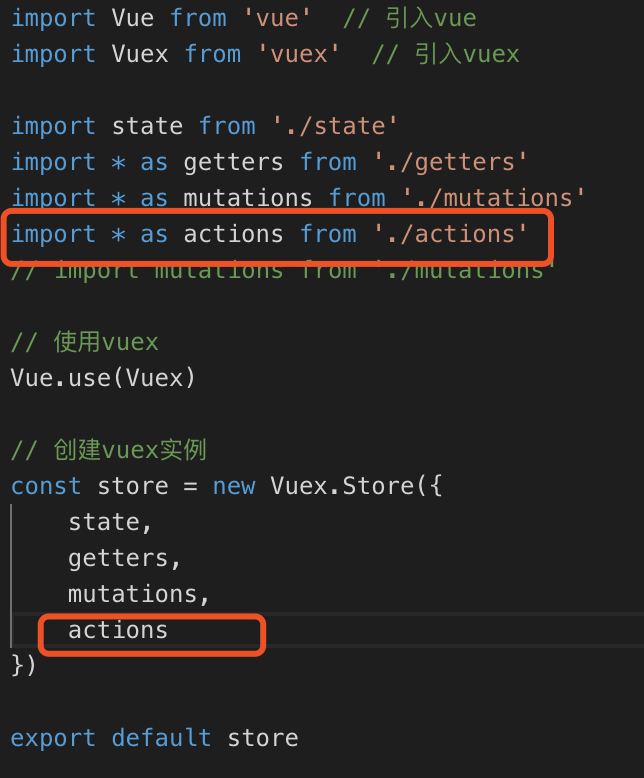
就可以在页面中使用actions了,在页面中调用actions的方法是:this.$store.dispatch('setName',{newName:'Tom'}),具体代码如下:
<template>

  <div class="hello">

    <h1>{{ msg }}</h1

    <h2>state:name:{{name}}</h2>

    <div><button @click="changeName()">点我store的名字变成alise</button></div>

    <div><button @click="changeName1()">点我store的名字变成Mark</button></div>

   <div><button @click="changeName2()">点我store的名字通过actions方式变成Tom</button></div>

  </div>

</template>

<script>

import { mapState,mapGetters,mapMutations } from 'vuex'

export default {

  name: 'HelloWorld',

  data () {

    return {

      msg: 'Welcome to Your Vue.js App'

    }

  },

computed:{

    ...mapState(['name','age','todos']),

    ...mapGetters(['doneTodosCount'])

  },

methods:{

    ...mapMutations(['CACHE_NAME']),

    changeName(){

       this.$store.commit('newName',{newName:'Alise'})

  },

   changeName1(){

     this.CACHE_NAME({newName:'MARK'})

   },

    changeName2(){

     this.$store.dispatch('setName',{newName:'Tom'})

   }

  }

}

</script>
使用mapActions辅助函数:
<template>

  <div class="hello">

    <h1>{{ msg }}</h1

    <h2>state:name:{{name}}</h2>

    <div><button @click="changeName()">点我store的名字变成alise</button></div>

    <div><button @click="changeName1()">点我store的名字变成Mark</button></div>

   <div><button @click="changeName2()">点我store的名字通过actions方式变成Tom</button></div>

  </div>

</template>

<script>

import { mapState,mapGetters,mapMutations,mapActions } from 'vuex'    // ------------添加mapActions

export default {

  name: 'HelloWorld',

  data () {

    return {

      msg: 'Welcome to Your Vue.js App'

    }

  },

computed:{

    ...mapState(['name','age','todos']),

    ...mapGetters(['doneTodosCount'])

  },

methods:{

    ...mapMutations(['CACHE_NAME']),

    ...mapActions(['setName']),                // 修改二:在methods中添加...mapActions

    changeName(){

       this.$store.commit('newName',{newName:'Alise'})

  },

   changeName1(){

     this.CACHE_NAME({newName:'MARK'})

   },

    changeName2(){

     // this.$store.dispatch('setName',{newName:'Tom'})

     this.setName({newName:'Tom1111'})            //  修改三:使用this.setName提交修改mutation

   }

  }

}

</script>
actions中通常是异步操作,可以组合使用action,以处理更复杂的流程。可查看官网例子组合action,官网地址:https://vuex.vuejs.org/zh/guide/actions.html
- Modules
由于使用单一状态树,应用的所有状态会集中到一个比较大的对象。当应用变得非常复杂时,store 对象就有可能变得相当臃肿。
为了解决以上问题,Vuex 允许我们将 store 分割成模块(module)。每个模块拥有自己的 state、mutation、action、getter、甚至是嵌套子模块——从上至下进行同样方式的分割。官方地址:https://vuex.vuejs.org/zh/guide/modules.html。
在store文件夹下,新建modules文件夹,在modules文件夹下面新建moduleA.js文件,内容如下:
const moduleA = {

    state: { count: 0 },

    mutations: {

      increment (state,num) {

        // 这里的 `state` 对象是模块的局部状态

        state.count += num

      }

    },

    getters: {

        sumWithRootCount (state, getters, rootState) {

            return state.count + rootState.age

        }

    },

    actions:{

        incrementIfOddOnRootSum ({ state, commit, rootState },param) {

            console.log(state,rootState,param)  // state :局部state传入值,如:{count:0},rootState:根元素state传入值,param:外部传入参

              commit('increment',param.num)

        }

    }

  }

export default moduleA
在store文件夹下index.js文件中,引入moduleA.js,内容如下:
import Vue from 'vue'  // 引入vue

import Vuex from 'vuex'  // 引入vuex

import state from './state'

import * as getters from './getters'

import * as mutations from './mutations'

import * as actions from './actions'

// import mutations from './mutations'

// moudules

import mouduleA from './modules/moduleA'     // --------引入moduleA

// 使用vuex

Vue.use(Vuex)

// 创建vuex实例

const store = new Vuex.Store({

    state,

    getters,

    mutations,

    actions,

    modules:{

        a:mouduleA             //  -----------实例化

    }

})

export default store
在页面中使用moduleA,helloword.vue内容如下:
<template>

  <div class="hello">

    <h1>{{ msg }}</h1>

    <h2>mouduleA--count:{{a.count}}</h2>        // 使用mapState在页面中显示,也可直接写 this.$store.state.a.count

    <h2>moduleA--sumWithRootCount:{{sumWithRootCount}}</h2>   // 使用mapGetters

    <div><button @click="changeCount()">点我ModuleA的Count+某个数</button></div>

  </div>

</template>

<script>

// 在单独构建的版本中辅助函数为 Vuex.mapState

import { mapState,mapGetters,mapMutations,mapActions } from 'vuex'     // -------引入mapState,mapGetters,mapMutations,mapActions

export default {

  name: 'HelloWorld',

  data () {

    return {

      msg: 'Welcome to Your Vue.js App'

    }

  },

  computed:{

    ...mapState(['a']),                 // 在computed中 --------------使用mapState

    ...mapGetters(['sumWithRootCount']),    // computed中-----------使用mapGetters

    Count() {

      return this.$store.getters.doneTodosCount

    }

  },

  methods:{

    ...mapMutations(['increment']),       //  在methods中-----------使用mapMutations

    ...mapActions(['incrementIfOddOnRootSum']),   // 在methods中---------使用mapActions

   changeCount(){

    //  this.$store.commit('increment',11)       // ------------一般方法 mutation 修改moduleA中state中的值

    //  this.$store.dispatch('incrementIfOddOnRootSum',{num:12})   // --------------一般方法 action 提交mutation

    // this.increment(12)   // ----------使用mapMutations  修改moduleA中state的值

    this.incrementIfOddOnRootSum({num:10})         // ------------使用mapActions    提交mutations

   }

  }

}

</script>

<!-- Add "scoped" attribute to limit CSS to this component only -->

<style scoped>

</style>
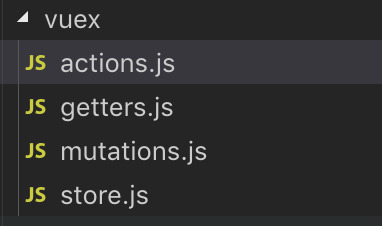
- store文件夹目录
store文件夹下,经过上述的关于核心概念的介绍,新建了actions、getters、state、mutations和modules五个文件夹,除modules文件夹下面是moduleA.js之外,其他下面都是index.js文件。第一图是store文件夹下的目录,中图是展开后,当然也可以根据自己的习惯管理文件。例如第三图。


ok,上述代码均经过本人测试,如果有问题,欢迎留言。
vue项目--vuex状态管理器的更多相关文章
- VueX状态管理器 的应用
VueX状态管理器 cnpm i vuex axios -S 1 创建Vuex 仓库 import Vue from 'vue' import Vuex from 'vuex' vue.use(Vue ...
- 前端Vue框架-vuex状态管理详解
新人报道!多多关照-多提宝贵意见 谢谢- vuex理解 采用集中式存储管理模式.用来管理组件的状态,并以自定义规则去观测实时监听值得变化. 状态模式管理理解 属性 理解 state 驱动应用的数据源 ...
- Vue中的状态管理器 - Vuex
我们知道vue是组件式开发的,当你的项目越来越大后,每个组件背后的数据也会变得越来越难以理顺, 这个时候你就可以考虑使用vuex了. 备注: 官方建议小项目不要使用,引入vuex会带来新的概念和模式, ...
- 应用四:Vue之VUEX状态管理
(注:本文适用于有一定Vue基础或开发经验的读者,文章就知识点的讲解不一定全面,但却是开发过程中很实用的) 概念:Vuex 是一个专为 Vue.js 应用程序开发的状态管理模式.它采用集中式存储管理应 ...
- 前端MVC Vue2学习总结(八)——Vue Router路由、Vuex状态管理、Element-UI
一.Vue Router路由 二.Vuex状态管理 三.Element-UI Element-UI是饿了么前端团队推出的一款基于Vue.js 2.0 的桌面端UI框架,手机端有对应框架是 Mint U ...
- vue状态管理器(用户登录简单应用)
技术点:通过vue状态管理器,对已经登录的用户显示不同的页面: 一 vue之状态管理器应用 主要用来存储cookie信息 与vue-cookies一起使用 安装:npm install vue-co ...
- vue第十八单元(单向数据流 vuex状态管理)
第十八单元(单向数据流 vuex状态管理) #课程目标 1.理解什么是数据管理模式 2.什么是vuex 3.什么时候使用vuex 4.vuex安装及工作原理 5.vuex语法 #知识点 1.首先来看下 ...
- vue 通信:父子通信、兄弟通信、跨多层通信、vuex状态管理
之前简单做了一次vue通信方法的培训,在此记录一下培训的内容. 关于vue通信,大家最先想到的方法应该是props.ref.$emit.$parent,还有vuex,因为这也是我在项目中最常用到的方法 ...
- vuex状态管理,state,getters,mutations,actons的简单使用(一)
之前的文章中讲过,组件之间的通讯我们可以用$children.$parent.$refs.props.data... 但问题来了,假如项目特别大,组件之间的通讯可能会变得十分复杂... 这个时候了我们 ...
随机推荐
- 【学习】windows 下PostgreSQL导入sql文件
在软件的安装目录的bin文件下打开命令行工具 输入: psql -d 数据库名称 -h 数据库地址 -p 5432 -U postgres -f sql文件(E:\Config\SQL\iS ...
- 剑指offer32----之字形打印一颗二叉树
题目 请实现一个函数按照之字形打印二叉树,即第一行按照从左到右的顺序打印,第二层按照从右至左的顺序打印,第三行按照从左到右的顺序打印,其他行以此类推. 思路 在这里我们如果单纯的使用队列去弄的话,会很 ...
- 数据库 mysql 操作
安装好xammp,打开阿帕奇和数据库服务: 点击右侧 shell 按钮,进入命令行: 首先,利用超级管理员权限进入数据库: mysql -uroot -p enter,再enter 把下述代码复制进命 ...
- leetcode-easy-listnode-21 merge two sorted lists
mycode 一定要记得创建两个头哦,一个找路,一个找家 # Definition for singly-linked list. # class ListNode(object): # def __ ...
- redis详解及应用(雪崩、击穿、穿透)
一. redis的简介与安装 引用:https://www.cnblogs.com/ysocean/tag/Redis%E8%AF%A6%E8%A7%A3/ 二. redis的配置文件介绍 引用:ht ...
- 【工具】rinetd 使用教程(linux 下的端口转发工具 )
日期:2019-07-30 20:00:36 更新: 作者:Bay0net 介绍:使用 rinetd 来转发某端口的流量. 0x01. 安装 官网 RINETD 安装方法很简单,一条语句就 OK 了. ...
- Python 解决八皇后问题
问题介绍 八皇后问题是一个以国际象棋为背景的问题:如何能够在 \(8\times8\) 的国际象棋棋盘上放置八个皇后,使得任何一个皇后都无法直接吃掉其他的皇后?为了达到此目的,任两个皇后都不能处于同一 ...
- Docker 资源汇总
Docker 资源汇总 Docker官方英文资源 Docker官网:http://www.docker.com Docker Windows 入门:https://docs.docker.com/do ...
- 意想不到的JavaScript(每日一题1)
问题: 答案: 解析:
- centos v7.0配置sftp
需求: 1.建立三个sftp帐号,admin,test1,test22.三个帐号分别在/home/sftp下拥有相应的目录3.test1和test2只能进入自己的目录,admin可以进入三个目录(ch ...