
SpringBoot+Thymeleaf+iView
SpringBoot+Thymeleaf参考:
https://www.cnblogs.com/kibana/p/10236187.html
1、Controller:
package cn.mmweikt.es.controller;

import org.springframework.stereotype.Controller;

import org.springframework.ui.Model;

import org.springframework.web.bind.annotation.GetMapping;

import org.springframework.web.bind.annotation.ResponseBody;

@Controller

public class IndexController {

    @GetMapping("/index")

    public String indexPage(Model model) {

        model.addAttribute("name", "es_project.");

        return "index";

    }

    @GetMapping("/vueResource")

    @ResponseBody

    public String vueResource() {

        return "Hello vue-resource.";

    }

}
2、index.html:
<!DOCTYPE html>

<html lang="en" xmlns:th="http://www.thymeleaf.org">

<head>

    <meta charset="UTF-8">

    <title>Title</title>

    <!-- import stylesheet -->

    <link rel="stylesheet" type="text/css" th:href="@{http://unpkg.com/iview/dist/styles/iview.css}">

    <!-- import Vue.js -->

    <script type="text/javascript" th:src="@{http://vuejs.org/js/vue.min.js}"></script>

    <!-- import iView -->

    <script type="text/javascript" th:src="@{http://unpkg.com/iview/dist/iview.min.js}"></script>

    <!-- import vue-resource -->

    <script th:src="@{https://cdn.jsdelivr.net/npm/vue-resource@1.5.1}"></script>

</head>

<body>

    <div>

        <span th:text="${name}"></span>

    </div>

    <div id="app">

        <i-button @click="show">Click me!</i-button>

        <Modal v-model="visible" title="Welcome">{{text}}</Modal>

    </div>

    <script>

        new Vue({

            el: '#app',

            data: {

                visible: false,

                text: "Welcome to iView!"

            },

            methods: {

                show: function () {

                    this.visible = true;

                    this.$http.get('/vueResource').then(function (response) {

                        this.text = response.bodyText;

                    });

                }

            }

        })

    </script>

</body>

</html>
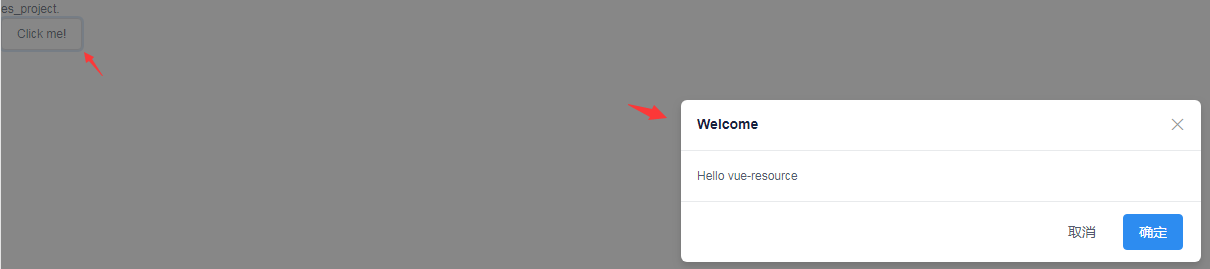
3、效果:
SpringBoot+Thymeleaf+iView的更多相关文章
- org.springframework.expression.spel.SpelEvaluationException: EL1004E: Method call: Method service() cannot be found on com.my.blog.springboot.thymeleaf.util.MethodTest type
前言 本文中提到的解决方案,源码地址在:springboot-thymeleaf,希望可以帮你解决问题. 至于为什么已经写了一篇文章thymeleaf模板引擎调用java类中的方法,又多此一举的单独整 ...
- springboot+thymeleaf+pageHelper带条件分页查询
html层 <div> <a class="num"><b th:text="'共 '+ ${result.resultMap['pages ...
- springboot+thymeleaf简单使用
关于springboot想必很多人都在使用,由于公司项目一直使用的是SpringMVC,所以自己抽空体验了一下springboot的简单使用. 环境搭建 springbooot的环境搭建可以说很灵活, ...
- SpringBoot thymeleaf使用方法,thymeleaf模板迭代
SpringBoot thymeleaf使用方法,thymeleaf模板迭代 SpringBoot thymeleaf 循环List.Map ============================= ...
- SpringBoot thymeleaf模板页面没提示,SpringBoot thymeleaf模板插件安装
SpringBoot thymeleaf模板插件安装 SpringBoot thymeleaf模板Html页面没提示 SpringBoot thymeleaf模板页面没提示 SpringBoot t ...
- SpringBoot thymeleaf模板版本,thymeleaf模板更换版本
SpringBoot thymeleaf模板版本 thymeleaf模板更换版本 修改thymeleaf模板版本 ================================ ©Copyright ...
- Springboot+Thymeleaf框架的button错误
---恢复内容开始--- 在做公司项目时,遇到了一个Springboot+Thymeleaf框架问题: 使用框架写网站时,没有标明type类型的button默认成了‘submit’类型,每次点击按钮都 ...
- layui表格数据渲染SpringBoot+Thymeleaf返回的数据时报错(Caused by: org.attoparser.ParseException: Could not parse as expression: ")
layui table渲染数据时报错(Caused by: org.attoparser.ParseException: Could not parse as expression: ") ...
- 不要再学 JSP 了,学 SpringBoot + Thymeleaf + Vue吧
老读者就请肆无忌惮地点赞吧,微信搜索[沉默王二]关注这个在九朝古都洛阳苟且偷生的程序员.本文 GitHub github.com/itwanger 已收录,里面还有我精心为你准备的一线大厂面试题. 读 ...
随机推荐
- 重定向和转向的写法,重定向以post方式提交
重转向保留跳转过来的Referer,路径不会变1 request.getRequestDispatcher("/eventweb/index.sp?loginId=" + logi ...
- scrapy错误-[scrapy.core.scraper] ERROR: Spider error processing
一.问题,就是我的callback没得回调函数 二:然后我查看源代码,发现: 三.我把解析页数的函数名设置为,def parse(self,response): 就没保错了 能运行成功 总结:在sp ...
- SpringBoot-技术专区-异步编程
最近在实现一个聚合搜索的需求时,由于需要从五个索引中查询数据,然后再将搜索结果组合返回给前端app展现,显然这个地方不能再用同步的方式来操作了,如果有一个索引查询出现耗时较长,那么其余的请求都会排同步 ...
- tomcat在cmd中部署到系统服务
基本步骤: 1.首先把整个tomcat拷贝到安装路径 2.打开cmd,设置JAVA_HOME,设置的值是对应cmd的局部变量 set JAVA_HOME=E:\tmp\2016\bghc\jdk1.7 ...
- 【问题解决方案】git/github本地和远程仓库的重命名
参考: CSDN博文:在Github上重命名仓库 背景: 偶然终于看到一条规范里写着: "通常(注意是通常,尤其是 Web 相关的项目) repo 的命名用小写英文,多个字母之间用连字符(比 ...
- 2019-11-7-WPF-How-to-get-plain-text-from-RichTextBox
title author date CreateTime categories WPF How to get plain text from RichTextBox lindexi 2019-11-0 ...
- tomcat manager详解
Tomcat Manager是Tomcat自带的.用于对Tomcat自身以及部署在Tomcat上的应用进行管理的web应用.Tomcat是Java领域使用最广泛的服务器之一,因此Tomcat Mana ...
- Retrofit总结(原)
1.Retrofit的作用 A type-safe HTTP client for Android and Java 看到这句话时候在想什么是类型安全? 百度一下:类型安全代码指访问被授权可以访问的内 ...
- Python 获取当前文件所在路径
记录几个os获取路径的函数 1. os.path.realpath(__file__):获取文件的绝对路径,包括文件自己的名字 2.os.path.dirname(path):获取path路径的上级路 ...
- 数据结构---Java---HashMap---JDK1.7
源码解读 public class HashMap<K,V> extends AbstractMap<K,V> implements Map<K,V>, Clone ...