
SpringBoot+Thymeleaf+iView
SpringBoot+Thymeleaf参考:
https://www.cnblogs.com/kibana/p/10236187.html
1、Controller:
package cn.mmweikt.es.controller;

import org.springframework.stereotype.Controller;

import org.springframework.ui.Model;

import org.springframework.web.bind.annotation.GetMapping;

import org.springframework.web.bind.annotation.ResponseBody;

@Controller

public class IndexController {

    @GetMapping("/index")

    public String indexPage(Model model) {

        model.addAttribute("name", "es_project.");

        return "index";

    }

    @GetMapping("/vueResource")

    @ResponseBody

    public String vueResource() {

        return "Hello vue-resource.";

    }

}
2、index.html:
<!DOCTYPE html>

<html lang="en" xmlns:th="http://www.thymeleaf.org">

<head>

    <meta charset="UTF-8">

    <title>Title</title>

    <!-- import stylesheet -->

    <link rel="stylesheet" type="text/css" th:href="@{http://unpkg.com/iview/dist/styles/iview.css}">

    <!-- import Vue.js -->

    <script type="text/javascript" th:src="@{http://vuejs.org/js/vue.min.js}"></script>

    <!-- import iView -->

    <script type="text/javascript" th:src="@{http://unpkg.com/iview/dist/iview.min.js}"></script>

    <!-- import vue-resource -->

    <script th:src="@{https://cdn.jsdelivr.net/npm/vue-resource@1.5.1}"></script>

</head>

<body>

    <div>

        <span th:text="${name}"></span>

    </div>

    <div id="app">

        <i-button @click="show">Click me!</i-button>

        <Modal v-model="visible" title="Welcome">{{text}}</Modal>

    </div>

    <script>

        new Vue({

            el: '#app',

            data: {

                visible: false,

                text: "Welcome to iView!"

            },

            methods: {

                show: function () {

                    this.visible = true;

                    this.$http.get('/vueResource').then(function (response) {

                        this.text = response.bodyText;

                    });

                }

            }

        })

    </script>

</body>

</html>
3、效果:
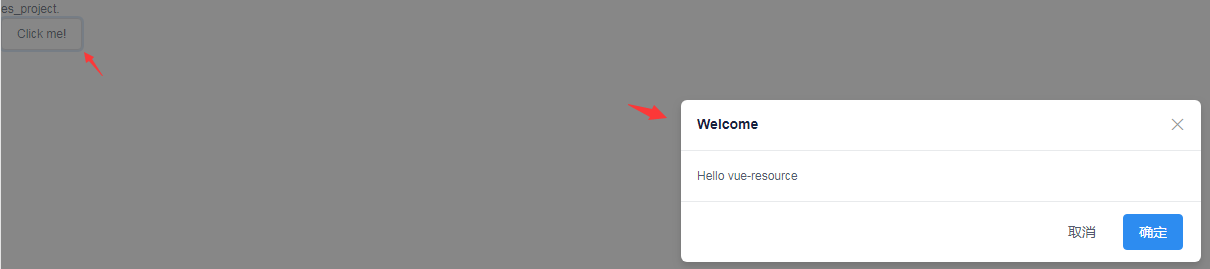
SpringBoot+Thymeleaf+iView的更多相关文章
- org.springframework.expression.spel.SpelEvaluationException: EL1004E: Method call: Method service() cannot be found on com.my.blog.springboot.thymeleaf.util.MethodTest type
前言 本文中提到的解决方案,源码地址在:springboot-thymeleaf,希望可以帮你解决问题. 至于为什么已经写了一篇文章thymeleaf模板引擎调用java类中的方法,又多此一举的单独整 ...
- springboot+thymeleaf+pageHelper带条件分页查询
html层 <div> <a class="num"><b th:text="'共 '+ ${result.resultMap['pages ...
- springboot+thymeleaf简单使用
关于springboot想必很多人都在使用,由于公司项目一直使用的是SpringMVC,所以自己抽空体验了一下springboot的简单使用. 环境搭建 springbooot的环境搭建可以说很灵活, ...
- SpringBoot thymeleaf使用方法,thymeleaf模板迭代
SpringBoot thymeleaf使用方法,thymeleaf模板迭代 SpringBoot thymeleaf 循环List.Map ============================= ...
- SpringBoot thymeleaf模板页面没提示,SpringBoot thymeleaf模板插件安装
SpringBoot thymeleaf模板插件安装 SpringBoot thymeleaf模板Html页面没提示 SpringBoot thymeleaf模板页面没提示 SpringBoot t ...
- SpringBoot thymeleaf模板版本,thymeleaf模板更换版本
SpringBoot thymeleaf模板版本 thymeleaf模板更换版本 修改thymeleaf模板版本 ================================ ©Copyright ...
- Springboot+Thymeleaf框架的button错误
---恢复内容开始--- 在做公司项目时,遇到了一个Springboot+Thymeleaf框架问题: 使用框架写网站时,没有标明type类型的button默认成了‘submit’类型,每次点击按钮都 ...
- layui表格数据渲染SpringBoot+Thymeleaf返回的数据时报错(Caused by: org.attoparser.ParseException: Could not parse as expression: ")
layui table渲染数据时报错(Caused by: org.attoparser.ParseException: Could not parse as expression: ") ...
- 不要再学 JSP 了,学 SpringBoot + Thymeleaf + Vue吧
老读者就请肆无忌惮地点赞吧,微信搜索[沉默王二]关注这个在九朝古都洛阳苟且偷生的程序员.本文 GitHub github.com/itwanger 已收录,里面还有我精心为你准备的一线大厂面试题. 读 ...
随机推荐
- leetcode.排序.75颜色分类-Java
1. 具体题目 给定一个包含红色.白色和蓝色,一共 n 个元素的数组,原地对它们进行排序,使得相同颜色的元素相邻,并按照红色.白色.蓝色顺序排列.此题中,我们使用整数 0. 1 和 2 分别表示红色. ...
- mac 支持rz sz
安装 lrzsz brew install lrzsz 配置 iTerm2 安装完成后我们需要在 iTerm2 中使用的话,还需要一些配置 进入到 /usr/local/bin 目录下,下载两个脚本文 ...
- 不要62(数位dp)
题目传送门 不要62 Time Limit: 1000/1000 MS (Java/Others) Memory Limit: 32768/32768 K (Java/Others)Total ...
- 微软宣布加入 OpenJDK 项目
近日,微软的 Bruno Borges 在 OpenJDK 邮件列表中发布了一条消息,内容包含接下来发生的事情以及微软如何开始将其团队整合到 OpenJDK 社区.在邮件中,Bruno Borges ...
- 源码包安装Mysql
特殊原因我需要装在个人用户下 libtool-2.4.2.tar.xz mysql-5.1.37.tar.gz 1.解压libtool-2.4.2.tar.xz tar -xvf libtoo ...
- python时间日期处理
一.模块介绍: 1.time模块接近操作系统,模块中的大多数函数是调用了所在平台C library的同名函数,部分函数式平台相关的:基于Unix Timestamp,能表述的日期范围被限定在 1970 ...
- Codeforces 360C DP 计算贡献
题意:给你一个长度为n的字符串,定义两个字符串的相关度为两个串对应的子串中第一个串字典序大于第二个串的个数.现在给你相关度,和第二个串,问满足条件的第一个串有多少个? 思路:设dp[i][j]为填了前 ...
- Jmeter接口压力测试(先登录再测接口)
Jmeter测试接口(包括登陆操作) 1. 创建HTTP Request先登录 参考: http://blog.csdn.net/ab_2016/article/details/782496 ...
- OpenCV常用基本处理函数(2)图像基本操作
可以根据像素的行和列的坐标获取他的像素值.对 BGR 图像而言,返回值为 B,G,R 例如获取蓝色的像素值: img=cv2.imread('messi5.jpg')px=img[100,100]bl ...
- FTPClient TLS 与 FTP 进行数据传输异常:Remote host closed connection during handshake
环境:java JDK 1.8.org.apache.commons-net-3.6.jar.端口已放开 FTPClient ftpClient = new FTPClient(protocol, f ...