
PIXI兼容微信小游戏
首先导入官方的weapp-adapter,然后导入pixi.min.js,微信小程序使用ES6的module引用模块,具体参见ES6的Module。
import './libs/weapp-adapter';

import * as PIXI from './libs/pixi.min';

const { pixelRatio, windowWidth, windowHeight } = wx.getSystemInfoSync()

let game = new PIXI.Application({

width:windowWidth*pixelRatio,

height:windowHeight*pixelRatio,

view:canvas

});

let graphics = new PIXI.Graphics();

graphics.beginFill(0xfff000);

graphics.lineStyle(0, 0xffffff, 1);

graphics.drawRect(80,80,100,100);

graphics.endFill();

game.stage.addChild(graphics);

let clktext = new PIXI.Text("Click Me!",{fill:"#ffffff",fontSize:32});

clktext.interactive = true;

let times = 0;

clktext.on("pointerdown",()=>{

  clktext.text = `times${++times}`;

});

clktext.x = 200;

clktext.y = 300;

game.stage.addChild(clktext);
目录结构如下
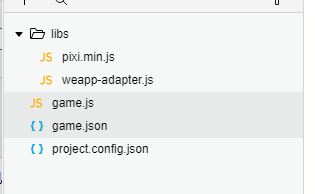
保存运行如下:

完美运行,但是当点击屏幕的任何位置时,报错了,内容如下:
TouchEvent未定义,为什么呢?看pixi源码:
 InteractionManager.prototype.normalizeToPointerData = function normalizeToPointerData(event) {

         var normalizedEvents = [];

         if (this.supportsTouchEvents && event instanceof TouchEvent) {

             for (var i = 0, li = event.changedTouches.length; i < li; i++) {

                 var touch = event.changedTouches[i];

                 if (typeof touch.button === 'undefined') touch.button = event.touches.length ? 1 : 0;

                 if (typeof touch.buttons === 'undefined') touch.buttons = event.touches.length ? 1 : 0;

                 if (typeof touch.isPrimary === 'undefined') {

                     touch.isPrimary = event.touches.length === 1 && event.type === 'touchstart';

                 }

                 if (typeof touch.width === 'undefined') touch.width = touch.radiusX || 1;

                 if (typeof touch.height === 'undefined') touch.height = touch.radiusY || 1;

                 if (typeof touch.tiltX === 'undefined') touch.tiltX = 0;

                 if (typeof touch.tiltY === 'undefined') touch.tiltY = 0;

                 if (typeof touch.pointerType === 'undefined') touch.pointerType = 'touch';

                 if (typeof touch.pointerId === 'undefined') touch.pointerId = touch.identifier || 0;

                 if (typeof touch.pressure === 'undefined') touch.pressure = touch.force || 0.5;

                 touch.twist = 0;

                 touch.tangentialPressure = 0;

                 // TODO: Remove these, as layerX/Y is not a standard, is deprecated, has uneven

                 // support, and the fill ins are not quite the same

                 // offsetX/Y might be okay, but is not the same as clientX/Y when the canvas's top

                 // left is not 0,0 on the page

                 if (typeof touch.layerX === 'undefined') touch.layerX = touch.offsetX = touch.clientX;

                 if (typeof touch.layerY === 'undefined') touch.layerY = touch.offsetY = touch.clientY;

                 // mark the touch as normalized, just so that we know we did it

                 touch.isNormalized = true;

                 normalizedEvents.push(touch);

             }

         }

         // apparently PointerEvent subclasses MouseEvent, so yay

         else if (event instanceof MouseEvent && (!this.supportsPointerEvents || !(event instanceof window.PointerEvent))) {

                 if (typeof event.isPrimary === 'undefined') event.isPrimary = true;

                 if (typeof event.width === 'undefined') event.width = 1;

                 if (typeof event.height === 'undefined') event.height = 1;

                 if (typeof event.tiltX === 'undefined') event.tiltX = 0;

                 if (typeof event.tiltY === 'undefined') event.tiltY = 0;

                 if (typeof event.pointerType === 'undefined') event.pointerType = 'mouse';

                 if (typeof event.pointerId === 'undefined') event.pointerId = MOUSE_POINTER_ID;

                 if (typeof event.pressure === 'undefined') event.pressure = 0.5;

                 event.twist = 0;

                 event.tangentialPressure = 0;

                 // mark the mouse event as normalized, just so that we know we did it

                 event.isNormalized = true;

                 normalizedEvents.push(event);

             } else {

                 normalizedEvents.push(event);

             }

         return normalizedEvents;

     };
第四行判断event是否是TouchEvent类型,报错显示就是TouchEvent未定义,TouchEvent是window的事件类型,打印一下window,发现window里没有TouchEvent属性,所以报错

其实只要把window.TouchEvent暴露出来即可,把weapp-adapter.js源码下载下来,查看源码发现有TouchEvent,但是没有对外导出,导出一下,然后在window.js文件再导出一下,打包一下。


webpack打包一下,替换原来的weapp-adapter.js文件,发现没问题了。但是点击事件出了问题,监听不到了,怎么回事呢?
问题出在事件的点击位置的转换上,pixi源码
InteractionManager.prototype.mapPositionToPoint = function mapPositionToPoint(point, x, y) {

        var rect = void 0;

        // IE 11 fix

        if (!this.interactionDOMElement.parentElement) {

            rect = { x: 0, y: 0, width: 0, height: 0 };

        } else {

            rect = this.interactionDOMElement.getBoundingClientRect();

        }

        var resolutionMultiplier = navigator.isCocoonJS ? this.resolution : 1.0 / this.resolution;

        point.x = (x - rect.left) * (this.interactionDOMElement.width / rect.width) * resolutionMultiplier;

        point.y = (y - rect.top) * (this.interactionDOMElement.height / rect.height) * resolutionMultiplier;

    };
向上追溯源码发现this.interactionDOMElement就是new Application()时传进来的canvas,打印发现就是一个canvas,没有parent。
这个重新映射的原理很简单。简单说就是canvas的尺寸与渲染尺寸。
以iphone5为例,全屏canvas(landscape)大小是568x320而渲染尺寸(devicePixelRatio=2)是1136x640。事件监听捕获到的位置是基于canvas(设备)的,比如有个sprite在屏幕右下角,此时pixi.js获取到的点击坐标是568, 320,而sprite在渲染尺寸的位置是1136, 640,如果不进行正确的映射就无法触发pixi.js内部实现的监听函数。
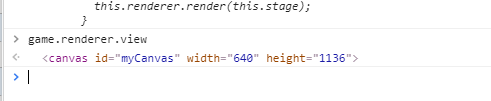

因为在微信小游戏里canvas肯定是全屏的,所以直接计算position即可
PIXI.interaction.InteractionManager.prototype.mapPositionToPoint = (point, x, y) => {

    point.x = x * pixelRatio

    point.y = y * pixelRatio

}
或者
app.renderer.plugins.interaction.mapPositionToPoint = (point, x, y) => {

    point.x = x * pixelRatio

    point.y = y * pixelRatio

}
再次运行完美!

还有一个PIXI.loader 和 ajax 相关的问题,
// weapp-adapter 源码

// src/XMLHttpRequest.js

// 添加 addEventListener 方法

addEventListener(ev, cb) {

  this[`on${ev}`] = cb

}
基本完成了。大部分内容来自简书
https://www.jianshu.com/p/38fcbcaf2930,之所以一步步去实现,主要是因为对一些东西还不了解。
PIXI兼容微信小游戏的更多相关文章
- pixi.js 微信小游戏 入手
pixi是什么?一款h5游戏引擎 优点:简单简洁性能第一 缺点:大多数用的国产三大引擎,pixi资料少,工具少, 为什么学,装逼 用pixi开发小游戏行吗? 行.但要简单处理下 下载官网上的 weap ...
- 使用Laya引擎开发微信小游戏(下)
本文由云+社区发表 6. 动画 6.1 创建伞兵对象 在src目录下创建一个新目录role,用来存放游戏中角色. 在role里创建一个伞兵Soldier.ts对象文件. module role{ ex ...
- 使用Laya引擎开发微信小游戏(上)
本文由云+社区发表 使用一个简单的游戏开发示例,由浅入深,介绍了如何用Laya引擎开发微信小游戏. 作者:马晓东,腾讯前端高级工程师. 微信小游戏的推出也快一年时间了,在IEG的游戏运营活动中,也出现 ...
- phaser3 微信小游戏入门
phaser与eget, laya, pixi.js本质上没什么区别. 都是渲染引擎. 其它的都是配角. phaser的特点是.代码容易理解 功能比较全面. 个人比较喜欢phaser的地方 twe ...
- cocos creator开发微信小游戏记录
先用cocoscreator实现游戏逻辑 在cocoscreator项目里可以调用微信小游戏api 在cocos里面判断小游戏的运行环境 if (cc.sys.platform === cc.sys. ...
- 【微信小游戏】文件系统,远程加载资源打破4M限制
一.前提 微信小游戏,对游戏包体的大小有严格是限制,上传文件大小<4M,但是本地缓存文件有50M空间,也就是说我们可以将一些资源放到网上,然后缓存到本地. 二.官方概念 文件系统 文件系统是小程 ...
- 没玩过这些微信小游戏你就out了
你确定没玩过下面这些微信小游戏?是不是有点out了?赶紧添加微信号kangfuyk,回复H5马上畅玩! 当然了,扫一下二维码关注后回复H5更快捷噢! 微信小游戏列表,持续更新中 辨色大比拼!心理游戏 ...
- 【转】微信小游戏接入Fundebug监控
在SegmentFault上看到Fundebug上线小游戏监控,刚好最近开始玩微信小游戏,于是尝试接入试了一下. 接入方法 创建项目的时候选择左下角的微信小游戏图标. 点击继续进入接入插件页面. 第三 ...
- 【转】Fundebug上线微信小游戏错误监控!支持自动截屏!
摘要: Fundebug竭诚为你的小游戏保驾护航. 想必大家都玩过"跳一跳"吧?刷排行榜的感觉是不是很好啊!还有"知乎答题王"呢,在智力上碾压老铁简直太棒了! ...
随机推荐
- 2018-12-10 发布 vue全家桶实现的商城web-app,真实数据接口开发
项目地址:https://github.com/Rosen97/web-shop.git 博客地址:https://segmentfault.com/a/1190000017323841
- 使用 Unity* 进行并行处理的一种方法
本文展示如何使用 Unity* 对游戏进行并行处理,以及如何使用游戏引擎执行与游戏相关的物理.在这个领域内,现实感是成功的一个重要标志.为了模拟真实世界,许多动作需要同时发生,这需要并行处理.创建两个 ...
- java中String中的endsWith()方法
解释:endsWith() ——此方法测试字符串是否以指定的后缀 suffix 结束. 此方法的定义:public boolean endsWith(String suffix) 我这里判断的是路径是 ...
- 向tabcontrol中添加form
昨天花了一天的时间去找一个错误,关系是这样的,我添加一个tabcontrol就叫tc1好了,然后在tc1中再动态添加一个父窗体l叫form1,要把form1添加进tabcontrol就要先新建一个ta ...
- Python xlsxwriter库 图表Demo
折线图 import xlsxwriter # 创建一个excel workbook = xlsxwriter.Workbook("chart_line.xlsx") # 创建一个 ...
- Vector和ArrayList的区别联系,Hashtable和HashMap的区别联系
Vector.Hashtable是早期的集合类,线程安全,但是效率低下,被相同原理.结构的ArrayList.HashMap取代. 1.Vector和ArrayList的区别和联系: 联系:实现原理相 ...
- HTML标签-->段落,格式,文本
只有努力奔跑,才能一直停留在原地. <!--段落标签--> <h1>默认向左</h1> <h1 align="right">向右对齐 ...
- 【Linux 驱动】简单字符设备驱动架构(LED驱动)
本文基于icool210开发板,内核版本:linux2.6.35: 驱动代码: (1)头文件:led.h #ifndef __LED_H__ #define __LED_H__ #define LED ...
- spring boot-8.静态资源映射
1.webjars WebJars是将客户端(浏览器)资源(javascript,Css等)打成jar包文件,以对资源进行统一依赖管理.WebJars的jar包部署在Maven中央仓库上.官网地址:h ...
- Vue 子组件,向父组件传递。