
3D Computer Grapihcs Using OpenGL - 11 Model View Projection Matrices
本节我们将绘制一个3维物体,立方体。
如果要渲染3D物体,我们需要了解MVP(Model View Projection),它表示三个转换矩阵。实际上这个名字不够明确,更加确切的释义如下:
- Model - Model to World 模型空间到世界空间
- View - World to View 世界空间到视图空间
- Projection - View to Projection 视图空间到投影空间
要实现这三个转换矩阵,我们需要借助glm数学库提供的一些方便的结构体和函数。
重构
我们先对程序结构进行修改,对工程右键>Add > New Filter, 创建一个Primitives 文件夹,在其中创建两个文件,一个Vertex.h,一个ShapeData.h
Vertex.h中定义了一个Vertex结构体,它包含两个glm::vec3成员,分别表示位置和颜色。
 #pragma once

 #include <glm\glm.hpp>

 struct Vertex

 {

     glm::vec3 position;

     glm::vec3 color;

 };
ShapeData.h中定义了一个ShapeData结构体,包含四个成员变量,分别是
- Vertex* 类型:顶点数组指针
- Gluint类型:顶点数量
- GLushort* 类型:索引数组指针
- GLuint 类型:索引数组长度
另外还提供了构造函数,清理函数
 #pragma once

 #include <GL\glew.h>

 #include "Vertex.h"

 struct ShapeData

 {

     ShapeData() :

         vertices(), numVertices(), indices(), numIndices() {}

     Vertex* vertices;

     GLuint numVertices;

     GLushort* indices;

     GLuint numIndices;

     GLsizeiptr vertexBufferSize() const

     {

         return numVertices * sizeof(Vertex);

     }

     GLsizeiptr indexBufferSize() const

     {

         return numIndices * sizeof(GLushort);

     }

     void cleanUp()

     {

         delete[] vertices;

         delete[] indices;

         numVertices = numIndices = ;

     }

 };
此外还加入了一个新的类,ShapeGenerator
ShapeGenerator.h
 #pragma once

 #include <ShapeData.h>

 class ShapeGenerator

 {

 public:

     static ShapeData makeCube();

 };
ShapeGenerator.cpp
 #include "ShapeGenerator.h"

 #include "Vertex.h"

 #define NUM_ARRAY_ELEMENTS(a) sizeof(a) / sizeof(*a)

 ShapeData ShapeGenerator::makeCube()

 {

     ShapeData ret;

     Vertex stackVerts[]=

     {

         glm::vec3(-1.0f, +1.0f, +1.0f), //

         glm::vec3(+1.0f, 0.0f, 0.0f),   //Color

         glm::vec3(+1.0f, +1.0f, +1.0f), //

         glm::vec3(0.0f, +1.0f, 0.0f),    //Color

         glm::vec3(+1.0f, +1.0f, -1.0f), //

         glm::vec3(0.0f, 0.0f, +1.0f), //Color

         glm::vec3(-1.0f, +1.0f, -1.0f), //

         glm::vec3(+1.0f, +1.0f, +1.0f), //Color

         glm::vec3(-1.0f, +1.0f, -1.0f), //

         glm::vec3(+1.0f, 0.0f, +1.0f),   //Color

         glm::vec3(+1.0f, +1.0f, -1.0f), //

         glm::vec3(0.0f, 0.5f, 0.2f),    //Color

         glm::vec3(+1.0f, -1.0f, -1.0f), //

         glm::vec3(0.8f, 0.6f, 0.4f), //Color

         glm::vec3(-1.0f, -1.0f, -1.0f), //

         glm::vec3(0.3f, +1.0f, +0.5f), //Color

         glm::vec3(+1.0f, +1.0f, -1.0f), //

         glm::vec3(0.2f, 0.5f, 0.2f),  //Color

         glm::vec3(+1.0f, +1.0f, +1.0f), //

         glm::vec3(0.9f, 0.3f, 0.7f),    //Color

         glm::vec3(+1.0f, -1.0f, +1.0f), //

         glm::vec3(0.3f, 0.7f, 0.5f),    //Color

         glm::vec3(+1.0f, -1.0f, -1.0f), //

         glm::vec3(0.5f, 0.7f, 0.5f),  //Color

         glm::vec3(-1.0f, +1.0f, +1.0f), //

         glm::vec3(0.7f, 0.8f, 0.2f),   //Color

         glm::vec3(-1.0f, +1.0f, -1.0f), //

         glm::vec3(0.5f, 0.7f, 0.3f),    //Color

         glm::vec3(-1.0f, -1.0f, -1.0f), //

         glm::vec3(0.8f, 0.6f, 0.4f), //Color

         glm::vec3(-1.0f, -1.0f, +1.0f), //

         glm::vec3(0.3f, +1.0f, +0.5f), //Color

         glm::vec3(+1.0f, +1.0f, +1.0f), //

         glm::vec3(0.7f, 0.8f, 0.2f),   //Color

         glm::vec3(-1.0f, +1.0f, +1.0f), //

         glm::vec3(0.5f, 0.7f, 0.3f),    //Color

         glm::vec3(-1.0f, -1.0f, +1.0f), //

         glm::vec3(0.8f, 0.6f, 0.4f), //Color

         glm::vec3(+1.0f, -1.0f, +1.0f), //

         glm::vec3(0.3f, +1.0f, +0.5f), //Color

         glm::vec3(+1.0f, -1.0f, -1.0f), //

         glm::vec3(0.7f, 0.8f, 0.2f),   //Color

         glm::vec3(-1.0f, -1.0f, -1.0f), //

         glm::vec3(0.5f, 0.7f, 0.3f),    //Color

         glm::vec3(-1.0f, -1.0f, +1.0f), //

         glm::vec3(0.8f, 0.6f, 0.4f), //Color

         glm::vec3(+1.0f, -1.0f, +1.0f), //

         glm::vec3(0.3f, +1.0f, +0.5f), //Color

     };

     ret.numVertices = NUM_ARRAY_ELEMENTS(stackVerts);

     ret.vertices = new Vertex[ret.numVertices];

     memcpy(ret.vertices, stackVerts, sizeof(stackVerts));

     unsigned short stackIndices[] =

     {

         ,,,,,,

         ,,,,,,

         ,,,,,,

         ,,,,,,

         ,,,,,,

         ,,,,,,

     };

     ret.numIndices = NUM_ARRAY_ELEMENTS(stackIndices);

     ret.indices = new GLushort[ret.numIndices];

     memcpy(ret.indices, stackIndices, sizeof(stackIndices));

     return ret;

 }
主要作用是提供了一个静态方法 makeCube,返回一个立方体的数据。
修改MyGlWindow类
 #include <gl\glew.h>

 #include "MyGlWindow.h"

 #include <iostream>

 #include <fstream>

 #include <glm\gtc\matrix_transform.hpp>

 #include <ShapeGenerator.h>

 GLuint programID;

 GLuint numIndices;

 void MyGlWindow::sendDataToOpenGL()

 {

     ShapeData shape = ShapeGenerator::makeCube();

     GLuint vertexBufferID;

     glGenBuffers(, &vertexBufferID);

     glBindBuffer(GL_ARRAY_BUFFER, vertexBufferID);

     glBufferData(GL_ARRAY_BUFFER, shape.vertexBufferSize(), shape.vertices, GL_STATIC_DRAW);

     GLuint indexBufferID;

     glGenBuffers(, &indexBufferID);

     glBindBuffer(GL_ELEMENT_ARRAY_BUFFER, indexBufferID);

     glBufferData(GL_ELEMENT_ARRAY_BUFFER, shape.indexBufferSize(), shape.indices, GL_STATIC_DRAW);

     glEnableVertexAttribArray();

     glVertexAttribPointer(, , GL_FLOAT, GL_FALSE, sizeof(GLfloat) * , );

     glEnableVertexAttribArray();

     glVertexAttribPointer(, , GL_FLOAT, GL_FALSE, sizeof(GLfloat) * , (char*)(sizeof(GLfloat) * ));

     numIndices = shape.numIndices;

     shape.cleanUp();

 }

 void MyGlWindow::installShaders()

 {

     GLuint vertexShaderID = glCreateShader(GL_VERTEX_SHADER);

     GLuint fragmentShaderID = glCreateShader(GL_FRAGMENT_SHADER);

     std::string tmp = ReadShaderCode("VertexShaderCode2.glsl");

     const char* vertexShaderCode = tmp.c_str();

     glShaderSource(vertexShaderID, , &vertexShaderCode, );

     tmp = ReadShaderCode("FragmentShaderCode2.glsl");

     const char* fragmentShaderCode = tmp.c_str();

     glShaderSource(fragmentShaderID, , &fragmentShaderCode, );

     glCompileShader(vertexShaderID);

     glCompileShader(fragmentShaderID);

     programID = glCreateProgram();

     glAttachShader(programID, vertexShaderID);

     glAttachShader(programID, fragmentShaderID);

     glLinkProgram(programID);

     glUseProgram(programID);

 }

 void MyGlWindow::initializeGL()

 {

     glewInit();

     glEnable(GL_DEPTH_TEST);

     sendDataToOpenGL();

     installShaders();

 }

 void MyGlWindow::paintGL()

 {

     glClear(GL_DEPTH_BUFFER_BIT | GL_COLOR_BUFFER_BIT);

     glViewport(, , width(), height());

     //更新:最新版本的glm中,glm::mat4()生成的是不是单位矩阵,而是零矩阵,这里要使用glm::mat4(1.0f)才可以

     glm::mat4 modelTransformMatrix = glm::translate(glm::mat4(1.0f), glm::vec3(0.0f, 0.0f,-3.0f));

     glm::mat4 projectionMatrix = glm::perspective(30.0f, ((float)width()) / height(), 0.1f, 10.0f);

     GLint modelTransformUniformLocation = glGetUniformLocation(programID, "modelMatrix");

     GLint projectionMatrixUniformLocation = glGetUniformLocation(programID, "projectionMatrix");

     glUniformMatrix4fv(modelTransformUniformLocation, , GL_FALSE, &modelTransformMatrix[][]);

     glUniformMatrix4fv(projectionMatrixUniformLocation, , GL_FALSE, &projectionMatrix[][]);

     glDrawElements(GL_TRIANGLES, numIndices, GL_UNSIGNED_SHORT, );

 }

 std::string MyGlWindow::ReadShaderCode(const char* fileName)

 {

     std::ifstream myInput(fileName);

     if (!myInput.good())

     {

         std::cout << "File failed to load..." << fileName;

         exit();

     }

     return std::string(

         std::istreambuf_iterator<char>(myInput),

         std::istreambuf_iterator<char>());

 }
Vertex Shader :
 #version

 in layout(location=) vec3 position;

 in layout(location=) vec3 vertexColor;

 uniform mat4 modelMatrix;

 uniform mat4 projectionMatrix;

 out vec3 passingColor;

 void main()

 {

   vec4 v =  vec4(position,1.0);

   vec4 newPosition = modelMatrix * v;

   gl_Position = projectionMatrix * newPosition;

   passingColor= vertexColor;

 }
Fragment Shader:
 #version

 in vec3 passingColor;

 out vec4 finalColor;

 void main()

 {

   finalColor = vec4(passingColor,1.0);

 }
注意MyGlWindow的78-85行,是使用Uniform 变量的通用方法,使用的是Vertex Shader中第6-7行的两个uniform。
使用Uniform变量的步骤总结:
- 使用glGetUniformLocation获取Uniform变量的ID,并储存在一个GLint 变量中
- 使用glUnifomxxxx()类的函数和刚才得到的ID给Uniform赋值。
另外要注意85-86行,函数的最后一参数需要一个const GLfloat * 类型的变量,所以我们使用[0][0]获取矩阵的第一个元素,它是个GLfloat类型的,再对他使用取地址符&得到它的地址。
编译运行以后得到一个平面(实际上是立方体的一个面):
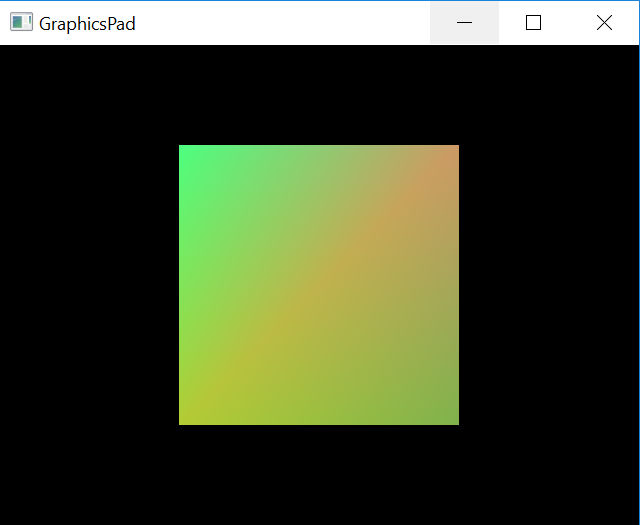
我们在最开始提到了3个矩阵,但是这里只用到了两个,实际上少了第二个矩阵,World to View矩阵,这也正是为什么我们现在无法移动观察视角的原因,我们的相机被假设在世界原点,朝向-z的方向看去,这是默认的设置。后面我们会学习world to view的转换矩阵。
3D Computer Grapihcs Using OpenGL - 11 Model View Projection Matrices的更多相关文章
- 3D Computer Grapihcs Using OpenGL - 17 添加相机(旋转)
在11节我们说过,MVP矩阵中目前只应用了两个矩阵,World to View 矩阵被省略了,这就导致我们的画面没有办法转换视角. 本节我们将添加这一环节,让相机可以旋转. 为了实现这一目的,我们添加 ...
- 3D Computer Grapihcs Using OpenGL - 15 Draw Element Instanced
友情提示:继续本节之前,需要保存此前的代码,本节为了试验,会对代码做一些修改,但后续的修改需要我们把代码返回之前的进度. OpenGL内置支持Instancing,有专门的函数来处理这件事情. 为了方 ...
- 3D Computer Grapihcs Using OpenGL - 09 Enable Depth Test
启用Depth Test OpenGL是个3D绘图API,也就是说不只有xy坐标轴,还有第三个坐标轴z,z轴的方向是垂直于屏幕,指向屏幕内. 靠近人眼的方向是负方向,标准化设备坐标的最小值是-1, 最 ...
- 3D Computer Grapihcs Using OpenGL - 06 Vertex and Fragment Shaders
从这里就接触到了可编程图形渲染管线. 下面介绍使用Vertex Shader (顶点着色器)和 Fragment Shader(像素着色器)的方法. 我们的目标是使用这两个着色器给三角形填充绿色. 添 ...
- 3D Computer Grapihcs Using OpenGL - 19 Vertex Array Object(顶点数组对象)
大部分OpenGL教程都会在一开始就讲解VAO,但是该教程的作者认为这是很不合理的,因为要理解它的作用需要建立在我们此前学过的知识基础上.因此直到教程已经进行了一大半,作者才引入VAO这个概念.在我看 ...
- 3D Computer Grapihcs Using OpenGL - 16 使用DrawElementsInstanced绘制立方体
我们使用15节学到的知识来绘制14节的立方体. 在第14节我们使用了两次glDrawElements实现了OpenGL实例化,发现这样仍然不太方便,如果需要绘制成千上万的立方体,就需要手写成千上万次的 ...
- 3D Computer Grapihcs Using OpenGL - 14 OpenGL Instancing
如果我们需要绘制两个(或者多个)一样的立方体(或者物体),只是位置.缩放.旋转不一样,那么我们可以不需要多次将这个物体的顶点信息.颜色信息等发送到显卡,而是发送一次,绘制多次,仅仅是每次绘制之前应用不 ...
- 3D Computer Grapihcs Using OpenGL - 12 Rotation Matrix
为了证明我们上节渲染出来的是一个立方体而不是一个平面,我们决定将它旋转一定角度,这样我们就需要一个旋转矩阵(也属于ModelTransformMatrix的一部分) 上一节我们的ModelTransf ...
- 3D Computer Grapihcs Using OpenGL - 10 Color Buffer
本节我们将尝试利用三角形制作一个“走马灯”效果. 一个三角形如图示方式,从左向右依次移动. 先看一下代码: MyGlWindow.cpp #include <gl\glew.h> #inc ...
随机推荐
- 第五周课程总结&试验报告(三
实验三 String类的应用 实验目的 掌握类String类的使用: 学会使用JDK帮助文档: 实验内容 1.已知字符串:"this is a test of java".按要求执 ...
- [19/10/16-星期三] Python中的模块和包、异常、操作文件
一.模块 # 模块(module) # 模块化,模块化指将一个完整的程序分解为一个一个小的模块 # 通过将模块组合,来搭建出一个完整的程序 # 不采用模块化,统一将所有的代码编写到一个文件中 # 采用 ...
- 类———用类定义对象———error:C++表达式必须包含类类型
//原文参考https://blog.csdn.net/lanchunhui/article/details/52503332 你以为你定义了一个类的对象,其实在编译器看来你是声明了一个函数 clas ...
- HDU-4857 逃生(反向拓扑排序 + 逆向输出)
逃生 Time Limit: 2000/1000 MS (Java/Others) Memory Limit: 32768/32768 K (Java/Others)Total Submissi ...
- I - The Values You Can Make (背包求具体方案)
题目大意 给你n个数,让你用这n个数在组成k的情况下,找到所有的value,这些value也由这n个数组成,且这些value组合在一起能够组成k 解法 看到题目我的想法就是母函数= =不过wa了,后来 ...
- Linux安装Jenkins并部署springboot项目
安装步骤: 1.跳转连接https://pkg.jenkins.io/redhat-stable/下载安装包 2.安装命令: sudo rpm -ih jenkins-2.73.2-1.1.noarc ...
- git(github)配置密钥/私钥/SSH公钥)
1.桌面右键 Git Bash Here 打开git命令行 2.ssh-keygen -t rsa -C "xxxxx@qq.com"(你的注册邮箱)enter 3.cd ~/.s ...
- java 技术分享
http://www.ccblog.cn/99.htm http://www.ccblog.cn/100.htm http://www.ccblog.cn/101.htm http://www.ccb ...
- Spring基础15——通过工厂方法来配置bean
1.什么是工厂方法 这里的工厂方法指的是创建指定bean的方法.工厂方法又分为静态工厂方法和实例工厂方法. 2.静态工厂方法配置bean 调用静态工厂方法创建Bean是将对象创建的过程封装到静态方法中 ...
- Apache Allow 命令
用于设置哪些客户端可以访问 Apache,格式如下: Allow from [All /全域名/部分域名/IP 地址/网络地址/CIDR 地址] All:表示全部客户端 全域名:表示域名对应的客户端, ...