
SSM框架——thymeleaf学习总结
本人关于thymeleaf的学习源自:
https://www.bilibili.com/video/BV1qy4y117qi
1、thymeleaf的项目搭建
首先创建springboot项目,相关博客有详细的创建教程,下方仅本人推荐示例(视频中也有相关项目创建教程):
IDEA创建项目教程 :https://www.jianshu.com/p/40422d484475
eclipse创建项目教程 :https://blog.csdn.net/qq_35170365/article/details/80688484
项目搭建完成后,配置application.properties,配置如下,端口号只要不和本机当前口号冲突即可,本人用的是8001
server.port=8001

spring.thymeleaf.cache=false
创建thymeleaf网页模板,相关代码如下:
<!DOCTYPE html>

<html lang="ch" xmlns:th="http://www.thymeleaf.org">

<head>

  <meta charset="UTF-8">

  <title>Title</title>

</head>

<body>

</body>

</html>
2、第一个程序
项目结构如图:
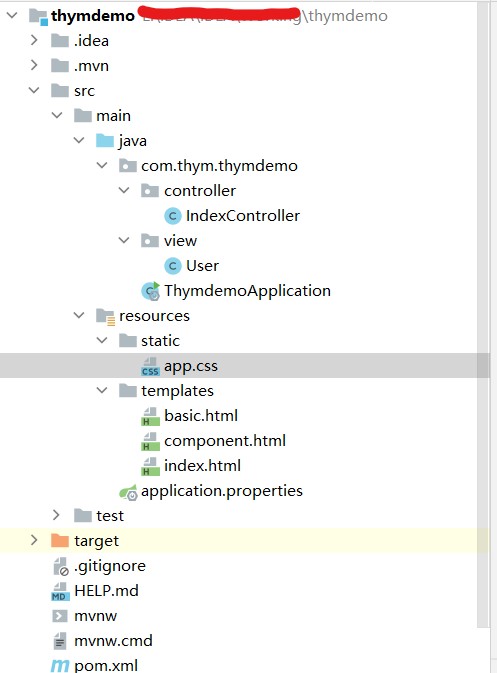
第一个程序(基本使用),实现前端标题的数据渲染,先上代码:
后台 创建包controller以及类IndexController:
package com.thym.thymdemo.controller;

import com.thym.thymdemo.view.User;

import org.springframework.stereotype.Controller;

import org.springframework.ui.Model;

import org.springframework.web.bind.annotation.GetMapping;

import java.util.ArrayList;

import java.util.Arrays;

import java.util.Date;

/**

 * @author June

 * @date 2021/12/25 15:35

 */

@Controller

public class IndexController {

    @GetMapping("/index")

    public String index(Model model){

        model.addAttribute("title","传递的title");

        model.addAttribute("keywords","传递的keywords");

        model.addAttribute("description","传递的description");

        return "index";

    }

}
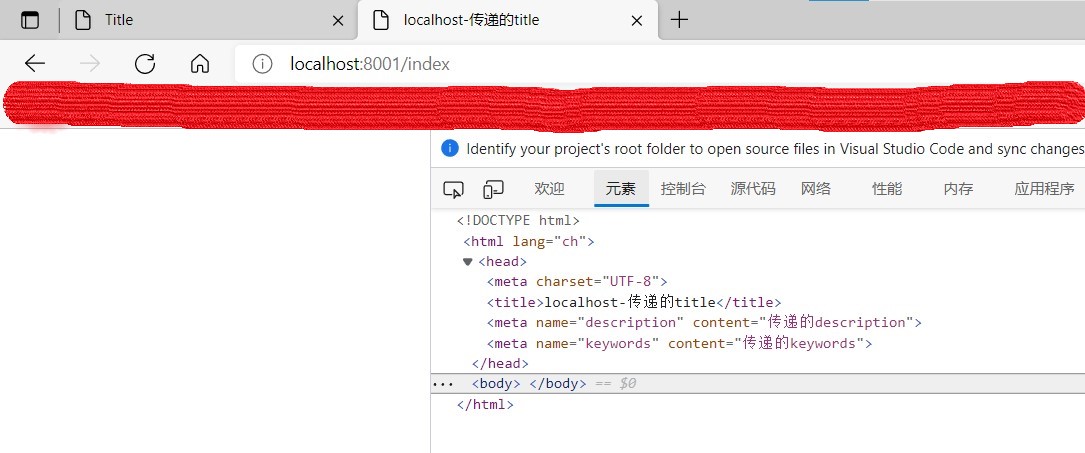
前端创建html网页,index.html,代码如下:
<!DOCTYPE html>

<html lang="ch" xmlns:th="http://www.thymeleaf.org">

<head>

    <meta charset="UTF-8">

    <title th:text="|localhost-${title}|">默认的Title</title>

    <meta th:content="${description}" name="description" content="默认的description">

    <meta th:content="${keywords}" name="keywords" content="默认的keywords">

</head>

<body>

</body>

</html>
结果实现如下:
3、常用方法
实现后台数据的前端实现,有关对象与类的数据传递:
后台 创建实体类 User.java,代码如下:
package com.thym.thymdemo.view;

import lombok.Data;

import java.util.Date;

import java.util.List;

/**

 * @author June

 * @date 2021/12/25 15:46

 */

@Data

public class User {
  //其中lombok插件可实现创建get、set方法,所以此处并未创建get、set方法

    private String username;

    private Integer age;

    private Integer sex;

    private Boolean isVip;

    private Date createTime;

    private List<String> tags;

}
IndexController.java 有关代码修改如下;
package com.thym.thymdemo.controller;

import com.thym.thymdemo.view.User;

import org.springframework.stereotype.Controller;

import org.springframework.ui.Model;

import org.springframework.web.bind.annotation.GetMapping;

import java.util.ArrayList;

import java.util.Arrays;

import java.util.Date;

/**

 * @author June

 * @date 2021/12/25 15:35

 */

@Controller

public class IndexController {

    @GetMapping("/index")

    public String index(Model model){

        model.addAttribute("title","传递的title");

        model.addAttribute("keywords","传递的keywords");

        model.addAttribute("description","传递的description");

        return "index";

    }

    @GetMapping("/basic")

    public String basic(Model model){//此处即为javaweb项目中的前后端传值行为

        User user = new User();

        user.setUsername("lookroot");

        user.setAge(32);

        user.setSex(1);

        user.setIsVip(false);

        user.setCreateTime(new Date());

        user.setTags(Arrays.asList("PHP","Java"));

        model.addAttribute("user",user);

        return "basic";

    }

}
前端创建html页面,basic.html 代码如下;
<!DOCTYPE html>

<html lang="ch" xmlns:th="http://www.thymeleaf.org">

<head>

    <meta charset="UTF-8">

    <title>Title</title>

</head>

<body>

    <!--<h2 th:text="${user.username}"></h2>

    <h2 th:text="${user.age}"></h2>

    <h2 th:text="${user.sex}"></h2>

    <h2 th:text="${user.isVip}"></h2>

    <h2 th:if="${user.isVip}">会员</h2>

    <h2 th:text="${user.createTime}"></h2>

    <h2 th:text="${user.tags}"></h2>-->

<div th:object="${user}">

    <h2 th:text="*{username}"></h2>

    <h2 th:text="*{age}"></h2>

    <h2 th:text="*{sex}"></h2>

    <h2 th:text="*{isVip}"></h2>

    <!--这里运用if标签判断该属性是否为真,如果为真则显示标题内容,如果为否则不显示相关内容-->

    <h2 th:if="*{isVip}">会员</h2>

    <h2 th:text="*{createTime}"></h2>

    <h2 th:text="*{tags}"></h2>

</div>

    <!--规范话日期格式-->

    <p th:text="${#dates.format(user.createTime,'yyyy-MM-dd HH:mm')}"></p>

<ul>

    <!--以列表形式显示List集合的各项-->

    <li th:each="tag:${user.tags}" th:text="${tag}"></li>

</ul>

    <!--选择结构实现数据的前端显示-->

<div th:switch="${user.sex}">

    <p th:case="1">男</p>

    <p th:case="2">女</p>

    <p th:case="*">默认</p>

</div>

    <!--replace com1-->

    <div th:replace="~{component::com1}"></div>

    <!--insert com1-->

    <div th:insert="~{component::com1}"></div>

    <!--id com2-->

    <div th:insert="~{component::#com2}"></div>

    <div th:insert="~{component::com3('传递的数据')}"></div>

    <div th:insert="~{component::com4(~{::#message})}">

        <p id="message">替换的模块</p>

    </div>

</body>

</html>
实现结果如下;

4、thymeleaf中JavaScript、css的应用
thymeleaf+css,首先在src\main\resources\static目录下,创建css文件,写入如下代码:
.app{

    height: 300px;

    width: 300px;

    background-color: blue;

}
前端basic页面中代码添加如下(由于所引用的css文件在根目录下,所以可以直接引用):
<div class="app"></div>
显示效果如下:

在html页面内部直接写入css有关代码
前端添加代码如下:
<ul>

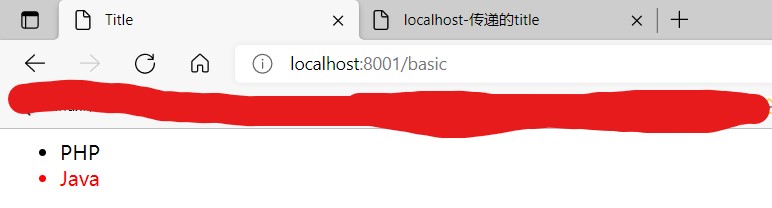
    <li th:each="tag,stat:${user.tags}" th:text="${tag}"

        th:classappend="${stat.last}?active"></li>

</ul>
结果显示如下:
5、thymeleaf中组件的使用
创建component.html页面,写入如下代码:
<!DOCTYPE html>

<html lang="ch" xmlns:th="http://www.thymeleaf.org">

<head>

    <meta charset="UTF-8">

    <title>Title</title>

</head>

<body>

    <footer th:fragment="com1">

        <!--/*@thymesVar id="user" type="com.thym.thymdemo.view.User"*/-->

        <h2 th:text="${user.username}"></h2>

        com1

    </footer>

    <div id="com2">

        com2

    </div>

    <div th:fragment="com3(message)">

        <p th:text="${message}"></p>

    </div>

    <div th:fragment="com4(message)">

        <p th:replace="${message}"></p>

    </div>

</body>

</html>
前端页面basic页面代码修改如下;
<!DOCTYPE html>

<html lang="ch" xmlns:th="http://www.thymeleaf.org">

<head>

    <meta charset="UTF-8">

    <title>Title</title>

    <link rel="stylesheet" th:href="@{app.css}">

    <style>

        .active{

            color: red;

        }

    </style>

</head>

<body>

    <!--规范话日期格式-->

    <p th:text="${#dates.format(user.createTime,'yyyy-MM-dd HH:mm')}"></p>

<ul>

    <!--以列表形式显示List集合的各项-->

    <li th:each="tag:${user.tags}" th:text="${tag}"></li>

</ul>

<ul>

    <li th:each="tag,stat:${user.tags}" th:text="${tag}"

        th:classappend="${stat.last}?active"></li>

</ul>

    <!--replace com1-->

    <div th:replace="~{component::com1}"></div>

    <!--insert com1-->

    <div th:insert="~{component::com1}"></div>

    <!--id com2-->

    <div th:insert="~{component::#com2}"></div>

    <div th:insert="~{component::com3('传递的数据')}"></div>

    <div th:insert="~{component::com4(~{::#message})}">

        <p id="message">替换的模块</p>

    </div>

</body>

<script th:inline="javascript">

    const user = /*[[${user}]]*/{}

    console.log(user)

</script>

</html>
实现结果如下:

SSM框架——thymeleaf学习总结的更多相关文章
- 菜鸟 ssm 框架的学习之路
跟着老师学习了两个月的java语言,现在学习到了框架的部分,一直想在博客上写点东西的,只是自己一直没有时间,其实到底也是懒,鲁迅说过:"时间就像海绵里的水,只要愿意去挤还是有的", ...
- IDEA 整合 SSM 框架学习
认识 Spring 框架 更多详情请点击这里:这里 Spring 框架是 Java 应用最广的框架,它的成功来源于理念,而不是技术本身,它的理念包括 IoC (Inversion of Control ...
- Spring MVC 学习总结(十一)——IDEA+Maven+多模块实现SSM框架集成
一.SSM概要 与SSH(Struts/Spring/Hibernate/)一样,Spring+SpringMVC+MyBatis也有一个简称SSM,Spring实现业务对象管理,Spring MVC ...
- SSM框架学习思维导图
SSM框架学习思维导图 2017年08月11日 20:17:28 阅读数:1141 放上前段时间学习SSM框架以及Spring.SpringMVC.MyBatis的学习结果,输出思维导图一共四幅图.这 ...
- (*)(转)要快速学习SSM框架,你需要一套学习曲线平滑的教程
作者:meepo链接:https://www.zhihu.com/question/57719761/answer/156952139来源:知乎著作权归作者所有.商业转载请联系作者获得授权,非商业转载 ...
- ssm 框架学习-1
理论理解 +项目阅读 SpringSpring就像是整个项目中装配bean的大工厂,在配置文件中可以指定使用特定的参数去调用实体类的构造方法来实例化对象.Spring的核心思想是IoC(控制反转),即 ...
- Java基础及JavaWEB以及SSM框架学习笔记Xmind版
Java基础及JavaWEB以及SSM框架学习笔记Xmind版 转行做程序员也1年多了,最近开始整理以前学习过程中记录的笔记,以及一些容易犯错的内容.现在分享给网友们.笔记共三部分. JavaSE 目 ...
- JavaEE学习文章汇总-ssm框架
Spring-SpringMVC-Mybatis 1:Maven创建webapp项目 Maven 下的spring框架(一创建项目) 2:mybatis3 入门教程 mybatis实战教程(mybat ...
- SSM框架学习之高并发秒杀业务--笔记2-- DAO层
上节中利用Maven创建了项目,并导入了所有的依赖,这节来进行DAO层的设计与开发 第一步,创建数据库和表. 首先分析业务,这个SSM匡济整合案例是做一个商品的秒杀系统,要存储的有:1.待秒杀的商品的 ...
随机推荐
- CF1082A Vasya and Book 题解
Content 给定 \(T\) 组数据,每组数据给出四个整数 \(n,x,y,d\).小 V 有一本 \(n\) 页的书,每次可以恰好翻 \(d\) 页,求从第 \(x\) 页恰好翻到第 \(y\) ...
- ELK 使用filebeat替代Logstash收集日志
使用beats采集日志 之前也介绍过beats是ELK体系中新增的一个工具,它属于一个轻量的日志采集器,以上我们使用的日志采集工具是logstash,但是logstash占用的资源比较大,没有beat ...
- 怎么从svn服务器上把工程导入到MyEclipse里
怎么从svn服务器上把工程导入到MyEclipse里,步骤如下:
- SQL:利用多表更新优化子查询
原SQL: update bi_data.order_list_wxset is_start='1',proc_time=now()where 1=1and is_end='0' and 交易时间&l ...
- SpringBoot整合kafka的简单应用及配置说明
引入依赖 <!-- https://mvnrepository.com/artifact/org.springframework.kafka/spring-kafka --> <de ...
- C/C++ byte 转 int 有符号数,转成Int 无符号数
p.p1 { margin: 0; font: 12px "Helvetica Neue"; color: rgba(69, 69, 69, 1); min-height: 14p ...
- 【LeetCode】388. Longest Absolute File Path 解题报告(Python)
作者: 负雪明烛 id: fuxuemingzhu 个人博客: http://fuxuemingzhu.cn/ 目录 题目描述: 题目大意 解题方法 日期 题目地址:https://leetcode. ...
- 【LeetCode】46. Permutations 解题报告(Python & C++)
作者: 负雪明烛 id: fuxuemingzhu 个人博客:http://fuxuemingzhu.cn/ 目录 题目描述 解题方法 方法一:库函数 方法二:递归 方法三:回溯法 日期 题目地址:h ...
- 如何改善win10录屏时声音降噪(消除杂音)
此文章是针对win10系统中安装Realtek声卡的麦克风出现杂音的设置办法 1. 打开win10的控制面板,找到"硬件和声音选项" 2. 进入"硬件和声音"选 ...
- EDP转LVDS屏转接板方案|基于INTELX86主板和商显应用EDP转LVDS设计CS5211
众所周知LVDS接口是美国NS美国国家半导体公司为克服以TTL电平方式传输宽带高码率数据时功耗大,电磁干扰大等缺点而研制的一种数字视频信号传输方式.由于其采用低压和低电流驱动方式,实现了低噪声和低功耗 ...